
- Top Pick: CORSAIR RS120 ARGB 120mm PWM Fans – Daisy-Chain Connection – Low-Noise – Magnetic Dome Bearing – Triple Pack – Black
- Best Value: Noctua NF-P12 redux-1700 PWM, Quiet Fan 120mm
- Premium Choice: Thermalright TL-C12C-S X3 CPU Fan 120mm ARGB Case Cooler Fan, 4pin PWM Silent Computer with S-FDB Bearing Included, up to 1550RPM Cooling Fan(3 Quantities) (TL-C12C X3)
Best 120mm Computer Case Fans only make sense as part of a layout. Six good fans fighting each other in a badly planned case will lose to four cheap ones arranged properly, so this guide covers the configuration first and the products second.
As an Amazon Associate we earn from qualifying purchases at no extra cost to you. Product prices and availability are accurate as of the date shown and are subject to change.




As an Amazon Associate we earn from qualifying purchases at no extra cost to you. Product prices and availability are accurate as of the date shown and are subject to change.
By Ryan Cole, hardware writer at NVIDIAReview.
How to Plan Around the Best 120mm Computer Case Fans
Buying fans before deciding where the air goes is the most common mistake here. Work out the path through the chassis first, then buy the best 120mm computer case fans for the number of positions you actually intend to fill.
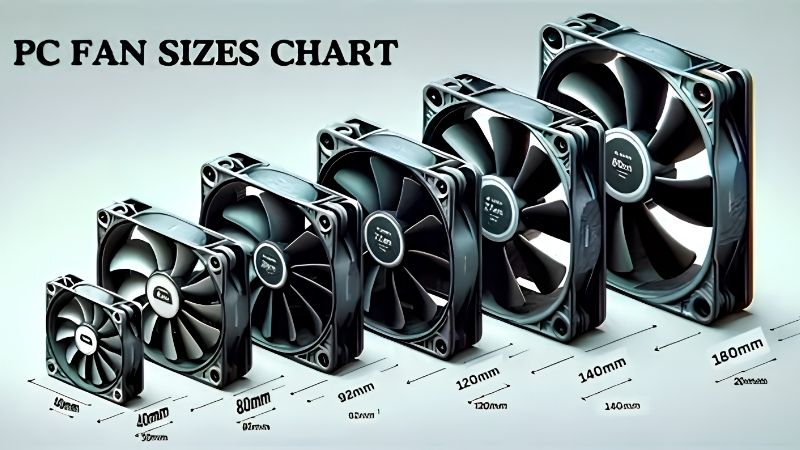
Decide the Airflow Path Before You Buy Anything
Air should enter low and at the front, cross the graphics card and processor, and leave at the rear and roof. Every fan you add should either feed that path or clear the exhaust, not fight it from the side.
Count your usable mounts first. A case that takes three 120 mm fans at the front and one at the rear needs four fans, not the six that a multi-pack tempts you into buying and cramming in wherever they fit.
Roof mounts are the exception worth thinking about. Hot air rises, so a roof position works better as exhaust unless a radiator is mounted there and drawing cool air in from outside.
Control Headers, PWM and Fan Hubs
Four-pin PWM fans give the motherboard the full speed range, including a genuinely slow idle. Three-pin fans run on voltage control, which works but has a narrower usable band and less consistent low-speed behaviour.
Motherboards typically offer four to six fan headers, which runs out faster than expected. A powered hub with a SATA connector solves it, and daisy-chain systems reduce a bank of fans to a single cable.
Group fans by role on the curve. Intakes and exhausts should follow a case or system temperature sensor rather than the processor, so a brief CPU spike does not make the whole machine surge.
Set a Noise Budget, Then Spend It
Every fan you add contributes noise even when it is quiet on its own. Six fans at 800 RPM will usually be quieter and cool better than three fans at 1,500 RPM doing the same total work.
That is the argument for buying more fans than you think you need and running them all slowly. It is also the argument for choosing fans with a low minimum speed rather than a high maximum.
Vibration is the other half of the noise budget. Rubber corner pads or decoupling mounts stop a fan transmitting motor hum into a steel panel, which is often what people actually hear rather than moving air.
Filters, Dust and Ongoing Maintenance
Filtered intakes cost a little airflow and save a lot of cleaning. Running slight positive pressure, with more intake than exhaust, keeps dust entering through those filters instead of every unfiltered gap in the chassis.
Plan for access. Fans mounted behind a hard drive cage or under a removable dust tray are far easier to clean, and how often you actually do it matters more than the last few CFM on a spec sheet.
Clogged filters change the equation quietly. A front panel that has not been cleaned in a year can cost more airflow than the difference between a budget fan and a premium one, whatever the specifications promised.
Top Picks for the Best 120mm Computer Case Fans
These six span budget multi-packs to premium single fans. Figures are manufacturer-rated, and retail pricing at the time of writing in August 2026 changes weekly, so use the tiers as your guide.
| Fan | RPM range | Connector | Strength | Notes |
|---|---|---|---|---|
| Arctic P12 PWM PST | 200-1800 | 4-pin with PST chain | Value and pressure | Sold in five-packs |
| Noctua NF-A12x25 PWM | 450-2000 | 4-pin PWM | All-round performance | Six-year warranty |
| be quiet! Pure Wings 3 | Up to about 1600 | 4-pin PWM | Budget acoustics | High-speed variant available |
| Corsair AF120 Elite | Up to about 2100 | 4-pin PWM | Unrestricted airflow | Magnetic levitation bearing |
| Cooler Master Mobius 120 | Up to about 2050 | 4-pin PWM | Ring-blade design | Interconnected blade ring |
| Phanteks M25-120 | Up to about 2000 | 4-pin PWM | Balanced case duty | Reverse-blade version sold |
Arctic P12 PWM PST
For filling a case cheaply, these are the best 120mm computer case fans available. The 200 RPM minimum lets a bank of them idle almost silently, the pressure focus suits filtered front panels, and the PST chain keeps cabling to a single header.
At full speed the tone is harder than the premium fans, and unrestricted airflow is not their strongest suit. Neither matters much when you are running six of them at a third of their maximum.
Noctua NF-A12x25 PWM
If you only have one or two positions that matter, such as a rear exhaust and a radiator, this is the fan to put there. It performs near the top in both airflow and pressure roles and is covered for six years.
The cost is difficult to justify across five case positions, and the standard colour scheme divides opinion. Buy one or two for the positions that count and fill the rest with something cheaper.
be quiet! Pure Wings 3
This is the budget entry from a brand built around acoustics. Rifle bearings, a smooth tone and sensible speed ceilings make it a good fit for someone who wants quiet without paying premium prices.
Raw performance sits behind the pressure-focused value fans on a radiator, and there are standard and high-speed variants that are easy to confuse when ordering. Check which one a listing actually contains.
Corsair AF120 Elite
The AF series is tuned for unrestricted airflow rather than pressure, which makes it a sensible front intake behind an open mesh panel. The magnetic levitation bearing is designed for a long service life.
It is not the fan to put on a dense radiator, and pricing sits above the value brands without matching Noctua on outright performance. Lighting versions add cost again.
Cooler Master Mobius 120
The interconnected ring around the blade tips is meant to reduce turbulence and vibration, and in practice it gives a smooth acoustic profile at moderate speeds with solid airflow figures.
Pricing sits in the upper middle of the market, and the design brings no advantage on a radiator over a good pressure fan. Availability of the non-lit version varies by region.
Phanteks M25-120
A straightforward, well-balanced case fan that handles intake, exhaust and light radiator duty without a specialism. The reverse-blade version is genuinely useful for side or bottom mounts where cabling would otherwise face outward.
It does not lead any single category, and the multi-packs are less aggressively priced than the value brands. It is a safe middle choice rather than an exciting one.
What 2026 Conditions Mean for This Purchase
Fans have escaped the worst of this year’s pricing turbulence, but the wider picture affects when to buy the best 120mm computer case fans. Three points are worth knowing.
Airflow Is Among the Last Cheap Upgrades
Graphics card pricing remains elevated and no new processor generation arrives before CES in January 2027, so there is nothing on the horizon to wait for. Fixing a starved case is the cheapest measurable improvement left.
Lower internal air temperature raises sustained clocks on both the processor and graphics card, and it lets every other fan in the machine run slower for the same result.
Multi-Packs Have Become the Value Play
Component pricing drifted upward roughly six to eight percent across cooling and power supplies as makers concentrated on higher tiers, and the promotional pricing that supported entry-level products ended in early 2026.
Buying five fans in one box now costs less per unit than ever relative to premium singles. Filling a case with slow-running value fans beats running two expensive ones hard.
November Deals Are Real in Cooling
Memory, drives and prebuilt machines are unlikely to see genuine Black Friday reductions this year, since stock was manufactured against high contract pricing. Fans, coolers, cases and paste still see honest markdowns.
If the machine runs warm but stable, waiting is sensible. If your graphics card is throttling inside a sealed case, buy the intakes now and consider the lighting upgrade later.
Frequently Asked Questions
These come up most often once someone has chosen the best 120mm computer case fans and starts planning where each one goes.
Should I run positive or negative pressure?
Slight positive pressure, meaning a little more intake than exhaust, is the practical choice. It forces air in through filtered intakes rather than pulling dust through unfiltered seams in the chassis.
Can I mix fan brands in one case?
Yes. Standard four-pin PWM fans work together on any header or splitter regardless of brand. Only proprietary daisy-chain systems and lighting ecosystems require you to stay with one manufacturer.
Does a fan hub need separate power?
Most powered hubs use a SATA connector, which is what lets them run more fans than a motherboard header can supply. Unpowered splitters draw from the header and should be limited to two or three fans.
Do more fans always mean more noise?
Not in practice. Several fans turning slowly usually produce less noise than a couple spinning fast for the same airflow, which is the main reason to fill your mounts and lower the curve.
See More:
- What Is the Best Thermal Paste
- Best PC Case Fans 120mm
- Thermal Paste Best Brand
- Best Thermal Paste Brands
- Best CPU Cooler Reddit
Final Thoughts
The best 120mm computer case fans are the ones that fit your layout and run slowly most of the time. Plan the airflow path, fill the mounts you have with value fans, and reserve one or two premium units for the rear exhaust or a radiator. Then set a gentle curve tied to system temperature rather than processor spikes.






Write Your Review
No reviews yet. Be the first to share your experience!