
- Top Pick: GIGABYTE B550 Eagle WIFI6 AMD AM4 ATX Motherboard, Supports Ryzen 5000/4000/3000 Processors, DDR4, 10+3 Power Phase, 2X M.2, PCIe 4.0, USB-C, WIFI6, GbE LAN, PCIe EZ-Latch, EZ-Latch, RGB Fusion
- Best Value: GIGABYTE B850 AORUS Elite WIFI7 AMD AM5 ATX Motherboard, Support AMD Ryzen 9000/8000/7000 Series, DDR5, 14+2+2 Power Phase, 3X M.2, PCIe 5.0, USB-C, WIFI7, 2.5GbE LAN, EZ-Latch, 5-Year Warranty
- Premium Choice: Asus ROG Strix B550-F Gaming WiFi II AMD AM4 (3rd Gen Ryzen) ATX Gaming Motherboard (PCIe 4.0,WiFi 6E, 2.5Gb LAN, BIOS Flashback, HDMI 2.1, Addressable Gen 2 RGB Header and Aura Sync)
Asking which is the best motherboard brand produces strong opinions and very little agreement, largely because every manufacturer builds excellent boards and poor ones. The tier within a range usually matters more than the badge printed across the heatsink. Model tier tells you far more than the badge.
As an Amazon Associate we earn from qualifying purchases at no extra cost to you.


As an Amazon Associate we earn from qualifying purchases at no extra cost to you.
By Ryan Cole
How to Judge the Best Motherboard Brand
Brand reputation is built on averages, and averages hide enormous variation within a single company’s lineup. These four factors are what actually differ, and each one can be checked before you buy rather than after. That is the honest starting point for the best motherboard brand question.
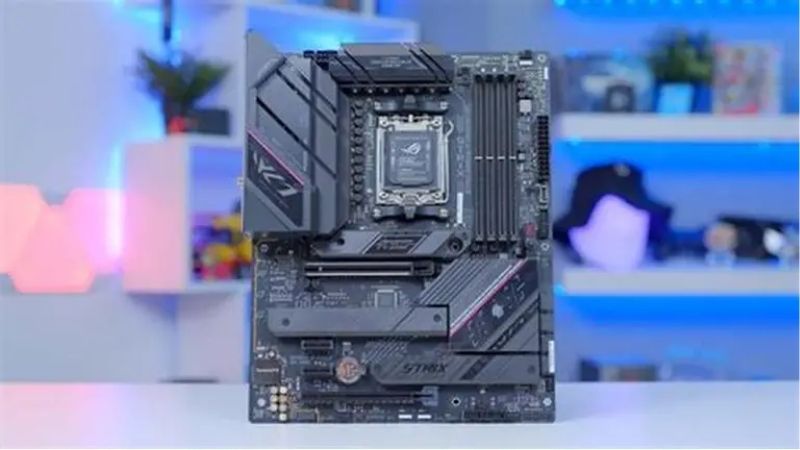
Power delivery on the specific model
VRM design is quoted as a phase count with a current rating, such as a fourteen-phase arrangement rated at 80A per stage. That configuration varies far more between tiers within one brand than it does between brands at the same price. Compare tiers rather than logos on the box.
Heatsink mass matters as much as the phase count. A board with capable stages but thin heatsinks will run hotter under a high-power processor, which is the practical reason review sites measure VRM temperature rather than counting phases. Review sites measure VRM temperature for this reason.
BIOS quality and default settings
This is where brands genuinely diverge. Interface layout, how quickly memory profiles train, how clearly power limits are exposed, and how often firmware updates arrive all differ noticeably between manufacturers on comparable boards. Firmware cadence differs noticeably between vendors.
Default power settings are worth checking on any new board. Vendors have historically applied different interpretations of processor power limits out of the box, so confirming the values against the chip manufacturer’s specification is sensible. Confirming the values takes two minutes in BIOS.
Warranty handling and regional support
Support experience varies by region far more than by brand, since it depends on local distributors and service partners. A manufacturer with a strong reputation in one country can be slow and difficult in another market entirely. Distributors matter more than the brand here.
Check what the process actually looks like where you live before buying. Whether a return goes through the retailer or directly to the manufacturer affects how long you are without a machine far more than the printed warranty length does. Downtime length is what you actually care about.
Features against price
Compare boards at the same price rather than by brand. At any given point, one manufacturer usually offers better connectivity, an extra M.2 slot or faster networking than its rivals, and that advantage shifts between generations. The advantage moves between generations regularly.
Focus on what you will use. An extra M.2 slot, 2.5G networking or Wi-Fi 7 are worth paying for if they match your setup, while rear lighting and elaborate heatsink styling add cost without changing how the machine performs. Styling adds cost without changing performance.
Top Picks: Comparing the Best Motherboard Brand Options
Each entry below pairs a brand with a representative mid-range board so the comparison is concrete rather than abstract. Prices and stock were checked in August 2026 against current listings. Which is the best motherboard brand for you depends on the tier you are shopping.
| Brand | Example board | Known for | Watch out for |
|---|---|---|---|
| ASUS | ROG Strix B650E-F Gaming WiFi | BIOS depth and memory tuning | Premium pricing |
| MSI | MAG B650 Tomahawk WiFi | Strong VRM at mid-range prices | Feature gaps on cheaper models |
| Gigabyte | B650 Aorus Elite AX | Connectivity for the money | Firmware update cadence |
| ASRock | B650 PG Lightning | Value and unusual layouts | Inconsistent accessories |
| NZXT | N7 B650E | Clean aesthetics and integration | Limited range and price |
ASUS
ASUS is the default recommendation in a great many build threads, mainly for BIOS depth and reliable memory training. The ROG Strix line sits above the mainstream TUF range, with more thorough power delivery and better networking. Memory training reliability is the practical draw.
The premium is real, and equivalent boards from rivals often cost noticeably less for similar capability. The lower-priced Prime range also differs substantially from ROG boards, so brand loyalty alone is a poor buying guide here. Brand loyalty is a poor buying guide here.
MSI
MSI has built a reputation at the mid-range, and the Tomahawk line in particular is regularly recommended for offering serious power delivery without flagship pricing. For a high-power processor on a moderate budget it is a common answer. It is the common answer for a high-power chip.
Cheaper MSI boards can be thin on features, occasionally dropping an M.2 slot or using slower networking than rivals at the same price. As always, the specific model matters far more than the manufacturer name on the box. Check the specification sheet line by line.
Gigabyte
Gigabyte typically leads on connectivity for the money, with Aorus boards frequently including an extra M.2 slot or faster networking than similarly priced competitors. That makes them strong value for storage-heavy builds. Storage-heavy builds benefit most from that.
Firmware has been the more common complaint, with updates sometimes arriving later than rivals after a processor launch. Checking that your intended chip is supported by a released BIOS version is worthwhile before ordering. Confirm BIOS support for your chip before ordering.
ASRock
ASRock has moved from budget specialist to a genuine alternative, often producing the cheapest board that still has adequate power delivery for a mid-range processor. It also produces unusual layouts that others do not, including compact formats. Compact formats are a genuine speciality here.
Bundled accessories are inconsistent, and cheaper models sometimes omit screws or brackets that rivals include. Heatsink mass on entry boards is also modest, which matters if you plan to run a high-power chip on one. Check what is actually in the box.
NZXT
NZXT sells a small range built around a clean single-colour cover that suits its cases, which is the main reason people choose it. For a build where the board is visible and appearance matters, nothing else looks quite the same. Appearance is the reason people choose it.
The range is narrow, pricing sits above equivalent boards from larger manufacturers, and the full cover makes access to the M.2 slots more awkward. You are buying appearance rather than a specification advantage. Access to the M.2 slots is more awkward.
What the 2026 Market Means for Board Buyers
Two developments this year change how much board you should buy and how long it will remain useful, which affects the brand question less than most people expect. Both change how much the best motherboard brand question actually matters at your price point.
AM5 is supported through 2029
AMD confirmed at Computex 2026 that socket AM5 will accept new processors through the end of 2029, so a board bought now has years of upgrade path ahead. Intel’s Nova Lake requires a new LGA 1954 socket instead. That is unusually long for a consumer socket.
That changes the calculation on how much to spend. A board that will host two or three processors over its life justifies stronger power delivery and better connectivity than one destined to be replaced with the next chip. A board hosting two chips justifies more spend.
The budget tier is thinning out
Motherboard sales have fallen more than 25% and manufacturers have concentrated on mid and high-end models, with promotional pricing policies withdrawn at the start of February 2026. Entry-level boards are the first thing to disappear. Entry boards disappear from stock first.
In practice that narrows the cheapest end of every brand’s range. Comparing what is actually in stock at your price point matters more than deciding on a manufacturer in advance and hunting for its equivalent model. Shop what is available rather than what is ideal.
No new platform before CES 2027
AMD’s next generation and Intel’s Nova Lake both arrive at CES in January 2027, so there is no imminent launch that would make a board bought today look dated. Current chipsets have a full generation of relevance remaining. Current chipsets have a full generation left.
Boards also sit outside the memory contract pricing problem, so genuine reductions around 27 November remain plausible unlike memory or prebuilt systems. Figures here reflect August 2026 and are worth confirming before ordering. Boards still discount properly in late November.
Frequently Asked Questions
The questions readers ask most when weighing up the best motherboard brand, covering reliability, chipsets, price tiers and what actually fails. They come up most from readers choosing between two boards at the same price.
Which brand is most reliable?
Failure rates across the major manufacturers are broadly similar, and most reported problems trace to a specific model or firmware version rather than the company. Choose the board tier that suits your processor instead. Specific models and firmware cause most issues.
Does the chipset matter more than the brand?
Usually yes. The chipset determines lane allocation, overclocking support and connectivity limits, which sets the ceiling for what any board in that class can offer regardless of which manufacturer produced it. The chipset sets the ceiling for the class.
Is an expensive board worth it?
It is if you run a high-power processor, need the connectivity, or plan to upgrade the chip within the same socket. For a mid-range build, a solid mid-tier board leaves nothing meaningful on the table. Mid-tier boards leave very little on the table.
What actually fails on motherboards?
Power delivery under sustained load and physical connectors are the common points, along with firmware issues that appear after a processor launch. Adequate VRM cooling and case airflow address most of the hardware side. Airflow across the VRM handles most of it.
See More:
- best CPU cooler for Ryzen 5 5600X
- best small form factor CPU cooler
- best SFF CPU cooler
- best CPU cooler for i9-14900K
- What is the best AIO CPU cooler
Final Thoughts
There is no single best motherboard brand, only better and worse boards at each price point within every range. Compare the specific model on power delivery, connectivity and firmware history, then let regional support quality break the tie. Regional support quality is the sensible tiebreaker.











Write Your Review
No reviews yet. Be the first to share your experience!