
- Top Pick: AMD RYZEN 7 9800X3D 8-Core, 16-Thread Desktop Processor
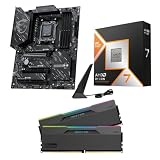
- Best Value: Micro Center 3-in-1 Combo: AMD Ryzen 7 9800X3D CPU Processor with MSI B850 Gaming Plus WiFi Motherboard and KLEVV CRAS V RGB DDR5 32GB (2x16GB) 6000MHz Ram Memory Black
- Premium Choice: Micro Center AMD 9800X3D Processor with MSI B850 Gaming Plus WF Motherboard
Best gaming motherboard for Ryzen 7 9800X3D is a narrower question than general board buying, because a locked X3D chip removes overclocking from the equation entirely. What remains are memory stability, networking, audio and physical layout, which is where these six boards actually differ.
As an Amazon Associate we earn from qualifying purchases at no extra cost to you. Product prices and availability are accurate as of the date shown and are subject to change.




As an Amazon Associate we earn from qualifying purchases at no extra cost to you. Product prices and availability are accurate as of the date shown and are subject to change.
By Ryan Cole, PC hardware writer at NVIDIA Review.
What Makes the Best Gaming Motherboard for Ryzen 7 9800X3D
This processor cannot be overclocked through the multiplier and holds a 120W ceiling, which removes the usual reasons to buy an expensive board. Four things still shape the best gaming motherboard for Ryzen 7 9800X3D.
EXPO Stability Is the One Setting That Affects Frames
Memory speed and timings influence frame rates on Ryzen more than most board features. A board with a mature BIOS that posts a 6000 MT/s EXPO profile first time saves hours of troubleshooting compared with one that needs manual tuning.
Two populated slots beat four for high-frequency stability. Buy a matched 32 GB kit as two modules rather than four smaller sticks, and the memory controller has a far easier job regardless of which board you choose.
Timings matter alongside frequency. A CL30 kit at 6000 MT/s generally outperforms a looser kit running slightly faster, which is why the standard recommendation pairs a moderate speed with tight primary timings.
Networking Affects Online Play More Than Chipset Tier
Wired 2.5 Gb Ethernet is standard on mid-tier boards and remains the better option for latency-sensitive multiplayer. The controller matters slightly, with Intel and Realtek implementations both mature at this point.
Wi-Fi 7 is worth having only if your router supports it, since on a Wi-Fi 6 network the newer radio behaves like Wi-Fi 6. Treat it as future capability rather than an immediate improvement to online performance.
Controller choice affects driver behaviour more than throughput. Both major vendors are stable now, but checking that your operating system has native support avoids the awkward situation of needing a network driver you cannot download.
Physical Layout Decides How Painful Upgrades Are
Modern graphics cards cover the lower M.2 sockets entirely, and their release tabs are frequently unreachable. A quick-release latch on the top PCIe slot turns card removal from a frustration into a two-second operation.
Look for at least one M.2 socket positioned above the graphics slot. Adding a drive without pulling the card is the difference between a five-minute job and a full teardown of the front half of the build.
Audio and Front Panel Connectivity Are Worth Checking
If you use a headset plugged into the case rather than a USB device, the onboard codec matters. Higher-tier boards use better implementations with cleaner amplification, which is audible with higher-impedance headphones.
Front panel USB-C headers are the other detail worth confirming. Many current cases expose a USB-C port on the front, and a board without the internal header leaves that port permanently unusable.
Fan and ARGB header count matters for the same reason. A build with six case fans and a lit cooler runs out of headers quickly, and a hub is a tidier solution than splitters running across the board.
Top Picks: Best Gaming Motherboard for Ryzen 7 9800X3D
The best gaming motherboard for Ryzen 7 9800X3D is the one whose layout and networking suit your build, since performance is identical across tiers. Specifications come from manufacturer sheets; check front panel headers against your case.
| Model | Chipset | Form Factor | Ethernet | Wireless |
|---|---|---|---|---|
| ASUS ROG Strix B650E-F Gaming WiFi | B650E | ATX | 2.5 Gb | Wi-Fi 6E |
| Gigabyte B850 AORUS Elite WiFi7 | B850 | ATX | 2.5 Gb | Wi-Fi 7 |
| MSI MAG B650 Tomahawk WiFi | B650 | ATX | 2.5 Gb | Wi-Fi 6E |
| ASUS ROG Strix X870-A Gaming WiFi | X870 | ATX | 2.5 Gb | Wi-Fi 7 |
| ASRock B650E PG Riptide WiFi | B650E | ATX | 2.5 Gb | Wi-Fi 6E |
| Gigabyte B650I AORUS Ultra | B650 | Mini-ITX | 2.5 Gb | Wi-Fi 6E |
ASUS ROG Strix B650E-F Gaming WiFi
The Strix B650E-F hits the gaming sweet spot without X870 pricing. A PCIe 5.0 graphics slot, Gen5 storage support, four DDR5 slots, 2.5 Gb Ethernet, Wi-Fi 6E and a strong audio implementation cover a complete build.
ASUS BIOS handling of EXPO profiles is among the most reliable, which matters more than any other feature here. The drawback is Wi-Fi 6E rather than Wi-Fi 7, relevant only if you already run a newer router at home.
Gigabyte B850 AORUS Elite WiFi7
This board brings Wi-Fi 7 and Gen5 connectivity into the mid-tier. A capable VRM with thick heatsinks, four DDR5 slots, multiple M.2 sockets with heatspreaders and 2.5 Gb Ethernet suit a gaming build well.
Gigabyte’s tool-free M.2 and graphics card releases are genuinely convenient with a large card installed. The reservation is BIOS presentation, which some builders find less intuitive when adjusting memory timings manually.
MSI MAG B650 Tomahawk WiFi
The Tomahawk remains the balanced value choice. A solid power stage layout with proper heatsinking, four DDR5 slots, multiple M.2 sockets, 2.5 Gb Ethernet and Wi-Fi 6E handle this processor with room to spare.
Layout is sensible and MSI’s EXPO handling is dependable. The compromise is a PCIe 4.0 graphics slot rather than Gen5, which costs nothing today since no consumer card saturates a Gen4 x16 connection.
ASUS ROG Strix X870-A Gaming WiFi
If you want USB4 alongside gaming features, this is where they meet. Gen5 graphics and storage, four DDR5 slots, Wi-Fi 7, 2.5 Gb Ethernet and a white finish that suits lighter builds make it comprehensive.
The quick-release PCIe latch and M.2 clips are well implemented for maintenance. The honest caveat is that a 9800X3D gains nothing from X870 in games, so the premium buys connectivity rather than frames.
ASRock B650E PG Riptide WiFi
Riptide is the value route to a PCIe 5.0 graphics slot. Four DDR5 slots, multiple M.2 sockets, adequate VRM heatsinking, 2.5 Gb Ethernet and Wi-Fi 6E arrive at a price below most B650E competitors.
For a build putting the budget into the graphics card, it makes sense. The trade-offs are a simpler audio codec and rear I/O that is functional rather than generous once several peripherals are connected.
VRM heatsinking is adequate rather than generous as well. That is fine for a 120W locked chip, but it makes the board a weaker foundation if you later move to a 16-core processor on the same socket.
Gigabyte B650I AORUS Ultra
Small-form-factor gaming builds are well covered here. Two DDR5 slots, dual M.2 sockets, 2.5 Gb Ethernet and Wi-Fi 6E fit onto a Mini-ITX board with a power delivery that handles a 120W chip comfortably.
Two DIMM slots frequently reach higher stable EXPO frequencies than four-slot boards, which suits this processor. The trade-offs are tight cooler clearance, restricted airflow and a price above equivalent ATX models.
Where This Build Sits in the 2026 Market
Three conditions affect the timing of a 9800X3D gaming build, and none of them argue for rushing.
AM5 Has a Confirmed Path to 2029
AMD confirmed at Computex 2026 that AM5 will receive new processors through the end of 2029. A board bought now can host a later chip with a firmware update, keeping the memory, cooler and case in place.
That is the strongest argument for choosing a mid-tier board over the cheapest one. The extra spend buys headroom you can actually use later, rather than features this particular processor is unable to exploit.
The Next Generation Is a Long Wait
Zen 6 desktop processors have moved to CES in January 2027, so nothing supersedes the 9800X3D in the near term. Waiting means a substantial delay with no intermediate releases to reconsider along the way.
No competition-driven price correction is scheduled either. If your current machine is limiting frame rates today, building now is defensible rather than impatient, since the alternative is most of a year without improvement.
Memory Is a Bigger Budget Line Than It Was
DRAM contract pricing rose steeply through 2026, with further increases forecast into the fourth quarter and no meaningful new capacity expected before late 2027. DDR5 absorbed the largest share of that rise.
Since memory speed genuinely affects Ryzen gaming performance, this is not a component to economise on carelessly. A 32 GB DDR5-6000 kit with a tight EXPO profile remains the sensible target for this processor.
Frequently Asked Questions
These questions come up most often from people building a gaming machine around this specific chip.
Does a more expensive board increase frame rates?
No. This processor has a locked multiplier and a fixed power ceiling, so every board runs it identically in games. Higher tiers add connectivity, audio quality and physical convenience rather than performance.
Is B650 enough, or should I go B850?
B650 is sufficient for gaming. B850 adds a PCIe 5.0 graphics slot and Gen5 storage as standard, which is future capability rather than present benefit, since no current card saturates a Gen4 connection.
What memory should pair with this processor?
A 32 GB DDR5-6000 kit with CL30 timings, bought as two matched modules. That configuration posts reliably on almost every AM5 board and sits at the point where faster memory stops delivering meaningful gains.
Does the best gaming motherboard for Ryzen 7 9800X3D need Wi-Fi 7?
Only if your router supports it. On a Wi-Fi 6 or 6E network the newer radio operates at the older standard, and wired 2.5 Gb Ethernet remains preferable for competitive multiplayer regardless of the wireless generation.
See More:
- Best MSI motherboard
- Best motherboard processor combo for gaming
- Best B550 motherboard
- Best CPU for streaming
- What is the best AM4 CPU for gaming
Final Thoughts
The best gaming motherboard for Ryzen 7 9800X3D is decided by memory stability and physical layout rather than chipset tier, because the processor performs identically across all of them. The Strix B650E-F and MAG B650 Tomahawk cover most builds well, while X870 boards earn their price only if USB4 is genuinely useful to you.



Write Your Review
No reviews yet. Be the first to share your experience!