
- Top Pick: Capture Card, 4K HDMI Video Capture Card, Game Capture Card, 1080P 60FPS Video Capture Device, HDMI to USB 3.0 Capture Card for Streaming, Work with Camera/Xbox/PS4/PS5/PC/OBS
- Best Value: Elgato 4K X Capture Card, HDMI 2.1, 4K144 Ultra-Low Latency
- Premium Choice: Guermok 4K@60FPS Capture Card for Streaming, 2K@120FPS USB3.0 HDMI Capture
Best capture card for PS5 choices come with two console-specific catches most guides skip: the copy protection setting that must be changed before anything records, and the fact that party chat never travels down the HDMI cable. Solve both of those first and the hardware decision itself becomes far more straightforward than it looks.
As an Amazon Associate we earn from qualifying purchases at no extra cost to you.
By Ryan Cole, PC hardware writer at NvidiaReview
How to Choose the Best Capture Card for PS5
Selecting the best capture card for PS5 use means working around how the console outputs video. Three things decide it: the copy protection setting on the console itself, whether the device passes through the modes you play in, and how you intend to get your own voice and party chat recorded.
Disable HDCP Before Anything Will Record
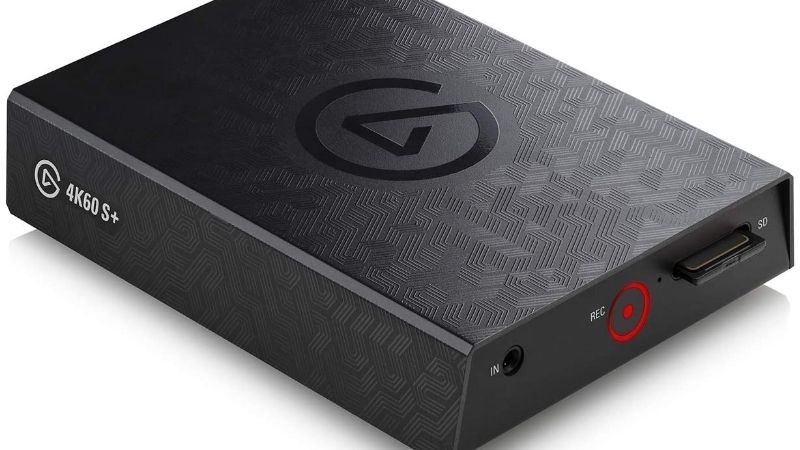
PlayStation consoles apply copy protection to their HDMI output by default, which produces a black screen or an error in your capture software rather than gameplay. The fix is in the console settings under HDMI, where the option to enable HDCP can be switched off for gameplay capture.
That setting only affects gameplay. Streaming video applications on the console will still enforce protection, so a black screen when a media app is open is expected behaviour rather than a hardware fault. Check this first whenever a new device appears to be failing, because it usually is not.
Passthrough Modes and Cable Requirements
The console outputs up to 4K120 with variable refresh rate on a compatible display, so a device that only passes 4K60 will cap what you see while playing. Devices rated for 4K144 passthrough handle every console mode comfortably, including performance settings in fast-paced titles.
Cables matter more than people expect here. Running 4K120 needs certified Ultra High Speed HDMI cables on both the input and output sides of the capture device, and a cheap cable is by far the most common cause of a signal that drops out or refuses to negotiate the higher mode.
Audio: Game Sound, Microphone and Party Chat
Game audio travels over HDMI and arrives alongside the video, so that part is entirely automatic. Your microphone is added separately in software on the recording machine, which is straightforward whether you are streaming live or simply recording footage for later editing.
Party chat is the complication, because it runs through the controller rather than the HDMI output. Capturing it requires a device with headset passthrough built into the unit, or a separate audio interface that splits your headset signal between the console and the recording computer.
Top Picks: Best Capture Card for PS5 Owners
These five candidates for the best capture card for PS5 cover 4K120 passthrough, budget 1080p options and an internal card. All figures are vendor-published specifications. Availability was checked in August 2026 and tends to tighten before major console releases.
| Device | Connection | Max capture | Max passthrough | Headset passthrough |
|---|---|---|---|---|
| Elgato Game Capture 4K X | USB 3.2 Gen 2 | 4K60 HDR10 | 4K144 with VRR | No |
| AVerMedia Live Gamer Ultra 2.1 | USB 3.2 Gen 2 | 4K60 HDR | 4K144 | No |
| Elgato 4K Pro | PCIe | 4K60 HDR10 | 4K144 | No |
| Elgato HD60 X | USB 3.0 | 1080p60 / 4K30 | 4K60 HDR10 | No |
| Razer Ripsaw HD | USB 3.0 | 1080p60 | 4K60 | Yes |
Elgato Game Capture 4K X – Best Overall for PS5
The 4K X passes through up to 4K144 with variable refresh rate support while capturing 4K60 with HDR10, which means the console keeps running in its full performance mode while you record. Over USB 3.2 Gen 2 it handles the highest quality output the console produces without compromise.
It needs a genuine 10Gbps USB-C port on the recording machine, and an older 5Gbps connection silently reduces what is available. There is no headset passthrough for party chat, so that requires a separate solution. For a console owner who wants nothing capped, this is the device.
AVerMedia Live Gamer Ultra 2.1 – Best Alternative for 4K120
AVerMedia specifies 4K144 passthrough with 4K60 HDR capture over USB 3.2 Gen 2, covering every console output mode including high frame rate performance settings. It behaves as a standard source in common recording software, which keeps the setup process short and predictable.
The housing feels plainer than the price suggests and the bundled software is basic rather than polished. It also requires a proper 10Gbps port to reach its rated figures. As a direct alternative when the Elgato is out of stock, it delivers effectively the same capability.
Elgato HD60 X – Best Value for 1080p Recording
Since most viewers watch at 1080p, this device covers the practical requirement while still passing through 4K60 HDR10 and 1080p120 with VRR support. It runs over ordinary USB 3.0, so it works with laptops and older desktops that have no 10Gbps port anywhere on the machine.
Passthrough tops out below 4K120, which caps the console if you play in performance mode on a high refresh television. Recording above 1080p60 is also unavailable. For streaming and everyday clip capture rather than archival footage, it does the important part at a much lower price.
Razer Ripsaw HD – Best for Headset Audio
The Ripsaw HD records 1080p60 with 4K60 passthrough, and its distinguishing feature is the headphone and microphone passthrough built into the unit. That solves the party chat problem directly, which is otherwise the most awkward part of recording console sessions with friends.
Capture is capped at 1080p60 and passthrough at 4K60, so high frame rate console modes are limited while it is in the chain. Build is functional rather than premium. If your recordings involve party chat and you want one device rather than an audio interface, it earns its place.
Elgato 4K Pro – Best Internal Option
For a desktop that stays put, the internal 4K Pro captures 4K60 HDR10 with 4K144 passthrough while keeping the data path inside the machine. That avoids competing with microphones, controllers and external drives for USB bandwidth during long recording or broadcasting sessions.
It requires a free PCIe slot and a desktop, costs more than the external equivalents, and installation means opening the case. Like the other 4K devices, party chat still needs a separate audio path. In a fixed setup with slots available, it is the most robust choice here.
What the Late 2026 Console Calendar Means
Demand for the best capture card for PS5 setups is about to spike for reasons that have nothing to do with component pricing or supply chains. Three developments are worth planning around before you order hardware and start configuring it, because the timing this year is unusually tight for console creators.
GTA 6 Arrives on Console Only
The game launches on 19 November for PlayStation 5 and Xbox, with no PC version announced. Historical precedent suggests a long wait for one: GTA V took roughly 19 months to reach PC and Red Dead Redemption 2 around 13, so console capture is the only route for creators this year.
That makes this the single biggest driver of capture hardware demand in years. If you plan to record or stream it, buy and test the whole chain well in advance, because stock on the popular 4K devices tends to tighten noticeably in the fortnight before a release of that scale.
An Earlier Release Gives You a Rehearsal
Call of Duty Modern Warfare 4 lands on 23 October, roughly a month earlier. That is a useful opportunity to confirm that your cables negotiate the right mode, that HDCP is switched off, that audio routing works and that your recording drive keeps up before the busier launch arrives.
Treat it as a full dress rehearsal rather than a casual session. Most capture problems are configuration issues rather than hardware faults, and discovering them during a quiet week is considerably better than troubleshooting a black preview window while a launch night audience waits.
No New Capture Hardware Before CES 2027
Nothing significant is expected in this category until CES in January 2027, so there is no pending launch that would reward waiting. The current generation of devices already covers every mode the console outputs, including 4K120 passthrough with variable refresh rate support.
Buy for the machine and television you own now. Confirm your USB port speeds and cable certification first, since those are the constraints that actually bite. Accessory discounts around the late November sales remain genuine, though stock may be tight during that same period.
Frequently Asked Questions
The questions console owners ask most when setting up recording: why the preview screen is black, whether the console can capture usable footage without a card, what cables are actually required, and how the best capture card for PS5 handles high frame rate performance modes.
Why is my capture preview black?
Almost always because copy protection is still enabled on the console. Switch off the HDCP option in the console’s HDMI settings and gameplay will appear normally. If media applications still show black, that is expected, since protection remains enforced for streaming video services.
Can I record without a capture card?
The console has built-in capture that works well for short clips and quick sharing, which is why the best capture card for PS5 is not essential for everyone, but it limits quality options, recording length and gives you no control over the footage on a computer. A capture device exists for people who want to stream live or edit properly afterwards.
What HDMI cables do I need?
Certified Ultra High Speed cables on both sides of the device if you want 4K120 passthrough. A cable that works fine at 4K60 may fail to negotiate the higher mode at all, and that failure usually presents as a signal dropping out rather than an obvious error message.
Will a capture card add input lag?
Not on the passthrough output, since the signal splits before any processing. The preview window on your computer runs behind by a noticeable amount, which is why you should always play on the passthrough display and use the preview only for checking your layout and framing.
See More:
- Best thermal compound paste
- Thermal paste at Best Buy
- Graphics card at Best Buy
- Best AM4 CPU for gaming
- Best motherboard for 9800x3d
Final Thoughts
The best capture card for PS5 depends on how you play. The 4K X preserves 4K120 with VRR and captures at 4K60, the HD60 X covers 1080p streaming for far less, and the Ripsaw HD solves party chat with built-in headset passthrough. Whichever you choose, disable HDCP and buy proper Ultra High Speed cables before blaming the hardware.
As an Amazon Associate we earn from qualifying purchases at no extra cost to you.














Write Your Review
No reviews yet. Be the first to share your experience!