
The best low profile NVIDIA graphics card for a small form factor PC, among the listings gathered here, is a GeForce RTX 3050 6GB low-profile model, with the older GTX 1050 Ti as the value fallback and the GT 710 and GT 730 reserved for people who only need extra display ports. That sentence hides a catch worth stating early: the search results for this keyword are not clean. Of the eight listings below, six carry NVIDIA GeForce chips and two are AMD Radeon RX 550 cards that appear because sellers stuff “SFF” and “low profile” into every title. We kept all eight, labelled each honestly, and sorted them by what the title actually promises.
- The short list at a glance
- Sorting six NVIDIA cards from two AMD cards
- Individual picks, from strongest to most basic
- How we picked these
- The fit check: three measurements before you click buy
- What a slim card can and cannot deliver
- Mistakes buyers make with small form factor graphics cards
- Verdict
- Frequently asked questions
Small cases punish guesswork. A card that is a few millimetres too tall, a slot too thick, or ten watts too hungry simply does not work, and the return window is the only fix. So this page spends less time on adjectives and more time on measurements you can take with a ruler, a flashlight and the sticker on your power supply.
The short list at a glance

maxsun GEFORCE GTX 1050 Ti 4GB GDDR5 128 Bit Video Gaming Graphics Card for Gaming PC Mini Small Form Factor SSF Slim Low Profile Design GPU, DisplayPort, HDMI (Low Profile)


As an Amazon Associate we earn from qualifying purchases. Product prices and availability are accurate as of the date/time indicated.

maxsun AMD Radeon RX 550 4GB Low Profile Small Form Factor Video Graphics Card for Gaming Computer PC GPU GDDR5 ITX SFF HDPC 128-Bit DirectX 12 PCI Express X16 3.0, HDMI, DisplayPort


As an Amazon Associate we earn from qualifying purchases. Product prices and availability are accurate as of the date/time indicated.
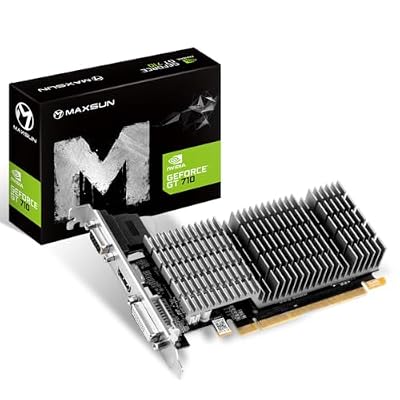
maxsun GEFORCE GT 710 2GB Low Profile Ready Small Form Factor Video Graphics Card GPU Support DirectX12 OpenGL4.5, Low Consumption, VGA, DVI-D, HDMI, HDCP, Fanless Cooling


As an Amazon Associate we earn from qualifying purchases. Product prices and availability are accurate as of the date/time indicated.

51RISC Radeon RX 550 LP Graphics Card, Low Profile 4GB GDDR5 Small Form Factor Video Card for Gaming 4K Display Desktop/Mini PC SFF Video Card (RX 550 4GB Low Profile)


As an Amazon Associate we earn from qualifying purchases. Product prices and availability are accurate as of the date/time indicated.
| Model | Chip and memory (from the title) | Outputs named in the title | Price tier | Best for |
|---|---|---|---|---|
| maxsun GeForce RTX 3050 6GB | RTX 3050, 6GB GDDR6, PCIe 4.0 | HDMI 2.1, DisplayPort 1.4a | Premium | Real 1080p gaming in a slim case |
| 51RISC GeForce RTX 3050 LP | RTX 3050, 6GB GDDR6 | Not listed in title | Premium | Same use, if outputs suit you |
| maxsun GeForce GTX 1050 Ti 4GB | GTX 1050 Ti, 4GB GDDR5, 128-bit | DisplayPort, HDMI | Mid-range | Esports and older titles |
| maxsun GeForce GTX 1050 4GB | GTX 1050, 4GB GDDR5, 128-bit | DisplayPort, HDMI | Mid-range | Light gaming on a budget |
| QTHREE GT 730 4GB | GT 730, 4GB DDR3, 128-bit | DVI-I, HDMI, VGA | Budget | Office and media systems |
| maxsun GeForce GT 710 2GB | GT 710, 2GB, fanless | VGA, DVI-D, HDMI | Budget | Silent display-output upgrade |
| maxsun Radeon RX 550 4GB (AMD) | Radeon RX 550, 4GB GDDR5 | HDMI, DisplayPort | Budget | AMD alternative |
| 51RISC Radeon RX 550 4GB (AMD) | Radeon RX 550, 4GB GDDR5 | Not listed in title | Budget | AMD alternative (near-duplicate) |
Price tiers are relative to this set only. “Premium” here still means a modest card by desktop standards; it simply costs several times what the GT 710 does.
Sorting six NVIDIA cards from two AMD cards
Before the individual write-ups, a quick sorting exercise saves confusion. The two RTX 3050 listings belong to the current-generation class and are the only ones in the set with GDDR6 memory. The GTX 1050 and GTX 1050 Ti listings belong to an older generation with GDDR5. The GT 730 and GT 710 are entry-level display adapters. The two RX 550 listings are AMD products, so they will not give you NVIDIA’s control panel, NVENC encoder or any NVIDIA-specific feature.
Two near-duplicates deserve mention. The maxsun and 51RISC RTX 3050 listings describe the same chip and capacity from different sellers, and the same is true of the two RX 550 4GB listings. We cannot tell from titles whether coolers, bracket sets or board layouts match, so treat them as alternatives and compare the photographs and dimensions on each page.
Individual picks, from strongest to most basic
maxsun GeForce RTX 3050 6GB Low Profile: the strongest NVIDIA option here
The title describes a GeForce RTX 3050 with 6GB of GDDR6, a slim low-profile design, PCI Express 4.0, HDMI 2.1 and DisplayPort 1.4a. Of everything in this set it is the only listing that names both a modern display connector pair and the newest slot generation. For a small form factor machine that wants to play current games at 1080p with sensible settings, this is where the list tops out. As a rough planning assumption, not a measurement, a 6GB card in this class suits 1080p at medium settings in many recent titles and high settings in lighter or older ones.
The unknown is power. The title does not say whether the card relies solely on the slot or needs an extra connector, and that single fact decides whether it works in a compact prebuilt with a modest supply. Read the specification table on the listing, and compare any stated board power with the label on your supply, leaving a healthy margin for the processor and drives. Cooling is the other question: a slim cooler on a card of this class tends to mean audible fan speed under load, so expect more noise than a full-size card would make.
One more practical point: the title bundles the product with a “Mini Small Form Factor” label, but low-profile cards still differ in how far they stick out past the slot. Look for a stated length in the listing and compare it with the distance between your slot and the nearest drive cage or fan. A card that fits in height can still collide at the far end, and that kind of mismatch is easy to catch with a tape measure before ordering.
Pros
- GDDR6 memory and PCI Express 4.0 named in the title, the most modern spec sheet in the set
- HDMI 2.1 and DisplayPort 1.4a outputs listed
- Low-profile design suits slim and mini-ITX cases
Cons
- Highest price tier in the group
- Only 6GB of video memory, which can limit high-texture settings in newer games
- Power connector, slot width and included brackets are not stated in the title
Who it’s for: builders of compact PCs who want genuine 1080p gaming and have confirmed their power supply and case clearances.
51RISC GeForce RTX 3050 LP 6GB: the same chip from a different seller
This listing names a GeForce RTX 3050 low-profile card with 6GB of GDDR6, aimed at desktop and mini PCs. The title also mentions “8K display”, which is worth reading carefully. A display output that can drive an 8K monitor for desktop use is not the same as a card that can render games at that resolution, and a 6GB RTX 3050 is a 1080p-class gaming product. Treat the 8K wording as marketing about connectivity at most, and check the listing for the actual port list.
Compared with the maxsun version, the title gives less: no output standards, no slot generation. That is not a flaw in the card, only a gap in the information, so the product page and any bundled manual become more important. If both listings are available at similar prices, pick the one that documents its dimensions, bracket options and power requirements most clearly, because that is what protects you from a bad fit.
Because the two RTX 3050 listings share a chip and memory size, the practical difference comes down to seller support, cooler design and return handling. Neither is visible from the title.
A fair way to use this listing is as a price check against the maxsun card. If the two are close, the one with the clearer dimensions, a visible warranty statement and a named return window is the lower-risk purchase. If one is clearly cheaper, make sure the saving is not coming from a missing half-height bracket, because replacement brackets for odd cooler designs are hard to source.
Pros
- RTX 3050 with 6GB GDDR6, the same modern class as the leader
- Low-profile layout stated for desktop and mini PCs
- A second source for the same chip if one seller is out of stock
Cons
- Title gives no output list, slot generation or power details
- The 8K wording can mislead buyers about gaming capability
- Premium price tier, so a poor fit is an expensive mistake
Who it’s for: buyers who want an RTX 3050 low-profile card and are willing to read the full listing and manual to confirm it suits their case.
maxsun GeForce GTX 1050 Ti 4GB: the value fallback for small cases
The title names a GTX 1050 Ti with 4GB of GDDR5 on a 128-bit bus, a slim low-profile design, and DisplayPort plus HDMI outputs. It belongs to an older generation, so it lacks the newer features the RTX 3050 offers, but it has a reputation for modest power needs, and the GPU design is commonly cited at around 75 W. That figure is a general reference, not a statement about this specific board, so confirm on the listing whether an auxiliary connector is required.
In practical terms, expect it to handle esports titles and older games at 1080p on lower to medium settings, with demanding recent releases pushing it hard. As a planning estimate rather than a measurement, think of it as a capable step above integrated graphics and a clear step below the RTX 3050 listings. Four gigabytes of memory is the other limit: texture-heavy games will force lower settings long before the processor becomes the bottleneck.
It is a sensible choice when a small office-class desktop needs a graphics upgrade without a new power supply, provided the listing confirms slot-powered operation.
It also helps to think about what the rest of the machine looks like. A GTX 1050 Ti paired with a recent four-core processor and dual-channel memory will behave sensibly in esports titles. The same card behind a very old dual-core processor will be held back, and you would see that as stutter rather than low average frame rates. Check the processor generation before assuming the card is the weak link.
Pros
- Modest mid-range price tier in this set
- 4GB on a 128-bit bus, which is a respectable configuration for its class
- DisplayPort and HDMI both named in the title
Cons
- Older generation with GDDR5 memory
- 4GB limits texture settings in newer games
- Driver support for older architectures should be confirmed on NVIDIA’s site
Who it’s for: owners of slim prebuilt systems who want playable esports and older-game performance without replacing the power supply.
maxsun GeForce GTX 1050 4GB: light gaming at the lowest GeForce gaming price
The GTX 1050 listing mirrors the Ti version in memory, bus width and ports: 4GB GDDR5, 128-bit, DisplayPort and HDMI, mini and slim form factor. The title does not spell out the difference in shader count, but the “Ti” suffix traditionally marks the faster sibling, so expect a step down in frame rates. Think of it as aimed at 1080p play in lighter games, or 720p to 900p compromises in heavier ones. Those are estimates based on the class of chip, not recorded results.
The decision between this card and the 1050 Ti is essentially arithmetic. If the price gap is small, take the Ti. If the gap is large relative to your budget and your games are older or esports-focused, the standard 1050 may be enough. Either way, check that the listing includes the half-height bracket and ask whether it ships with a full-height bracket as well, since many small cases need one or the other and you cannot always swap them yourself.
Another consideration is longevity. An older chip and 4GB memory pool will age faster than an RTX 3050 if you plan to keep the PC for several years.
If you run two monitors, the title lists both DisplayPort and HDMI, so a mixed pair is feasible without adapters. Anything beyond two displays needs a look at the listing, because the maximum number of simultaneous outputs is a chip and board decision, not something the title reveals. That matters for people building small trading or monitoring desks on a compact PC.
Pros
- Lower price than the Ti and the RTX cards
- Same ports and memory layout as the Ti listing
- Suitable for light and older games
Cons
- Slower than the Ti variant
- Ageing architecture with limited headroom for newer releases
- Bracket and power details are not in the title
Who it’s for: tight-budget buyers who mostly play older or esports titles on a small desktop.
QTHREE NVIDIA GT 730 4GB: a display adapter that happens to be NVIDIA
The title names a GT 730 with 4GB of DDR3 on a 128-bit bus, PCI Express x16, DVI-I, HDMI and VGA outputs, a low-profile build, DirectX 11 and “support 2K”. The interesting part is the port list: VGA and DVI are rare on modern cards, so this one earns its place in offices that still run older monitors, projectors or multi-screen signage. If you need to connect a legacy display to a small computer, that mix is the reason to buy.
As a gaming card it is a different story. DDR3 memory is slower than the GDDR5 and GDDR6 used on the other cards, and the GT 730 class is designed for basic graphics work, video playback and very light games. “Support 2K” most plausibly refers to output resolution rather than gaming performance, so do not read it as a promise of smooth 1440p frame rates. Four gigabytes also sounds generous, but memory size does not rescue a slow chip.
It is a good fit when the goal is more screens, not more frames.
One practical angle is multi-monitor use. With VGA, DVI-I and HDMI on one card, an office machine can feed an older monitor and a newer one at the same time, which is the kind of mismatch many shared workstations end up with. Verify with the listing how many outputs can run at once, since boards often carry more connectors than they can drive together.
It also suits people who keep a system for a long time, since a basic adapter rarely becomes obsolete for desktop work.
Pros
- DVI-I, HDMI and VGA all named in the title
- Low-profile layout for slim cases
- Budget price tier
Cons
- DDR3 memory and an entry-level chip make it weak for current games
- “Support 2K” is vague about what it covers
- Older DirectX 11 generation
Who it’s for: office, kiosk and media-centre builds that need extra or legacy display outputs.
maxsun GeForce GT 710 2GB: the quiet, fanless option
The GT 710 listing names 2GB of memory, DirectX 12 and OpenGL 4.5 support, low consumption, VGA, DVI-D and HDMI outputs, HDCP, and fanless cooling. Fanless is the headline: with no fan to wear out or whirr, the card is silent, which helps in a living-room media PC or a workshop terminal. The tradeoff is that a passive heatsink in a cramped case relies on whatever airflow the chassis provides, so confirm that your case moves air across the expansion slot area.
This is the least capable card in the set and is best understood as an upgrade over missing or very old integrated graphics. It can drive monitors, play video and handle everyday desktop tasks. It is not a gaming card in any modern sense, and listing it in a gaming roundup only makes sense because shoppers searching for low-profile NVIDIA cards will see it.
Its other virtue is the low price tier: if a system simply needs a working display output, it avoids overspending on performance you will never use.
If you plan to use it in an enclosed shelf or a tiny case, think about heat soak. A passive card has no way to dump heat except into the surrounding air, so a closed cabinet with no ventilation is a poor home. A case with even one slow intake fan, or a gap above the slot area, is usually enough for a card of this class that draws little power, though the listing’s own guidance should have the final word.
Pros
- Fanless design, so no fan noise
- VGA, DVI-D and HDMI outputs listed
- Lowest price tier in the group
Cons
- Not suitable for modern gaming
- Passive cooling depends on case airflow
- Only 2GB of memory
Who it’s for: anyone who wants a silent card for a media or office PC and has no interest in games.
maxsun Radeon RX 550 4GB (AMD, not NVIDIA): a light-gaming alternative
This listing is an AMD Radeon RX 550 with 4GB of GDDR5, a 128-bit interface, DirectX 12, PCI Express x16 3.0, and HDMI plus DisplayPort. It sits in this roundup because the search term brought it up, not because it is an NVIDIA product. If you are tied to NVIDIA software, such as its encoder or its driver suite, skip it. If you only want a low-profile card that can handle light gaming and does not care about the brand on the chip, it is a fair alternative to the GTX 1050 class.
As a planning assumption, the RX 550 class is aimed at esports titles and older games at 1080p on low settings, and will usually sit below the GTX 1050 in frame rates. The two cards have not been compared head to head here, so take that as a general class expectation rather than a result.
Its appeal is a budget tier price with modern outputs, while its limitation is that it will not bring an NVIDIA experience.
For people weighing this against the GTX 1050, the practical differences are software and ecosystem. NVIDIA owners get its control panel and encoder. AMD owners get Radeon software and its own feature set. For basic gaming in a small case, either route is workable, so the decision usually comes down to price on the day and which listing documents its dimensions best.
Remember that two RX 550 listings exist in this set, so compare both before buying.
Pros
- 4GB GDDR5 on a 128-bit interface
- HDMI and DisplayPort named in the title
- Budget price tier
Cons
- It is an AMD card, so it does not meet the NVIDIA part of the keyword
- Older architecture with modest performance
- Power and bracket details are not in the title
Who it’s for: buyers who are brand-flexible and want the cheapest low-profile card with modern outputs.
51RISC Radeon RX 550 LP 4GB (AMD, not NVIDIA): near-duplicate of the maxsun card
The second RX 550 listing names a Radeon RX 550 low-profile card with 4GB of GDDR5, aimed at desktop and mini PCs, with mention of a 4K display. As with the RTX 3050 from the same seller, the display claim is about output capability. The title does not list ports, so you will need the product page to learn whether you get HDMI, DisplayPort, or something else.
It duplicates the maxsun RX 550 on chip and memory. The differences that matter, such as cooler design, fan noise, bracket set and warranty handling, are invisible in the title. If you have decided on an RX 550, choose between the two by reading the complete listings and comparing return policies, not by trusting either title. If you have not decided, remember that this is an AMD part and that the NVIDIA cards above give you access to the features in the keyword.
It is the least informative title in the set, which is a reason for caution rather than a verdict on the hardware.
If you land here from an NVIDIA search and decide an AMD card is acceptable, one extra check is worth making: confirm that your operating system and monitors are supported by the current Radeon driver for this chip generation. Older chips can move to maintenance-only support, and a quick look at AMD’s support pages answers that in a minute.
In short, treat it as a fallback rather than a first choice for NVIDIA shoppers.
Pros
- 4GB GDDR5, low-profile layout stated
- Budget price tier
- A second seller option for the same chip
Cons
- AMD product in an NVIDIA search
- No ports or power details in the title
- “4K display” wording says little about gaming ability
Who it’s for: brand-flexible buyers who prefer this seller and have confirmed ports and fit on the full listing.
How we picked these
This page is written by the Editorial team. Nobody on the team used or measured these units. The “testbench” for this article is published specifications, manufacturer documentation and buyer reviews, and every statement about a product is limited to what its listing title says. Where we add a number, such as a typical slot-power ceiling, we label it as a general reference or an estimate and state the assumption behind it.
The selection rule was simple. We took the listings that the marketplace returned for low-profile and small-form-factor graphics cards, kept every one that named a recognisable GPU, and then separated NVIDIA from AMD. We ranked within the NVIDIA group by chip generation and memory type, because those are the only performance clues a title gives. Price entered only as a tier, relative to the other cards on the page.
Anything not in a title is flagged as “check the listing”. That includes power connectors, slot width, bracket sets, cooler design, fan noise and warranty terms. These are the attributes most likely to make or break a purchase in a small case, and they are exactly the ones sellers tend to leave out of titles.
If you want broader context before choosing, our guides to bracket height, slot width and the 75 W budget and to small form factor graphics cards for gaming cover the same ground from different angles.
The fit check: three measurements before you click buy
Most returns in this category are fit failures, not performance disappointments. A five-minute check prevents nearly all of them. Work through the three steps below in order, and stop if any one fails.
Step 1: height and bracket
Open the case and look at the rear of the expansion slots. A low-profile (half-height) slot is a short opening, and the card must use a short bracket. Measure the opening from the motherboard edge to the top of the slot cover. Then read the listing for the card’s overall height including the bracket. Many low-profile cards ship with both a short and a full-height bracket, but the title rarely says so, so look for it in the box contents.
Step 2: slot width and neighbours
Count the free slots and look at what sits next to them: a Wi-Fi card, a cable bundle, or a drive cage can all block a thick cooler. A single-slot card needs one free position, while a dual-slot design takes two. Compare the listing’s stated thickness with the clearance you measured. Fanless cards like the GT 710 are often thicker because of the heatsink, so do not assume passive means thin.
Step 3: the power budget, with a worked example
Suppose your small desktop carries a power supply labelled 180 W total. Assume, as an illustration, 65 W for the processor under load, 25 W for the motherboard, memory and fans, 10 W for a drive, and 75 W reserved for a slot-powered card. That adds up to 175 W against a 180 W label, which leaves almost no margin. Continuous loads near a supply’s limit reduce lifespan and can trigger shutdowns, so this machine is a candidate only for the lowest-power cards, or it needs a supply upgrade.
Now change one assumption. If the processor is a 35 W part, the same arithmetic gives 145 W, leaving about 35 W, or roughly 19 percent, of margin. That is a far more comfortable situation. The point is that your own numbers matter, and the card’s rating is only one line in the sum. Treat these figures as an exercise with stated assumptions, then replace them with the values from your own parts and supply label.
Many small-form-factor supplies also use proprietary connectors, and some have no spare cable at all. If your supply has no extra lead and the card needs one, a bigger supply is a larger project. If you are unsure, ask the system manufacturer or a qualified technician rather than guessing. Working inside a powered-off, unplugged computer is routine for many, but the supply itself should not be opened.
What a slim card can and cannot deliver
Performance expectations by class
Low-profile cards trade away cooling capacity and power for size, so they sit below their full-size namesakes. As rough, labelled estimates: the RTX 3050 6GB class suits 1080p play at medium settings in many recent games. The GTX 1050 Ti class suits esports and older titles. The GTX 1050 and RX 550 classes suit lighter workloads and lower settings. The GT 730 and GT 710 classes suit desktops, video and office use.
Processor and memory still matter. A strong card paired with an old dual-core processor or single-channel memory will deliver less than its class suggests, and small prebuilts are often configured that way. Check what is already inside before you decide how much card to buy.
Heat and noise
A small heatsink and a small fan must dissipate the same heat per watt as a large one, which means higher fan speeds. Expect more audible noise from a slim gaming card than from a full-size equivalent, and better case airflow to compensate. Fanless cards avoid noise by running at very low power, which is why the GT 710 is silent while the RTX 3050 listings are not.
Outputs and monitors
Match ports to monitors before ordering. HDMI 2.1 and DisplayPort 1.4a, named on the maxsun RTX 3050, suit modern displays. DVI and VGA, named on the GT 730 and GT 710, suit older ones. If a card has fewer ports than your monitors need, adapters add cost and sometimes limit resolution or refresh rate. Our guide to compact Nvidia GPUs for Mini-ITX gaming PCs goes further into pairing cards with compact builds.
Drivers and longevity
Older architectures eventually move to reduced driver support. Before buying a GTX 1050 or GT 710, check NVIDIA’s support pages for the chip’s current status. If you plan to keep the system for years, a newer chip is the safer bet, even if it costs more today.
Mistakes buyers make with small form factor graphics cards
Trusting the word “low profile” alone. Sellers apply it loosely. Some cards ship only with a full-height bracket, and some “low profile” coolers still exceed the half-height envelope. Confirm dimensions and bracket contents.
Ignoring the power supply label. A wattage figure on a prebuilt supply is the ceiling for the whole machine. Add the card’s draw to everything else before buying, and leave margin.
Buying by memory size. Four gigabytes of DDR3 on a GT 730 is not equivalent to four gigabytes of GDDR5 or GDDR6. Bandwidth and the chip behind the memory matter more than the number.
Assuming a brand-name chip means NVIDIA. Two cards here are AMD. Always read the first words of the title for the chip, not the keywords scattered after it.
Overlooking ports. Buying a card whose outputs do not match your monitors adds adapter costs and can reduce quality.
Skipping the bigger picture. A small case may suit a stronger processor and storage upgrade better than a graphics card. If your frame rates are limited by the processor, a faster card will not fix it. Our overview of low-profile graphics cards for small PCs compares several approaches.
Verdict
For a small form factor PC that needs to play current games, the maxsun RTX 3050 6GB is the leading NVIDIA listing here because its title documents the most modern specifications. The 51RISC RTX 3050 is a sensible alternative if its full listing confirms the details you need. The GTX 1050 Ti is the value pick for esports and older games. The GT 730 and GT 710 are display adapters for offices and media systems, with the GT 710 winning on silence. The two RX 550 cards are AMD alternatives, not NVIDIA products.
Whichever you choose, measure first, add up the power budget, and read the listing for everything the title leaves out. A correct fit beats a faster card that does not fit.
Frequently asked questions
What is the best low profile NVIDIA graphics card for a small form factor PC?
Among the listings here, the two RTX 3050 6GB low-profile cards are the strongest NVIDIA choices for actual gaming, because they are the newest architecture and carry GDDR6 memory. The maxsun version lists HDMI 2.1, DisplayPort 1.4a and PCI Express 4.0. If your budget or power supply is tight, the GTX 1050 Ti is the older fallback. Always confirm bracket height, slot width and power connector on the listing before ordering.
Do low profile graphics cards need extra power cables?
Some do and some do not. A card that draws only what the PCI Express slot supplies, commonly cited as up to 75 W, needs no cable, which is why many compact prebuilt systems can use it. A card with an auxiliary connector needs a spare lead and enough wattage. The titles here do not state this, so read the listing’s specification table and your power supply label before buying.
Will a low profile card fit my Dell, HP or Lenovo small desktop?
Possibly, but three things decide it: whether the case takes a half-height bracket, how many slots of width are free, and whether the power supply has headroom. Measure the opening, count the free slots and read the wattage on the supply label. Some proprietary supplies also use non-standard connectors. If any of the three answers is unclear, ask the seller or the system maker before you order.
Are GT 710 and GT 730 cards good for gaming?
They are better described as display-output cards. They add HDMI, DVI or VGA ports to a computer without a graphics processor, and they handle video playback and office work. They can run very light or older games at low settings, but modern titles will struggle. If gaming is the goal, the GTX 1050, GTX 1050 Ti or RTX 3050 listings are a more realistic starting point.
Why are Radeon RX 550 cards listed in an NVIDIA roundup?
Two of the eight listings that matched this search are AMD Radeon RX 550 cards, not NVIDIA products. We kept them visible so readers do not mistake them for NVIDIA, and we explain where they fit as alternatives. If you specifically want NVIDIA drivers, features or software, skip those two and choose from the GeForce cards. If you are open to either brand, the two RX 550 cards can still serve as budget low-profile options, provided you confirm ports and fit on the listing first.
Top picks from this guide
maxsunmaxsun GEFORCE GT 710 2GB Low Profile Ready Small Form…$55 \xc2\xb7 97/100maxsunmaxsun AMD Radeon RX 550 4GB Low Profile Small Form…$122 \xc2\xb7 96/100maxsunmaxsun GEFORCE GTX 1050 Ti 4GB GDDR5 128 Bit Video…$170 \xc2\xb7 95/10051RISC51RISC Radeon RX 550 LP Graphics Card, Low Profile 4GB…$120 \xc2\xb7 94/100






Write Your Review
No reviews yet. Be the first to share your experience!