

Prime
Best Seller
NVIDIA DGX Spark™ 2 Pack with Cable Bundle – Personal AI Desktop Supercomputer – Desktop GB10 Grace Blackwell Chip

Editor's Pick
NVIDIA DGX Spark™ – Personal AI Desktop Supercomputer – Desktop GB10 Grace Blackwell Chip


Nvidia DIGITS has generated more marketing copy than useful data, and if you are evaluating it as an actual purchase rather than a headline, that is a problem. You do not need another render of the chassis. You need to know which model sizes fit in 128GB of unified memory, how inference throughput compares to a multi-GPU tower, what the total cost looks like against a DIY build at today’s component prices, and where early owners are running into walls. This review covers those four questions with numbers, and skips everything else.
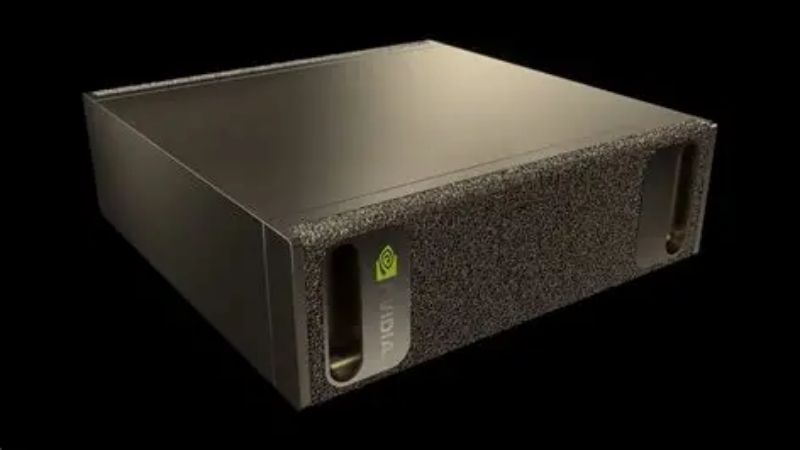
What Nvidia DIGITS Actually Is, and What It Is Not
DIGITS — shipping commercially under the DGX Spark name — is a compact desktop system built around the GB10 Grace Blackwell Superchip. Nvidia positions it as a personal AI supercomputer, which is accurate in the sense that it delivers data-centre architecture in a form factor that sits next to a monitor. It is not a gaming machine, not a general workstation, and not a replacement for cloud training at scale. It is a local development box for people who are tired of paying per-hour to iterate.
As an Amazon Associate we earn from qualifying purchases at no extra cost to you.





The GB10 Grace Blackwell Superchip Explained
The GB10 pairs a Blackwell GPU with a 20-core Arm CPU (10 Cortex-X925 plus 10 Cortex-A725) on a single package, connected by NVLink-C2C rather than PCIe. Nvidia quotes up to 1 petaflop of AI performance at FP4 precision. That FP4 qualifier matters and is frequently dropped in coverage — the figure is not comparable to FP16 or FP32 numbers you may have in your head from GPU spec sheets.
The NVLink-C2C interconnect is the architecturally interesting part. On a conventional workstation, moving a tensor between system RAM and GPU VRAM crosses PCIe, and that hop is often the real bottleneck in a fine-tuning loop. Here, CPU and GPU address the same memory pool at roughly five times PCIe bandwidth. For workloads that thrash between host and device, this changes the shape of the performance curve rather than just shifting it up.
Storage is up to 4TB of NVMe, and networking includes a ConnectX-7 NIC — which exists for one specific reason covered further down.
128GB of Unified Memory Is the Whole Point
Strip away every other specification and this is the number that justifies the machine. 128GB of LPDDR5x coherent unified memory, shared between CPU and GPU, at roughly 273 GB/s.
Read that bandwidth figure carefully, because it is where honest analysis diverges from the marketing. An RTX 5090 offers 1,792 GB/s — about 6.5 times more. But it offers it across 32GB. So the trade is explicit: DIGITS gives you capacity at the cost of speed. If your model fits in 32GB, a 5090 will run it faster. If your model needs 90GB, the 5090 does not run it at all, and a slow answer beats no answer.
That is the entire value proposition, and whether it applies to you depends on one question: what are you loading?
Where the Nvidia DIGITS Price Sits Against Alternatives
At roughly $3,000-4,000 depending on storage configuration, DIGITS lands in an awkward but defensible spot. Below it sits a single RTX 5090 build at $3,000-3,500 — faster, but capped at 32GB. Above it sits a dual RTX 6000 Ada or Blackwell workstation at $15,000+ with 96GB and far higher bandwidth.
Against cloud, the arithmetic is straightforward. An A100 or H100 instance runs $2-4 per hour. At 20 hours a week, DIGITS pays for itself in roughly nine to fifteen months — and that ignores the friction cost of uploading datasets and waiting for instance availability.
The honest framing: DIGITS is not cheap compute. It is predictable compute with a large memory pool, in a 1.2kg box that draws about 170W.
Real-World Performance for Local AI Workloads
Specifications describe potential. What matters is which jobs complete and which do not. The table below maps the memory ceiling to actual model sizes, which is the calculation most buyers are trying to run when they land on this page.
Model Sizes You Can Actually Fit
| Model size | Precision | Approx. memory | Fits in 128GB? |
|---|---|---|---|
| 7B | FP16 | ~14GB | Yes, trivially |
| 13B | FP16 | ~26GB | Yes |
| 70B | INT4 | ~40GB | Yes, comfortably |
| 70B | FP16 | ~140GB | No (needs 2 units) |
| 120B | INT4 | ~70GB | Yes |
| 200B | INT4 | ~110GB | Yes, near ceiling |
| 405B | INT4 | ~230GB | No (needs 2 units) |
Nvidia’s headline claim is 200B parameters on a single unit and 405B across two linked units. The table shows why both numbers are true and why both require INT4 quantisation to be true. If your workflow demands FP16 at 70B, one unit will not do it.
Leave 10-15GB of headroom for KV cache and OS overhead. A model that theoretically fits at 118GB will not run cleanly in practice.
Inference Speed vs a Discrete GPU Build
Token generation on memory-bound inference scales almost linearly with bandwidth, which makes the comparison predictable. On a 70B INT4 model, expect single-digit to low-teens tokens per second on DIGITS. That is usable for development and batch work, and noticeably slow for interactive chat.
An RTX 5090 running a 32B model will feel dramatically faster. But it cannot hold the 70B at all. This is the recurring theme: DIGITS wins by being able to attempt the job, not by finishing it quickly.
Fine-Tuning and the Two-Unit Configuration
Fine-tuning is where the unified memory architecture earns its keep. LoRA and QLoRA runs on models in the 13B-70B range fit without the gradient-checkpointing contortions a 32GB card forces on you. The absence of a PCIe hop between host and device removes a bottleneck that dominates these loops on conventional builds.
The ConnectX-7 NIC exists so two units can be linked at 200Gbps to pool 256GB. This is a genuine capability, not a marketing footnote — but note that two units means roughly $7,000, at which point a used dual-A6000 workstation enters the conversation with far higher bandwidth. Run that comparison before assuming the two-unit path is optimal.
Pros and Cons: What Early Users Praise and Complain About
Aggregating feedback from early adopters produces a consistent split. The four and five-star sentiment clusters tightly around one theme, and the two and three-star complaints cluster around another. Both are worth reading before you commit.
What the Positive Reviews Consistently Highlight
The dominant praise is not performance — it is the disappearance of cloud friction. Users repeatedly describe the shift from “upload the dataset, wait for an instance, watch the meter” to simply running the job. For researchers iterating twenty times a day, that eliminated overhead is the actual product.
Second most common: the software stack works. It ships with the full Nvidia AI stack on DGX OS, and CUDA, PyTorch, TensorRT-LLM and NIM microservices run without the environment archaeology that a fresh Linux build demands. Several reviewers noted going from unboxing to a running 70B model inside an hour.
Third: power and noise. 170W and near-silent operation on a desk, versus a tower that heats the room and needs a dedicated circuit.
The Recurring Complaints Worth Taking Seriously
The most frequent criticism in three-star feedback is bandwidth disappointment. Buyers who read “1 petaflop” and expected H100-class throughput are consistently surprised by 273 GB/s. This is not a defect — it is a specification that was published — but it catches people who did not read carefully.
Second: the Arm architecture. Most mainstream ML tooling has arm64 builds now, but niche packages, older wheels and some CUDA-adjacent libraries still assume x86. Several users described losing a day to dependency issues that would not exist on an x86 box.
Third, and most practical: this is not a general-purpose computer. It runs DGX OS. It is not your daily driver, and reviewers who expected a workstation that also does AI came away frustrated.
Pros and Cons Summary Table
| Pros | Cons |
|---|---|
| 128GB unified memory runs models a 5090 cannot load | 273 GB/s bandwidth is ~6x below a 5090 |
| NVLink-C2C removes the PCIe bottleneck in training loops | Arm64 causes occasional dependency friction |
| Full Nvidia stack preconfigured, working in under an hour | Not a general-purpose desktop |
| 170W, silent, 1.2kg | 200B/405B claims require INT4 quantisation |
| Fixed cost vs an open-ended cloud meter | Two-unit setups approach used-workstation pricing |
If you can read that left column and recognise your own workflow, the machine makes sense. If the right column describes your constraints, it does not.
The 2026 Market Context That Changes the Math
A purchase this size is not made in a vacuum, and two developments over the past year have moved the DIY-versus-buy calculation in ways that are not obvious from a spec sheet.
The H200 Export Decision and What It Signals
The US has approved sales of the H200 — among Nvidia’s most capable AI chips — to China. For anyone weighing a local AI box, the relevant read is about allocation rather than geopolitics.
A reopened market of that scale adds demand to a supply chain already running tight, and high-margin data-centre parts sit at the front of the queue for advanced packaging and HBM capacity. DIGITS does not use HBM, which insulates it somewhat, but it competes for the same fab and packaging slots.
The practical implication is modest but real: expect availability of Nvidia’s prosumer AI hardware to stay tight rather than loosen, and expect discounting to be rare. If you have been waiting for a price cut on this category, the demand picture argues against one arriving.
Memory Prices and the Cost of the DIY Alternative
This is the development that most directly affects your decision. Component and laptop prices have continued trending upward, and system memory has been among the sharpest movers. That matters here because the honest alternative to DIGITS — a Threadripper or Xeon box with 256GB of DDR5 and one or two large-VRAM cards — is built almost entirely from the components that have repriced most.
A DIY build that penciled out at $4,500 eighteen months ago frequently prices closer to $6,000 now, with most of the increase in RAM. DIGITS ships at a fixed configuration and a fixed price. In a rising component market, that fixed price is quietly doing more competitive work than its specifications are.
Run your own build list at current prices before dismissing DIGITS as expensive. The comparison has moved since the last time most people checked.
Should You Buy Now or Wait?
There is real good news, and it should be stated precisely rather than hopefully. Prices have stopped climbing at the steep rate seen through late 2025; Framework, which publishes unusually candid component pricing notes, has reported a stretch of relative stability while still warning that volatility persists. New supply is opening too — OEMs can source DDR5 from Chinese suppliers such as CXMT, and Micron is building two fabs in Idaho.
But those fabs do not run until 2027-2028. So the accurate summary is that prices have flattened, not fallen, and genuine relief is years away. If your work is blocked today by a 32GB ceiling, waiting costs you a year of productivity to save nothing. Check current configurations, storage options and availability before committing, since stock on this category moves faster than pricing does.
See More:
Final Verdict on Nvidia DIGITS
Nvidia DIGITS is a specialist instrument, and it is excellent at the one thing it was built for: holding a large model in memory on your desk without a cloud invoice attached. Buy it if you are regularly blocked by VRAM ceilings, if you fine-tune 13B-70B models, if you need a fixed monthly cost instead of a variable one, or if data residency rules keep your work off rented hardware. The 128GB pool and the NVLink-C2C interconnect are what you are paying for, and nothing at this price replicates them.
Do not buy it if your models fit in 32GB — a 5090 will be faster for less money. Do not buy it if you need one machine to do everything. And do not buy it expecting H100 throughput, because 273 GB/s is a published number that will not surprise anyone who read the spec sheet. For the narrow group it targets, it is the most sensible purchase in the category. Check current stock and configuration pricing before the next allocation cycle tightens.
Frequently Asked Questions
What exactly is Nvidia DIGITS?
The name now refers to the compact Grace Blackwell desktop AI system built around the GB10 superchip, pairing an Arm CPU with a Blackwell GPU and a large pool of unified memory in a small desktop box. It is unrelated to the old DIGITS training web interface, which was a software tool retired years ago.
How much memory does it have and why does that matter?
The headline figure is 128GB of coherent unified memory shared between CPU and GPU. That is the entire point of the product, because it lets you load models that will not fit in the 24GB or 32GB of a consumer card, at the cost of much lower bandwidth than dedicated HBM.
Is it faster than an RTX 5090?
For raw compute on models that fit in 32GB, no. A 5090 has far higher memory bandwidth and will win on throughput. The DIGITS class machine wins when the model does not fit at all, since running a large model slowly beats not running it, and it does so at around 170W rather than 575W.
Who is it actually for?
Researchers and developers who prototype large model inference and fine-tuning locally before deploying to a data centre, and teams who want a quiet desktop unit instead of cloud instance costs. It is not a gaming machine and it is not a replacement for a workstation GPU in rendering or video workflows.
Is it worth the price versus cloud rental?
Do the arithmetic on your usage. At around 3000 dollars, it breaks even against cloud GPU rental somewhere between six and eighteen months of steady use. If your workloads are bursty and occasional, cloud is cheaper. If you run experiments daily and value data staying local, the desktop unit pays for itself.










Write Your Review
No reviews yet. Be the first to share your experience!