
- Top Pick: PNY CS900 1TB 2.5" SATA III Internal SSD
- Best Value: PNY 128GB Turbo Attaché 3 USB 3.0 Flash Drive 2-Pack
- Premium Choice: PNY GeForce RTX 2080 Ti 11GB Blower Graphics Card (Renewed)
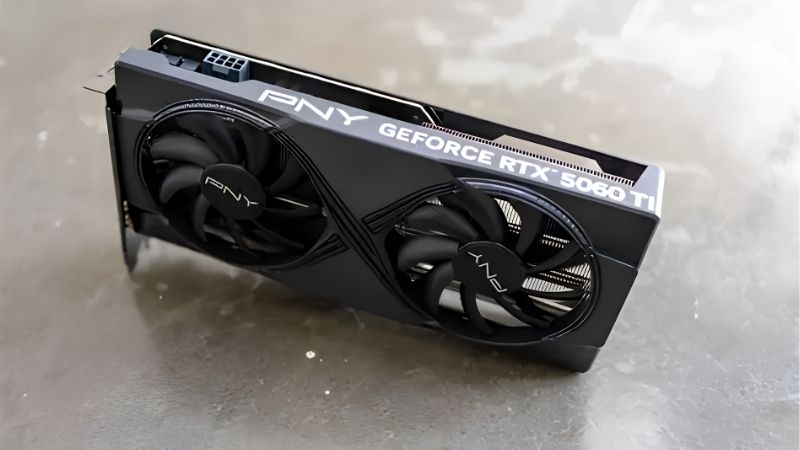
pny 5060 ti review is a search with a thirty-second answer, so here it is: yes, it is fine, buy it — but buy the 16 GB version, not the 8 GB one. PNY is a legitimate Nvidia partner rather than a knock-off, every RTX 5060 Ti performs within a few percent of every other regardless of badge, and the money you save is coming out of brand premium rather than out of your frame rate. The one thing that genuinely matters on this listing is the capacity, and PNY sells both under nearly the same name. Below is the reasoning if you want it, and the checks to run once it arrives.
The Short Answer: Yes, With One Condition
PNY’s RTX 5060 Ti is a competent, cheaply priced version of a card whose limits are set by Nvidia rather than by the board partner. The condition is the memory: 8 GB and 16 GB variants exist, they share a design and nearly a name, and roughly $50 separates them. That $50 is the best money in this entire tier and skipping it is the only real way to get this purchase wrong.
Why PNY Is Not a Risk
The concern driving most of these searches is that a cheaper badge means cheaper hardware. It does not. PNY is a decades-long official Nvidia partner and the primary distributor of Nvidia’s professional workstation graphics across North America and Europe — when an engineering firm buys a multi-thousand-dollar professional GPU through a reseller, PNY is frequently the company supplying it.
Nvidia does not hand its enterprise channel to an operation with quality control problems, and board partners that cut corners do not survive decades in a relationship Nvidia can end at will. The low price is a positioning decision, not a warning.
Why Every 5060 Ti Performs the Same
Every RTX 5060 Ti runs the same GB206 die, the same 4,608 CUDA cores, the same 128-bit bus, and roughly 448 GB/s of GDDR7 bandwidth. Nvidia sets the specification and the boost algorithm behaves the same way on every board.
Partners differentiate on cooler, lighting, warranty, and badge. Across a broad review sample, partner cards at the same tier land within roughly 1% to 3% of each other — inside run-to-run variance, and undetectable in normal use.
At 180W the cooling requirement is modest enough that almost any competent dual-fan design handles it comfortably. This is a tier where paying extra for a premium cooler buys you very little.
The 8GB vs 16GB Trap
This is the only paragraph in this review that can cost you money. The two variants are identical silicon — same shaders, same clocks, same bus. The difference is memory capacity, and roughly $50.
When a game exceeds available VRAM, the card does not slow down gracefully — it stutters. Frame times spike from 12 ms to 60 ms as textures swap over PCIe, and the average frame rate figure barely moves while the experience falls apart. Several modern titles already exceed 8 GB at 1440p with high textures, and some do at 1080p with ray tracing on.
Benchmark charts reporting average fps will show the 8 GB card looking nearly identical to its 16 GB sibling. It is not. Read the capacity on the listing twice — the ambiguity between these SKUs is not accidental.
Thermals, Noise and What Owners Report
Aggregating four and five star feedback against the two and three star complaints gives a clearer read on a specific board than any synthetic test.
Cooling at 180W
The recurring positive theme is that the dual-fan design is comfortably adequate for 180W. Owners report load temperatures in the 60s to low 70s Celsius in cases with reasonable airflow, with fans well short of maximum. That is an unremarkable result, which is exactly what you want at this tier.
The zero-RPM fan behaviour at idle draws consistent praise — the card is silent at desktop and during video playback. For a machine in a bedroom or shared space, that is a genuine quality-of-life feature.
Complaints about heat almost always trace to the case rather than the card. A sealed tempered-glass front panel with one exhaust fan will make any card run hot. If that describes your build, that is the variable to fix.
Coil Whine and Software
Coil whine reports exist against PNY cards. They exist against every brand, and leaving that out of a review you are reading for reassurance would be dishonest. A minority of owners report audible whine under load, particularly at very high frame rates in menus or lightly loaded scenes.
It is a physical property of inductors rather than a fault, manufacturers generally will not accept a return for it alone, and it is largely fixable at your end — capping frame rate in the driver or enabling V-Sync removes the extreme frame rates that provoke it. Most reports resolve once a cap is applied.
On software: PNY’s VelocityX utility is dated and most owners ignore it in favour of MSI Afterburner, which is free and works on any brand. That is not a mark against the card — nearly every partner’s first-party tool draws the same complaint.
Power, Connector and PSU
The 5060 Ti draws roughly 180W and PNY’s designs use a single standard 8-pin PCIe connector rather than the 16-pin 12V-2×6. That is a real advantage — no adapter, no seating ritual, no melting-connector discourse.
Nvidia recommends 600W for the 16 GB model with a mid-range CPU. Most existing builds already clear that, which makes this a genuine single-component upgrade.
The exception is prebuilt machines. A Dell or HP tower with a 300W to 400W proprietary supply and no spare PCIe cable will not run this card regardless of the wattage arithmetic. If that is your machine, a quality 600W or 650W 80+ Bronze unit is your first purchase and it is worth pricing into the same order rather than discovering the problem on installation day.
Pros, Cons and the Warranty Detail
Here is the plain ledger, plus the part that only matters once.
PNY RTX 5060 Ti: Pros
Pros: Frequently the cheapest route to a 5060 Ti, with performance within 1% to 3% of premium-badged cards. PNY is a decades-long official Nvidia partner and Nvidia’s primary professional workstation distributor across North America and Europe — the brand concern does not survive that fact. Single standard 8-pin, no 12V-2×6 adapter. Dual-fan cooler is over-specified for 180W and runs in the 60s to low 70s. Silent at idle. 16 GB variant available, unlike the plain RTX 5060 which is 8 GB only. Full DLSS 4 with Multi Frame Generation. Ninth-generation NVENC with dual AV1.
The most common unprompted praise is exactly what you would hope: buyers describe it as indistinguishable in use from cards costing more, with the only identifiable difference being the logo.
PNY RTX 5060 Ti: Cons
Cons: The 8 GB variant shares its name and design with the 16 GB — genuine buying confusion, and the single biggest risk on this listing. Coil whine reports exist, as with every brand. VelocityX software is dated; use Afterburner. Plastic backplate on lower-tier models. RMA turnaround reports are mixed. Plainer aesthetics than premium badges, if that matters to you. And the 128-bit bus is a real constraint at 1440p — that is Nvidia’s decision rather than PNY’s, but you inherit it.
Warranty and Your Hedge
PNY’s XLR8 Gaming cards commonly carry a three-year limited warranty in the United States, with terms varying by region — verify what applies where you are buying rather than assuming the figure travels. Keep the invoice and register the product if registration is offered in your region.
RMA feedback is mixed, which is unremarkable across the industry but worth weighing if downtime matters. The practical hedge costs nothing: buy from a retailer with its own returns process, which gives you a route independent of the manufacturer.
Use your first fortnight. Check hotspot temperature under sustained load — a core in the 60s with a hotspot above 95°C is a warranty case rather than something to accept — and listen for coil whine at uncapped frame rates. Both are easy inside a return window and painful outside one.
Why the 8GB Version Exists
Two capacities of the same card at a $50 gap is not an accident. Three market forces explain it, and they tell you which way to buy.
Memory Cost Is the Whole Story
The broad direction for laptops and PC components remains upward, and memory is the driver. AI infrastructure is consuming DRAM and GDDR at a scale consumer graphics cannot outbid, and that cost lands directly in every board partner’s bill of materials — PNY’s included.
Mainstream cards absorb it worst. On a $999 card a memory cost increase disappears into margin. On a $379 card it is a large share of the price, so rather than raise the price and lose the shelf position, partners ship an 8 GB variant at the attractive number. The 8 GB model is a price-tag decision, not a product decision.
Read that in reverse and it becomes advice. The 16 GB version is the one that would cost most to build today — and that kind of value leaves the market rather than improving.
The Good News Is Real, But Weak and Distant
Prices have at least stopped climbing at the pace they set through late 2025. Framework, which publishes unusually candid supply commentary, has reported a stretch of relative stability while still warning that volatility has not ended. The steep climb flattened. Nothing reversed.
For someone with the tab already open, that is useful: you are not being penalised for buying today. It also means waiting a quarter buys you nothing except thinner stock of the 16 GB variant people are already prioritising.
New Memory Supply Arrives in 2027 at the Earliest
Fresh capacity is genuinely opening up. OEMs can increasingly source DDR5 from Chinese suppliers such as CXMT, and Micron is building two fabs in Idaho. Both are real and both are large. Neither runs before 2027 or 2028.
So relief exists, but it is weak and years away. Waiting for 16 GB to become standard at this price means waiting through two more product generations.
Which settles it. Buy the memory while it is attached to a card you can afford, because the trend at this tier is toward less of it.
See More:
Conclusion: Should You Buy It?
The verdict from this pny 5060 ti review is the one you were hoping for: yes, PNY is fine, and the low price is not hiding anything. PNY is a decades-long official Nvidia partner and Nvidia’s primary distributor of professional workstation cards across North America and Europe — not a relationship Nvidia extends to companies with quality problems. Every RTX 5060 Ti runs the same GB206 silicon within 1% to 3%, and at 180W the cooling requirement is modest enough that PNY’s dual-fan design handles it with room to spare, running in the 60s to low 70s and staying silent at idle.
The one thing that can go wrong is the capacity. Buy the 16 GB version. The 8 GB variant is identical silicon with half the memory for roughly $50 less, and when a game exceeds 8 GB the card stutters rather than slowing down — a failure the average fps charts will not show you. Read the listing twice, because the two SKUs share a name and a cooler and that ambiguity is doing real work. Once it arrives, check the hotspot temperature under load and listen for coil whine at uncapped frame rates while your return window is open; a frame cap fixes the whine, and a hotspot above 95°C is a warranty case. With prices flat but high and no memory relief before 2027, the 16 GB card at today’s price is the one to take. Confirm the capacity on the listing, check your PSU has a spare 8-pin, and buy it.
Frequently Asked Questions
Is the cheapest 5060 Ti a compromise?
Mostly on cooler quality and acoustics rather than performance. All 5060 Ti cards share identical silicon and near-identical power limits, so frame rates land within a couple of percent. Budget models typically run a few degrees warmer with louder fans and use plainer plastic shrouds, which is a fair trade for the saving.
Which memory configuration should I buy?
Take the 16GB version if you can. The 8GB card has the same cores but runs short at 1440p with high textures, ray tracing or frame generation, causing frame time spikes rather than a smooth decline. Sixteen gigabytes also enables local AI work and comfortable video editing.
How much power does it need?
Around 180W board power with a 550W supply recommendation, and most PNY models use a single 8-pin PCIe connector. A good 600W unit gives comfortable margin. If your existing supply is an unbranded OEM unit over five years old, replace it before adding any modern graphics card.
How is PNY warranty and support?
PNY offers a standard multi-year warranty in most regions, though service turnaround and regional coverage varies more than with the largest board partners. Register the card at purchase and keep the invoice, since warranty terms are calculated from the purchase date and proof is required for a claim.
Does it fit compact cases?
PNY dual-fan 5060 Ti models are usually around 250mm long and two slots thick, which suits most mid-towers and many compact builds but not the smallest mini ITX chassis. Check your case GPU clearance, and remember to allow extra room for the power connector cable bend at the top of the card.
As an Amazon Associate we earn from qualifying purchases at no extra cost to you.













Write Your Review
No reviews yet. Be the first to share your experience!