
Nvidia Tensor Core GPU list is what you need when the sheer number of Nvidia accelerators has become impossible to keep straight and you want one clear reference to compare them. Tensor Cores are the specialized hardware that powers modern AI, and they now appear across data-center, professional, and consumer cards alike. This guide gives you an organized, up-to-date list of Nvidia’s Tensor Core GPUs by category, explains how the generations differ, and helps you pick the right one for your workload in 2026.
As an Amazon Associate we earn from qualifying purchases at no extra cost to you.


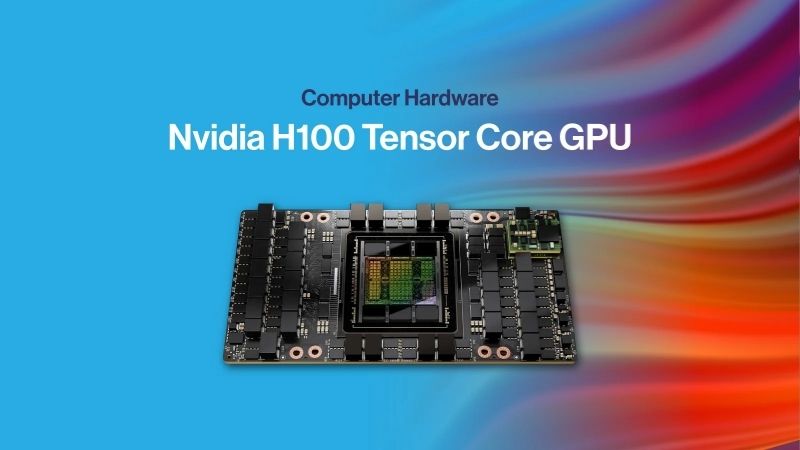
Understanding Nvidia Tensor Core GPUs
Before scanning the list, it helps to understand what Tensor Cores actually are and why their generation matters as much as the card they sit in. That context turns a raw list of names into a tool you can use to make a real decision rather than just a catalog to skim.
What Tensor Cores Do
Tensor Cores are specialized units that accelerate the matrix math at the heart of deep learning, performing the multiply-accumulate operations that dominate AI far faster than general-purpose GPU cores. They are the reason modern Nvidia GPUs excel at AI.
Their key trick is mixed precision: by computing in formats like FP16, BF16, TF32, FP8, and now FP4, they trade unnecessary precision for enormous speed, without meaningfully hurting accuracy on most AI workloads. Each new format has widened that advantage.
For a buyer, the practical point is that Tensor Core capability, not just core count, largely determines a card’s AI performance. Two cards with similar general specs can differ dramatically in AI throughput based on their Tensor Core generation.
This is the single most common mistake buyers make when reading spec sheets. They compare core counts and clock speeds while overlooking the Tensor Core generation, which for AI work is frequently the number that matters most of all.
How Tensor Cores Evolved by Generation
Tensor Cores have advanced through several generations. Volta introduced them with FP16, Turing added INT8 efficiency, Ampere brought TF32 and structural sparsity, Hopper added the FP8 Transformer Engine, and Blackwell introduces FP4 for another large leap.
Each generation roughly multiplies AI throughput on supported workloads, which is why a newer card can vastly outperform an older one with more raw cores. Generation is often the single most important factor in AI performance per dollar.
The analytical takeaway is to weigh generation heavily when reading any GPU list. A current-generation card frequently delivers more usable AI performance and better efficiency than an older, nominally larger one, especially on modern model formats.
The practical implication for this list is that a card’s position in a generation matters as much as its tier. A mid-range current-generation card can outperform a former flagship on AI, which is why the generation column deserves as much attention as memory or price.
How to Read This List
The list below is organized by category, because a data-center accelerator and a consumer card serve completely different buyers even though both carry Tensor Cores. Matching the category to your use case is the first filter before comparing individual cards.
Within each category, focus on memory capacity, Tensor Core generation, and power, since those three together predict how a card will perform on your workload and whether it fits your system. Raw core counts matter less than this combination.
Use the list as a shortlist tool: identify your category, note the cards whose memory and generation fit your needs, then dig deeper into the two or three that match rather than trying to evaluate every option at once.
The Nvidia Tensor Core GPU List by Category
Here is the organized list of major Nvidia Tensor Core GPUs, grouped by the buyers they serve. The table summarizes the headline specifications, and the sections that follow explain what distinguishes each category so you can navigate straight to the right group.
| GPU | Category | Memory | Tensor Core Gen |
|---|---|---|---|
| GH200 Grace Hopper | Data center | Up to 144 GB HBM3e | 4th (Hopper) |
| H200 | Data center | 141 GB HBM3e | 4th (Hopper) |
| H100 | Data center | 80 GB HBM3 | 4th (Hopper) |
| A100 | Data center | 40 / 80 GB HBM2e | 3rd (Ampere) |
| L40S | Data center / pro | 48 GB GDDR6 | 4th (Ada) |
| L4 | Data center | 24 GB GDDR6 | 4th (Ada) |
| Tesla T4 | Data center | 16 GB GDDR6 | 2nd (Turing) |
| RTX PRO 6000 Blackwell | Workstation | 96 GB GDDR7 | 5th (Blackwell) |
| RTX 6000 Ada | Workstation | 48 GB GDDR6 | 4th (Ada) |
| RTX 5000 / 4500 / 4000 Ada | Workstation | 32 / 24 / 20 GB | 4th (Ada) |
| A40 / A-series | Workstation | Up to 48 GB | 3rd (Ampere) |
| Jetson Orin | Edge | Up to 64 GB shared | 3rd (Ampere) |
Data-Center GPUs
The data-center category contains the most powerful Tensor Core GPUs, built for training and large-scale inference. The GH200, H200, and H100 lead on Hopper Tensor Cores with FP8, while the A100 remains a widely used Ampere option and the L40S and L4 serve efficient inference.
These cards use high-bandwidth HBM memory (except the Ada-based L40S and L4) and connect via NVLink and NVSwitch for scaling. They target organizations building AI infrastructure rather than individual users.
Within this group, choose by memory and scale: the H200 and GH200 for the largest models, the H100 for top training performance, the A100 for value, and the L40S or L4 for cost-efficient inference.
Availability and price also cluster in this category, since these are the cards a global market competes for most fiercely. That demand is worth factoring into any data-center choice from the list, not just raw specifications.
Professional and Workstation GPUs
The workstation category carries Tensor Cores into professional cards for CAD, rendering, and local AI. The new RTX PRO 6000 Blackwell leads with 96 GB and fifth-generation cores, while the RTX 6000, 5000, 4500, and 4000 Ada cover the range beneath it.
These cards add certified drivers and ECC memory that professional software expects, distinguishing them from consumer parts. They suit individual professionals and workstations rather than data-center clusters.
Choose within this group by memory and performance tier, from the compact, efficient RTX 2000 and 4000 SFF Ada up to the flagship, matching the card to your project size and your workstation’s power and space.
Consumer and Edge GPUs
Tensor Cores also appear in consumer GeForce RTX cards and in edge modules like Jetson Orin. Consumer RTX cards offer strong AI performance for enthusiasts and developers on a budget, while Jetson brings Tensor Cores to robotics and embedded devices.
These options lack the ECC and certification of professional cards but deliver excellent value for their intended uses, from local AI experimentation to deployed edge inference at a few watts.
Choose here when your work is personal, experimental, or embedded rather than enterprise, and when value or power efficiency matters more than certified reliability and maximum memory capacity.
Choosing From the List in 2026: Guidance, Market, and Pros and Cons
A list is only useful if it helps you decide, so this section turns the catalog into guidance and adds the market context that should influence your timing. Together they help you pick not just the right card but the right moment to buy it.
How to Pick the Right Tensor Core GPU
Start with category, then memory, then generation. Decide whether you need a data-center, workstation, or consumer or edge card, ensure the memory fits your models or scenes, and favor a newer Tensor Core generation for better AI efficiency.
Then weigh power and cost against your real constraints. The most capable card on the list is rarely the right one; the right one is the smallest, most efficient card that comfortably meets your workload, which keeps both budget and power in check.
For most buyers, this narrows the list to two or three genuine candidates quickly. Comparing those closely, rather than agonizing over the whole catalog, is the fastest path to a confident, well-matched decision.
If two candidates remain close, let your dominant constraint break the tie. Memory-bound work favors the larger buffer, power-constrained deployments favor efficiency, and AI-heavy workloads favor the newer Tensor Core generation almost every time.
Keep the list handy as a living reference rather than a one-time read. Nvidia’s lineup evolves quickly, so revisiting your category and the newest generation before each purchase ensures you are comparing against what is actually current.
Market Forces and Prices
Two developments shape pricing across the whole list in 2026. The United States has moved to permit Nvidia to sell the H200 into China, adding a large new source of demand for Hopper-class cards, and broad component prices climbed steeply through late 2025 before merely leveling off.
New memory supply is coming, with OEMs able to source DDR5 from vendors such as CXMT and Micron building two Idaho plants, but those fabs will not reach volume until 2027 to 2028. The result is that few cards on this list are likely to get dramatically cheaper soon.
For a buyer, the practical read is that waiting for a broad price drop is optimistic. Once you have used the list to identify the right card, acting on a real need generally beats holding out for relief the supply timeline does not promise.
In practical terms, that means the list is a buying tool for now, not a wishlist for later. The card that fits your workload today is very likely the card to buy, because the market is not offering a meaningfully cheaper version of it any time soon.
Pros and Cons of Tensor Core GPUs
The picture distilled for a fast decision.
Pros: dramatically accelerate AI across every category; mixed-precision formats keep widening the advantage each generation; options exist for every budget and use case from edge to data center; a mature software ecosystem behind them all.
Cons: generation matters as much as specs, so older cards can disappoint on modern AI; the most capable cards are expensive and power-hungry; choosing well requires understanding categories and formats; prices held up by strong demand and a firm memory market.
See More:
Final Verdict: Using the Nvidia Tensor Core GPU List
This Nvidia Tensor Core GPU list is meant to turn a confusing catalog into a clear decision: identify your category, match the memory and Tensor Core generation to your workload, and weigh power and cost against your real constraints. Do that, and the right card usually stands out quickly, whether you need a data-center accelerator, a professional workstation card, or an efficient edge module.
Once the list has pointed you to the right card, a firm memory market means waiting is unlikely to reward you. Check the latest pricing, specifications, and availability for your chosen Nvidia Tensor Core GPU through the link below and buy the one that matches your workload before demand tightens further.
Top-Rated Picks



| Product | Brand | Rating | Reviews | Price |
|---|---|---|---|---|
| ARCTIC MX-4 (4 g) – Premium Performance Thermal Paste… | ARCTIC | ★ 4.8 | 104k | $4.99 |
| ARCTIC MX-4 (incl. Spatula, 4 g) – Premium Performanc… | ARCTIC | ★ 4.8 | 71.9k | $5.49 |
| Crucial 8GB DDR4 RAM 3200MHz (PC4-25600), Downclockab… | Crucial | ★ 4.8 | 62.8k | $74.99 |
| AMD Ryzen 5 5600X 6-core, 12-thread unlocked desktop … | — | ★ 4.8 | 30.2k | $177.60 |
| NVIDIA Shield Remote; Voice Search, Motion-Activated,… | — | ★ 4.7 | 10.6k | $25.99 |
Frequently Asked Questions
Which Nvidia GPUs actually have Tensor Cores?
Every GeForce card from the RTX 20 series onward includes Tensor Cores, along with the Titan V, Quadro RTX, and all data-center parts from Volta forward including V100, A100, H100 and Blackwell. GTX 10 and 16 series cards have none, which is why they cannot run DLSS upscaling.
Do more Tensor Cores mean more gaming frames?
Not directly. Tensor Cores accelerate DLSS upscaling, frame generation and ray reconstruction, but those workloads use only a fraction of a gaming GPU’s tensor throughput. Raster performance, memory bandwidth and RT core count matter far more for frame rates, so do not pick a gaming card on tensor counts alone.
How much VRAM do I need for local AI work?
Capacity matters more than tensor generation for local models. Eight gigabytes handles small image models awkwardly, twelve to sixteen gigabytes covers Stable Diffusion and mid-size quantized language models comfortably, and twenty-four gigabytes or more is where larger models and long-context inference stop spilling into slow system memory.
What PSU headroom should I plan for high-tensor cards?
Sustained AI workloads hold cards near their full board power far longer than gaming does. An RTX 4090 or 5090 class card at 450 to 575W wants a 1000W or larger ATX 3.1 supply with a native 12V-2×6 cable, seated fully until the latch clicks to avoid connector heating.
Do older Tensor Core generations still get driver and feature support?
Turing and Ampere still receive current Game Ready drivers and support DLSS super resolution, including the newer transformer model, though frame generation requires Ada or later and multi-frame generation requires Blackwell. Nvidia typically supports an architecture for many years before moving it to legacy branch drivers.











Write Your Review
No reviews yet. Be the first to share your experience!