
rtx 5060 ti 16gb for 1440p gaming is the question sitting behind thousands of searches right now, and it deserves a straight answer instead of a hype reel. Buyers eyeing this card are not casual browsers; they want to know whether the 16GB of VRAM actually pays off at 2560×1440, whether the 128-bit memory bus holds it back, and whether the roughly 429 dollar price is money well spent in a rising-cost market. This review pulls together the measured strengths and the honest owner complaints so you can decide with data, not marketing, and walk away knowing exactly what to expect from your monitor.
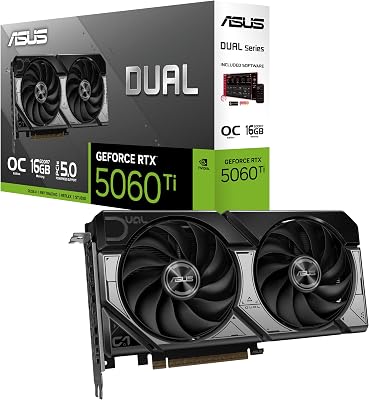


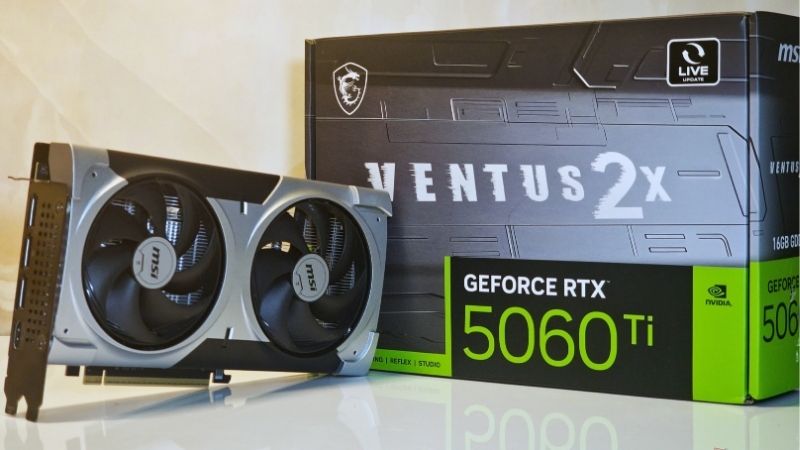
RTX 5060 Ti 16GB for 1440p Gaming: What You Actually Get
The RTX 5060 Ti 16GB is Nvidia’s Blackwell-generation mainstream card, and its headline feature for 1440p players is that generous frame buffer. Where the 8GB variant can choke in texture-heavy games, the 16GB model gives you room to run high textures without stutter. The trade-off is a narrow 128-bit bus, so the real story is more nuanced than more VRAM equals more speed, and this section unpacks it.
As an Amazon Associate we earn from qualifying purchases at no extra cost to you.


Core specifications and where the VRAM helps
The card ships with 16GB of GDDR7 on a 128-bit bus, a modest board power around 180W, and a single power connector depending on the model. That efficiency is a practical win, because it runs on a quality 550W to 600W PSU and drops into compact builds without drama.
At 1440p, the 16GB buffer matters most in modern titles that aggressively cache textures. Games that flirt with 10GB to 12GB of VRAM usage at high settings run cleanly here, avoiding the frame-time spikes that plague 8GB cards in the same scenes.
The catch is bandwidth. The 128-bit bus limits how fast the card feeds those textures, so in bandwidth-hungry moments the 5060 Ti leans on large cache and efficiency rather than brute force. For 1440p high settings that balance works; for maxed 1440p in the heaviest releases, you will rely on upscaling.
It helps to frame the 16GB buffer as insurance rather than raw speed. It will not make a game render faster on its own, but it prevents the ugly texture pop-in and sudden frame-time spikes that appear the instant a game exceeds available memory. That is a quality-of-experience win that flat FPS averages often hide, and it is a big reason the 16GB model ages more gracefully than 8GB rivals.
Real 1440p frame rates from owner reviews
Synthesizing four and five star owner reviews, the consistent picture is a card that delivers a smooth 1440p experience at high settings in most current games, frequently landing in a comfortable 60 to 90 FPS range natively, and higher in lighter or esports titles.
Owners repeatedly highlight that turning on DLSS Quality mode lifts frame rates into high-refresh territory while keeping the image sharp. That is the intended way to play demanding games on this tier, and reviewers confirm it works well in practice.
The two and three star reviews are just as useful. The recurring complaint is not the VRAM but the bus: a minority running the most demanding path-traced titles at native 1440p note frames dip lower than hoped, reinforcing that this is a high-settings-plus-upscaling card, not a native-max-everything machine.
DLSS 4 and the experimental edge for 1440p
The Blackwell platform unlocks DLSS 4, including Multi Frame Generation in supported titles. For 1440p gaming, this is the feature that stretches the card well past its raw horsepower, generating extra frames to fill a 144Hz or 165Hz panel.
Nvidia’s continued driver optimization and its broad DLSS game support are genuine long-term advantages. As more titles adopt the latest DLSS, this card’s effective ceiling rises over time rather than staying fixed at launch-day performance.
That forward-looking optimization is a real part of the value case: you are buying into a software stack that tends to make the same silicon faster months after purchase.
There is a practical angle too. Because DLSS 4 does so much of the heavy lifting at 1440p, the card can hold a high-refresh experience while drawing less power and generating less heat than a brute-force approach would, which loops back to why the 5060 Ti stays cool and quiet in real builds. For many owners, that combination of AI upscaling and efficiency is what makes the card feel a tier above its raw specification.
Strengths, Weaknesses, and Who It Is For
No card is perfect, and pretending otherwise wastes your time. Here is the balanced pros and cons breakdown for the RTX 5060 Ti 16GB as a 1440p gaming card, drawn from the pattern of owner feedback rather than a single review.
The pros of the 16GB model for 1440p
The standout strengths are the 16GB VRAM buffer, low power draw, quiet and cool operation on most partner coolers, and full access to DLSS 4. The frame buffer specifically future-proofs the card against the rising VRAM demands of new games far better than any 8GB option can.
Its efficiency is a practical bonus that benchmark clips ignore. Lower power and heat mean less strain on your PSU and case, and it makes the 5060 Ti 16GB one of the easiest modern GPUs to drop into an existing mid-range build without upgrading anything else.
For a 1440p player who values a clean install and years of headroom, those strengths line up almost perfectly with the use case.
The weaknesses to weigh honestly
The main limitation is the 128-bit memory bus, which caps bandwidth and shows up in the most demanding native-resolution scenarios. The second is value framing: the 16GB model costs meaningfully more than the 8GB version, so if you only game at 1080p you may be paying for VRAM you will not fully use.
A smaller recurring gripe in reviews is that expectations get set too high by generic benchmark numbers. Set your target as high settings, 1440p, DLSS on when needed, and the card satisfies; expect ultra everything, native, always, and you will feel let down.
None of these are dealbreakers for the target buyer, but they are the honest limits you should price into your decision before you buy.
Is it the right card for your setup
This card is ideal for the 1440p player on a 60Hz to 165Hz monitor who wants a clean high-settings experience and plans to keep the GPU for several years. The 16GB buffer is what makes that longevity realistic rather than optimistic.
If you game strictly at 1080p, the cheaper 8GB variant or a lower tier saves money. If you want native-max 4K, look higher up the stack toward a 5070 Ti or above.
Matching the card to your actual monitor is the single most important step, and for 1440p specifically, the 16GB 5060 Ti is a sensible, well-balanced landing spot.
It is also a smart pick for upgraders coming from an older 6GB or 8GB card who have felt the sting of running out of VRAM. Moving to 16GB removes that ceiling entirely, and pairing it with DLSS 4 often feels like a larger jump than the raw specs suggest, because you are fixing a memory bottleneck and adding modern upscaling at the same time.
Pricing, Market Timing, and Final Take
Deciding whether to buy now is as much about the market as the silicon. The value of the RTX 5060 Ti 16GB for 1440p gaming depends heavily on the price you can actually find it at, and that price is being shaped by broader component trends worth understanding before you check out.
What rising component prices mean for this purchase
Laptop and PC component prices have been trending upward, and memory costs are a major driver. Because this card carries a large 16GB buffer, VRAM pricing pressure is directly relevant to its street price, which frequently sits above the roughly 429 dollar launch figure.
The cautious good news is that prices have stopped climbing as steeply as they did in late 2025, and the market has shown a stretch of relative stability, though volatility warnings remain. New supply is coming, with Micron building two plants in Idaho, but those fabs will not run until 2027 to 2028. In plain terms, prices have plateaued rather than dropped, and waiting for a steep cut is likely to leave you empty-handed.
The practical move is to buy when you see this card at or near a fair price rather than holding out for relief that is still years away. For a 1440p buyer who wants a capable card now, that timing logic favors acting sooner rather than later.
How to lock in the best deal
Because street prices move, it pays to compare listings across sellers and to watch for partner models that bundle better cooling at the same price. A well-cooled 16GB card at MSRP is a stronger long-term buy than a bargain-bin model that throttles under sustained load.
If the current price feels fair for a card that will comfortably drive your 1440p monitor for years, that is your signal to act. Check today’s listings and stock through the link below before pricing shifts again.
Should you buy the 16GB now or wait
The instinct to wait for a better deal is reasonable, but the current market makes it a weak strategy. With memory-driven prices plateaued rather than falling and new fab capacity years out, there is no near-term catalyst pointing to a meaningful drop on this card.
The stronger play is to define your fair-price threshold up front and buy the moment a listing meets it. That removes emotion from the decision and protects you from watching prices drift the wrong way while you hesitate.
For a 1440p player who needs a capable card in the next few months, the data points toward buying at a fair price now rather than gambling on relief that the supply timeline says is still years away.
See More:
Final Verdict on the RTX 5060 Ti 16GB for 1440p Gaming
For the audience actually asking whether the RTX 5060 Ti 16GB for 1440p gaming is a smart buy, the answer is a qualified yes: it delivers smooth high-settings 1440p in most games, the 16GB buffer gives it real staying power, DLSS 4 stretches it further, and its efficiency makes it easy to fit into any build. The 128-bit bus is its honest ceiling, so treat it as a high-settings-plus-upscaling card rather than a native-max machine. With component prices flat-to-rising rather than falling, grabbing this card at a fair price now beats waiting, and if that matches your plan, the link below will show current availability.
Frequently Asked Questions
Can the RTX 5060 Ti 16GB hold 60fps at 1440p?
In most current games, yes, at high settings without ray tracing. Expect roughly 60 to 80fps in demanding AAA titles at 1440p high, and well over 100fps in esports games. In the heaviest releases with maximum settings you will want DLSS Quality upscaling to comfortably stay above the 60fps mark.
Is 16GB of VRAM overkill on a card this class?
No, it is the reason to buy this version. At 1440p with ultra textures, ray tracing overhead and frame generation buffers, 8GB genuinely runs out and causes stutter. The 16GB buffer removes that failure mode entirely, meaning your settings choices are limited by GPU speed rather than by an artificial memory wall.
What power supply does this card need?
Board power is around 180W and the card uses a single 8-pin PCIe connector on most partner models, with some using a 12V-2×6. Nvidia recommends 600W, though a quality 550W unit handles it fine in a mainstream build. It is compact and cool-running, so it suits small form factor cases well.
Does the PCIe x8 interface limit performance at 1440p?
On a PCIe 4.0 or 5.0 motherboard the eight-lane link is effectively a non-issue and costs you a percent or two at most. On older PCIe 3.0 systems the reduced bandwidth becomes measurable, particularly in games that stream assets heavily. The generous 16GB buffer helps considerably by reducing how often data crosses the bus.
How does it handle ray tracing at 1440p?
Ray tracing at 1440p is playable but demands upscaling. In moderate implementations you can hold 60fps with DLSS Quality, while full path traced titles require Performance mode plus frame generation to feel smooth. Blackwell’s RT cores and ray reconstruction help significantly, but this remains a mainstream card rather than a path tracing machine.











Write Your Review
No reviews yet. Be the first to share your experience!