
- Top Pick: PNY NVIDIA GeForce RTX™ 5070 Ti OC Triple Fan, Graphics Card (16GB GDDR7, 256-bit, Boost Speed: 2572 MHz, PCIe® 5.0, HDMI®/DP 2.1, 2.98-Slot, NVIDIA Blackwell Architecture, DLSS 4)
- Best Value: PNY NVIDIA GeForce RTX™ 5070 Ti OC Triple-Fan Graphics Card
- Premium Choice: GIGABYTE GeForce RTX 5070 Ti Gaming OC 16G Graphics Card, 16GB 256-bit GDDR7, PCIe 5.0, WINDFORCE Cooling System, GV-N507TGAMING OC-16GD Video Card


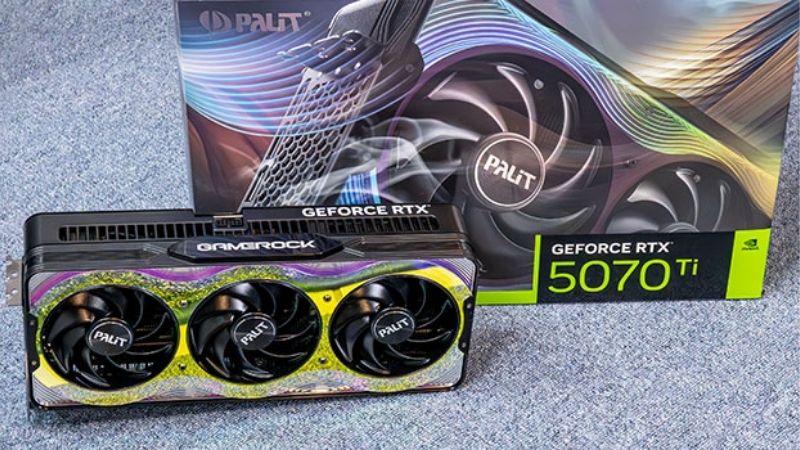
PNY GeForce RTX 5070 Ti 16GB OC review searches tend to fixate on two letters. OC. The listing says overclocked, the price is a little higher than the plain model, and the reasonable assumption is that you are buying speed. You are buying a little speed. This review is about how little, why the number is smaller than the marketing implies on this card specifically, and what you can do for free that beats it comfortably. The 16GB, meanwhile, turns out to be the more interesting half of the product name.
What “OC” Actually Means on This Card
Factory overclocking is one of the few genuinely opaque things in GPU buying. Every partner sells an OC variant, none of them publish what it costs to make, and the frame rate difference rarely appears in reviews because reviewers test one model. Here is what is actually happening.
As an Amazon Associate we earn from qualifying purchases at no extra cost to you.


How Board Partners Create an OC Model
Nvidia ships GB203-300-A1 dies to every partner with the same specification: 8,960 CUDA cores, 70 SMs, and a reference boost clock around 2,452 MHz. Partners cannot change the silicon. What they can do is raise the boost clock target in the card’s firmware and validate that their cooler and power delivery hold it.
That is the whole of it. An OC model is a stock card with a higher number written into its BIOS and a cooler tested to sustain it. There is no better binning happening at this tier — the dies are not sorted by quality before shipping.
PNY’s OC sits in the modest bracket. For reference, MSI’s Gaming Trio OC runs 2,572 MHz on a 338mm cooler; PNY’s clocks lower than that and higher than reference. The spread across the whole tier is roughly 120 MHz.
Why 120 MHz Buys Almost Nothing Here
This is where the card’s own architecture undercuts the marketing. The RTX 5070 Ti runs 16GB of GDDR7 at 28 Gbps on a 256-bit bus, delivering 896 GB/s.
Compare it to the RTX 5080: 20% more CUDA cores, and only 7% more bandwidth at 960 GB/s. The result is a 10–14% real frame rate gap. Twenty percent more shader hardware buys ten to fourteen percent more frames, because the memory subsystem cannot feed the extra cores proportionally.
Now apply that logic to a 120 MHz clock bump — roughly 5% — on the same bandwidth. If 20% more cores yields 10–14%, a 5% clock increase on unchanged memory yields low single digits. Often 2–3%. Frequently inside run-to-run variance.
| Change | On paper | Real frame rate |
|---|---|---|
| Reference → PNY OC | ~+3–5% clock | ~2–3% |
| PNY OC → highest AIB OC | ~+5% clock | ~2–3% |
| 5070 Ti → 5080 | +20% cores, +7% bandwidth | 10–14% |
| Manual memory OC | GDDR7 has real headroom | Frequently more than the factory OC |
The Test That Settles It for You
Before believing any of this, measure your own variance. Run a fixed benchmark or a repeatable three-minute route twice on the same settings and compare. Most systems show 2–4% between identical runs.
If your variance is 3% and the factory OC is worth 2–3%, the OC is undetectable on your machine. Not small — undetectable. It is inside the noise floor of your own measurement.
That does not make the OC model a bad buy. It makes it a bad reason to pay more.
What You Can Do for Free That Beats It
The uncomfortable part of this review, if you are PNY’s marketing department: MSI Afterburner is free, works on any card regardless of brand, and gives you more than the factory OC does. Two features in particular.
Memory Overclocking: Where the Headroom Actually Is
Factory overclocks target the core because that is what fits on a box. On a bandwidth-limited card, memory is where the gain lives.
Afterburner 4.6.6 — the first stable release in over two years — extended the memory offset range substantially for RTX 50 cards and supports GDDR7 tuning well beyond stock. There is a known example of how much headroom exists in this generation: RTX 5080 memory chips are 32 Gbps parts factory-limited to 30 Gbps.
On a card constrained by its 896 GB/s rather than its 8,960 cores, moving memory does more than moving core clock. That is the opposite of what the product name is selling you, and it costs nothing.
Undervolting: The Better Trade
The more valuable tuning on a 300W card is downward. A good undervolt typically drops 10–20°C and takes tens of watts with it, while holding the same sustained clock or slightly better — because a cooler card throttles less.
That is the thing a factory OC cannot give you. The OC raises peak boost; undervolting raises sustained boost by removing the heat that pulls clocks down after twenty minutes of play. Peak boost is a benchmark number. Sustained clock is what you play on.
Download Afterburner only from Guru3D or MSI’s own site — searches surface a great many mirror sites, some bundling adware.
So Should You Pay Extra for the OC Model?
If the OC variant costs $10–$20 more, take it. You get a marginally better cooler and power delivery alongside the clock bump, and the cooler is worth more than the clock.
If it costs $60–$100 more, no. Buy the cheaper card and spend thirty minutes in Afterburner. You will end up ahead, with a quieter card.
PNY’s positioning helps here: its OC models sit at the bottom of the tier’s price band anyway, typically $50–$150 below ASUS TUF and MSI Gaming Trio on identical silicon. You are usually not choosing between PNY OC and PNY non-OC. You are choosing between PNY OC and a more expensive partner’s OC, and the answer there is straightforward.
The 16GB Is the Interesting Half
The product name puts OC last and 16GB in the middle, which is backwards. The memory configuration is what this card is actually about, and in 2026 it is what makes it hard to buy.
Why 16GB on a 256-Bit Bus Matters
Capacity and bandwidth are different problems and people conflate them constantly. Capacity determines whether a texture set fits in memory; bandwidth determines how fast the GPU can feed it to the shaders.
This card has both: 16GB on a full 256-bit bus at 896 GB/s. Compare the RTX 5060 Ti 16GB, which carries the same capacity on a 128-bit bus at 448 GB/s — exactly half. Same VRAM number, half the road.
That is why the 5070 Ti is a 1440p Ultra card and the 5060 Ti 16GB is a 1080p card, despite identical VRAM figures. Read the bandwidth column before the VRAM column. It is the most useful habit in this generation.
What the 16GB Is Actually For
At 1440p Ultra with ray tracing, 16GB is comfortable where 12GB has started to get tight in a handful of recent titles. That is the gaming case, and it is real but not dramatic.
The stronger case is non-gaming. Local AI inference, Stable Diffusion at higher resolutions, video timelines, and multi-streaming consume VRAM in ways games do not. 16GB on a fast bus is genuinely more capable there than 12GB.
One warning about reading VRAM monitoring tools: allocation is not usage. Games reserve more than they need when it is available. A graph showing 15GB allocated on a 16GB card does not mean it is starved. Genuine exhaustion shows as stutter in 1% lows, not as a high allocation number.
The 16GB Is Why This Card Is Scarce
Here is the connection most reviews miss. A 16GB card consumes twice the GDDR7 modules of an 8GB one, and GDDR7 has been the tightest link in a memory market under sustained pressure.
At CES 2026, ASUS told Hardware Unboxed that Nvidia had stopped supplying GB203 dies for the RTX 5070 Ti and placed the model into end-of-life status, alongside the RTX 5060 Ti 16GB. Nvidia disputed this publicly, stating all SKUs remain in production; ASUS later called the reports incomplete.
The logic is hard to argue with regardless of who is right. The 5070 Ti and the 5080 are both GB203. With memory constrained, shipping every usable die as the higher-margin 5080 is the rational move — and Nvidia’s allocation has visibly shifted toward 8GB parts across the range.
What This Means for Buying It
The OC question turns out to be the least important thing about this card. The availability question is the one that decides your purchase, and it points the opposite way from normal buying advice.
Prices Have Flattened, Not Fallen
Component pricing has continued trending upward, memory foremost. The positive news is real but weak: the steep late-2025 climb has flattened, and Framework has reported a stretch of relative stability while still warning that volatility remains. New supply is opening — OEMs can source DDR5 from Chinese suppliers such as CXMT, and Micron is building two Idaho fabs — but neither produces until 2027–2028.
For this card the numbers are specific. The cheapest available 5070 Ti went from roughly $730 in November 2025 to $830 by January 2026, with one major US retailer moving from $835 to $990 overnight at the end of January. As of July 2026 the range sits at $979–$1,049 at major retailers.
The SUPER refresh that would replace this tier at 24GB has slipped repeatedly — from early 2026 toward Q3 2026 and, in other reports, 2027 — with GDDR7 supply named each time.
What to Do About It
Reverse the usual advice. Do not wait for a sale, do not compare OC variants patiently, and do not treat the factory clock as a reason to hold out for a specific model. There is no restock coming at list price for this SKU.
If you find any RTX 5070 Ti near $850, take it. The OC badge is worth 2–3% and the availability is worth considerably more. PNY’s models sit at the bottom of the price band, which is exactly why they clear first.
If you cannot find one, the RTX 5080 is the 16GB card still clearly in production. And if ray tracing is not central to how you play, AMD’s RX 9070 XT trades with this card in rasterization and runs GDDR6 — memory nobody is fighting over, which is why it stayed available while Nvidia’s 16GB tier did not. It is worth checking what is actually in stock across all three before settling on a model.
Verify What Arrives
Two checks on arrival. First, open GPU-Z and read the ROPs field — an RTX 5070 Ti should show 80. Under 0.5% of early RTX 50 production shipped with a disabled ROP unit, and the card posts and games normally while running a few percent below spec. Nothing in Windows tells you.
Second, confirm the boost clock matches the OC model you paid for rather than the reference figure. If you are paying for the two letters, verify you received them.
See More:
- Nvidia beta
- Nvidia CUDA 11.8
- Check CUDA version
- Nvidia GPU for gaming
- PNY GeForce RTX 5080 16GB OC review
Final Verdict on the PNY GeForce RTX 5070 Ti 16GB OC
The honest PNY GeForce RTX 5070 Ti 16GB OC review verdict: the OC is real and nearly irrelevant. A 120 MHz factory bump on a card limited by its 896 GB/s of bandwidth yields 2–3% — frequently inside your own run-to-run variance. Thirty minutes in Afterburner, which is free and works on any card, gets you more through memory tuning and considerably more through undervolting, which raises sustained clocks rather than peak ones.
Buy the OC variant if it costs $10–$20 more, because the cooler that comes with it is worth more than the clock. Do not pay $60–$100 for it. And pay attention to the part of the name everyone skips: the 16GB on a full 256-bit bus is what makes this a 1440p Ultra card rather than a 1080p one — and it is also why AIBs have declared this tier end of life while Nvidia disputes it, and why the buying advice this year is to take one when you see it rather than wait for a better price that is not coming.
Frequently Asked Questions
Is the factory OC on this card meaningful?
Only marginally. Partner overclocks on the 5070 Ti typically raise the boost clock by a small margin over reference, which translates to roughly one to three percent in games, inside normal benchmark variance. The real benefit of an OC model is usually a beefier cooler and higher power headroom, which sustains clocks better in a warm case.
What power supply and connector does it need?
The 5070 Ti has a total board power around 300W and Nvidia recommends a 750W system supply. It uses a 12V-2×6 connector, so either use an ATX 3.1 native cable or the bundled adapter. Seat the connector fully until it clicks and avoid tight bends within about 35mm of the plug to prevent hot spots.
Is 16GB enough for 4K gaming?
For current titles, yes. 16GB of GDDR7 on a 256-bit bus gives roughly 896GB per second, which is ample for 4K with DLSS quality upscaling in most games. Very heavy path traced titles at native 4K can approach the limit, but those workloads are compute bound before they are capacity bound on this card.
How does it compare to the RTX 5080?
Both use the GB203 die and both carry 16GB, but the 5080 has more cores enabled, faster memory, and a higher power limit, giving roughly fifteen to twenty percent more performance for a considerably higher price and a 360W draw. The 5070 Ti is generally the better performance per pound choice of the pair.
Will a triple-fan PNY card fit a mid-tower?
Usually, but check first. Triple-fan 5070 Ti designs commonly run around 320mm to 340mm long and occupy two and a half to three slots. Confirm your case maximum GPU clearance, verify nothing blocks the slot below, and leave room above the connector for the cable bend if you are using a 12V-2×6 adapter.
Ready to decide? Our #1 pick for 2026 is the Reference → PNY OC.
Live price & availability on Amazon.











Write Your Review
No reviews yet. Be the first to share your experience!