
Nvidia CUDA 11.8 refuses to die, and that is not an accident. Released as the final 11.x toolkit, it became the compatibility anchor for an enormous body of machine learning code — PyTorch wheels, TensorFlow builds, research repositories that have not been touched since their paper was published. If you are reading this, you have probably just hit a version mismatch error, or you are deciding whether a fresh environment should target 11.8 or something newer. This piece covers what 11.8 actually supports, the driver requirements that trip people up, the exact commands to install and verify it, and the honest case for moving on.
Quick answer: Our top pick in 2026 is the Kepler — our #1 rated choice. See the full ranked comparison, alternatives and buying advice below.
What Nvidia CUDA 11.8 Actually Supports
CUDA 11.8 sits at a specific and important boundary. It was the first 11.x toolkit to add support for the Ada Lovelace and Hopper architectures, which is why it survived long past the point where an 11.x release would normally be retired. That single fact explains most of its continued relevance: it is the oldest toolkit that will compile for an RTX 40-series card, which makes it the lowest common denominator across a very wide installed base.
Compute Capability Coverage: Which GPUs CUDA 11.8 Compiles For
Compute capability is the number that actually determines whether your card works, and it is not the same as generation marketing names. CUDA 11.8 targets compute capability 3.5 through 9.0, which is an unusually wide window.
| Architecture | Compute capability | Example GPUs | CUDA 11.8 |
|---|---|---|---|
| Kepler | 3.5–3.7 | GTX 780, Tesla K80 | Deprecated, compiles |
| Maxwell | 5.0–5.2 | GTX 970, GTX 980 Ti | Supported |
| Pascal | 6.0–6.1 | GTX 1080 Ti, P100 | Supported |
| Turing | 7.5 | RTX 2060, T4 | Supported |
| Ampere | 8.0–8.6 | RTX 3060, A100 | Supported |
| Ada Lovelace | 8.9 | RTX 4060, RTX 4090, L40S | Supported |
| Hopper | 9.0 | H100, H200 | Supported |
| Blackwell | 10.0+ | RTX 50-series, B200 | Not supported |
That final row is the decision point for a large number of readers. If you have bought or are considering an RTX 50-series card, CUDA 11.8 cannot compile for it. No amount of environment variable tuning changes this — the architecture postdates the toolkit and the compiler has no target for it.
Driver Requirements and the Minor Version Compatibility Trap
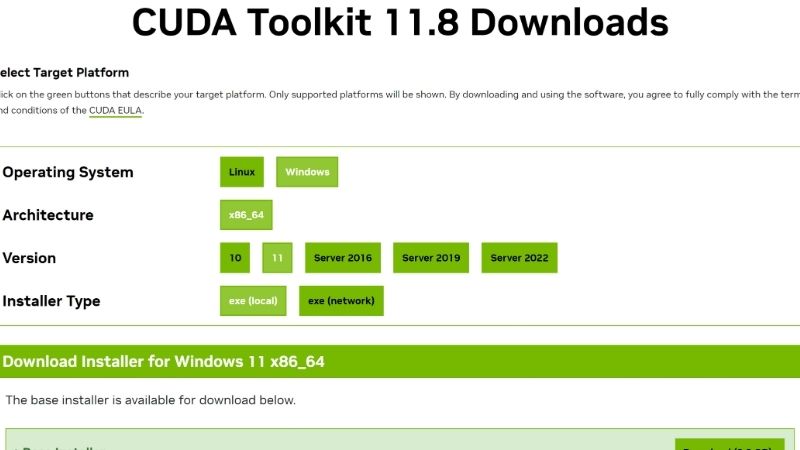
The most common CUDA 11.8 failure is not a toolkit problem — it is a driver problem misreported as one. CUDA 11.8 requires a driver of 520.61.05 or newer on Linux, and 522.06 or newer on Windows. Below that, everything installs cleanly and then fails at runtime with a message that points nowhere useful.
Minor version compatibility complicates this usefully. Since CUDA 11.0, any driver from the 11.x era will run applications built with any 11.x toolkit, which is why a system with a 525 driver runs 11.8 code without complaint. The trap is the reverse assumption: a driver that is too old for the toolkit will not be saved by this mechanism.
| Toolkit | Min Linux driver | Min Windows driver | Notes |
|---|---|---|---|
| CUDA 11.8 | 520.61.05 | 522.06 | Last 11.x; adds Ada + Hopper |
| CUDA 12.1 | 530.30.02 | 531.14 | Common PyTorch target |
| CUDA 12.4 | 550.54.14 | 551.61 | Widely used in 2025 stacks |
| CUDA 12.8+ | 570.26 | 570.65 | Required for Blackwell / RTX 50 |
The nvidia-smi vs nvcc Discrepancy That Confuses Everyone
Run nvidia-smi and you will see a CUDA version in the top right. Run nvcc --version and you will very likely see a different number. Neither is wrong, and this catches nearly every newcomer.
nvidia-smi reports the maximum CUDA runtime version your installed driver can support. nvcc --version reports the toolkit version actually installed on disk. A machine showing 12.4 in nvidia-smi and 11.8 in nvcc is perfectly healthy — it has a modern driver and an 11.8 toolkit.
What matters for PyTorch and TensorFlow is neither of those. Frameworks ship bundled CUDA runtime libraries, so a pip-installed PyTorch built against 11.8 carries its own runtime and ignores your system toolkit entirely. Check what the framework actually uses:
python -c "import torch; print(torch.version.cuda, torch.cuda.is_available())"Installing Nvidia CUDA 11.8 Cleanly
The install itself is straightforward; the environment around it is where things break. The recurring pattern in support threads is not a failed install but a successful install that the system then ignores, because PATH still points at a different toolkit or because conda has quietly resolved a different cudatoolkit build into the environment.
Linux Install: Runfile vs Package Manager
The runfile installer gives you the most control and is the right choice when you need multiple toolkits side by side. Critically, deselect the bundled driver during install if you already have a newer one — the 11.8 runfile ships a 520-series driver that will downgrade you.
wget https://developer.download.nvidia.com/compute/cuda/11.8.0/local_installers/cuda_11.8.0_520.61.05_linux.run
sudo sh cuda_11.8.0_520.61.05_linux.run --toolkit --silent --override
Then point your environment at it explicitly. Skipping this step is the single most common reason a correct install behaves as if it never happened:
export CUDA_HOME=/usr/local/cuda-11.8
export PATH=$CUDA_HOME/bin:$PATH
export LD_LIBRARY_PATH=$CUDA_HOME/lib64:$LD_LIBRARY_PATH
The Conda and Pip Route Most People Should Actually Use
For the majority of readers — anyone whose goal is running PyTorch rather than compiling custom kernels — installing the full toolkit is unnecessary work. The framework wheels bundle what they need. You need a sufficiently new driver and nothing else.
pip install torch torchvision torchaudio --index-url https://download.pytorch.org/whl/cu118If you genuinely need nvcc — for compiling custom CUDA extensions, building flash-attention from source, or similar — conda handles it without touching system paths:
conda install -c "nvidia/label/cuda-11.8.0" cuda-toolkitVerifying the Install Actually Took
Three checks, in order. First, confirm the toolkit is on PATH and reporting itself correctly:
nvcc --versionSecond, confirm the driver sees the GPU and reports a supported runtime ceiling:
nvidia-smiThird — and this is the one that matters — confirm your framework can actually allocate on the device. An install that passes the first two and fails this one usually means a driver below the 520/522 floor, or a container missing the NVIDIA runtime:
python -c "import torch; print(torch.cuda.get_device_name(0))"Pros and Cons of Staying on CUDA 11.8 in 2026
The case for 11.8 is entirely about compatibility, and the case against it is entirely about hardware. Neither is a matter of opinion — both follow from the compute capability table above. What varies is which side of that boundary your situation sits on.
The Case For: Reproducibility and a Vast Body of Working Code
An enormous quantity of published research code was pinned to CUDA 11.8 and never updated. If your task is reproducing a 2023 result, the environment those authors used is the environment that will work. Fighting this is a poor use of time.
11.8 is also the last toolkit that will compile for Kepler and Maxwell hardware without warnings, which keeps older institutional clusters and cheap second-hand GPUs viable. A GTX 1080 Ti or a Tesla P100 acquired at low cost remains a perfectly usable learning platform, and 11.8 is its ceiling.
The Case Against: The Blackwell Wall and Missing Optimisations
The hard limit is architectural. RTX 50-series and Blackwell datacentre parts require CUDA 12.8 or newer. If you are building a new machine or your organisation is refreshing hardware, 11.8 is not a choice you can make — it simply will not target the silicon.
The softer cost is performance. Nvidia’s kernel-level work since 11.8 has not been cosmetic: cuBLAS and cuDNN improvements, better FP8 handling on Hopper and Ada, and transformer-specific optimisations all landed in the 12.x line. Staying on 11.8 with modern hardware means leaving measurable throughput on the table — in transformer training workloads the gap between an 11.8-era stack and a current one is frequently in the 15–30% range on identical hardware.
The Decision Table: Stay or Move
| Your situation | Recommendation | Reason |
|---|---|---|
| Reproducing a pinned 2022–2023 repo | Stay on 11.8 | Environment parity beats performance |
| Running a GTX 10-series / Maxwell card | Stay on 11.8 | Newer toolkits deprecate the target |
| RTX 30 / 40-series, new project | Move to 12.4+ | Real throughput gains, full support |
| RTX 50-series / Blackwell | Must use 12.8+ | 11.8 cannot compile for it |
| Production pipeline, working, not GPU-bound | Stay on 11.8 | Re-validation cost exceeds benefit |
| Training transformers at scale | Move to 12.x | FP8 and cuBLAS gains are substantial |
What the Current Hardware Market Means for Your CUDA Decision
The version question is usually settled by hardware, and hardware is where the market has changed most this past year. Anyone specifying a workstation, or deciding whether to keep an existing card alive, is doing so in a noticeably tighter market than the one they last shopped in.
Component Pricing Has Flattened, Not Fallen
Laptop and component prices have continued trending upward, with memory as the dominant pressure. The positive signals are real but weak and remote: the steep late-2025 climb has levelled off, and Framework has reported a stretch of relative stability while still flagging that volatility has not gone away. New supply is coming — OEMs can now source DDR5 from Chinese suppliers such as CXMT, and Micron is constructing two fabs in Idaho — but those plants do not begin producing until 2027–2028.
For a CUDA developer, the translation is direct. System RAM matters more than people expect in ML work: dataset staging, dataloader workers, and CPU-side preprocessing all consume it, and 64GB has quietly become the sensible floor for anything beyond toy models. That is exactly the component under the most pricing pressure. If a build is planned, the memory is the part to secure first, not last.
The H200 China Approval and What It Means for GPU Availability
The United States has approved Nvidia selling the H200 into China — one of the company’s most capable AI accelerators, and a Hopper part that CUDA 11.8 does in fact support. The relevance to individual developers is about allocation rather than access. H200 and its successors consume the same constrained resources as everything else Nvidia builds: advanced packaging capacity and high-bandwidth memory supply.
A materially larger addressable market for datacentre parts does not create shortages of RTX cards by itself, but it removes the pressure that would otherwise push consumer and prosumer pricing down. For anyone planning to buy a card to run CUDA workloads locally, the practical guidance is that waiting for a correction is not a strategy with evidence behind it.
Practical Guidance for Anyone Specifying Hardware Now
If your work is pinned to 11.8 by legacy code, the sensible move is securing a used Ampere or Ada card while pricing is stable rather than falling. An RTX 3090 with 24GB, or an RTX 4090, remains fully supported by 11.8, has enough VRAM for serious work, and does not force a stack migration you have not budgeted time for.
If you are starting fresh with no legacy constraints, buy Blackwell and target CUDA 12.8+. You get the current optimisation work, full framework support going forward, and no migration ahead of you.
Either way, the memory decision is the urgent one. VRAM is not upgradeable and system RAM is the component most exposed to the pricing pressure described above. Specifying 64GB now rather than planning to add it later is the difference between a build that ages well and one that needs revisiting at a worse price. It is worth reviewing current pricing on 24GB-class cards and on DDR5 kits before the next contract cycle prices in.
See More:
Final Verdict on Nvidia CUDA 11.8
Nvidia CUDA 11.8 is a compatibility anchor, not a default. It earns its place when you are reproducing pinned research, running Pascal or Maxwell hardware, or maintaining a production pipeline where re-validation costs more than the throughput you would gain. It is the wrong answer for a new project on modern silicon, and it is a non-answer for Blackwell — the RTX 50-series requires CUDA 12.8 or newer, and no configuration changes that.
Practically: check nvcc --version against torch.version.cuda before assuming your problem is the toolkit, keep your driver above the 520/522 floor, and isolate toolkits per environment with conda rather than fighting a system-wide install. If a hardware refresh is on your horizon, make that decision on hardware grounds first — the CUDA version will follow from it automatically, and the current market rewards deciding sooner rather than waiting for relief that supply data says is still years away.








Write Your Review
No reviews yet. Be the first to share your experience!