
- Top Pick: Samsung 27” Odyssey G5 (G50F) Series QHD Gaming Monitor
- Best Value: ASUS TUF VG279QM5A 27 Inch 1080p 240Hz Fast IPS G-SYNC Gaming Monitor
- Premium Choice: Luskinno 4-in-1 Micro USB OTG Adapter Hub with 3 USB Ports and 1 Ethernet Adapter, Reliable Data Sync for Raspberry Pi Zero/2W, Older Android Tablets, Nvidia Shield K1, Fire TV Cube Gen 2
NVIDIA Fast Sync is the answer for players who want to kill screen tearing but refuse to accept the input lag that traditional V-Sync adds. If your GPU pumps out far more frames than your monitor can show, Fast Sync lets it run uncapped while still displaying only clean, complete frames. If you have wondered when to use it instead of V-Sync or G-Sync, this review explains exactly how Fast Sync works, the situations where it shines, and where it falls short, based on how players describe the difference in fast, high-frame-rate games.
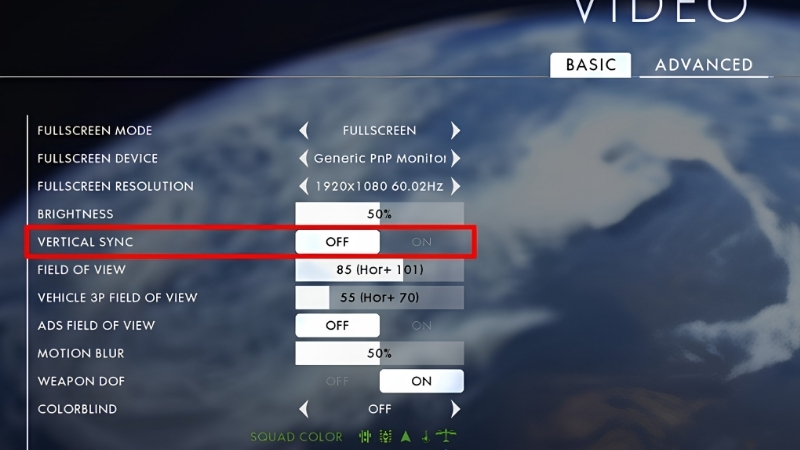
What NVIDIA Fast Sync Is and How It Works
Fast Sync is an alternative to V-Sync that eliminates tearing without capping your frame rate or adding the heavy input lag V-Sync is known for. It lets the GPU render as many frames as it can, then intelligently picks only the most recent complete frame to display, discarding the rest. Understanding this render-and-discard approach is the key to knowing when Fast Sync is the right tool, because its whole benefit depends on producing far more frames than your monitor’s refresh rate. Here is how it actually works.
As an Amazon Associate we earn from qualifying purchases at no extra cost to you.





How Fast Sync Handles Frames
Screen tearing happens when the GPU sends a new frame to the monitor mid-refresh, so you see parts of two frames at once. V-Sync fixes this by forcing the GPU to wait for the monitor, which adds latency and can cause stutter.
Fast Sync takes a different route: the GPU renders freely at full speed, and Fast Sync acts as a smart buffer that hands the monitor only the latest fully completed frame at each refresh. Extra frames are simply discarded rather than shown torn.
The result is a tear-free image without forcing the GPU to wait, which is what separates it from V-Sync and gives it much lower added latency.
The reason this works comes down to how the buffer is managed. Traditional V-Sync uses a small number of buffers and makes the GPU stall until the monitor is ready for the next one, which is where its lag comes from. Fast Sync effectively lets the GPU keep rendering into a rotating set of buffers and simply grabs whichever finished frame is newest at the moment the monitor refreshes. The frames rendered in between are thrown away, so no work slows the GPU down, and the frame you see is always the most current complete one available. That is why abundant frames are essential: the more frames the GPU produces, the fresher the one Fast Sync can hand to the display at each refresh.
Fast Sync vs V-Sync vs G-Sync
These three anti-tearing methods work very differently. V-Sync caps frames to the refresh rate and adds latency by making the GPU wait. G-Sync varies the monitor’s refresh rate to match the GPU, giving smooth, tear-free, low-latency results but requiring compatible hardware.
| Method | Tearing | Input lag | Needs special monitor |
|---|---|---|---|
| V-Sync | Removed | High | No |
| G-Sync | Removed | Very low | Yes (G-Sync/Compatible) |
| Fast Sync | Removed | Low (needs high FPS) | No |
Fast Sync sits between them: no special monitor needed like V-Sync, but far lower latency, on the condition that your frame rate substantially exceeds your refresh rate.
The Input Lag and Tearing Trade-off
Fast Sync’s low latency depends entirely on high frame rates. When the GPU produces far more frames than the refresh rate, there is always a fresh complete frame ready, so latency stays low and the image stays smooth.
If your frame rate is close to or below the refresh rate, Fast Sync loses its advantage and can introduce uneven frame pacing or stutter, since there are not enough spare frames to pick from. This is the crucial condition that decides whether it helps or hurts.
So the trade-off is simple: with abundant frames, Fast Sync gives you tear-free, low-lag gaming; without them, it is the wrong choice and another method serves better.
When to Use Fast Sync
Fast Sync is a situational tool, excellent in the right scenario and counterproductive in the wrong one, so knowing when to reach for it is what makes it useful. The deciding factor is always whether your frame rate comfortably exceeds your monitor’s refresh rate. This section covers exactly when Fast Sync shines, when V-Sync or G-Sync is the better pick, and the honest trade-offs, so you apply it where it actually helps.
When Fast Sync Shines
Fast Sync is ideal for older or less demanding games where your GPU produces frame rates far above your monitor’s refresh rate, think competitive shooters and esports titles running at hundreds of frames on a 60Hz or 144Hz screen. There, the surplus of frames is exactly what Fast Sync needs.
In these cases it delivers a tear-free image with much less latency than V-Sync, which is valuable for players who want smooth visuals without the lag penalty. It is a strong fit for high-frame esports on a standard monitor.
The rule of thumb is that your average frame rate should comfortably exceed your refresh rate, ideally by a wide margin, for Fast Sync to work as intended.
A concrete example makes the fit obvious. Picture a competitive shooter running at 300 frames per second on a 144Hz monitor. The GPU is producing more than twice as many frames as the display can show, so at every refresh there is always a brand-new complete frame waiting, and Fast Sync simply picks it, giving you tear-free visuals with barely any added delay. Now picture a demanding single-player game struggling to hold 100 frames on that same 144Hz screen: there is no surplus, Fast Sync often has to reuse or wait on frames, and pacing turns uneven. Same monitor, opposite outcome, and the only variable that changed was how far frame rate exceeded refresh rate.
When V-Sync or G-Sync Is Better
If you own a G-Sync or G-Sync Compatible monitor, that is almost always the better choice, since variable refresh gives tear-free, low-latency results across a wide frame-rate range without the high-FPS requirement Fast Sync depends on. G-Sync is simply more flexible.
V-Sync makes more sense when your frame rate hovers near your refresh rate and you cannot produce a big surplus, since Fast Sync struggles there. In demanding games where you barely hit the refresh rate, Fast Sync’s frame pacing suffers.
So the hierarchy is: use G-Sync if you have it, Fast Sync for high-FPS games on a standard monitor, and V-Sync as the fallback when frames are limited.
Pros and Cons Users Report
Since Fast Sync is free and easy to toggle, the honest question is how well it works in practice. Weighing the praise against the complaints sets realistic expectations.
What users like: tear-free gaming with far less input lag than V-Sync, no special monitor required, and excellent results in high-frame-rate esports titles. For players on standard monitors running fast games, it is a genuine improvement over V-Sync.
What users criticize: a hard dependence on high frame rates, uneven frame pacing or stutter when frames are limited, and general redundancy if you already have G-Sync. It is a specialist tool that only works well under the right conditions.
Getting the Best Tear-Free Experience
Fast Sync is one path to tear-free gaming, and getting the best result means enabling it correctly and pairing it with hardware that suits your goals. For many players, a variable-refresh monitor ultimately delivers a better all-round experience. This final section covers how to turn Fast Sync on, the hardware that makes tear-free gaming best, and the bottom line on when to use it.
How to Enable Fast Sync
You enable Fast Sync in the NVIDIA software under the manage 3D settings area, setting the vertical sync option to Fast, either globally or per game. Turn off in-game V-Sync when using it so the two do not conflict.
It works best applied to specific high-frame-rate games rather than globally, since you only want it where your frame rate far exceeds the refresh rate. For demanding games, leave it off and use another method.
Once set, test in a fast game and watch for tearing and smoothness. If frame pacing feels off, your frame rate is likely too low for Fast Sync to work well there.
Hardware That Makes Tear-Free Gaming Best
Here is the honest bigger picture: while Fast Sync is a clever free option, a G-Sync Compatible high-refresh monitor delivers a better tear-free experience across far more games, since it does not depend on producing a huge frame surplus. It is the more flexible long-term solution.
A high-refresh monitor also reduces tearing on its own by refreshing more often, and combined with variable refresh it largely removes the problem Fast Sync exists to solve. For most players, the display is the real upgrade.
If you want the best tear-free gaming without frame-rate caveats, compare current prices and specs on G-Sync Compatible high-refresh monitors through the links on this page.
See More:
- NVIDIA Broadcast vs OBS
- RTX HDR settings
- NVIDIA App download
- NVIDIA RTX Video Super Resolution
- GeForce Experience alternative
Final Verdict
Fast Sync is worth using for players on standard monitors running fast games at frame rates well above their refresh rate, where it beats V-Sync by removing tearing with much less lag. In that specific scenario, it is a smart, free choice.
For anyone with a G-Sync Compatible monitor, that is the better route, and for games where frames are limited, V-Sync is more reliable. Match Fast Sync to high-frame-rate situations, and it delivers exactly what it promises.
In short, NVIDIA Fast Sync gives you tear-free gaming without V-Sync’s input lag, as long as your GPU produces frames well above your monitor’s refresh rate. Use it for high-frame esports on a standard screen, prefer G-Sync where you have it, and fall back to V-Sync when frames are scarce. Since a variable-refresh monitor solves tearing most completely, check the recommended G-Sync Compatible displays through the links here for the smoothest long-term experience.
Top-Rated Picks


| Product | Brand | Rating | Reviews | Price |
|---|---|---|---|---|
| ARCTIC MX-4 (4 g) – Premium Performance Thermal Paste… | ARCTIC | ★ 4.8 | 104k | $4.99 |
| ARCTIC MX-4 (incl. Spatula, 4 g) – Premium Performanc… | ARCTIC | ★ 4.8 | 71.9k | $5.49 |
| Crucial 8GB DDR4 RAM 3200MHz (PC4-25600), Downclockab… | Crucial | ★ 4.8 | 62.8k | $74.99 |
| AMD Ryzen 5 5600X 6-core, 12-thread unlocked desktop … | — | ★ 4.8 | 30.2k | $177.60 |
| NVIDIA Shield Remote; Voice Search, Motion-Activated,… | — | ★ 4.7 | 10.6k | $25.99 |
Frequently Asked Questions
What does Fast Sync actually do?
Fast Sync lets the game render frames without a frame rate cap, then displays only the most recently completed frame at each monitor refresh and discards the rest. This removes tearing like V-Sync does but avoids V-Sync’s input lag penalty, because the render pipeline is never stalled waiting for the display.
When is Fast Sync worth enabling?
It works best when your frame rate is consistently two to three times your refresh rate, which usually means older or competitive titles such as CS2, Valorant or Overwatch on a capable GPU. Below that threshold, frame pacing becomes uneven and stutter is more distracting than the tearing you removed.
How do I turn it on?
Open the NVIDIA Control Panel, go to Manage 3D Settings, find Vertical Sync and change it from Use the 3D Application Setting to Fast. Set it per-game under Program Settings rather than globally, and disable any in-game V-Sync so the two systems do not fight each other.
Should I use it if I own a G-Sync monitor?
Generally no. Within your monitor’s variable refresh range, G-Sync or G-Sync Compatible adaptive sync gives tear-free output with lower latency and perfect pacing. Fast Sync is the better tool only when frame rates run far above the panel’s maximum refresh, where adaptive sync no longer applies.
Does Fast Sync hurt performance or increase power draw?
It does not reduce rendered frame rate, but because the GPU keeps rendering frames that are thrown away, it runs at full load with correspondingly high power draw, heat and fan noise. Many players prefer a frame rate cap slightly above refresh combined with adaptive sync for a quieter, cooler system.











Write Your Review
No reviews yet. Be the first to share your experience!