
- Top Pick: Gelid Solutions GP-Ultimate 15W- Thermal Pad 90x50x1.0mm. Excellent Heat Conduction, Ideal Gap Filler. Easy Installation
- Best Value: Gelid Solutions GP-Extreme Thermal Pad 80 x 40 x 1.0 mm Excellent Heat Conduction, Ideal Gap Filler Easy Installation Thermal Conductivity 12W
- Premium Choice: Temperature Displaying GPU Stand ARGB Infinity Graphics Card Support Adjustable 5V 3PIN Video Card Holder Anti-sag Bracket Magnetic Base Display Card Brace Rack PC Graphic Card Accessories (White)
GPU memory junction temperature is the reading that alarms owners of high-end cards the most, because it routinely sits 20–30°C above the core and can climb past 100°C under load. The reassuring news is that this is largely by design: GDDR6X memory runs hot and is rated to tolerate it. The concerning news is that on an aging card, dried thermal pads can push that number to its throttle ceiling and quietly cap your performance. This guide explains why memory runs so hot, where the safe limits really sit, what drives the temperature up, and how to bring a pinned memory junction reading back down before it starts costing you frames.
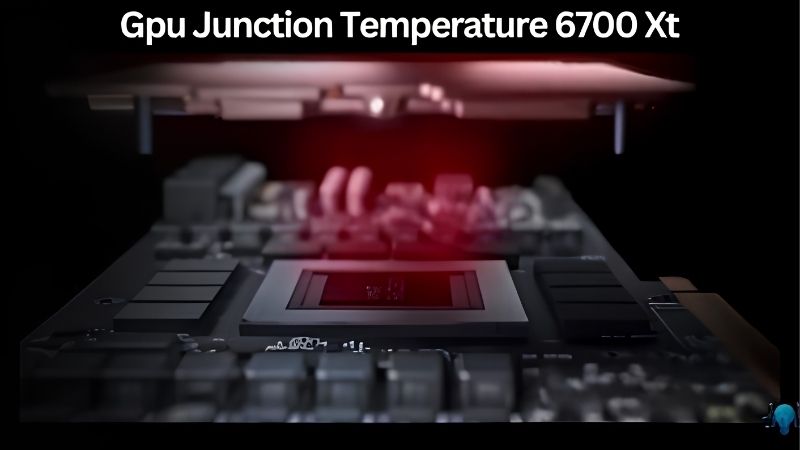
Quick Answer — GPU Memory Junction Temperature
As an Amazon Associate we earn from qualifying purchases at no extra cost to you.




Normal under load: 80–100°C • Throttle point: ~105°C • Worry threshold: pinned at or near 105°C consistently • Fix: replace thermal pads (10–20°C drop typical).
What Is GPU Memory Junction Temperature?
Memory junction temperature is a dedicated sensor that reports the hottest point on the graphics memory, separate from the core and hotspot readings. It exists mainly on higher-end cards, particularly those using fast GDDR6X modules, and it is normal for it to be the highest temperature your card reports. This section explains why that is and where the limits sit.
Why Memory Runs Hotter Than the Core
Graphics memory packs a great deal of activity into small modules positioned around the die, and they are cooled through thermal pads rather than direct contact with the main cold plate. That indirect path means memory naturally runs warmer than the core it surrounds.
Fast GDDR6X modules in particular generate significant heat at the bandwidth modern games demand. A gap of 20–30°C between the core and the memory junction is common and expected, not a sign of a fault by itself.
Because the cooling depends on pads, memory temperature is also the reading most sensitive to those pads aging, which is why it is the first sensor to climb on an older card.
Safe Limits and the Throttle Point
Memory junction temperature is rated to run hot. Readings in the 90s are routine under load, and many cards tolerate figures past 100°C within spec. The number that looks frightening to a newcomer is frequently well inside the design envelope.
The protective throttle point typically sits around 105°C, where the card cuts back to keep the modules safe. Sustained operation pinned at that ceiling is the real warning sign, because it means the card is limiting itself and you are losing performance.
The practical line to watch is whether the sensor is sitting at throttle. Below it, the card is operating safely even at high-looking numbers; pinned at it, the memory needs attention.
GDDR6X and Nvidia’s Thermal Design
Nvidia’s high-end cards pair powerful dies with hot-running GDDR6X to deliver their bandwidth, and the cooling system is engineered around the assumption that memory runs warm. The thermal pads bridging the modules to the cold plate are a deliberate part of that design.
This is also why memory cooling rewards good thermal materials so strongly. Because the design runs the memory close to its comfortable upper range from the factory, restoring lost pad efficiency on an aging card can claw back a large amount of headroom that dried pads had silently consumed.
This is also why the memory junction sensor is such a useful early-warning indicator. Because it responds so strongly to pad condition, a memory reading that has climbed several degrees over a year or two is often the first concrete sign that a card is due for a refresh, well before the core temperature gives anything away.
What Drives High Memory Junction Temperatures
If your memory junction reading is climbing toward its ceiling, a handful of causes are usually responsible. Identifying which one applies tells you whether a free fix will help or whether the card needs fresh pads. The factors below are the main drivers, ordered roughly by how often they are the culprit.
Thermal Pads and Card Age
The most common cause of a high memory junction temperature on an older card is degraded thermal pads. Over three to five years they dry out, harden, and lose contact pressure, and because memory relies entirely on those pads, the effect lands hardest on this sensor.
Owners who repad an aging card frequently report memory junction drops of 10–20°C, far larger than the core improvement from the same job. When this sensor is the problem, fresh pads are usually the decisive fix.
Thickness accuracy is what makes or breaks that fix. Memory locations use specific pad thicknesses, and a pad too thin leaves an air gap while one too thick can stop the cold plate seating. Measuring the originals and matching them exactly is the difference between a 15°C improvement and a job that makes things worse, so this is not a step to guess at.
Case Airflow and Backplate Cooling
Airflow still matters, even though memory is pad-cooled. Many cards shed some memory heat through the backplate, so a case with poor airflow or a card pressed against a panel with little clearance can run warmer memory than a well-ventilated build.
Improving intake and exhaust, clearing dust, and ensuring the backplate has breathing room can shave several degrees off the memory junction reading before you ever consider opening the card. It is the cheapest first step worth trying.
Pros and Cons of Repadding to Fix It
On the plus side, a repad targets the exact cause of high memory junction temperatures on most aging cards, delivers the largest drop available on this sensor, and costs a fraction of a workshop fee while restoring fan headroom and quiet.
On the downside, it means opening the cooler, which can affect warranty, and a wrong pad thickness or a careless slip can cause damage. It also requires fresh die paste on the same teardown, adding a little to the cost and effort.
For an out-of-warranty card with memory pinned near throttle, the trade is clearly worthwhile. For a newer, in-warranty card running within spec, the cautious choice is to leave it sealed and rely on airflow.
How to Monitor and Lower Memory Junction Temperature
If the sensor is reading high, the approach is to confirm it with monitoring, try the free wins, and reach for new pads when they are the real fix. Acting in that order means you only open the card when it will actually help. The steps below cover both diagnosis and the cure.
Tools That Read Memory Junction Temperature
Not every utility shows this sensor, so use one that does, such as HWiNFO or recent versions of GPU-Z. These report the memory junction figure alongside core and hotspot, letting you see the full thermal picture rather than guessing from the core alone.
Log the sensor across a demanding game, not at idle. A memory junction temperature that climbs toward 105°C and stays there under load is the clear signal that the pads are no longer doing their job.
Compare the reading against the card’s history if you have it. Memory that once held in the low 90s and now pushes past 100°C in the same titles has drifted for a reason, and that drift is your evidence that the pads have aged rather than that the card is simply hot by nature. A logged baseline turns a vague worry into a concrete diagnosis.
Quick Wins Before Opening the Card
Start with the no-cost steps. Improve case airflow, clear dust, give the backplate clearance, and set a more aggressive fan curve so the card ramps earlier. Undervolting also helps, since lowering power reduces the heat the memory has to shed.
These measures can take several degrees off the reading and are always worth trying first. On a card that is only mildly elevated, they may be enough to keep the sensor comfortably below its ceiling.
Set realistic expectations for these free steps, though. Airflow and undervolting trim the edges of the problem, but they cannot restore contact that dried pads have lost. If your memory junction temperature is genuinely pinned near throttle, treat the quick wins as a useful warm-up rather than the cure, and plan for the repad that will actually solve it.
When New Pads Are the Real Fix
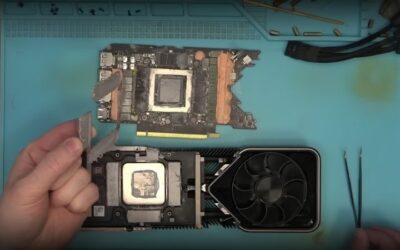
If the memory junction temperature stays pinned near throttle after the free fixes, degraded pads are the cause and replacement is the cure. Match the exact pad thickness at each memory location and choose a high-conductivity, pump-out-resistant kit for a lasting result.
This is the single most effective action for a hot-memory card, routinely returning the sensor to a comfortable range and recovering the performance that throttling had quietly removed. Pair the pads with fresh die paste on the same job.
Because reaching the memory pads means breaking the seal on the die, refreshing the paste at the same time is simply efficient, turning two potential teardowns into one. It also means the core benefits from the same service, so a card that came in with both a hot core and hot memory leaves running cooler on every sensor.
If your memory junction temperature is sitting at its limit, the right thermal pads are the fix that brings it back down for good. Match your thicknesses, choose a quality kit, and refresh the paste at the same time.
See More:
- How to lower GPU temperature
- How to lower GPU hotspot temp
- How to increase GPU performance
- How to enable G-Sync
Conclusion
GPU memory junction temperature is the hottest sensor your card reports and is designed to run that way, with readings into the 90s and past 100°C safe before throttling near 105°C. The number only becomes a problem when it sits pinned at that ceiling, which on most aging cards points to dried thermal pads rather than a failing card. Confirm it with proper monitoring, try airflow and undervolting first, and replace the pads when they are the real cause. Bring a hot memory junction reading back into the safe range through the gear linked above and recover the performance throttling had taken away.
Top-Rated Picks


Save $1.00

| Product | Brand | Rating | Reviews | Price |
|---|---|---|---|---|
| ARCTIC MX-4 (4 g) – Premium Performance Thermal Paste… | ARCTIC | ★ 4.8 | 104k | $4.99 |
| ARCTIC MX-4 (incl. Spatula, 4 g) – Premium Performanc… | ARCTIC | ★ 4.8 | 71.9k | $5.49 |
| Crucial 8GB DDR4 RAM 3200MHz (PC4-25600), Downclockab… | Crucial | ★ 4.8 | 62.8k | $74.99 |
| AMD Ryzen 5 5600X 6-core, 12-thread unlocked desktop … | — | ★ 4.8 | 30.2k | $177.60 |
| NVIDIA Shield Remote; Voice Search, Motion-Activated,… | — | ★ 4.7 | 10.6k | $25.99 |
Frequently Asked Questions
What memory junction temperature is safe?
GDDR6X modules are specified to a maximum junction temperature of around 105 degrees Celsius, and cards typically begin throttling memory clocks somewhere between 100 and 110 degrees. Sustained readings in the 80 to 95 degree range under load are common and acceptable, particularly on high-power cards with memory mounted on both sides of the board.
Why does memory run hotter than the core?
Memory modules sit under thermal pads rather than a direct heatsink contact, and on some designs they are placed on the rear of the board where cooling is minimal. GDDR6X in particular generates substantial heat because of its high signalling rate, which is why memory junction temperature became a monitored value in the first place.
What happens when memory hits its limit?
The card reduces memory clock speed to bring temperature down. You see this as a sudden and sustained frame rate drop after ten or twenty minutes of gaming rather than immediately at launch, and monitoring shows memory clock stepping down while core clock remains high. It is protective, not damaging, but it costs real performance.
How do I lower memory temperature?
Increase case airflow, particularly around the rear of the card if memory is mounted there, and set a more aggressive fan curve. Removing any memory overclock helps significantly, since faster memory generates more heat. On older cards, replacing degraded thermal pads with correctly sized higher-conductivity pads can drop readings by ten degrees or more.
Does mining history affect memory temperatures?
It can. Extended full-load memory operation accelerates thermal pad degradation, so a used card may show unusually high junction readings even after cleaning. If you buy second-hand, run a sustained memory stress test and log junction temperature for at least thirty minutes before the return window closes.






Write Your Review
No reviews yet. Be the first to share your experience!