
What is ray tracing is a question every modern PC gamer eventually asks, usually after seeing a game with strikingly realistic reflections, shadows, and lighting that older games could never quite match. Ray tracing is the technology behind those lifelike visuals, and it has become one of the defining features of recent NVIDIA RTX graphics cards. This simple guide explains what ray tracing is, how it differs from older rendering methods, and exactly how to turn it on and get the best from it on your own PC, without drowning you in jargon.
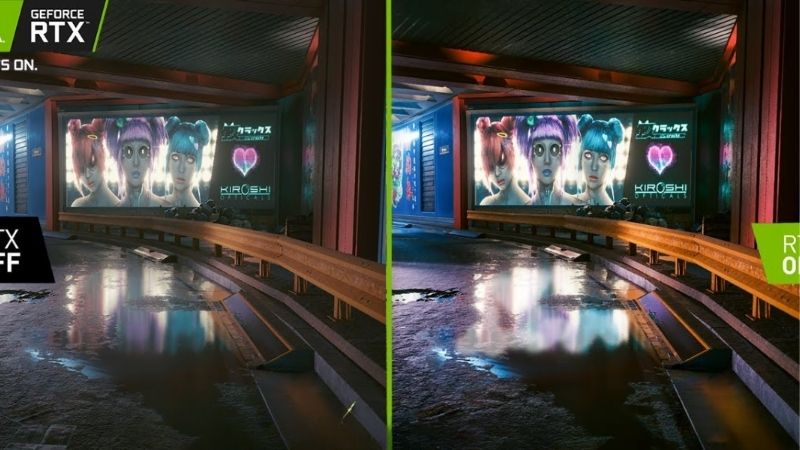
What Is Ray Tracing and Why It Matters
At its heart, ray tracing is a way of rendering light that mimics how it behaves in the real world. Instead of faking reflections and shadows with clever tricks, it simulates actual rays of light, and the result is a striking jump in realism. Understanding the basics makes it clear why it has become such a headline feature and why it asks so much of your hardware.
How Ray Tracing Works
Ray tracing simulates the path that individual rays of light take as they bounce around a scene. The graphics card traces these rays from the camera into the world, calculating how they reflect, refract, and cast shadows off every surface they hit.
This is computationally demanding, because each frame can involve millions of light calculations. That is why ray tracing needs dedicated hardware, the RT cores found on modern NVIDIA RTX cards, to run at playable frame rates rather than a slideshow.
The payoff is lighting that behaves naturally: reflections that show what is actually around them, shadows with realistic softness, and light that bounces convincingly between surfaces.
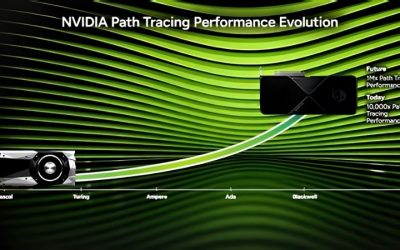
This is the experimental edge of modern graphics, where NVIDIA leans on dedicated hardware and ongoing software refinement to make a once-impossible technique run in real time. It is a genuine glimpse of where game visuals are heading.
Ray Tracing vs Traditional Rasterization
Traditional games use rasterization, a fast method that approximates lighting with pre-baked tricks and clever shortcuts. It looks good and runs quickly, but reflections and shadows are often faked and can break down in motion or at certain odd angles.
Ray tracing replaces those shortcuts with real light simulation, so reflections show the true scene and shadows fall exactly where they should. The difference is most obvious in shiny surfaces, water, and complex lighting that rasterization struggles to fake convincingly. Once you notice the accuracy of ray-traced reflections, the old faked versions become hard to unsee.
The trade-off is performance: ray tracing is far more demanding, which is why it pairs so naturally with upscaling technologies that claw back the lost frames. Understanding that balance is the key to enjoying ray tracing rather than being frustrated by it.
What Ray Tracing Looks Like in Games
In practice, ray tracing shows up as several distinct effects. Ray-traced reflections turn flat, faked surfaces into mirrors that accurately show their surroundings, while ray-traced shadows gain realistic depth and softness instead of hard, artificial edges.
Ray-traced global illumination is often the most transformative of all, letting light bounce naturally around a scene so colours and brightness feel genuinely realistic. Path tracing, the most advanced form, simulates lighting almost entirely with rays for a near cinematic look, and it represents the cutting edge of what current RTX hardware can attempt.
The effect ranges from subtle to dramatic depending on the game, but in well-implemented titles it can make a world feel tangibly more real. The best showcases use it to transform mood and atmosphere, not just to add shine.
How to Use Ray Tracing on Your PC — Step by Step
Turning on ray tracing is straightforward once you have the right hardware. The key is balancing the visual gain against the performance cost, which the right combination of settings makes surprisingly easy. Here is what you need and how to do it.
What You Will Need
Ray tracing has a few requirements, but most are simple to meet on a modern setup. Gather these before you start.
- A ray tracing capable GPU — an NVIDIA RTX card with dedicated RT cores, such as a current-generation RTX model, is what makes playable ray tracing possible.
- A game that supports ray tracing — many modern titles include it as a graphics option.
- The latest NVIDIA drivers — kept current through the NVIDIA app for the best performance and stability.
- Enough VRAM — since ray tracing adds memory load, a card with ample VRAM helps avoid stutter.
If your current card lacks RT cores, no setting will enable true ray tracing, so a capable RTX card is the real starting point. Older cards without this hardware simply cannot run it, however powerful they are in other respects.
Step-by-Step: Enabling Ray Tracing
Follow these steps to turn ray tracing on and tune it for your system.
- Update your drivers. Open the NVIDIA app and install the latest driver for the best ray tracing performance.
- Open the game’s graphics settings and find the ray tracing or RTX options.
- Enable ray tracing and choose which effects to turn on, such as reflections, shadows, or global illumination.
- Turn on DLSS to recover the frames ray tracing costs while keeping the image sharp.
- Test and adjust. Play a demanding scene, watch your frame rate, and dial effects up or down to taste.
Starting with one or two ray-traced effects plus DLSS is the easiest way to enjoy the visuals without a harsh performance hit. You can always add more once you see how your particular card handles the load in your favourite games.
Pros and Cons of Turning Ray Tracing On
Ray tracing is stunning, but it is a genuine trade-off, so it helps to weigh what is gained against what is lost before you commit to it in every game.
On the plus side, ray tracing delivers a dramatic leap in visual realism, with lifelike reflections, shadows, and lighting that flat rasterization cannot match. In well-implemented games, it can make scenes feel genuinely cinematic and immersive.
On the downside, ray tracing is demanding and can cut frame rates substantially, especially at higher resolutions, and it adds VRAM load on top. Without a capable card and upscaling, the performance hit can outweigh the visual gain, which is why it suits stronger RTX cards best and why DLSS is almost always recommended alongside it for a smooth result.
Pro Tips, Performance, and Upgrades
A few smart habits let you enjoy ray tracing without wrecking your frame rates, and the right pairing of technologies makes it far more practical. Here is how to get the most from it.
Pro Tips and Mistakes to Avoid
Keep these in mind to balance beauty and performance.
- Always pair ray tracing with DLSS. Upscaling recovers most of the lost frames while keeping the image crisp.
- Do not enable every effect at once. Start with reflections or global illumination, the most noticeable, before adding more.
- Watch your VRAM. Ray tracing adds memory load, so a card short on VRAM may stutter with it on.
- Match effects to the game. Some titles show a dramatic difference, while others gain little, so judge case by case.
The biggest mistake is maxing every ray-traced effect on a modest card, then blaming the technology for the resulting slideshow, when a lighter touch plus DLSS would have looked great and played smoothly.
Using DLSS to Offset the Cost
DLSS is the natural companion to ray tracing, and the two are designed to work together. DLSS uses AI to render the game at a lower internal resolution and intelligently upscale it, recovering much of the performance ray tracing consumes.
This pairing is what makes demanding ray tracing playable on most RTX cards, since the frames DLSS gives back roughly offset the frames ray tracing costs. NVIDIA continues to refine this through driver and software updates, improving the result over time, so the same card often handles ray tracing better a year after launch.
In practice, enabling both together is the single best way to enjoy ray tracing without a punishing performance hit, and it is the approach almost every experienced RTX owner recommends.
When a New Card Unlocks Ray Tracing
If your current card lacks RT cores or struggles with ray tracing enabled, a newer card is the real path to enjoying it. A current-generation NVIDIA RTX GPU brings far stronger ray tracing hardware, the latest DLSS, and the headroom to run demanding effects smoothly.
Reviewers upgrading to a modern RTX card frequently describe ray tracing going from a slideshow to a smooth, jaw-dropping experience, alongside a major leap in overall performance. For many, it is the feature that finally made the upgrade feel worthwhile.
If an upgrade was already tempting, the chance to finally run ray tracing well is the practical push to compare current RTX graphics cards, so it is worth checking today’s deals before they change.
See More:
- GPU pink screen
- Nvidia Control Panel missing
- Nvidia Control Panel not opening
- GeForce Experience won’t open
- Nvidia app won’t install
Final Word on What Ray Tracing Is
So what is ray tracing comes down to this: a rendering technology that simulates real light for dramatically more realistic reflections, shadows, and lighting than traditional rasterization can manage. It is demanding, but on a capable RTX card paired with DLSS, it genuinely transforms how games look and feel.
Make sure you have an RTX card with RT cores, enable ray tracing alongside DLSS, and start with a couple of effects before pushing further. Done that way, ray tracing becomes a stunning, practical upgrade to your games rather than a performance trap, and you will finally understand firsthand what ray tracing brings to modern PC gaming.





Write Your Review
No reviews yet. Be the first to share your experience!