
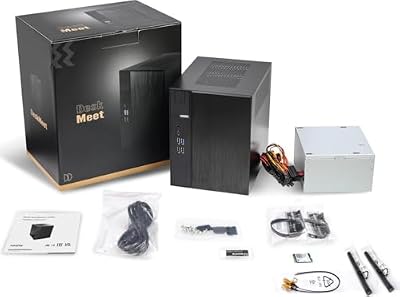
- Top Pick: Shiny Snake L400 12.1L MESH ITX SFF Case – Gen3 Riser Cable Included -Black
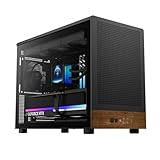
- Best Value: Mechanic Master C25 Plus Compact Aluminum ITX PC Case
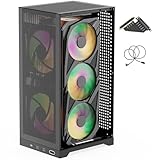
- Premium Choice: CORSAIR 3500X LX RGB Link Panoramic Mid-Tower PC Case – 3X Pre-Installed Fans, High Airflow, Spacious Interior, GPU Anti-Sag, Reverse Connection Motherboard Compatible – Black


The best gpu for mini itx build projects balances powerful gaming with the tight clearances, compact power supplies and careful airflow that define a tiny case. In a mini-ITX build, the whole system must work together, so card size, thermals and power all factor into the decision alongside raw speed. Using current benchmarks, owner feedback and case-clearance data, this guide ranks the top cards for mini-ITX builds, shows what each delivers within those constraints, and gives you a clear buying guide. Let’s find the card that turns your tiny case into a serious gaming machine.
As an Amazon Associate we earn from qualifying purchases at no extra cost to you.




Quick Picks: Best GPU for Mini ITX Build at a Glance
If you only have a minute, these three cards cover the core needs for mini-ITX builds, balancing performance, physical fit and cooling so you can choose quickly based on your case and budget.
Best Overall: Nvidia RTX 5070 Ti ($749, 16GB) – compact models bring high-end power to mini-ITX cases.
Best Budget: Nvidia RTX 5060 ($299, 8GB) – a short, efficient card that fits almost any tiny case.
Best Premium: Nvidia RTX 5080 ($999, 16GB) – compact versions for high-end mini-ITX in larger SFF cases.
| Card | VRAM | Price | Best For |
|---|---|---|---|
| Nvidia RTX 5070 Ti | 16GB | $749 | High-end mini-ITX |
| Nvidia RTX 5060 | 8GB | $299 | Easy-fit budget |
| Nvidia RTX 5080 | 16GB | $999 | Premium SFF |
Best Overall: Nvidia RTX 5070 Ti
The RTX 5070 Ti is the ideal mini-ITX card because compact models deliver flagship-class 1440p performance while fitting many tiny cases. It brings high-end gaming to a build most people think too small for it.
With 16GB of VRAM and DLSS 4 Multi Frame Generation, it handles demanding games and ray tracing with ease. Its efficient architecture keeps heat reasonable for its performance class.
It needs a case with decent airflow and a capable compact power supply, but it rewards that planning with serious performance. For most ambitious mini-ITX builds, it is the sweet spot.
Best Budget: Nvidia RTX 5060
The RTX 5060 is the easy-fit budget choice, with a short, efficient design that slots into almost any mini-ITX case. Its low power draw is ideal for the compact supplies these builds use.
It delivers smooth 1080p gaming and capable 1440p performance with DLSS 4, making it a great value for a tiny system. Its efficiency keeps temperatures low in cramped cases.
Its 8GB of VRAM is sufficient for 1080p, and the card rarely causes cooling or power headaches. For budget mini-ITX builders, it is a stress-free pick.
Best Premium: Nvidia RTX 5080
For builders using larger SFF-friendly mini-ITX cases, compact RTX 5080 models bring near-flagship 4K-capable performance to a small footprint. It is the choice for a no-compromise tiny powerhouse.
With DLSS 4 and strong ray tracing, it delivers an elite experience in a build that fits on a shelf. Its performance rivals full-size systems many times its volume.
It draws more power and demands excellent airflow, so case choice matters most here. For high-end mini-ITX ambitions, it is the premium option.
In-Depth Reviews of the Top Mini-ITX Cards
Choosing the right card for a tiny build means balancing performance against fit, cooling and power, so here is a closer look at how each option performs within the constraints of a mini-ITX system.
RTX 5070 Ti: The Mini-ITX Standard
In real-world tiny builds, compact 5070 Ti models deliver high 1440p performance while fitting many mini-ITX cases. DLSS 4 keeps demanding games fluid without a huge cooler.
Owners praise how it brings high-end power to a small build that looks impossibly compact. It is the practical benchmark for ambitious mini-ITX systems.
Its 16GB buffer and efficiency also give it strong longevity in a build you may keep for years. For most mini-ITX gamers wanting power, it is the go-to.
RTX 5060: The Easy-Fit Pick
The 5060 slots into nearly any mini-ITX case thanks to its short, efficient design, making it the least stressful choice for a tiny build. It runs cool even where airflow is limited.
It delivers smooth 1080p gaming and capable 1440p performance for a low price. For a compact, fuss-free system, it is an excellent foundation.
Its low power needs also suit the small supplies mini-ITX builds rely on. For budget builders, it removes the usual SFF headaches.
RTX 5080: The Compact Flagship
Compact 5080 models bring near-flagship performance to larger mini-ITX cases, proving a tiny build can rival a full tower. They deliver 4K-capable gaming in a small footprint.
The trade-off is heat and power, so a case with strong airflow and a capable supply is essential. With proper planning, it runs reliably while delivering elite performance.
It is the card for builders who refuse to compromise despite the small size. For high-end mini-ITX, it is the standout choice.
Pros and Cons of a Mini-ITX Build GPU
Building in a mini-ITX case brings clear benefits along with real constraints, so here is an honest look at the pros and cons tied to choosing a GPU for a tiny system.
The Strengths of a Mini-ITX Build
Pros: A tiny, portable, striking build, strong performance from efficient compact cards, and the satisfaction of fitting real power into a small space. Modern cards make capable mini-ITX gaming achievable.
These builds save space and look impressive while delivering mainstream or high-end performance. The compact form is a genuine appeal for many enthusiasts.
The Trade-Offs to Consider
Cons: Tight clearances limit card choice, cooling demands careful planning, and compact power supplies constrain the most powerful options. Every component must be checked for fit.
Cable management and airflow are also more challenging in a small case. For most builders, though, careful planning avoids these pitfalls.
Who Should Build Mini-ITX
This category suits builders who want a small, portable or visually striking PC without giving up real performance. If a tiny case is your goal, these cards are designed for it.
If you prefer easy building and ample space, a larger case is simpler. For mini-ITX ambitions, though, these picks deliver power that fits.
Getting the Most from a Mini-ITX Build
A well-chosen card is the foundation, but a few build choices determine whether your mini-ITX system runs cool, quiet and stable, so these tips help you get the best from a tiny build. Thinking through fit, cooling and power together, rather than one at a time, is what makes a small build come together smoothly.
Checking Case Clearances
Before buying, confirm your case’s maximum GPU length, height and slot width, since mini-ITX cases vary widely in what they accept. Matching the card’s exact dimensions to your case avoids a costly mismatch.
Compact models are usually the safest choice, and case makers publish clearance figures. Measuring carefully before buying is the foundation of a successful mini-ITX build.
Planning Airflow and Thermals
Mini-ITX cases benefit greatly from a deliberate airflow plan, with intake feeding the GPU and exhaust clearing heat efficiently. Even an efficient card runs better with good ventilation.
Choosing an efficient card lightens the cooling load and keeps the system quieter. In a tiny build, thermal planning is as important as the card itself.
Choosing the Right Power Supply
Mini-ITX builds typically use compact SFX supplies, so confirm yours has the wattage and connectors your card requires. A little headroom keeps the system stable under demanding loads.
Efficient cards make power planning easier, letting a smaller supply do the job. Planning power alongside the GPU keeps your tiny build reliable.
Buying Guide and FAQs
A few final fundamentals will help you choose the right card for a mini-ITX build and avoid the mistakes that catch out tiny-case builders.
What to Look For in a Mini-ITX GPU
Start with physical fit, checking length, height and slot width against your case, then weigh performance, cooling and power. A card that fits and runs cool beats a faster one that strains your build.
Confirm your power supply and airflow can support the card. Matching the card to your specific case is what delivers a reliable mini-ITX system.
Building a parts list around a verified case-and-card combination, rather than buying components separately and hoping they fit, is the surest way to avoid an expensive mismatch.
What Power Supply Do I Need for Mini-ITX?
Most mini-ITX builds use a compact SFX supply, so match its wattage and connectors to your chosen card with a little headroom. Efficient cards make a smaller supply viable.
For high-end cards, ensure the supply has the necessary connectors and capacity. Planning power early prevents surprises during the build.
Modern compact supplies have improved greatly, so a quality SFX unit can comfortably power even a high-end card when sized correctly for the load.
See More:
Is Mini-ITX Harder to Build?
It is a little more demanding than a standard build, with tighter spaces and stricter clearances, but careful planning makes it very achievable. Checking fit and airflow ahead of time is the key.
The reward is a compact, striking system that punches above its size. For many builders, that payoff is well worth the extra care.
Taking your time with cable routing and build order also makes a tiny case far less frustrating, turning a fiddly job into a satisfying one.
To sum up, the best gpu for mini itx build projects in 2026 is the RTX 5070 Ti for high-end power that fits, with the RTX 5060 for easy budget builds and the RTX 5080 for premium SFF cases. Check your clearances, plan your airflow and match your power supply, and your tiny case will become a serious gaming machine. Check current pricing and dimensions on these cards through the links above before you buy. As an Amazon Associate we may earn from qualifying purchases.
Frequently Asked Questions
How do I know if a GPU will fit my Mini ITX case?
Check three dimensions against your case specification: length in millimetres, height from the PCIe bracket to the top of the shroud, and slot thickness. Many small cases limit you to about 300mm length and two and a half slots. Also verify clearance for the power connector, which adds 20-40mm above the card.
Are two-slot cards still available in the current generation?
Yes, but they are the minority. Compact dual-slot or 2.5-slot models exist from most partners in the RTX 5060, 5060 Ti, 5070 and RX 9060 XT and 9070 tiers. Flagship cards are almost universally three slots or more, so an SFF build usually means accepting a mid-range or upper mid-range tier.
What PSU do I need for a small form factor build?
Most ITX cases use SFX or SFX-L supplies. A 750W SFX unit covers an RTX 5070 Ti or RX 9070 XT class card comfortably, while 850W is safer for anything higher due to transient power spikes. Choose a unit with native 12V-2×6 cabling to avoid bulky adapters that will not bend inside the case.
Do compact cards run hotter and louder?
Generally yes, because smaller heatsinks and fans have less surface area. Expect a few degrees higher temperature and noticeably more fan noise than a triple-fan version of the same GPU. Undervolting or applying a modest power limit reduction typically cuts temperature and noise substantially with only a small performance loss.
Should I worry about the 12VHPWR cable bend radius?
Yes. The 12V-2×6 connector requires roughly 35mm of straight cable before bending, and forcing a tight bend in a cramped case risks poor contact and overheating at the plug. Use a native cable or a 90 degree adapter designed for the standard, and confirm the connector is fully seated.











Write Your Review
No reviews yet. Be the first to share your experience!