
- Top Pick: ARCTIC MX-4 (4 g) – Premium Performance Thermal Paste for All Processors
- Best Value: ARCTIC MX-6 (4 g, incl. 6 MX Cleaner) – Ultimate Performance Thermal Paste for CPU, Consoles, Graphics Cards, laptops, Very high Thermal Conductivity, Long Durability, Non-Conductive
- Premium Choice: ARCTIC MX-4 (incl. Spatula, 4 g) – Premium Performance Thermal Paste
Best thermal paste for laptops is a different answer depending on what you are opening, because an ultrabook drawing 15W and a gaming machine pushing 150W fail in completely different ways. This guide matches compounds to machine type, and covers tube sizing if you service several laptops rather than one.
As an Amazon Associate we earn from qualifying purchases at no extra cost to you.




As an Amazon Associate we earn from qualifying purchases at no extra cost to you.
By Ryan Cole
How to Choose the Best Thermal Paste for Laptops
Picking the best thermal paste for laptops starts with matching the material to the power the machine actually draws, then thinking about how often you plan to open it again.
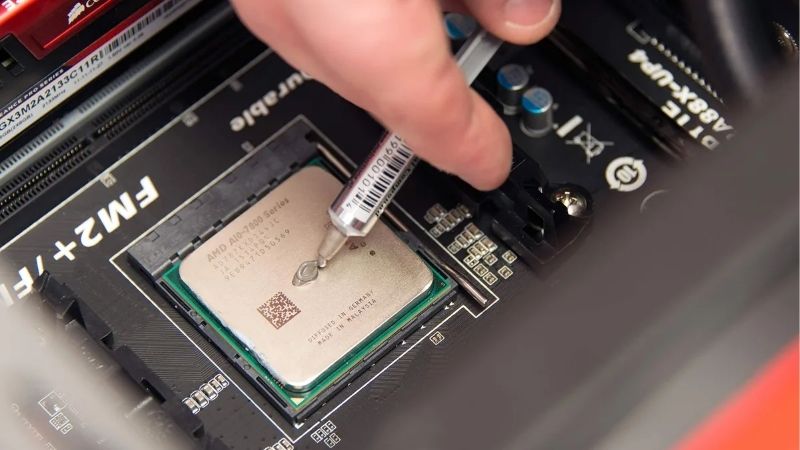
Match the Compound to the Machine Class
An ultrabook with a 15W to 28W processor produces modest heat but has almost no cooling mass, so a thin even layer matters more than raw conductivity. Any quality non-conductive compound performs well here.
Business laptops in the 35W to 45W range sit in the middle and tolerate ordinary paste for a few years. Gaming machines above 100W combined are where conventional compound degrades fastest and phase-change materials earn their price.
Older machines are their own category. A five-year-old laptop often has hardened pads and dust-packed fins, and replacing those matters considerably more than which compound goes on the die.
Handheld gaming devices sit closer to the gaming laptop end than their size suggests. They run small dies at sustained load inside very tight enclosures, which is exactly the condition that destroys ordinary compound quickly.
Pump-Out Decides Longevity
Every laptop cycles from idle to load and back constantly, and each cycle pushes compound a little further out from between die and heatsink. That is the dominant failure mode across all machine classes.
The hotter the machine, the faster it happens. On a gaming laptop, a conventional compound can lose measurable performance within twelve months, while the same paste on an ultrabook may hold for three years or more.
Convex or slightly uneven die surfaces make it worse still. Where the gap between silicon and heatsink varies across the contact patch, thermal cycling has more room to push compound outward with every heating cycle.
Tube Sizing When You Service Several Machines
A single laptop die needs a tiny amount of compound, roughly a grain of rice worth. A 1g tube covers six or more laptop applications, whereas a desktop processor consumes far more per job.
If you look after several machines, the economics change sharply. An 8g tube of a mid-tier compound costs less than 2g of a premium one and covers dozens of repastes, which matters more than a degree of difference.
Electrical Safety on Bare Dies
Laptop processors expose bare silicon surrounded by small surface-mount components, with no heatspreader to catch overflow. Non-conductive compounds are the sensible default because a small amount of squeeze-out is survivable.
Conductive materials including liquid metal and graphene pads can work but need masking and precision. On a machine you cannot easily replace, that risk is rarely worth the few degrees it might return.
Keep a bottle of high-purity isopropyl alcohol and lint-free wipes on hand regardless of what you apply. Residue from the old compound left on the die undermines the new application more than the choice between products does.
Top Picks: Best Thermal Paste for Laptops by Machine Type
These six cover every laptop class from thin ultrabooks to high-power gaming machines, plus the bulk options for anyone servicing several. Ratings are manufacturer figures as of August 2026.
| Product | Type | Rated Conductivity | Best Machine Class |
|---|---|---|---|
| Honeywell PTM7950 | Phase change sheet | 8.5 W/mK | Gaming and high power |
| Arctic MX-6 | Paste | 8.5 W/mK | All classes, bulk servicing |
| Noctua NT-H1 | Paste | Not published | Ultrabooks and business |
| Thermal Grizzly Kryonaut | Paste | 12.5 W/mK | Short-term best numbers |
| Thermal Grizzly KryoSheet | Graphene pad | Not published | Machines opened often |
| Thermalright TF7 | Paste | 12.8 W/mK | Budget multi-machine work |
Honeywell PTM7950 – Best for High-Power Machines
For high-power hardware this is the best thermal paste for laptops by a wide margin, and it is not really a paste. The sheet reflows at operating temperature rather than being squeezed out, eliminating pump-out entirely. On a gaming laptop that cycles hard for years, that stability is worth more than any conductivity figure.
It needs several heat cycles before performing fully, so the first boot looks disappointing. It comes as sheets you cut to size, and counterfeit listings are common enough that buying from a reputable seller matters.
Arctic MX-6 – Best All-Round Value
Non-conductive, widely available in tubes up to 8g and cheap per gram, MX-6 is the practical answer for anyone servicing several machines. Performance across every laptop class is within a couple of degrees of premium compounds.
It is thick when cold and needs warming in your hand before it spreads under light laptop mounting pressure. As a conventional compound it also carries the same pump-out limitation as everything in its category.
Noctua NT-H1 – Best for Thin Machines
NT-H1 has forgiving viscosity that spreads evenly under the low clamping force thin laptop heatsinks provide, and it stays stable for years on machines that never get very hot.
It is outperformed by newer compounds on high-power hardware, and Noctua publishes no conductivity figure. The larger 10g tube is good value, but the small ones are expensive relative to alternatives.
Thermal Grizzly Kryonaut – Best Immediate Results
Kryonaut delivers the lowest temperatures straight away on any machine class and is non-conductive, so minor squeeze-out is not fatal. Where you want the best possible result today, this is what to use.
It dries out fastest on hot chips, and a gaming laptop is the harshest environment it will meet. Expect to redo the job within twelve to eighteen months on a machine that regularly exceeds ninety degrees.
Thermal Grizzly KryoSheet – Best for Frequent Servicing
This graphene pad cannot dry out or pump out and survives repeated remounting, which suits machines you open regularly for dust removal. There is no curing period and nothing to clean up between mounts.
It is electrically conductive, so overhang past the die edge is a real hazard, and it needs firm even pressure. Some thin laptop heatsink assemblies cannot generate enough clamping force to get the best from it.
Thermalright TF7 – Cheapest Sensible Bulk Option
Rated at 12.8 W/mK and sold cheaply in larger quantities, TF7 suits anyone repasting a stack of older machines where premium compound would be wasted. It is non-conductive and spreads reasonably under light pressure.
Manufacturer ratings at this price should be treated with some caution, and independent results usually land below the headline number. Long-term stability on hot machines is also less proven than the established names.
Why Laptop Maintenance Makes Sense in 2026
The wider hardware market has shifted the value of keeping machines running, which is why the best thermal paste for laptops is worth choosing carefully rather than grabbing whatever is nearest.
Cheap Upgrades Still Deliver Real Results
With graphics hardware pricing elevated and no new architectures arriving before CES in January 2027, holding existing machines for another year is the sensible plan. Cooling maintenance is where accessible improvement remains.
A machine that throttled within ten minutes can often sustain full clocks afterwards. On a fleet of older laptops, an afternoon of repasting frequently restores performance people assumed was permanently lost to age.
Cooling Supplies Are Still Priced Normally
While memory and storage climbed steeply through 2026, thermal compounds, pads and accessories stayed close to normal pricing with genuine seasonal discounts and single-digit manufacturer increases.
That makes the November sales a reasonable time to buy a larger tube or a multi-thickness pad set. Nothing in this category faces the supply pressure that has distorted memory and storage pricing.
Check Warranty Terms First
Some manufacturers treat internal service as voiding coverage, and a repaste is rarely worth losing a claim over a fault that develops later. Read the terms before removing any base panel.
If temperatures worsened recently, clear dust from the intakes and exhaust fins before anything else. A blocked heatsink causes worse throttling than degraded compound and takes minutes rather than an afternoon to fix.
Frequently Asked Questions
The best thermal paste for laptops question usually arrives with these, from people servicing more than one machine and wondering whether a single compound covers everything.
Can one compound be the best thermal paste for laptops of every kind?
Close to it. A quality non-conductive paste such as MX-6 performs well across every class. The exception is high-power gaming machines, where a phase-change material lasts considerably longer under aggressive thermal cycling.
How much paste does one laptop need?
Roughly a grain of rice per die, spread thinly to cover the silicon and no further. That means a 1g tube covers six or more machines, so buying a large tube only makes sense if you service laptops regularly.
Should I replace thermal pads at the same time?
Yes on any machine more than a few years old. Hardened pads on memory and power stages frequently trigger throttling before the processor does, and you are already inside the machine with the heatsink removed.
How often should each type of laptop be repasted?
Ultrabooks every three years or so, business machines every two to three, gaming laptops every eighteen months with conventional compound. Phase-change materials extend all of those intervals considerably, often to the life of the machine.
See More:
- Best 4TB NVMe SSD
- Best thermal grizzly paste
- Best thermal paste for 7800X3D
- Best CPU case fans
- Best motherboard for gaming computer
Final Thoughts
The best thermal paste for laptops depends on the machine in front of you. PTM7950 is the right answer for high-power gaming hardware, MX-6 covers everything else economically, NT-H1 suits thin machines with light clamping force, and KryoSheet fits anything you open regularly. Replace the pads while you are in there, and with cooling supplies still discounting normally through late 2026, buying a larger tube is the sensible way to stock up.











Write Your Review
No reviews yet. Be the first to share your experience!