
- Top Pick: GIGABYTE B850 AORUS Elite WIFI7 AMD AM5 ATX Motherboard, Support AMD Ryzen 9000/8000/7000 Series, DDR5, 14+2+2 Power Phase, 3X M.2, PCIe 5.0, USB-C, WIFI7, 2.5GbE LAN, EZ-Latch, 5-Year Warranty
- Best Value: GIGABYTE B550 Eagle WIFI6 AMD AM4 ATX Motherboard, Supports Ryzen 5000/4000/3000 Processors, DDR4, 10+3 Power Phase, 2X M.2, PCIe 4.0, USB-C, WIFI6, GbE LAN, PCIe EZ-Latch, EZ-Latch, RGB Fusion
- Premium Choice: GIGABYTE X870 AORUS Elite WIFI7 ICE AMD AM5 LGA 1718 Motherboard, ATX, DDR5, 4X M.2, PCIe 5.0, USB4, WIFI7, 2.5GbE LAN, EZ-Latch, 5-Year Warranty
Gigabyte best motherboard questions usually come down to which AORUS tier is worth paying for, because the brand splits its range more finely than most competitors. This guide covers what separates Gaming X from Elite and Master, which tool-free features genuinely help, and where Gigabyte firmware still trails its rivals.
As an Amazon Associate we earn from qualifying purchases at no extra cost to you.


As an Amazon Associate we earn from qualifying purchases at no extra cost to you.
By Ryan Cole
How to Choose the Gigabyte Best Motherboard for Your Build
Finding the gigabyte best motherboard for a given budget means understanding the naming ladder first, then checking the same specifications you would on any brand.
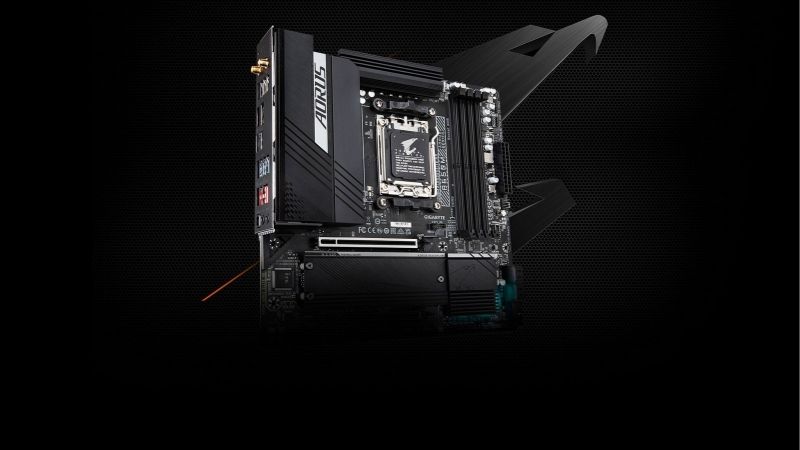
Reading the Gigabyte Product Ladder
Gaming X sits at the entry level with adequate power delivery and basic connectivity. AORUS Elite is the mid-range tier where most gaming builds should land, adding stronger VRM cooling, better networking and the tool-free features.
AORUS Master and above bring heavier power delivery, more M.2 slots and premium networking such as 5G Ethernet or USB4. Those tiers matter for sixteen-core processors and workstation duty rather than for gaming.
The UD line appears occasionally at the very bottom and should be treated as an office board. Power delivery there is minimal and rear connectivity is sparse enough to be limiting in a gaming system.
Power Delivery Across the Range
Gigabyte publishes phase configurations clearly, and the B850 AORUS Elite runs a 14+2+2 arrangement that handles any current processor comfortably. The X870E AORUS Master steps up substantially for heavy all-core work.
Where the brand has been criticised is heatsink mass at the entry tier. A Gaming X board paired with a sixteen-core chip under sustained load will pull clocks back sooner than a mid-range board with the same phase count.
For a six or eight-core gaming processor none of that becomes relevant. Games load too few threads to stress power delivery meaningfully, which is why the entry tier remains a defensible choice in a pure gaming build.
Tool-Free Features That Actually Help
Gigabyte leads the industry on assembly convenience. EZ-Latch clips M.2 drives and their heatsinks into place without screws, and the quick-release graphics latch lets you remove a card without reaching behind it.
Those features sound like marketing until you have removed a graphics card in a cramped case. On a build you expect to open regularly, they save real time and reduce the chance of damaging a slot.
The M.2 thermal guards are worth checking individually, though. Boards vary in whether every slot gets a substantial heatsink or only the primary one, which matters if you plan to run a Gen5 drive in a secondary position.
The Firmware Caveat
Gigabyte BIOS is the weakest of the three major brands for memory tuning. High-speed EXPO kits sometimes need manual intervention that would train automatically on an ASUS or MSI board.
Board revisions also matter more here than elsewhere. Some early production runs needed a firmware update before running the newest processors, so check for Q-Flash Plus support, which updates the BIOS from a USB drive with no processor installed.
Top Picks: Gigabyte Best Motherboard Options by Tier
These six span AM5 and Intel platforms across ATX and micro-ATX. Specifications are Gigabyte-published as of August 2026.
| Board | Socket | Form Factor | Networking | Tier |
|---|---|---|---|---|
| B850 AORUS Elite WiFi7 | AM5 | ATX | Wi-Fi 7, 2.5G | Mid-range |
| X870 AORUS Elite WiFi7 | AM5 | ATX | Wi-Fi 7, 2.5G | Upper mid |
| X870E AORUS Master | AM5 | ATX | Wi-Fi 7, 5G LAN | Flagship |
| B850M AORUS Elite WiFi6E | AM5 | Micro-ATX | Wi-Fi 6E, 2.5G | Compact |
| B650 Gaming X AX | AM5 | ATX | Wi-Fi 6E, 2.5G | Budget |
| Z890 AORUS Elite WiFi7 | LGA 1851 | ATX | Wi-Fi 7, 2.5G | Intel mid-range |
B850 AORUS Elite WiFi7 – Best Overall
This is the gigabyte best motherboard for most gaming builds. A 14+2+2 power arrangement covers any AM5 processor, and the board pairs a PCIe 5.0 graphics slot and Gen5 M.2 with Wi-Fi 7 and 2.5G Ethernet.
Tool-free M.2 retention and the quick-release graphics latch make it the easiest board here to build in. Firmware remains the weak point, particularly with aggressive memory kits, so budget time for manual tuning if you push past 6000.
X870 AORUS Elite WiFi7 – Best for Connectivity
The X870 chipset mandates USB4, so this board offers 40Gbps external connectivity alongside stronger power delivery than the B850 equivalent. For a machine that doubles as a workstation, that is the meaningful upgrade.
Gaming performance is identical to the B850 board with the same components, so the premium buys ports rather than frames. Rear I/O layout also mixes USB generations in a way that requires checking the manual.
X870E AORUS Master – Best Flagship
Heavy power delivery, four M.2 slots, 5G Ethernet and extensive VRM cooling make this the board for sixteen-core processors under sustained load. Build quality and heatsink mass are a clear step above the Elite tier.
It is expensive enough that the money would be better spent on a graphics card in most gaming builds. Populating all M.2 slots also triggers lane sharing that reduces the graphics slot to eight lanes on some configurations.
B850M AORUS Elite WiFi6E – Best Compact Option
This micro-ATX board keeps four DIMM slots, solid power delivery and the tool-free M.2 system in a form factor that fits considerably smaller cases. For a compact AM5 gaming build it covers everything needed.
Networking steps down to Wi-Fi 6E rather than Wi-Fi 7, and rear I/O is noticeably sparser than the full-size Elite. Expansion slots are limited to what a single graphics card plus one small card requires.
B650 Gaming X AX – Best Budget Board
When the budget belongs to the graphics card, this delivers the essentials: four DIMM slots, adequate power delivery for six and eight-core chips, Wi-Fi 6E and 2.5G Ethernet at the lowest price in the lineup.
VRM heatsinks are modest enough that a sixteen-core processor is beyond its comfortable range, and B650 does not guarantee a Gen5 M.2 slot the way B850 does. Check the specific model listing rather than assuming.
Z890 AORUS Elite WiFi7 – Best Intel Option
For a Core Ultra build, this mirrors the B850 Elite on features while adding the memory support and Thunderbolt connectivity that the Intel platform provides. Power delivery is comfortable for any current Intel chip.
The platform limitation is upgrade path rather than the board itself. LGA 1851 has a short roadmap and Intel’s next architecture moves to a different socket, so this is effectively a single-generation purchase.
What the 2026 Market Means for Gigabyte Buyers
Two developments should shape which tier of gigabyte best motherboard you buy into and how long the board stays useful.
AM5 Is Supported Through 2029
AMD confirmed at Computex 2026 that AM5 will keep receiving processors through the end of 2029, while Intel moves to a new socket for its next architecture. A Gigabyte AM5 board bought today has years of drop-in upgrades ahead.
That changes how to value power delivery. Paying a little more for a board that comfortably handles a sixteen-core chip makes sense when the processor you install in 2028 may need that headroom without a board replacement.
Memory Pricing Shifts Where to Spend
DDR5 contract prices rose sharply through 2026 with forecasts pointing to further increases into Q4, and no new manufacturing capacity is expected before late 2027. Memory now takes a larger share of a build budget.
That argues for the AORUS Elite tier rather than Master, since gaming performance is identical and the saving funds the memory capacity you actually need. It also makes buying one larger kit upfront the sensible approach.
The Budget Tier Is Thinning
Motherboard unit sales have fallen more than 25%, and manufacturers including Gigabyte have concentrated on mid and high-tier products. Promotional pricing policies tightened in early 2026 and some entry lines have disappeared from listings.
The risk is availability rather than price. If a Gaming X board fits your build and you see it in stock, buying it then is more sensible than waiting for a discount that may not arrive before the model is discontinued.
Frequently Asked Questions
The gigabyte best motherboard question usually arrives with these, from builders deciding whether the AORUS badge is worth the step up.
Is the gigabyte best motherboard always an AORUS model?
For gaming builds, usually yes, since AORUS Elite is where the tool-free features, stronger VRM cooling and better networking begin. Gaming X remains a reasonable budget choice with a six or eight-core processor.
How does Gigabyte compare to ASUS and MSI?
Gigabyte leads on physical build convenience and usually undercuts ASUS on price at the same specification. It trails both rivals on firmware polish, particularly for memory tuning, which is the main reason to choose differently.
What is Q-Flash Plus and do I need it?
It updates the BIOS from a USB drive with no processor or memory installed. That matters when buying a board that has been in stock since before your chip launched, since it removes the need to borrow an older processor.
Do board revisions matter when buying Gigabyte?
They can. Some earlier production runs shipped with firmware predating current processors, and revision numbers are printed on the box rather than in the listing. Q-Flash Plus support removes most of the risk either way.
See More:
- Best 4TB NVMe SSD
- Best thermal grizzly paste
- Best thermal paste for 7800X3D
- Best CPU case fans
- Best motherboard for gaming computer
Final Thoughts
The gigabyte best motherboard for most gaming builds is the B850 AORUS Elite WiFi7, which pairs solid power delivery with the tool-free features the brand does better than anyone. Step up to X870 only if you need USB4, and to the Master tier only for sustained all-core work. With AM5 supported through 2029 and memory absorbing more of a typical budget, the Elite tier is the right landing point for most people.











Write Your Review
No reviews yet. Be the first to share your experience!