
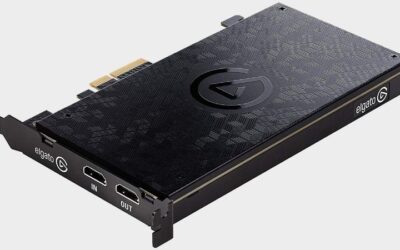
- Top Pick: Elgato 4K Pro Internal Capture Card, 8K60 Passthrough
- Best Value: AVerMedia GC573 Live Gamer 4K, Internal Capture Card, Stream and Record 4K60 HDR10 with ultra-low latency on PS5, PS4 Pro, Xbox Series X/S, Xbox One X, in OBS, Twitch, YouTube
- Premium Choice: VIXLW 4K Internal Capture Card, PCIe Capture Card, HDMI, 4K60 Passthrough, Ultra-Low Latency for Streaming & Recording, for PS4,PS5, Xbox, in OBS, YouTube, Single & Dual PC Setups, Black
The best internal capture card exists for one reason: a PCIe slot supplies far more bandwidth than any USB port, which matters once you move past 1080p60. The trade is that you need a desktop with a free slot and the patience to install it properly. Slot bandwidth is the whole argument for going internal.
As an Amazon Associate we earn from qualifying purchases at no extra cost to you.




As an Amazon Associate we earn from qualifying purchases at no extra cost to you.
By Ryan Cole
How to Choose the Best Internal Capture Card
Internal cards are simpler than they look, but the specifications that matter are not the ones printed largest on the box. These four points decide whether the card fits your machine and actually improves what you record. They also decide whether the best internal capture card in your build starves something else.
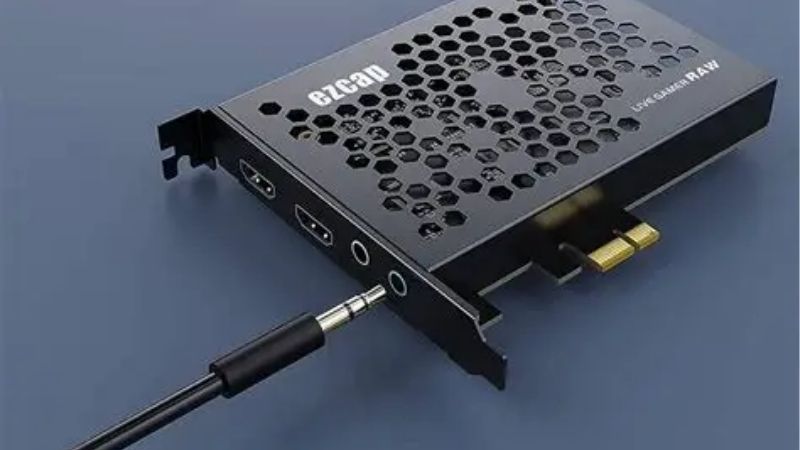
Slot type and available lanes
Most capture cards use a PCIe x4 connector, and almost all of them run happily in a physically longer slot. What matters is how many lanes that slot actually receives, because motherboards frequently drop a secondary slot to x1 when other devices are populated. Physical fit and lane count are separate questions.
Check the manual for your board rather than counting slots visually. On compact boards the second slot often shares lanes with an M.2 socket, which means installing a capture card can quietly reduce the speed of a drive you already rely on. The block diagram is the document that matters.
Capture resolution versus passthrough
Capture resolution is what the card records or sends to streaming software, while passthrough is the signal it sends onward to your display with minimal delay. The two figures are frequently different, and the passthrough number affects your experience more. The two figures rarely match on a product page.
A card that captures 4K60 while passing through 4K144 with variable refresh support lets you play at full display speed and still record a high resolution file. If passthrough caps below your monitor, you are choosing between recording quality and how the game feels. Passthrough is what you look at all session.
Compressed or uncompressed output
Consumer cards deliver compressed video, which keeps bandwidth and file sizes manageable and suits streaming perfectly well. Professional cards output uncompressed frames, which preserves every detail but demands far more from the processor and the storage system. File size follows directly from that choice.
For gaming and streaming, compressed output is the right answer. Uncompressed capture makes sense for video production work where the footage will be graded or heavily edited, and where the storage array is built to sustain those write speeds continuously. Storage speed is part of the decision.
Drivers, software and operating system support
Every internal card requires a driver, since there is no class-compliant standard for PCIe capture the way there is for USB devices. That makes ongoing manufacturer support a genuine buying consideration rather than an afterthought you can ignore. Support length is worth checking before buying.
Check that the card works with your streaming software directly rather than only through the manufacturer’s own application. OBS Studio support is the practical baseline, and cards that require a proprietary layer add complexity to a workflow you rely on being stable. OBS support is the practical baseline here.
Top Picks: Best Internal Capture Card Options in 2026
These five cover gaming capture, dual-input setups and professional uncompressed work. Check your available slot and lane configuration first, since that constraint eliminates more options than performance does. Stock was checked in August 2026. Any of them can be the best internal capture card depending on your board layout.
| Card | Capture | Passthrough | Interface |
|---|---|---|---|
| Elgato 4K Pro | 4K60 HDR10 | Up to 4K144 with VRR | PCIe x4 |
| AVerMedia Live Gamer 4K 2.1 | 4K60 HDR | Up to 4K144 | PCIe x4 |
| AVerMedia Live Gamer Duo | Two inputs, 1080p60 | 4K60 | PCIe x4 |
| Elgato 4K60 Pro MK.2 | 4K60 HDR10 | 4K60 HDR10 | PCIe x4 |
| Magewell Pro Capture HDMI 4K Plus | Up to 4K30 uncompressed | None | PCIe x4 |
Elgato 4K Pro
This is the default recommendation for a modern gaming setup, capturing 4K60 with HDR10 while passing through up to 4K144 with variable refresh rate intact. For a high refresh monitor paired with a current console, nothing here compromises less. It is the least compromised option for gaming.
It is the most expensive gaming-focused card in the list, and 4K60 recordings consume storage quickly enough that a dedicated drive becomes sensible. The card is also physically long, which is worth checking against a crowded case before ordering. Measure the slot clearance before ordering.
AVerMedia Live Gamer 4K 2.1
AVerMedia matches the headline figures closely with 4K60 capture and passthrough up to 4K144, usually at a lower price than the Elgato equivalent. For builders who want flagship capability without paying the flagship premium, it is the sensible alternative. It is the value pick at the top of the range.
The bundled software is less refined, so most users end up working through OBS Studio instead. Some passthrough modes have proved fussier with particular monitors, which makes checking compatibility with your exact display worthwhile before you commit. Confirm your monitor is on the supported list.
AVerMedia Live Gamer Duo
The Duo takes two HDMI inputs on a single card, which lets you capture a console and a camera, or a game feed and a second source, without buying two devices. For a production-style setup that flexibility is genuinely useful. Two sources on one slot is the selling point.
Each input is limited to 1080p60, so this is not the card for 4K recording. It is also aimed at a specific workflow, and anyone capturing a single source will get better value from a standard one-input card at a similar price. Check whether you actually need the second input.
Elgato 4K60 Pro MK.2
The previous generation still handles 4K60 capture with HDR10 and passthrough at the same resolution, and it appears at lower prices now that a successor exists. For a 60Hz display it delivers effectively the same result as the newer card. It is a reasonable buy for a 60Hz setup.
Passthrough caps at 4K60 with no high refresh or variable refresh support, which makes it a poor match for a 120Hz or 144Hz setup. Stock is also inconsistent as retailers clear remaining units rather than restocking them. Stock is being cleared rather than replenished.
Magewell Pro Capture HDMI 4K Plus
Magewell builds for professional use, delivering uncompressed capture at up to 4K30 with drivers that are maintained across operating systems for years. In broadcast and production environments it is a common and trusted choice. Driver longevity is what you are paying for.
There is no passthrough, no gaming focus and no HDR handling, so it is the wrong card for streaming gameplay. It is also considerably more expensive than consumer options, and the uncompressed output places real demands on your storage. Plan the storage before you plan the card.
What Q4 2026 Means for Capture Hardware
Demand for the best internal capture card options is unusually seasonal this year, and the release calendar is the main reason. Two factors are worth weighing before you order. Both affect availability more than price.
A console-driven release schedule
Call of Duty Modern Warfare 4 arrived on 23 October and GTA 6 follows on 19 November as a console release with no confirmed computer version. Previous titles from the same studio took well over a year to reach personal computers.
Computer gamers buying a console for those titles need a capture device to stream from their existing setup. That pushes demand toward exactly the cards listed here, and popular models become harder to find in the weeks around those launches. Popular models thin out quickly in November.
Availability matters more than price
Capture hardware is not tied to the memory contract pricing that has kept storage and system memory elevated through 2026, so genuine discounts around 27 November remain plausible. Prices quoted here reflect August 2026 and should be rechecked. Cooling and capture parts still discount properly.
The risk is stock rather than cost. If one card matches your slot configuration and your display, buying before the seasonal rush is safer than waiting for a discount on a model that may be unavailable when you finally decide. A discount is worthless on an out-of-stock card.
No new generation before CES 2027
No major platform launches are scheduled before CES in January 2027, so a card bought now will remain current for some time. There is no imminent standard that would make a 4K60 capture card look dated within the next year.
That argues for buying to match the equipment you already own. Paying for 4K144 passthrough when your display caps at 4K60 buys nothing, and the money is better spent on storage for the recordings you actually intend to keep. Storage is the better place for spare budget.
Frequently Asked Questions
The questions readers ask most when choosing the best internal capture card, covering external alternatives, lanes, latency and recording quality. They assume a desktop with at least one free slot.
Is an internal card better than an external one?
It has more bandwidth available and frees a USB port, which matters at 4K. For consoles, laptops or anyone who moves equipment between locations, an external device remains the more practical choice despite the lower ceiling. Portability is where external devices still win.
Will a capture card slow down my graphics card?
On most boards the primary slot keeps its full lane allocation, so the graphics card is unaffected. The risk is on compact boards where a secondary slot shares lanes with an M.2 socket, which can reduce drive performance instead.
Do I still need passthrough on a single PC?
Not for capturing your own gameplay, since software records the game directly. Passthrough matters when a console or second machine feeds the card, because you need to see that source without the capture pipeline delay. Console feeds are the case that needs it.
Does 4K capture need a fast drive?
It needs sustained write performance rather than a high sequential figure. A Gen4 NVMe drive with onboard cache handles long recordings comfortably, while cheaper drives slow noticeably once their fast cache is exhausted mid-session.
See More:
- best CPU cooler for Ryzen 5 5600X
- best small form factor CPU cooler
- best SFF CPU cooler
- best CPU cooler for i9-14900K
- What is the best AIO CPU cooler
Final Thoughts
The best internal capture card for your setup is the one whose passthrough matches your display and whose lane requirement your board can satisfy. Confirm both before ordering, then choose capture resolution based on where the footage is actually going. Lane allocation decides more than the price does.

Write Your Review
No reviews yet. Be the first to share your experience!