
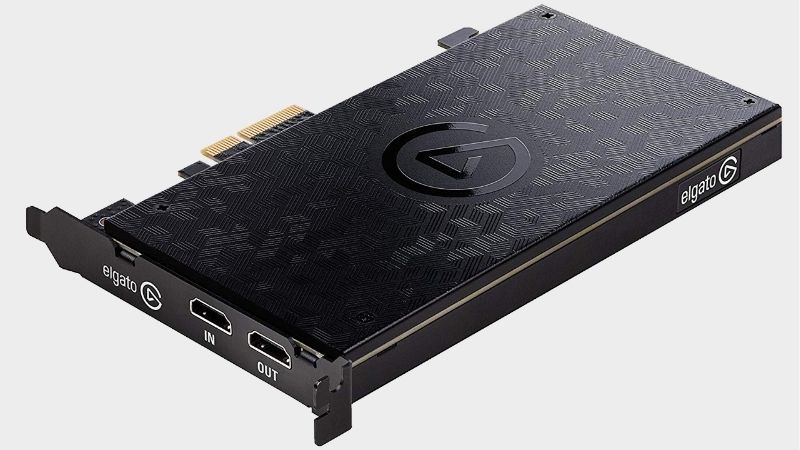
- Top Pick: Elgato 4K Pro Internal Capture Card, 8K60 Passthrough
- Best Value: AVerMedia GC573 Live Gamer 4K, Internal Capture Card, Stream and Record 4K60 HDR10 with ultra-low latency on PS5, PS4 Pro, Xbox Series X/S, Xbox One X, in OBS, Twitch, YouTube
- Premium Choice: AVerMedia HDMI 2.1 Internal PCIe Capture Card for Streaming and Recording 4K60 with Ultra-Low Latency on PS5, PS4 Pro, Xbox Series X/S, Xbox One X, Switch Games – GC575 Live Gamer 4K 2.1
Choosing the best PCIe capture card is as much a motherboard question as a capture question. Lane allocation, slot placement and airflow around the card decide whether it performs as advertised or quietly costs you drive speed elsewhere in the system. Read the motherboard manual before the product page.
As an Amazon Associate we earn from qualifying purchases at no extra cost to you.




As an Amazon Associate we earn from qualifying purchases at no extra cost to you.
By Ryan Cole
How to Choose the Best PCIe Capture Card for Your Board
Before comparing capture specifications, work out what your motherboard can actually give the card. These four checks catch the problems that appear after installation rather than before it. Getting the best PCIe capture card right starts with the block diagram.
Lane allocation and shared bandwidth
Capture cards typically use a x4 connector, and they will run in any physically longer slot. The problem is that many boards give a secondary slot only one lane, or disable it entirely when a second M.2 drive is installed in the shared socket. Slot count tells you almost nothing on its own.
The block diagram in your motherboard manual shows exactly which devices compete. Reading it before you buy takes five minutes and avoids the common outcome of a capture card working while a storage drive silently drops to a slower mode. Five minutes of reading avoids a bad surprise.
Slot placement, length and airflow
Modern graphics cards are thick enough to cover the slot immediately below them, and several are long enough to overlap a second slot entirely. Measure the space rather than assuming the slot is usable simply because it exists on the board. Card length is as important as slot position.
Capture cards also generate heat and usually rely on case airflow rather than an active fan. Mounting one directly beneath a graphics card that exhausts downward is the most common cause of a card running hotter than it should. Passive cards depend entirely on case airflow.
Capture format and what your system must handle
Consumer cards output compressed video, which keeps processor load and file sizes reasonable. Professional cards deliver uncompressed frames, which preserves quality for editing but requires far more from both the processor and the storage subsystem. Storage requirements follow from this choice.
Match this to your actual workflow. Streaming and gameplay recording work perfectly with compressed output, while uncompressed capture only makes sense when the footage will be graded or when a broadcast pipeline demands it. Most people need compressed output only.
Driver quality and software support
There is no class-compliant standard for PCIe capture, so every card depends on a driver and on the manufacturer maintaining it. That makes long-term support a real consideration rather than a detail you can safely ignore at purchase time. Support length varies enormously by brand.
Confirm the card appears natively in OBS Studio rather than only through a proprietary application. A card that requires an extra software layer adds another component that can break after an update, in a workflow you need to be dependable. An extra software layer is another failure point.
Top Picks: Best PCIe Capture Card Options in 2026
These five span gaming capture, dual-input production and professional uncompressed work. All use a x4 connector, so read the lane column against your board diagram first. Stock was checked in August 2026 against current listings. Which is the best PCIe capture card depends on the lanes your board can spare.
| Card | Connector | Capture | Suits |
|---|---|---|---|
| Elgato 4K Pro | PCIe x4 | 4K60 HDR10 | High refresh gaming |
| AVerMedia Live Gamer 4K 2.1 | PCIe x4 | 4K60 HDR | Value flagship |
| Magewell Pro Capture HDMI 4K Plus | PCIe x4 | Up to 4K30 uncompressed | Production work |
| AVerMedia Live Gamer Duo | PCIe x4 | Two 1080p60 inputs | Two sources at once |
| Elgato 4K60 Pro MK.2 | PCIe x4 | 4K60 HDR10 | 60Hz displays |
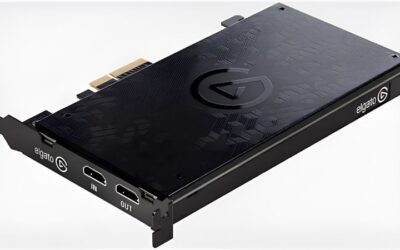
Elgato 4K Pro
For a gaming build this is the card to beat, capturing 4K60 with HDR10 and passing through up to 4K144 with variable refresh rate preserved. Driver support has been consistent and it appears directly as a source inside OBS Studio. Driver updates have been steady on this one.
It is long enough that slot clearance needs checking in a case already holding a large graphics card. It is also the most expensive gaming option here, and 4K60 recordings fill a drive faster than most people expect. Long cards and crowded cases rarely mix well.
AVerMedia Live Gamer 4K 2.1
The closest competitor matches 4K60 capture and 4K144 passthrough for less money, which makes it the value choice at the top of the market. It installs the same way and presents itself to streaming software without any complication. It is the value option at flagship level.
The bundled application is weaker than Elgato’s, so plan on using OBS. Reports of fussy behaviour with specific monitors in certain passthrough modes make it worth confirming compatibility with your display before buying. Check your display before committing to it.
Magewell Pro Capture HDMI 4K Plus
Magewell is the professional option, delivering uncompressed capture at up to 4K30 with drivers maintained across operating systems for years rather than months. In production environments that longevity is the reason people pay the premium. Slot consolidation is the real advantage.
There is no passthrough, no HDR support and no gaming focus at all. Uncompressed output also places real demands on storage and processor, so it is a poor fit for anyone simply wanting to record gameplay sessions. One input is enough for most streamers.
AVerMedia Live Gamer Duo
Two HDMI inputs on one card means a console and a camera, or two machines, can be captured without a second slot. On a board where slots are scarce, that consolidation is worth more than the specification alone suggests. Uncompressed output needs a dedicated drive.
Both inputs cap at 1080p60, so 4K recording is not an option. Anyone capturing a single source will get better capability for the same money from a standard one-input card, making this a workflow-specific purchase. It is built for production, not for gaming.
Elgato 4K60 Pro MK.2
The older generation still captures 4K60 with HDR10 and passes the same resolution through, and it now sells for noticeably less. Paired with a 60Hz display it produces effectively the same result as the current model. It suits a 60Hz display without complaint.
Passthrough has no high refresh or variable refresh support, which rules it out for a 120Hz or 144Hz monitor. Availability is also inconsistent, since retailers are clearing remaining stock rather than reordering it. Availability is inconsistent at this point.
What Q4 2026 Means for This Purchase
Timing matters more than usual this quarter, because demand for the best PCIe capture card models is driven by a console release calendar rather than by hardware launches. Both affect stock levels more than pricing.
Console exclusives are driving demand
Call of Duty Modern Warfare 4 arrived on 23 October and GTA 6 follows on 19 November as a console title with no confirmed computer version. Precedent from the same studio suggests a port could take well over a year to appear. That precedent shapes expectations this year.
That sends computer gamers toward consoles and, in turn, toward capture hardware so they can stream from the setup they already own. Demand concentrates around those dates, and stock on popular models thins noticeably. Stock thins in the weeks around a launch.
Pricing and stock this year
Capture cards sit outside the memory contract pricing that has kept storage and system memory elevated through 2026, so real reductions around 27 November are plausible. Figures here reflect August 2026 and are worth confirming. Cooling and capture parts still discount normally.
Availability is the greater risk. Where a specific card is the only one that suits your board layout and display, buying ahead of the rush beats waiting for a discount on something that has sold out everywhere. Securing the right card beats saving a little.
Buy for the system you have
With no platform launch scheduled before CES in January 2027, a card bought now stays current. There is no imminent standard that would make a 4K60 capture card look outdated within the next twelve months. No standard change is due in the next year.
That makes matching the card to your existing board and monitor the sensible approach. Spending on passthrough your display cannot use is money better directed toward storage for the footage you plan to keep. Storage is where the remaining budget belongs.
Frequently Asked Questions
Common questions from readers installing a capture card in a desktop, covering slots, lanes, heat and operating system support. They come up most from readers fitting the best PCIe capture card into an existing build.
Can I put a x4 card in a x16 slot?
Yes, and it will work normally. The card only uses the lanes it needs, so the main consideration is whether the slot itself receives enough lanes from the chipset once your other devices are installed. Lane count is the number that matters.
Will it conflict with my M.2 drives?
It can on compact boards, where a secondary slot shares bandwidth with an M.2 socket. Check the block diagram in the manual, since the conflict usually appears as reduced drive speed rather than as an obvious failure. Reduced drive speed is the usual symptom.
Do capture cards need extra cooling?
Most rely on case airflow and have no fan of their own. Avoid mounting one directly under a graphics card that exhausts downward, and leave a slot gap if the layout of your board and case allows it. A slot gap helps more than people expect.
Do these work on Linux?
Support varies considerably by manufacturer, and consumer gaming cards are generally the weakest in this respect. Professional cards from broadcast-focused brands usually provide better documented drivers for non-Windows systems. Check documentation before assuming support.
See More:
- best CPU cooler for Ryzen 5 5600X
- best small form factor CPU cooler
- best SFF CPU cooler
- best CPU cooler for i9-14900K
- What is the best AIO CPU cooler
Final Thoughts
The best PCIe capture card for your build is whichever one your board can feed properly without starving another device. Read the lane diagram first, confirm slot clearance, then choose capture resolution to match your display and workflow. The board decides this more than the card does.

Write Your Review
No reviews yet. Be the first to share your experience!