
Best motherboard for AMD Ryzen 7 9800X3D planning should start with the rest of the machine. This processor performs identically on a mid-range board and a flagship, so the decisions that matter are physical: what cooler you are fitting, what case it goes in, and which features you will genuinely use.
As an Amazon Associate we earn from qualifying purchases at no extra cost to you.
By Ryan Cole, PC hardware writer at NvidiaReview
How to Choose the Best Motherboard for AMD Ryzen 7 9800X3D
Selecting the best motherboard for AMD Ryzen 7 9800X3D builds is mostly an exercise in not overspending. Three things decide it: where the board genuinely affects performance, how it fits the cooler and case you have chosen, and which features are worth their price at this tier.
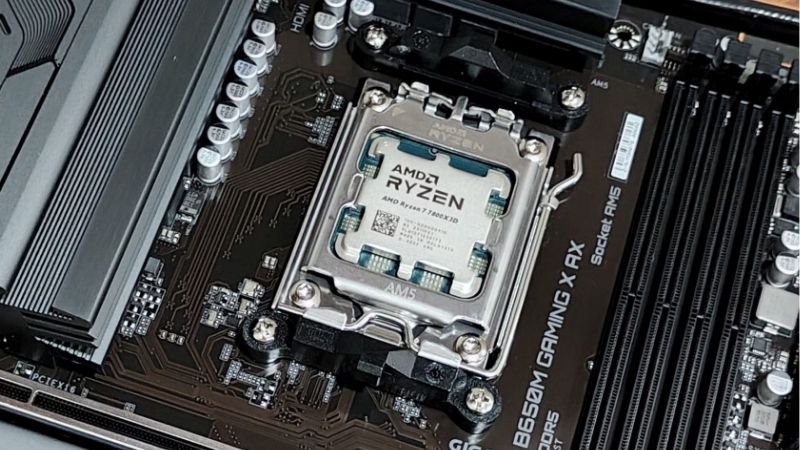
Where a Board Affects This Processor at All
Power delivery is not the constraint. At a 162W package limit, this eight-core chip runs comfortably on any mid-range design, and a larger VRM array changes nothing you can measure. What does matter is how the board runs your memory and how clearly it exposes tuning settings.
A 6000 MT/s EXPO kit at a 1:1 memory controller ratio is the target, and boards vary in stability at that speed. Per-core Curve Optimizer undervolting is the only meaningful tuning this chip rewards, so a BIOS that presents those settings clearly is worth more than extra phases.
Cooler Clearance, Case Airflow and Layout
This chip concentrates heat under its stacked cache die, so most builds pair it with a substantial dual-tower cooler or a 240mm liquid unit. Tall VRM heatsinks on gaming boards can foul wide air coolers, particularly on the memory side, so check clearance diagrams before ordering.
Board layout also determines how hot your storage gets. A primary M.2 slot sitting between the socket and the graphics card collects heat from both, which matters if you plan a Gen5 drive. Airflow around the socket helps the processor, the power stages and the drive simultaneously.
Which Features Are Worth Paying For
Worth having: Wi-Fi you will actually use, a front panel USB-C header, decent onboard audio, screwless M.2 heatsinks and a quick-release latch for the graphics card. These affect the experience of owning and maintaining the machine every time you open the case.
Usually not worth it for this chip: USB4 unless you own high-speed external storage, dual-chipset X870E boards, and PCIe 5.0 on the graphics slot, which no current card comes close to needing. Those features exist for workstation use rather than an eight-core gaming build.
Top Picks: Best Motherboard for AMD Ryzen 7 9800X3D Builds
These five candidates for the best motherboard for AMD Ryzen 7 9800X3D span budget ATX to compact Mini-ITX. All figures are vendor-published specifications and revisions vary, so confirm the exact model code before ordering. Availability was checked in August 2026.
| Board | Chipset | Form factor | Networking | Best for |
|---|---|---|---|---|
| Gigabyte X870 Aorus Elite WIFI7 | X870 | ATX | 2.5GbE, Wi-Fi 7 | Storage-heavy builds |
| MSI MAG B850 Tomahawk WiFi | B850 | ATX | 2.5GbE, Wi-Fi 7 | Best all-rounder |
| ASUS ROG Strix X870-A Gaming WiFi | X870 | ATX | 2.5GbE, Wi-Fi 7 | White builds |
| ASUS Prime X870-P WiFi | X870 | ATX | 2.5GbE, Wi-Fi 7 | USB4 on a budget |
| MSI MPG B850I Edge TI WiFi | B850 | Mini-ITX | 2.5GbE, Wi-Fi 7 | Compact builds |
MSI MAG B850 Tomahawk WiFi – Best Overall
The Tomahawk line has been the sensible default on AM5 for two chipset generations, pairing generous power delivery with dual 8-pin connectors, multiple M.2 slots, Wi-Fi 7 and 2.5GbE. VRM heatsinks are large enough to stay comfortable even with poor case airflow around the socket.
Rear USB port count is adequate rather than generous, and the plain black styling will not suit a show build. There is no USB4 at this tier. For a gaming machine built around this processor, it delivers everything that matters and nothing you are paying for without reason.
Gigabyte X870 Aorus Elite WIFI7 – Best for Storage
Gigabyte specifies a 16+2+2 phase design with four M.2 slots, three of them PCIe 5.0, plus dual USB4 Type-C ports, Wi-Fi 7 and 2.5GbE. The EZ-Latch screwless mechanisms for storage and the graphics card make both assembly and later maintenance noticeably quicker.
It costs meaningfully more than a B850 board while producing identical gaming results with this chip, and the audio codec sits below flagship implementations. If you run several NVMe drives or want a Gen5 storage upgrade path, that slot layout is the reason to pay the difference.
ASUS Prime X870-P WiFi – Best Budget Route to USB4
The Prime range strips out gaming styling and keeps the chipset features, which makes this the cheapest straightforward path to USB4 at 40Gbps alongside Wi-Fi 7 and 2.5GbE. Power delivery is ample for a 162W processor, and the BIOS is the familiar ASUS layout.
VRM heatsinks are smaller than on the gaming ranges, so airflow matters, and rear I/O beyond the USB4 ports is basic. There is no lighting and little visual appeal. If you specifically need USB4 for external storage or a dock, this reaches it for the least money.
ASUS ROG Strix X870-A Gaming WiFi – Best for a White Build
The X870-A is the white-finished ROG option, combining a strong power stage array, USB4, Wi-Fi 7, 2.5GbE and the ROG BIOS that remains the clearest for memory tuning and Curve Optimizer work. For a light-coloured build behind glass, matching components properly is genuinely difficult.
You pay both an ROG premium and a colour premium for performance identical to boards costing far less with this processor. The heatsink covers also add weight and complicate cooler installation. Buy it for the build aesthetic, which is a legitimate reason, not for performance.
MSI MPG B850I Edge TI WiFi – Best Compact Option
For a small form factor build, this Mini-ITX board provides two DIMM slots, dual M.2 support, Wi-Fi 7 and 2.5GbE in a 170mm square. The two-slot memory layout is an advantage rather than a limitation, since shorter traces usually mean higher stable EXPO transfer rates.
Memory capacity is halved, rear I/O is necessarily limited, and VRM temperatures climb faster in a confined chassis. Cooler clearance in compact cases is tight for the tower coolers this chip prefers. Plan the cooling before choosing the case and it makes an excellent compact base.
What the 2026 Market Means for This Build
Building around this processor in 2026 means planning the budget with an eye on what has happened elsewhere in the parts list, because the best motherboard for AMD Ryzen 7 9800X3D builds is rarely the expensive one. Three factors are worth understanding before ordering.
AM5 Support Runs Through 2029
AMD confirmed at Computex 2026 that socket AM5 will keep receiving new processors until the end of 2029, while Intel moves to a new socket with its next generation. The board you buy for this chip can therefore host something considerably faster in a few years without a rebuild.
That is the argument for buying a solid mid-range board rather than the cheapest available. Better VRM cooling, an extra M.2 slot and reliable firmware updates all keep their value across future processors, whereas a chipset badge you never exercise does not.
Memory Is Now a Major Line Item
DRAM prices have risen substantially through 2026, with further increases forecast and little new manufacturing capacity before late 2027. A 32GB DDR5 kit now takes a far bigger share of the total build than it did previously, which squeezes the rest of the parts list.
Since this processor gains nothing from an expensive board, that is where to absorb the pressure. Choosing B850 over X870E and putting the difference into a 6000 MT/s EXPO kit with tight timings produces a faster machine, which is the clearest trade available in this build.
No New Hardware Until CES 2027
Both AMD’s Zen 6 processors and Intel’s Nova Lake have slipped to CES in January 2027, so nothing imminent rewards waiting. This chip remains among the strongest gaming processors available, and its board ecosystem is mature with well-tested firmware after more than a year on sale.
Board discounts around the late-year sales remain genuine, unlike memory and storage, so grouping a motherboard purchase into that window is reasonable if the build can wait. Everything described here reflects August 2026 conditions and should be verified before ordering.
Frequently Asked Questions
The questions builders ask most when specifying this machine: whether the chipset tier matters in practice, what cooler to plan the board around, how much memory to buy at current prices, and whether a compact board limits anything this processor can actually do.
Does this processor need an X870 board?
No. The best motherboard for AMD Ryzen 7 9800X3D is usually a B850 or discounted B650 board, since either handles the 162W package limit easily with identical gaming performance. X870 is worth the premium only when you specifically want USB4 at 40Gbps or richer rear connectivity, neither of which affects how the processor performs in games.
What cooler should I plan the board around?
A dual-tower air cooler or a 240mm liquid unit covers it. If you choose air, check the cooler’s clearance diagram against the board’s VRM heatsink height and your memory module height, since wide coolers overhang the first slot on most boards in this class.
Is 32GB of memory enough for this chip?
For gaming, comfortably, and it is the sensible capacity given current pricing. Buy it as two matched sticks running a 6000 MT/s EXPO profile rather than four smaller modules, since four populated slots frequently clock lower and complicate stability at the same rated speed.
Does a Mini-ITX board limit this processor?
Not in performance terms. The best motherboard for AMD Ryzen 7 9800X3D can be a Mini-ITX one, since the chip runs identically and two-slot memory layouts often reach higher stable speeds. The limits are practical: fewer rear ports, halved memory capacity, tighter cooler clearance and warmer VRM temperatures inside a small case.
See More:
- Best thermal compound paste
- Thermal paste at Best Buy
- Graphics card at Best Buy
- Best AM4 CPU for gaming
- Best motherboard for 9800x3d
Final Thoughts
The best motherboard for AMD Ryzen 7 9800X3D is one chosen around your cooler, your case and the features you will actually touch. The MSI B850 Tomahawk covers almost every build, the Gigabyte X870 Aorus Elite suits storage-heavy machines, and the compact Edge TI handles small builds. Spend the difference on memory instead.
As an Amazon Associate we earn from qualifying purchases at no extra cost to you.














Write Your Review
No reviews yet. Be the first to share your experience!