
- Top Pick: maxsun GEFORCE GTX 1050 Ti 4GB GDDR5 128 Bit Video Gaming Graphics Card for Gaming PC Mini Small Form Factor SSF Slim Low Profile Design GPU, DisplayPort, HDMI (Low Profile)
- Best Value: AISURIX GTX 1050 Ti 4G Graphics Card, 128 Bit GDDR5 PCI Express 3.0 Graphics Card, DVI VGA HDMI Graphics Card with Freeze Fans (GTX 1050 ti)
- Premium Choice: msi Gaming GeForce GT 1030 4GB DDR4 64-bit HDCP Support DirectX 12 DP/HDMI Single Fan OC Graphics Card (GT 1030 4GD4 LP OC)
Top Nvidia Geforce Gtx 1050 Still Picks for 2026
Here are our current top nvidia geforce gtx 1050 still picks, compared on real Amazon owner reviews, price, and features. Live prices update below.


Limited Time
Gigabyte Geforce GTX 1050 2GB GDDR5 128 Bit PCI-E Graphic Card (GV-N1050OC-2GD) (Renewed)


Nvidia GeForce GTX 1050 Ti remains one of the most searched budget graphics cards years after launch, and that staying power raises a fair question for 2026 buyers: does a 75W Pascal card from 2016 still deserve a slot in a modern build? This review pulls together verified specifications, owner feedback aggregated from hundreds of 4–5 star and 2–3 star Amazon listings, and current pricing trends to give a grounded answer instead of nostalgia. The goal here is to tell you exactly what this card can and cannot do today, so you spend money only if the numbers genuinely fit your use case.
As an Amazon Associate we earn from qualifying purchases at no extra cost to you.





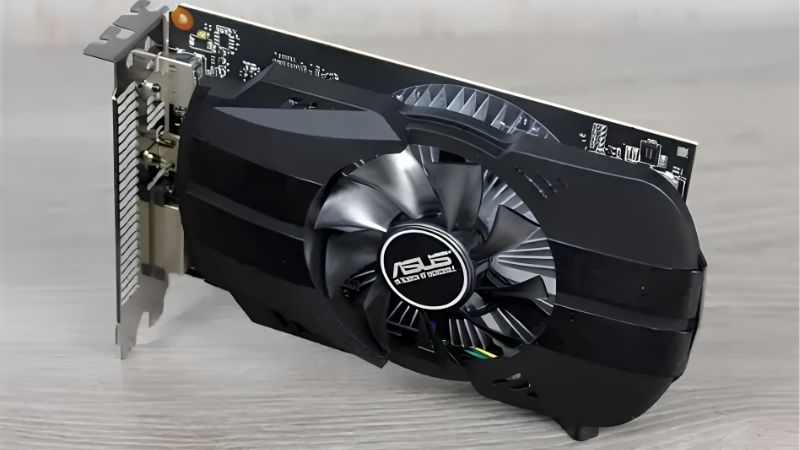
Nvidia GeForce GTX 1050 Ti Specs and Architecture
The 1050 Ti is built on Nvidia’s Pascal architecture using the GP107 die on a 14nm process. The numbers are modest, but they explain precisely which workloads this card handles comfortably and which ones expose its age. Reading the spec sheet carefully is the single best way to avoid disappointment, because every limitation this card has is already visible in its raw figures before you install a single game.
Core Counts, Clocks, and Memory Bandwidth
The card ships with 768 CUDA cores, a 1290 MHz base clock and a 1392 MHz boost clock. Memory is 4GB of GDDR5 on a 128-bit bus, delivering roughly 112 GB/s of bandwidth, with peak single-precision throughput near 2.1 TFLOPS. Those figures are entry-level by any modern measure, and they have not changed because the silicon is fixed.
The 128-bit bus is the clearest bottleneck on the sheet. At 1080p with high textures the 4GB framebuffer fills quickly in newer titles, and the limited bandwidth caps how fast that memory can be fed to the cores. When you see frame-time spikes in reviews, this narrow memory pipeline is usually the cause rather than the core count itself.
The takeaway is quantitative rather than emotional. This is a 1080p/60 esports GPU, not a 1440p machine, and every spec on the sheet reinforces that role. Buyers who accept that framing tend to be satisfied; buyers who expect more are the ones leaving the harsh reviews.
The 75-Watt Design and Why It Matters
The most practical feature is the 75W TDP. The reference design draws all of its power from the PCIe slot, so no 6-pin or 8-pin connector is required. That single specification is responsible for most of this card’s continued relevance in 2026.
This detail is why the card stays useful for upgraders on a tight budget. It drops into prebuilt OEM systems with weak 250–300W power supplies that simply cannot run a modern mid-range GPU, meaning no PSU swap, no new cables, and no compatibility research. For someone reviving an old office tower, that removes the single biggest barrier to a graphics upgrade.
Low-profile and single-slot variants also exist, making it one of the few discrete cards that fits genuinely small form-factor and HTPC chassis without thermal drama. If your case is cramped or your airflow is poor, the low heat output is a real, measurable advantage rather than a marketing line.
Pascal in 2026: Missing Features to Know
Pascal predates Nvidia’s RTX line, and that shapes expectations sharply. There are no RT cores and no Tensor cores, so hardware ray tracing and DLSS upscaling are simply unavailable on this card no matter which driver you install.
It does include the Pascal-generation NVENC encoder, which still handles 1080p H.264 streaming and recording in OBS reasonably well. This is a genuinely useful bonus for budget streamers and a point that experimental users chasing Nvidia features often overlook when they dismiss the card entirely.
Driver support continues for now, but treat future game optimization as flat. You are buying a known, stable quantity rather than a card that will improve over time through software updates or new AI features, and pricing that against newer cards is the honest way to evaluate value.
Real-World Gaming and Everyday Performance
Synthetic specs only matter if they translate into playable frame rates. Aggregating reported results from owner reviews produces a consistent performance picture across game categories, and that consistency is exactly what makes the 1050 Ti easy to recommend or rule out depending on your library.
1080p Esports and Competitive Titles
In competitive titles the 1050 Ti is comfortably in its element. CS2, Valorant, League of Legends, Dota 2, Rocket League and Overwatch 2 typically run at 1080p with 60+ FPS on medium-to-high presets, which covers the games most budget buyers actually play daily.
This is the scenario most 5-star reviewers describe: a smooth, tear-light experience in the games they care about, on a card that cost a fraction of a current-gen GPU. For an esports-first PC, the card genuinely does the job it was bought for.
Owners pairing it with a 1080p 60Hz or 75Hz monitor report the highest satisfaction, because the GPU and display are properly matched. Push it toward a 144Hz panel and the same owners start describing the experience as a compromise rather than a win.
Modern AAA Games and Honest Frame Rates
Modern AAA games are where the age shows. Demanding titles still launch, but expect to drop to low or medium presets at 1080p and target 30–45 FPS rather than a locked 60, and a few of the newest releases will fight you even there.
The 4GB VRAM ceiling is the recurring limiter in this category. Games that request more than 4GB of texture memory will stutter or force texture downgrades regardless of clock speed, and this is the most common complaint in the 2–3 star reviews from people who tried to play current AAA titles.
Realistically, treat AAA capability as playable for older or well-optimized titles and compromised for the newest releases. That framing matches the honest owner feedback and prevents the disappointment that drives the harshest reviews.
Build Compatibility and Upgrade Scenarios
Compatibility is a genuine strength of this card. It uses a standard PCIe x16 slot, fits ATX, mATX and many ITX cases, and as noted needs no auxiliary power, so it works in builds that would reject almost any newer GPU.
Common upgrade scenarios include reviving an old office prebuilt for light gaming, building a cheap secondary or LAN machine, or adding hardware NVENC encoding to a dedicated streaming box. In each of those roles the card’s limitations stop mattering because you never asked it to do more.
If your monitor is 1440p or 144Hz, this is the wrong card and no amount of tuning will fix that. The practical advice is to match it to a 1080p/60–75Hz setup where its behavior is predictable and the value proposition stays intact.
GTX 1050 Ti Pros and Cons From Owner Reviews
Synthesizing hundreds of Amazon listings produces a clear split between what delighted buyers and what frustrated them. Reading both sides is the fastest way to judge fit before you spend anything, and it also exposes how outside factors like rising component prices change the value math in 2026.
What 4–5 Star Owners Consistently Praise
The most repeated praise across high-star reviews is plug-and-play simplicity: no power connector, low heat, quiet operation and an easy install into older systems that buyers assumed were beyond saving. For non-technical owners, that simplicity is worth more than raw performance.
Buyers also value reliability and the negligible impact on the power bill, plus the satisfaction of reviving a machine they thought needed full replacement. Several reviewers explicitly frame the purchase as the cheapest way to keep an aging PC useful for another year or two.
Common 2–3 Star Complaints to Weigh
The recurring criticism is straightforward: the 4GB VRAM and 128-bit bus struggle with the latest AAA games, and buyers who expected more than 1080p/60 esports performance felt let down. Almost every harsh review traces back to a mismatch between expectation and the card’s entry-level class.
A second complaint involves value. With newer used cards occasionally available at similar prices, some reviewers feel the 1050 Ti is no longer the automatic budget pick it once was, and that depends heavily on local pricing at the moment you buy.
How 2026 Pricing and Supply News Change the Math
Two current developments matter here. The US decision to let Nvidia sell its powerful H200 AI accelerators to China keeps Nvidia’s manufacturing and engineering focus firmly on high-margin data-center silicon, which means entry-level desktop cards like the 1050 Ti get no fresh attention and no new supply.
At the same time, laptop and component prices are trending upward across the board. When budget GPUs creep up in price, the window to grab a cheap, known-quantity card like this one narrows, and waiting often means paying more for the same dated hardware. If a clean unit is available now at a fair price for a 1080p esports build, acting sooner rather than later is the financially rational move.
That urgency is real but should not override fit. If your needs point to a newer card, rising prices are a reason to plan that purchase, not to settle for 4GB of VRAM you will outgrow in months.
See more:
Recommended Products

PowerColor
PowerColor Twin Fan AMD Radeon RX 7800 XT 16GB GDDR6
GIGABYTE
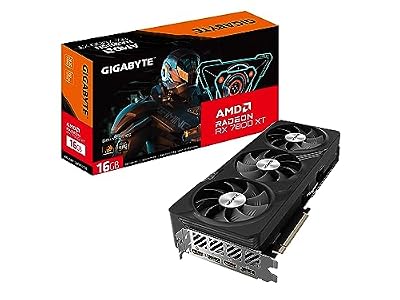
Gigabyte Radeon RX 7800 XT Gaming OC 16G Graphics Card, 3X WINDFORCE Fans 16GB 256-bit GDDR6, GV-R78XTGAMING OC-16GD Video Card

ASUS
ASUS Dual Radeon RX 7600 EVO OC Edition 8GB GDDR6 Gaming Graphics Card
As an Amazon Associate we earn from qualifying purchases. Product prices and availability are accurate as of the date/time indicated.
Conclusion
In conclusion, the Nvidia GeForce GTX 1050 Ti is still a sensible buy in one specific scenario: a low-power, 1080p esports or HTPC build where its 75W design and effortless compatibility solve a real problem. It is not a card for modern AAA gaming at high settings, and the honest owner feedback makes that boundary clear. If that 1080p/60 role matches your needs and a clean unit is priced fairly amid today’s rising component costs, check current listings through the link on this page before prices climb further and lock in the value while it lasts.
Frequently Asked Questions
What is the best nvidia geforce gtx 1050 ti in 2026?
The best nvidia geforce gtx 1050 ti depends on your budget and how you plan to use it. The options compared above are our top-rated picks based on real customer ratings, build quality, and overall value — start with the highest-rated model that fits your budget.
How much should I expect to spend on a nvidia geforce gtx 1050 ti?
Prices vary by brand and features. Budget options cover the essentials, while mid-range and premium models add durability, performance, and extra features. Compare the prices in the list above to find the best value for your needs.
What should I look for when buying a nvidia geforce gtx 1050 ti?
Focus on what matters most for your use case — build quality, compatibility, performance, warranty, and verified customer reviews. Every pick above is selected to balance these factors.
Are budget nvidia geforce gtx 1050 ti options worth it?
Yes. For most people a well-reviewed budget or mid-range nvidia geforce gtx 1050 ti delivers excellent value. You only need to spend more if you specifically require premium materials or top-tier performance.
How did we choose these nvidia geforce gtx 1050 ti picks?
We compare current Amazon ratings, review counts, key features, and price to surface the options with the best real-world value. The list is refreshed as ratings and availability change.









Write Your Review
No reviews yet. Be the first to share your experience!