
- Top Pick: 87MM PLD09220S12H for RTX3080 RTX3070 Graphics Card Fan Replacement for EVGA GeForce RTX 3070 3080 TI 3090 FTW3 Cooler Fan (Black 3-Fan)
- Best Value: SCCCF Dual 92mm Graphic Card Fans, Graphics Card Cooler, Video Card VGA Cooler, PCI Slot Fan GPU Cooler
- Premium Choice: Graphics Card Cooling Fan Replacement for Gigabyte GT 1030 2G GT 730 for ZOTAC GT 210 220 N9500 N8600GT for MSI GTX 720 GT 1030 N720 Video Card Cooler Fans PLD05010S12L 47mm 12V 0.1A 2 Pin
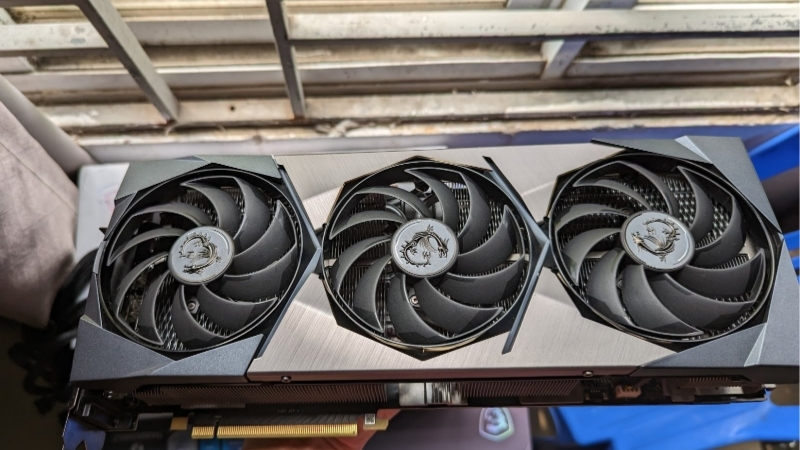
2 fan vs 3 fan GPU coolers come up the moment you start choosing a specific model, because almost every graphics card is sold in both dual-fan and triple-fan versions, and the difference affects temperatures, noise, and whether the card even fits your case. The good news is that the choice is simpler than it looks once you understand what each design is actually for. This comparison gives you a quick verdict, a clear comparison table, a feature-by-feature face-off, the alternative cooling designs worth knowing, and a recommendation on which fan configuration is right for your build.
The Quick Verdict: 2 Fan vs 3 Fan GPU Coolers
Here is the short version. A 2-fan (dual-fan) GPU is shorter and more compact, fits a wider range of cases, and is perfectly adequate for lower and mid-power cards. A 3-fan (triple-fan) GPU has more cooling surface, so it runs cooler and quieter under heavy load, which matters most for high-power cards, but it is longer and may not fit smaller cases. Choose a dual-fan card for compact builds and lower-power GPUs, and a triple-fan card for high-power GPUs or whenever quiet, cool operation is the priority.
As an Amazon Associate we earn from qualifying purchases at no extra cost to you.



Who Wins on Cooling Performance
On raw cooling, the 3-fan design wins. More fans and a larger heatsink move more air and dissipate more heat, which keeps the GPU cooler under sustained load. For a high-power card that generates a lot of heat, that extra capacity directly translates to lower temperatures and more consistently held boost clocks.
For lower and mid-power cards, however, the advantage shrinks. A well-designed dual-fan cooler has more than enough capacity to keep a modest GPU comfortable, so the triple-fan card’s extra cooling becomes headroom you do not actually use. The hotter and more power-hungry the card, the more a third fan matters.
A simple way to think about it is to look at the card’s rated power draw. The higher that number, the more heat the cooler has to handle, and the more a triple-fan design earns its place. For a card with a modest power rating, a dual-fan cooler has ample capacity and the third fan adds little beyond size.
Who Wins on Noise
Noise is closely tied to cooling capacity, and here too the 3-fan design generally wins on high-power cards. Because a triple-fan cooler dissipates heat more easily, its fans can spin slower to hit the same temperature, which means less noise under load. Many also feature larger fans that move air more quietly at lower speeds.
On a lower-power card the gap narrows, since a dual-fan cooler is not working hard enough to get loud in the first place. Both designs also typically support fan-stop, staying silent at idle and during light use. The practical takeaway is that triple-fan coolers are quietest when a card runs hot, which is exactly when noise would otherwise become a problem.
2 Fan vs 3 Fan Comparison Table
The table summarizes the trade-offs at a glance. Focus on the size and target-GPU rows, since those are what usually decide the choice for a given build.
| Factor | 2-Fan (Dual) | 3-Fan (Triple) |
|---|---|---|
| Cooling capacity | Adequate for low/mid power | Best, for high-power cards |
| Noise under load | Fine on modest cards | Quieter on hot cards |
| Card length | Shorter, more compact | Longer |
| Case compatibility | Fits more cases | Needs more room |
| Best for | Small builds, lower-power GPUs | High-power GPUs, quiet builds |
Deep Dive Face-Off: Size, Fit and Power
The headline trade-off is cooling versus size, so this section looks more closely at the factors that decide a real build: how card length affects case compatibility, which GPUs actually need a third fan, and the honest pros and cons of each design. These details are where the right choice becomes obvious for your situation.
Card Length and Case Compatibility
The most practical difference is length. Triple-fan cards are longer, often well over 300 mm, while dual-fan cards are noticeably shorter, which makes them far easier to fit in compact and budget cases. Before choosing a triple-fan model, always check your case’s maximum GPU length against the card’s specifications.
In a small-form-factor or mini-tower build, a dual-fan card is frequently the only option that fits, and forcing a triple-fan card into a tight case can block airflow or simply not close the panel. In a standard mid-tower or larger case, both designs usually fit, so length stops being the deciding factor and cooling needs take over.
It is worth measuring rather than guessing, since a card that is even slightly too long can foul a front radiator, a fan stack, or the drive cage. Manufacturers list the exact dimensions of each model, and case makers list the maximum supported GPU length, so a quick check of both numbers before buying avoids an expensive return.
Which GPUs Suit 2 Fans vs 3 Fans
The right choice depends heavily on the GPU’s power draw. Lower and mid-power cards, the kind that draw well under 250W, run comfortably on a dual-fan cooler, so the compact option is usually the smart pick for those cards unless you have a specific reason to want more cooling.
High-power cards that draw more heat benefit clearly from a triple-fan cooler, which keeps temperatures and noise in check under sustained load. For a flagship or near-flagship card, a triple-fan design is generally the better choice, while for a budget or efficient card, paying for a third fan often buys headroom you will never use.
There are exceptions worth noting. If you plan to overclock, run the card in a hot room, or want the quietest possible operation even on a mid-power card, a triple-fan design can still make sense for the extra headroom. For the typical buyer, though, matching the cooler to the card’s power draw is the simplest reliable guide.
The 2-Fan vs 3-Fan Trade-offs
The dual-fan design’s strengths are compactness, lower cost on many models, and easy case compatibility, with the trade-off of less cooling headroom that only matters on hot, high-power cards. It is the pragmatic choice for small builds and modest GPUs.
The triple-fan design’s strengths are superior cooling and quieter operation under load, with the trade-offs of greater length, more weight, and sometimes a higher price. It is the right call for high-power cards and quiet-focused builds, as long as your case has the room. Neither is universally better; the best choice is simply the one that matches your card’s heat output and your case’s space.
Framed that way, the decision stops being about which design is better in the abstract and becomes a simple fit check. Identify your card’s power draw and your case’s clearance, and one of the two options will usually be the obvious answer for your specific build.
Choosing the Right Cooler: Alternatives and Final Verdict
With the trade-offs clear, the decision comes down to your specific card and case. This section covers the other cooler designs worth knowing about, then gives a direct recommendation on who should choose a dual-fan card and who is better served by a triple-fan one.
The Alternative: Blower and Liquid-Cooled Designs
Beyond fan count, a couple of other designs exist. Blower-style coolers exhaust heat directly out the back of the case, which suits cramped or poorly ventilated builds and multi-GPU setups, but they are usually louder and run hotter than modern open-air coolers, so they are now niche.
Hybrid or liquid-cooled cards pair a fan with an all-in-one liquid cooler, offering excellent temperatures and low noise on high-power cards, at the cost of needing a radiator mount in your case and a higher price. For most buyers, a standard dual or triple-fan card is the right choice, with these alternatives reserved for specific situations.
For the vast majority of gaming builds, then, the real decision genuinely is just dual-fan versus triple-fan, and it comes down to your card’s heat and your case’s space. The blower and liquid options are worth knowing about, but most buyers will never need to choose them over a good open-air card.
Who Should Choose a 2-Fan GPU
Choose a dual-fan card if you are building in a compact or budget case, your GPU is a lower or mid-power model, or you simply want the shortest card that fits cleanly. For those builds, a dual-fan cooler provides all the cooling you need without wasting space or money.
It is also the sensible default for efficient cards that do not generate much heat, where a larger cooler offers no real benefit. If your card runs cool by nature, the compact option is the smarter choice.
Who Should Choose a 3-Fan GPU
Choose a triple-fan card if you are running a high-power GPU, prioritize the quietest possible operation under load, or have a case with room to spare. For hot, demanding cards, the extra cooling keeps temperatures down and noise low, which is exactly where a third fan earns its keep.
It is also worth choosing when you plan to push the card hard for long sessions or want maximum thermal headroom for overclocking. If you go this route, confirm your case clearance first, then compare well-cooled triple-fan models through the links here to find the best value for your build.
See More:
- Colorful iGame RTX 4090
- Founders Edition vs AIB
- Best RTX 4080 Super card
- Best RTX 5080 AIB
- Best RTX 5070 Ti card
Conclusion: 2 Fan vs 3 Fan GPU, the Right Choice
There is no universal winner in the 2 fan vs 3 fan GPU debate, only the right cooler for your card and case. A dual-fan design is the compact, sensible choice for small builds and lower-power GPUs, while a triple-fan design delivers cooler, quieter operation that high-power cards genuinely benefit from. Match the cooler to your GPU’s heat output and your case’s available space, and you will get the temperatures and noise you want without paying for capacity you do not need.
Top-Rated Picks

Save $6.00



| Product | Brand | Rating | Reviews | Price |
|---|---|---|---|---|
| EZDIY-FAB RTX 3000 Series 12 Pin to Dual 8 Pin PCIe S… | EZDIY-FAB | ★ 4.6 | 428 | $15.59 |
| 87MM PLD09220S12H RTX3080 RTX3070 Graphics Card Fan R… | LTANDBR | ★ 4.6 | 61 | $29.98 |
| Compatible with GIGABYTE GeForce RTX 5060/5050 OC Low… | NIVXE | ★ 3.9 | 12 | $29.92 |
| Hilitand GPU Backplate Radiator, Aluminum Alloy Graph… | Hilitand | ★ 3.9 | 8 | $26.81 |
| NVIDIA GX Spark – Founders Edition, W129251900 | — | ★ 1.0 | 1 | $10,309.00 |
Frequently Asked Questions
Is a three-fan GPU always better than a two-fan model?
Not always. Three fans and a longer fin stack help on cards drawing above roughly 250W, where the extra surface area lowers temperatures and lets fans spin slower. On a sub-200W card such as an RTX 4060 or RX 7600, a well-built dual-fan cooler is already sufficient and the third fan mainly adds length.
Which design is quieter?
Generally the triple-fan, because a bigger heatsink can dissipate the same wattage at lower fan speed. Noise depends heavily on the specific fan and bearing quality though; a good dual-fan card with a zero-RPM idle mode can be quieter in desktop use than a cheap triple-fan model with buzzy motors.
How do I know which one fits my case?
Compare the manufacturer’s stated card length against your case’s maximum GPU clearance, then subtract for any front radiator or fan thickness. Dual-fan cards usually land between 200mm and 280mm at two slots, while triple-fan models often exceed 300mm and three slots, which can also block the PCIe slot below.
Does fan count affect the power supply I need?
No. Power requirements come from the GPU itself and the number of PCIe connectors on the board, not the cooler. A triple-fan model with a raised factory power limit may draw slightly more than a reference-spec dual-fan version of the same chip, so follow the card maker’s own PSU recommendation rather than a generic figure.
Do dual-fan cards throttle during long gaming sessions?
They can if the card is high-wattage and case airflow is poor. Modern GPUs reduce boost clocks progressively as temperature rises rather than crashing to a low clock, so throttling appears as a small frame rate decline after ten or fifteen minutes. Adding a front intake fan usually recovers most of that loss.






Write Your Review
No reviews yet. Be the first to share your experience!