
- Top Pick: ASRock Radeon RX 7600 Challenger Pro 8GB OC, AMD RDNA 3, 8GB GDDR6, PCIe 4.0, Triple Fans, 0dB Silent, 2695MHz Boost, Triple Fan Graphics Card
- Best Value: XFX Speedster SWFT210 Radeon RX 7600 Graphics Card with 8GB GDDR6 HDMI 3xDP, AMD RDNA 3 RX-76PSWFTFY
- Premium Choice: ASRock Radeon RX 7600 Challenger 8GB OC, RDNA 3, 2695MHz Boost, 8GB GDDR6 128-bit, PCIe 4.0, Dual Fans, 0dB Silent, HDMI 2.1, DisplayPort 1.4
RX 7600 is one of the first cards most new PC builders seriously consider, and for good reason: it is an affordable, efficient 1080p graphics card that gets a budget gaming rig off the ground without draining the rest of the build budget. If this is your first build, or you are putting together an affordable machine for a younger gamer, the questions that matter are simple and practical: how well does it run modern games at 1080p, is the 8GB of VRAM enough, and is it the smart pick over its rivals. This review answers all three with measurable performance, real build details, and an honest look at value.
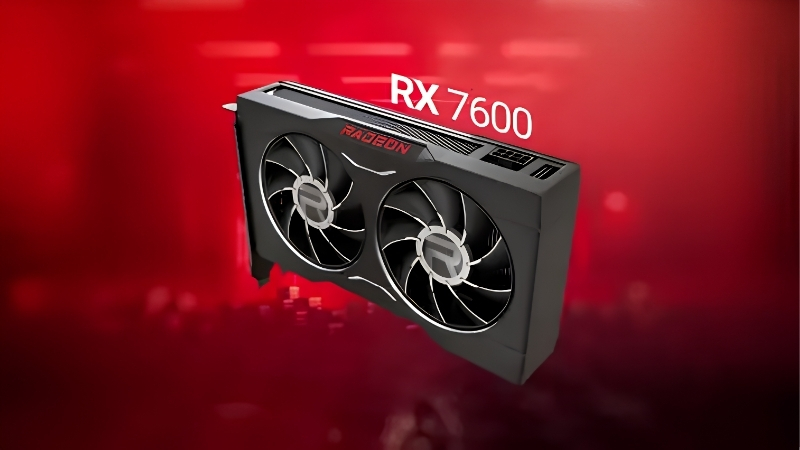
RX 7600 Performance: Built for Affordable 1080p Gaming
The RX 7600 is AMD’s entry-level RDNA 3 card, built on Navi 33 with 8GB of GDDR6 on a 128-bit bus and a low 165W board power. It is designed squarely for 1080p, the resolution the majority of budget gamers still use, and it delivers that experience efficiently and affordably. Below, the performance is broken down the way a first-time or budget buyer actually evaluates a card: frame rates at 1080p, the modern features it brings, and what real owners say after living with it.
As an Amazon Associate we earn from qualifying purchases at no extra cost to you.





1080p Gaming Performance
At 1080p the RX 7600 is a capable performer, clearing 60 FPS in the vast majority of modern titles at high settings and pushing well beyond 100 FPS in lighter and competitive games like the popular esports titles many budget gamers play most. For a card at this price, that is exactly the experience a 1080p builder is looking for.
It is not built to climb beyond its tier. Push it to 1440p and it can still manage many games at reduced settings, especially with upscaling, but native 1440p at high settings is not its job. The honest framing is that this is a 1080p card first and foremost, and it does that one job well.
The practical takeaway is that the RX 7600 hits the most common budget resolution squarely. You are paying for exactly the performance a 1080p build needs, with no money wasted on headroom a budget gamer will rarely use, which is precisely why it is such a popular first graphics card.
Ray Tracing, FSR and AV1 Encoding
Ray tracing exists on the RX 7600 but is best treated as a bonus rather than a feature you buy the card for. At 1080p you can enable light ray tracing in some titles, but the card does not have the headroom for heavy ray-traced effects, so most budget gamers will leave it off in demanding games and rely on raw rasterized performance instead.
For upscaling it uses FSR, including FSR 3 with Frame Generation, which is widely supported and a genuinely useful way to lift frame rates in heavier titles. As an RDNA 3 card it does not support the newer FSR 4, which is an RDNA 4 feature, but the existing FSR support is broad and effective for this tier.
One modern bonus worth highlighting is AV1 encoding, which the RX 7600 includes thanks to its RDNA 3 media engine. For a budget streamer or content creator, that is a real advantage over older cards, offering better-quality streaming and recording at lower bitrates, and it is a feature the previous-generation budget cards lack.
What Owners Praise and Criticize
Owner feedback is largely positive for a budget card, with the most common praise being strong 1080p performance for the money, low power draw, quiet operation, and the value it offers first-time builders. Many owners highlight how easy it is to drop into an affordable build and how well it handles the games they actually play.
The recurring criticism is the 8GB of VRAM, which is adequate for 1080p today but is increasingly tight in a handful of newer, texture-heavy titles, particularly with ray tracing enabled. Some owners also note that the generational jump over the previous budget cards is modest. Neither concern undermines its core value, but both are worth knowing before you buy.
Taken together, the feedback describes a dependable first graphics card that does the 1080p job well for the money, with weaknesses that are easy to live with for the budget gamer it targets.
| Strengths | Trade-offs |
|---|---|
| Strong 1080p performance for the price | 8GB VRAM is tight in some newer titles |
| Low 165W power draw and efficiency | Not built for native 1440p at high settings |
| AV1 encoding for budget streamers | Modest gen-on-gen jump over older cards |
| Quiet, easy to build around | Ray tracing limited at this tier |
RX 7600 Build Fit: Power, Size and Cooling
A budget card should slot into almost any build with minimal fuss, and the RX 7600 mostly does. Still, it pays to confirm three practical things before you buy: how much power it draws and what supply it needs, whether it fits your case, and how it handles heat and noise. Each is covered below so your first build comes together cleanly and without surprises.
Power Draw and PSU Requirements
With a low 165W board power, the RX 7600 is one of the easiest cards to power, and a quality 450W to 550W power supply is plenty for most budget builds. It uses a single standard 8-pin connector, which keeps the install simple for a first-time builder.
That low draw is a real budget advantage, because it rarely forces a power-supply upgrade and keeps total system power, heat, and your electricity bill all down. For anyone slotting this into a prebuilt or older system, the chances are good that the existing PSU already has the headroom it needs.
Card Size and Small-Case Builds
Most RX 7600 models are compact, with plenty of short dual-fan designs that fit easily into small and budget cases. This makes the card a natural choice for compact builds and tight budgets where the larger mid-range and high-end cards simply will not fit.
Dimensions still vary by brand, so measure your case clearance before buying, especially in a small-form-factor build. The good news is that the card’s low power draw means even an affordable, compact cooler keeps it running comfortably, so you give up nothing by choosing a smaller model.
Cooling, Noise and Temperatures
Because it draws so little power, the RX 7600 runs cool and quiet on virtually every cooler, and even the most affordable dual-fan models keep temperatures comfortably in check during extended gaming. Fan-stop keeps the card silent on the desktop and during light use.
Under sustained gaming load it stays quiet enough for almost any setup, which is exactly what a budget builder wants. There is little need to tweak anything, though a mild undervolt can squeeze out an even calmer profile for the noise-sensitive.
RX 7600 Pricing, Value and When to Buy
Value is the entire point of a card like the RX 7600, so pricing decides the verdict, and the wider component market is part of that calculation. This section covers where prices sit today, how the card compares to its rivals, and exactly which buyer it suits best.
Where Prices Stand Right Now
For a budget buyer, every dollar matters, so the market backdrop is worth understanding. PC component prices have broadly trended upward, driven mainly by memory costs, and that pressure reaches graphics cards and the rest of a build, from the RAM to the storage. The encouraging side is real but limited: the steep climb seen at the end of 2025 has cooled, and some makers, Framework among them, have reported a relatively stable recent stretch while still warning of further movement.
New memory supply is on the way but not soon. OEMs can now source DDR5 from suppliers like CXMT, and Micron is building two fabs in Idaho, yet those plants are not expected to come online until 2027–2028. In short, prices have stopped spiking rather than started falling, so genuine relief is still some distance out, which matters when you are building a whole system on a tight budget.
The practical implication for an RX 7600 buyer is to plan the entire build around current pricing rather than waiting for a near-term drop, and to buy the card when it sits near its intended price. Because budget components are all caught in the same trend, factoring the total system cost, not just the GPU, into your budget is the smart move.
RX 7600 vs the Competition
The most important comparison is with its own sibling, the RX 7600 XT, which offers the same core GPU but 16GB of VRAM instead of 8GB. If you want more longevity headroom and play texture-heavy games, the XT is worth considering, while the standard 7600 is the better pure-value pick for straightforward 1080p gaming.
Against NVIDIA’s budget cards and the previous-generation options, the RX 7600 generally competes well on rasterized performance per dollar, with AV1 encoding as a bonus over older cards. The decision usually comes down to whether you prioritize raw 1080p value, in which case the 7600 is a strong choice, or extra VRAM, in which case the XT or a rival deserves a look.
Who Should Buy the RX 7600
Buy it if you are building an affordable 1080p gaming PC, value low power draw and quiet operation, and want strong rasterized performance for the money, especially as a first graphics card. It is one of the easiest budget recommendations for a straightforward 1080p build, and the AV1 encoding is a nice bonus for aspiring streamers.
Look at the 7600 XT or a rival instead if you specifically want more VRAM for longevity or plan to game at 1440p. If the standard RX 7600 fits your resolution and budget, check the current price and availability through the link here before you buy, and consider setting a price alert, since budget cards see the sharpest swings and patience can land a better deal.
See More:
- Colorful iGame RTX 4090
- Founders Edition vs AIB
- Best RTX 4080 Super card
- Best RTX 5080 AIB
- Best RTX 5070 Ti card
Conclusion: Is the RX 7600 Worth It?
The RX 7600 is a strong, sensible choice for an affordable 1080p gaming PC, delivering capable performance, low power draw, quiet operation, and modern AV1 encoding at a budget-friendly price. Its main limitation is the 8GB of VRAM, which is fine for 1080p today but the reason VRAM-conscious buyers may step up to the 16GB 7600 XT. With component prices stabilizing rather than falling, there is little reason to wait, so if you are building a 1080p machine on a budget, the RX 7600 remains one of the easiest and most cost-effective graphics cards to recommend for a first build or an affordable everyday gaming PC.
Top-Rated Picks


Editor's Pick
GIGABYTE GeForce RTX 3060 Gaming OC 12G (REV2.0) Graphics Card, 3X WINDFORCE Fans, 12GB 192-bit GDDR6, GV-N3060 Video Card


| Product | Brand | Rating | Reviews | Price |
|---|---|---|---|---|
| MSI GeForce RTX 3060 Ventus 2X 12G OC, Gaming Graphic… | — | ★ 4.7 | 4.5k | $635.00 |
| GIGABYTE GeForce RTX 3060 Gaming OC 12G (REV2.0) Grap… | — | ★ 4.7 | 3.2k | $479.00 |
| EVGA GeForce GTX 1060 3GB GAMING, ACX 2.0 (Single Fan… | EVGA | ★ 4.6 | 3.4k | $247.79 |
| MSI Gaming GeForce GTX 1660 Super 192-bit HDMI/DP 6GB… | — | ★ 4.7 | 2.2k | $232.60 |
| MSI GeForce RTX 4060 Ti Ventus 3X 8G OC (8GB GDDR6/PC… | — | ★ 4.7 | 1.3k | $998.00 |
Frequently Asked Questions
Is 8GB of VRAM a problem on the RX 7600 in 2026?
It is the card’s main weakness. At 1080p medium to high settings 8GB is still workable in the large majority of games, but a growing number of recent AAA titles hit the ceiling with ultra textures or ray tracing enabled, producing stutter and blurry textures. Dropping texture quality one notch usually resolves it with little visual cost.
What power supply does the RX 7600 need?
Total board power is about 165W and cards use a single 8-pin PCIe connector, so a good 450W to 500W supply is enough for a mainstream six or eight core CPU. This is one of the easiest modern GPUs to drop into an older prebuilt, provided the existing unit is a reputable model rather than a generic bundled one.
Can the RX 7600 game at 1440p?
It can, with compromises. Expect medium settings plus FSR quality mode to reach a stable 60fps in demanding titles, while lighter games and esports run at high refresh without help. The 128-bit bus and 8GB buffer both push back at 1440p, so treat 1440p as a stretch goal rather than the card’s intended home.
How does it compare to older cards like the RX 6600 or RTX 3060?
The RX 7600 is meaningfully faster than an RX 6600 and trades blows with the 12GB RTX 3060, winning most rasterized comparisons while losing on ray tracing and VRAM capacity. The upgrade is worth it from a GTX 1060, 1650 or RX 570 class card, but marginal if you already own an RX 6650 XT.
Does the RX 7600 support FSR 3 frame generation?
Yes. RDNA 3 cards support FSR 3 and the driver-level Fluid Motion Frames feature, which can inject generated frames in games without native support. Frame generation works best when your base frame rate is already around 60fps, since it improves smoothness but does not reduce input latency the way real frames do.











Write Your Review
No reviews yet. Be the first to share your experience!