
- Top Pick: Generic Tesla A40 PCIe 300W 48GB Passive Double Wide Full Height GPU
- Best Value: NVIDIA Tesla A100 Ampere 40 GB Graphics Processor Accelerator – PCIe 4.0 x16 – Dual Slot
- Premium Choice: PNY Tesla L40S 48GB AI HPC graphics accelerator by NVIDIA with DisplayPort, compatible with PCIe workstations
Nvidia A40 is one of those data-center cards that rarely makes headlines yet quietly powers a huge amount of enterprise work, from virtual workstations to rendering farms and inference nodes. For IT teams building shared infrastructure, the question is not whether the A40 is capable, but whether its blend of 48 GB of memory, professional features, and a sensible power envelope still earns a slot in a 2026 server. This review synthesizes deployment reports and buyer feedback to show exactly what the A40 does well, where it falls short, and who should still choose it today.
As an Amazon Associate we earn from qualifying purchases at no extra cost to you.


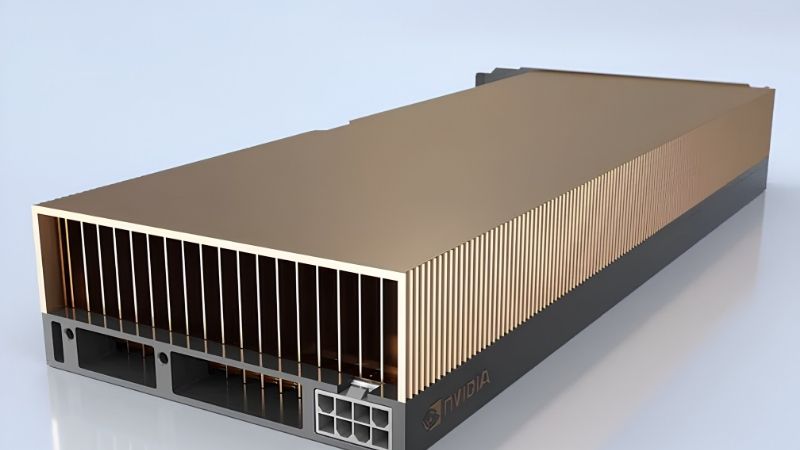
What the Nvidia A40 Offers
The A40 is built on Nvidia’s Ampere architecture and aimed squarely at the data center and professional visualization, not gaming. Understanding what that positioning gives you, and the trade-offs it carries, is the first step to judging whether the A40 fits your infrastructure better than a newer Ada card or a training-focused A100.
Ampere Architecture and 48 GB of Memory
The A40 pairs 10,752 CUDA cores with 336 third-generation Tensor cores and 84 second-generation RT cores, all fed by 48 GB of GDDR6 memory with error correction. That large, ECC-protected frame buffer is the card’s defining strength, giving it room for complex scenes, multiple virtual desktops, or sizeable inference models on a single board.
For enterprise buyers, the ECC memory is not a checkbox but a reliability feature. In long rendering jobs and multi-user environments, silent memory errors can corrupt output or crash sessions, and error correction is exactly the kind of guarantee that separates a professional card from a repurposed gaming GPU.
Analytically, the A40 delivers strong general-purpose compute for its class, though as an Ampere-generation part it lacks the FP8 acceleration that newer Ada and Hopper cards use to speed modern inference. That gap defines where the A40 remains ideal and where a newer card pulls ahead.
Put in buyer terms, the A40 is a capacity-and-reliability card first and an efficiency card second. If your bottleneck is fitting the work in memory and keeping it stable across many users, the A40 answers that directly, which is why it endured in enterprise fleets far longer than its launch date would suggest.
Built for the Data Center, Not Gaming
The A40 uses a passively cooled, dual-slot design meant to sit in a server that provides its own airflow, and it supports NVLink to pair two cards into a 96 GB pool. These are deliberate data-center choices that make the A40 behave predictably in dense, always-on deployments.
It also carries the professional driver stack, certified for the CAD, simulation, and visualization software that enterprises depend on. Those certifications matter in practice because they turn “it probably works” into vendor-backed reliability, which is precisely what a business paying for uptime is buying.
The practical implication is that the A40 is not a card you drop into a desktop for gaming; it is a building block for shared infrastructure. Judged against that intent, its feature set is coherent and purpose-built rather than compromised.
That purpose-built nature also shows in longevity. Data-center cards are designed for years of continuous duty, so a well-cooled A40 running around the clock is doing exactly what it was engineered for, unlike a consumer card pressed into a role it was never meant to fill.
Where the A40 Fits vs A100 and L40S
Against the A100, the A40 trades HBM bandwidth and pure training performance for a lower price, display and visualization capability, and a more versatile role. The A100 is the training and high-bandwidth compute card; the A40 is the visualization, virtualization, and inference workhorse.
Against the newer L40S, the A40 is the older, often cheaper option that lacks FP8 and Ada efficiency. For fresh purchases focused on AI inference, the L40S usually wins, but for virtualization-heavy estates and buyers finding A40s at strong prices, the A40 still holds real value.
Knowing which of those roles dominates your workload is the whole decision. If you mainly serve virtual workstations and rendering, the A40 is a natural fit; if you chase the latest inference throughput per watt, look to Ada.
It also helps to think in fleet terms rather than single cards. An organization standardized on the A40 gains predictable behavior, shared drivers, and simpler support, and those operational savings can outweigh the per-card performance edge a newer part would bring to a mixed estate.
Nvidia A40 Performance in Real Deployments
Specifications only hint at value; what matters is how the A40 behaves in the workloads it targets. Across virtualization, visualization, and inference, operator feedback paints a consistent picture of a dependable card that rewards buyers who match it to the right job.
Virtualization and Virtual Workstations (vGPU)
The A40 is a favorite for Nvidia vGPU deployments, where its 48 GB is carved among many virtual machines to deliver GPU-accelerated desktops to remote users. For enterprises running VDI at scale, that memory capacity directly determines how many users one card can serve.
In practice, IT teams praise the A40 for stable, predictable multi-user performance, which is the metric that actually matters for virtual workstations. A card that quietly serves dozens of sessions without incident is worth more to an administrator than a faster card that behaves unpredictably under contention.
The common caveat is licensing: vGPU capability requires the appropriate software subscription, so budget for that alongside the hardware. Buyers who account for it up front report smooth rollouts, while those who overlook it are the ones caught by surprise.
Sized correctly, the A40 serves a large number of concurrent virtual workstations from a single board, which is the metric that drives its return on investment in VDI. The more users each card supports reliably, the lower the effective cost per seat, and here the 48 GB buffer does real work.
Rendering, Visualization, and AI Inference
For GPU rendering and 3D visualization, the A40’s large buffer lets it hold complex scenes that would overflow smaller cards, and its RT cores accelerate ray-traced workloads. Studios and engineering teams use it as a reliable, high-capacity rendering node.
For AI inference, the A40 is perfectly capable on many models, though its lack of FP8 means newer Ada cards deliver more inference throughput per watt. It is a solid inference option when you already own A40s or need the display and visualization features alongside AI work.
The pattern in feedback is telling: buyers who deploy the A40 for visualization and mixed workloads are consistently satisfied, while the disappointed minority almost always expected cutting-edge AI-inference efficiency from a card built for a broader, visualization-first role.
For teams that genuinely need both visualization and inference on shared hardware, that breadth is the point. The A40 is a generalist, and generalists earn their place in environments where buying separate specialized cards for each task would cost more and complicate operations.
Power, Cooling, and Server Compatibility
At 300 W in a passive dual-slot form factor, the A40 is designed for server chassis with strong front-to-back airflow rather than for a quiet desktop. Confirming your server supplies adequate cooling is the single most important compatibility check before buying.
Because it needs no exotic liquid cooling and fits standard data-center slots, the A40 rarely forces a facilities upgrade, which keeps deployment cost and risk low. That drop-in nature is part of why it spread so widely across enterprise racks.
NVLink support adds practical flexibility, letting two A40s combine into a 96 GB pool for larger scenes or models. Just verify your server layout physically supports the bridge before planning around it, since not every chassis accommodates paired cards.
Buying the A40 in 2026: Value, Market, and Pros and Cons
The A40 makes the most sense today as a value and versatility play rather than a performance flagship, especially for virtualization and visualization estates. Two market realities in 2026 also shape whether now is a good time to buy, and both reward matching the card to a real need over waiting.
Why the A40 Still Makes Sense
The core argument is fit and price. For virtual workstations, rendering, and mixed workloads, the A40 delivers exactly the memory capacity and professional reliability these jobs need, often at a lower cost than newer cards whose FP8 advantage goes unused in visualization work.
It also standardizes cleanly. Organizations already running A40s gain operational simplicity by staying on one certified, well-understood platform, and that reduced complexity has real value across a fleet’s support and maintenance life.
Where it stops making sense is cutting-edge AI inference at maximum efficiency, and buyers should be honest about that boundary. Choosing the A40 for the right reasons is what turns it from an aging part into a smart, cost-effective purchase.
Memory Prices and Buying Timing
The main external factor is the memory market. Component and memory prices climbed steeply through late 2025 before leveling off, and that plateau is a pause rather than a price cut, so a 48 GB card like the A40 remains exposed to elevated memory costs that keep its price firm.
New supply is on the way, with OEMs able to source DDR5 from vendors such as CXMT and Micron building two plants in Idaho, but those fabs will not reach volume production until 2027 to 2028. The measured conclusion is that A40 pricing is unlikely to fall much in the near term.
With broad component prices still drifting upward, the practical takeaway for an A40 buyer is that today’s quote is likely close to the best you will see for a while, so if the card fits your workload, deploying now beats waiting on relief that remains years away.
Nvidia A40 Pros and Cons
The ownership picture distilled for a fast decision.
Pros: 48 GB ECC memory for large scenes and many virtual desktops; excellent vGPU and virtualization support; certified professional drivers and strong reliability; NVLink for a 96 GB pool; drops into standard servers at 300 W.
Cons: Ampere generation lacks FP8, so newer Ada cards lead on inference efficiency; GDDR6 bandwidth trails HBM training cards; vGPU features require paid licensing; pricing held up by an elevated memory market into 2027.
See More:
Final Verdict: Is the Nvidia A40 Worth It?
For enterprises running virtual workstations, rendering farms, and mixed visualization-and-inference workloads, the Nvidia A40 remains a genuinely worthwhile card, delivering the memory capacity, reliability, and professional certifications these jobs demand at a sensible cost. If your priority is the latest AI-inference efficiency or large-scale training, a newer Ada card such as the L40S or a Hopper accelerator is the better tool.
If the A40 matches your infrastructure, a firm memory market means waiting is unlikely to reward you. Check the latest Nvidia A40 pricing, availability, and server compatibility through the link below and secure the value while supply lasts.
Top-Rated Picks

Best Seller
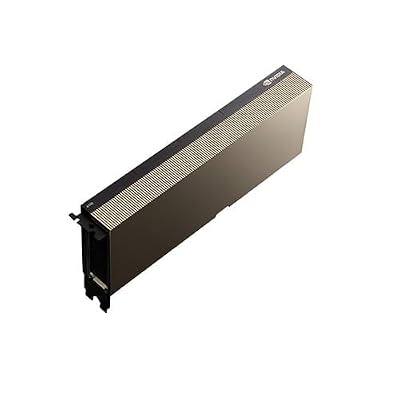
NVIDIA Tesla A100 Ampere 40 GB Graphics Processor Accelerator – PCIe 4.0 x16 – Dual Slot


| Product | Brand | Rating | Reviews | Price |
|---|---|---|---|---|
| ARCTIC MX-4 (4 g) – Premium Performance Thermal Paste… | ARCTIC | ★ 4.8 | 104k | $4.99 |
| ARCTIC MX-4 (incl. Spatula, 4 g) – Premium Performanc… | ARCTIC | ★ 4.8 | 71.9k | under $10 |
| Crucial 8GB DDR4 RAM 3200MHz (PC4-25600), Downclockab… | Crucial | ★ 4.8 | 62.8k | under $80 |
| AMD Ryzen 5 5600X 6-core, 12-thread unlocked desktop … | — | ★ 4.8 | 30.2k | under $200 |
| NVIDIA Shield Remote; Voice Search, Motion-Activated,… | — | ★ 4.7 | 10.6k | under $30 |
Frequently Asked Questions
What are the A40 key specifications?
The A40 is an Ampere data center card with 48GB of GDDR6 with ECC, roughly 300W board power, and a dual-slot passive cooler with no fan. It targets virtual workstation and rendering workloads, combining large memory capacity with RT and tensor cores for mixed graphics and compute.
Can the A40 be installed in a desktop workstation?
It is designed for servers with high static-pressure airflow and has no onboard fan, so a normal desktop will not cool it without a custom shroud and dedicated fan. It also lacks display outputs in typical configurations, making it unsuitable as a primary desktop graphics card.
Is 48GB of memory the main reason to buy an A40?
Largely yes. That capacity handles very large 3D scenes, high-resolution simulation, and AI models that will not fit on consumer cards, with ECC protecting long jobs. On the used market that memory per dollar is the A40 strongest argument compared with newer but smaller cards.
How does the A40 compare to the L40S?
Both have 48GB, but the L40S is Ada-based with substantially higher tensor and RT throughput, FP8 support, and AV1 encoding, at around 350W. The A40 is older and slower but usually much cheaper secondhand. For new deployments the L40S is the stronger choice.
Does the A40 support MIG partitioning?
No. MIG is limited to compute-focused data center parts such as the A100, A30, H100 and their successors. The A40 supports vGPU software for virtual workstation partitioning instead, which is the intended sharing mechanism for its graphics-oriented deployment scenarios.
Ready to decide? Our #1 pick for 2026 is the ARCTIC MX-4 (4 g) – Premium Performance Thermal Paste….
Live price & availability on Amazon.









Write Your Review
No reviews yet. Be the first to share your experience!