
Nvidia GeForce GTX 960 drivers are still worth getting right, because a card this age lives or dies on having a clean, correct driver rather than the newest one. Whether you are keeping an old build alive, chasing a fix for crashes, or wondering why a game will not launch, the driver is almost always where the answer lies. This guide covers exactly where to download the right version, how to install it without leftover-file problems, how to fix the issues owners run into most, and the honest point where no driver can rescue an aging card. The good news is that most GTX 960 problems are driver problems, which means they are fixable for free once you know the right steps, and only a minority come down to the hardware finally showing its age.
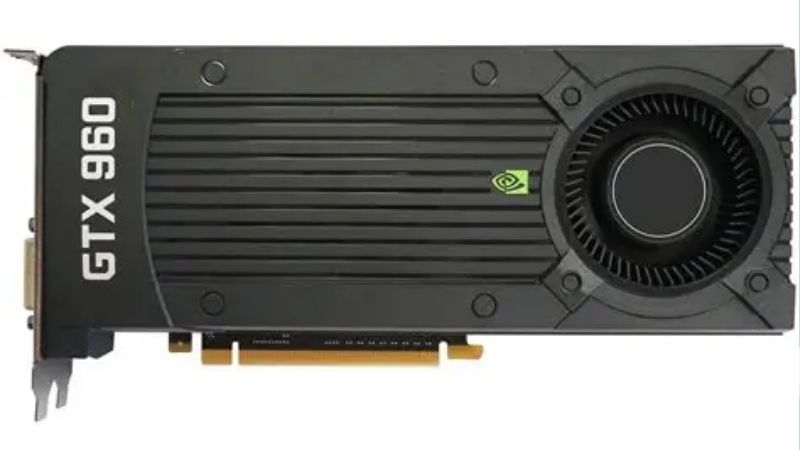
Getting the Right GTX 960 Drivers
The most important step happens before you install anything, and that is choosing the correct driver from a trustworthy source. A card of this generation has a specific set of supported drivers, and picking the wrong file, or the wrong download site, causes far more problems than it solves. Getting this part right is what turns a five-minute job into a stable, lasting result rather than a fresh round of crashes. It is tempting to grab the first download a search throws up, but a few seconds spent confirming the source and the exact version is what separates a clean install from an afternoon of troubleshooting.
Where to Download the Correct Driver
The only source you should trust is Nvidia’s official driver page, which lets you search by your exact product and operating system and returns every version that officially supports the GTX 960. Downloading straight from Nvidia avoids the wrong-version and bundled-software problems that plague third-party sites.
Steer well clear of paid driver-updater tools and unofficial mirrors. Reviews of these are full of complaints about adware, mismatched files and installers that break more than they fix, and since the genuine driver is completely free from Nvidia, any site charging for it is a warning sign on its own.
Nvidia also keeps an archive of older releases, which matters here because the right driver for an aging card is sometimes a slightly older, more stable version rather than the very latest one on offer.
Game Ready, Studio and Legacy Status
Nvidia ships two driver branches: Game Ready, tuned for the latest games, and Studio, tuned for creative applications. For a GTX 960 used mainly for gaming, the Game Ready branch is the natural choice, while anyone doing creative work may prefer Studio for its stability focus.
The more important question for this card is legacy status. Nvidia eventually moves older GPUs off active driver support, and while the GTX 960 has enjoyed a long support life, buyers should check whether new drivers still cover it or whether they are installing one of its final supported releases.
Knowing which situation applies shapes everything else, because a card still receiving updates is treated differently from one that has reached the end of its driver road.
Identifying Your Exact Card and Operating System
Installing a driver for the wrong chip is a common self-inflicted problem, so confirm your card first. Open Device Manager and expand Display adapters to read the exact model, or let Nvidia’s automatic detection identify your hardware so there is no guesswork involved.
Matching the driver to your operating system matters just as much, since the correct file differs between Windows versions. Selecting the right combination of card and system on Nvidia’s download page is what ensures the driver installs cleanly and behaves as intended rather than causing conflicts.
Installing and Troubleshooting GTX 960 Drivers
Once you have the correct file, how you install it decides whether you end up with a stable system or a lingering mess, because leftover pieces of an old driver are a leading cause of the very problems people are trying to fix. This section covers the clean way to install and how to handle the issues that most often send GTX 960 owners searching for answers. The reassuring pattern in user reports is that the same handful of problems come up again and again, and each has a known, reliable fix rather than being a mystery unique to your machine.
Clean Install Versus a Simple Update
A standard update installs over the existing driver and is fine for routine maintenance when nothing is actually wrong. It is the quick option and needs no extra effort, which is exactly why it is the default for a working system.
A clean install, which wipes the previous driver first, is the right call whenever you are chasing crashes, corruption or leftover files from a bad install. Nvidia’s installer offers a clean-install option, and for stubborn cases a dedicated driver removal tool run in safe mode gives the cleanest possible slate.
The rule of thumb is simple: update for routine changes, and clean install whenever stability is the goal, because a shallow update on a genuinely broken driver usually leaves the same problem behind.
Common Problems and Fixes
The most reported issues are black screens, flicker, crashes and games refusing to launch, and the great majority trace back to a corrupted, mismatched or outdated driver. A clean install of the correct current driver clears most of them outright.
When a brand-new driver introduces a regression on this older card, rolling back to a slightly earlier stable release is the reliable fix, which is why keeping a note of your last known-good version is such a useful habit. Reverting then becomes a quick reinstall rather than a hunt through the archive while a game sits broken.
For choppy video or performance stutter, confirm hardware acceleration is enabled and that no background task is loading the card, since those small settings resolve a surprising share of complaints without touching the driver at all.
Nvidia GeForce GTX 960 Drivers: Pros and Cons of Updating
Updating this card’s drivers is usually sensible, but not blindly, so here is the honest balance for an aging GPU.
| Pros of updating | Reasons to hold or roll back |
|---|---|
| Fixes and stability improvements | New drivers can regress on old cards |
| Support for newer games | A stable current setup may not need it |
| Security patches over time | The card may be near legacy end-of-support |
| Free and official from Nvidia | Little gain if you play only older titles |
The takeaway is to update for a specific game or a known fix, and to keep a stable known-good version on hand so you can revert quickly if a new release misbehaves on this older hardware.
When Drivers Cannot Help: Upgrading the GTX 960
There is a clear line where updating the GTX 960’s drivers stops being the answer, and being honest about it saves you from an endless loop of reinstalls. Once the card is genuinely struggling with modern games regardless of driver, the real fix is new hardware, and the practical questions become compatibility and budget rather than which file to download. Reaching that point is not a failure of the driver or of your setup; it is simply the natural end of a long service life for a card that was mid-range years ago and has been asked to keep up ever since.
Signs the Card Has Aged Out
The tell-tale signs are consistent: modern games run poorly even at low settings, the card appears on or near Nvidia’s legacy list, and no driver, old or new, delivers a smooth experience. At that point the driver is not the bottleneck, the silicon is.
This is a normal and expected stage in a GPU’s life. The GTX 960 was a solid mid-range card in its day, and needing more now is simply a sign that games have moved on past what it was built to handle, no matter how well it is configured.
Compatibility for a Modern Replacement
If the signs point to an upgrade, confirm three things before buying: your power supply provides the wattage and connectors a new card needs, the card fits your case, and your processor is strong enough not to bottleneck it. A modern mid-range GPU is a huge leap from the GTX 960 and rarely demands a top-tier supply.
Some older systems built around the GTX 960 may need a power supply upgrade to move to a more capable card, so factor that into the budget when weighing the total cost of a real upgrade rather than just the price of the card itself.
See More:
Choosing an Upgrade
Moving to a current-generation card ends the aging-driver balancing act entirely, delivering active support, far more performance and modern features such as upscaling that the GTX 960 never had. Even a modest step up transforms what the machine can do in both games and everyday tasks.
Once you have confirmed your system is ready, you can compare current graphics cards that suit your budget through the links on this page and choose a replacement that leaves the driver headaches of an aging card behind for good.
In summary, getting your Nvidia GeForce GTX 960 drivers right is mostly about downloading the correct version from Nvidia, installing it cleanly, and keeping a stable known-good release on hand to roll back to. Do that and most black screens, crashes and launch problems disappear. Just watch for the moment when no driver, old or new, can keep the card up with modern games, because that is the signal to invest in a current GPU rather than another reinstall. Handled that way, the GTX 960 gives you every last mile it has, and you upgrade on your own terms when the numbers, not frustration, tell you the time has come.
Frequently Asked Questions
Is the GTX 960 still supported by current drivers?
Not by the current Game Ready line. NVIDIA ended new feature driver development for Maxwell, Pascal and Volta cards, pinning them to their final branch with security updates continuing for a defined period afterward. Your GTX 960 will install and run its last supported driver correctly, but it will not receive optimisation for newly released games.
Where do I download the correct driver?
Use the official NVIDIA driver search page and select GeForce, then the 900 series, then GTX 960, along with your Windows version. The site will present the final supported release for that hardware. Avoid third party driver sites entirely, since GPU drivers are a common vector for bundled adware and tampered installers.
How do I fix a driver that fails to install?
Run Display Driver Uninstaller in safe mode to clear any partial or corrupted installation, then reboot and install the downloaded package with the clean installation option selected. If installation still fails, disconnect from the internet so Windows Update cannot inject a competing driver mid-install, and temporarily pause any antivirus that blocks driver signing.
Should I worry about security with an unsupported driver?
Graphics drivers do receive occasional security advisories, and once the extended support window closes those fixes stop. For an offline or lightly used machine the risk is low. For a system handling sensitive work, an end of life driver is one more reason to plan a hardware refresh rather than continue indefinitely.
What should I upgrade to from a GTX 960?
Almost any current entry level card is a large leap. An RTX 5050 or RX 9060 XT provides several times the performance plus hardware ray tracing, modern upscaling and AV1 encoding, and both fit modest power budgets. If your power supply is old and low wattage, budget for replacing it at the same time.
As an Amazon Associate we earn from qualifying purchases at no extra cost to you.




Ready to decide? Our #1 pick for 2026 is the Pros of updating.
Live price & availability on Amazon.











Write Your Review
No reviews yet. Be the first to share your experience!