
- Top Pick: ASRock Radeon RX 9060 XT Challenger 16GB OC, RDNA 4, 3290MHz Boost, 16GB GDDR6 128-bit, PCIe 5.0, Dual Fans, 0dB Silent, LED Indicator, DisplayPort 2.1a, HDMI 2.1b
- Best Value: ASRock Intel Arc B580 Challenger 12GB OC Graphics Card, 2740 MHz GPU Clock, 12GB GDDR6, DisplayPort 2.1, HDMI 2.1a, Dual Fan Cooling, 0dB Silent Operation
- Premium Choice: ASUS Dual Radeon RX 9060 XT 16GB GDDR6 Graphics Card, AMD, for Desktop (PCIe 5.0, HDMI 2.1b, DisplayPort 2.1a, 2.5-Slot, Axial-tech Fan, 0dB Technology, and More)
GPU 1440p benchmarks are published everywhere and organised almost nowhere. You get a chart of twenty cards sorted by speed, which tells you the RTX 5090 is fast — a fact you already knew — and leaves you to work out which of them you can actually afford and whether it clears your monitor’s refresh rate. This page inverts that. Sorted by budget, with the frame rates that follow, the VRAM floor that decides longevity, and the cards whose 1440p listings are quietly wrong. Find your price band and read one section.
What 1440p Actually Demands
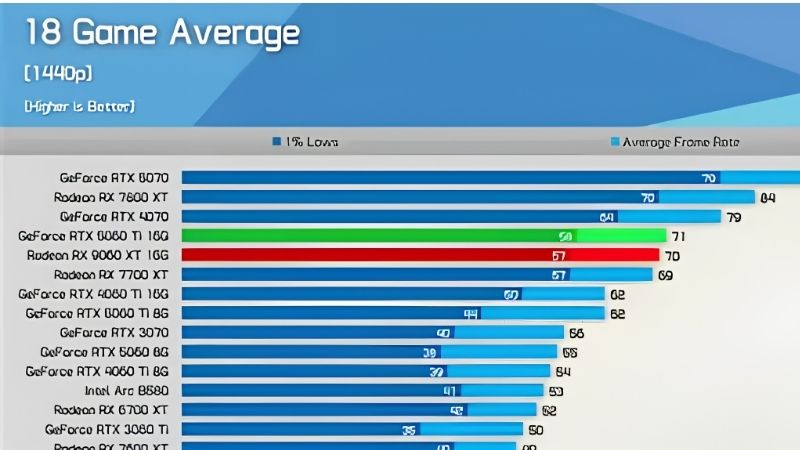
2560×1440 is 3.7 million pixels — 78% more than 1080p and 44% of 4K. That middle position is why it is the best value resolution in PC gaming and also why benchmark charts for it are so inconsistent: it sits exactly where architectural differences stop being masked by CPU limits and start being masked by nothing at all.
The VRAM Floor Is 10GB, and 12GB Is the Real Target
Start here, because it decides whether a card ages or expires.
At 1440p, 8GB is finished — not slow, broken. Several current titles exceed it at High settings, and when they do, performance does not decline gracefully. The driver spills assets across PCIe into system RAM and produces frame time spikes that no average frame rate reveals. 10GB works today with care. 12GB is comfortable. 16GB is where you stop thinking about it.
The practical rule: ignore any 8GB card for 1440p regardless of how its 1080p benchmarks look. An RTX 5060 or 4060 Ti 8GB is a good 1080p card and a bad 1440p one, and no driver update will change that.
Your Refresh Rate Decides Your Budget, Not Your Ambition
Before comparing any card, look at what you are plugging into. This single number moves the correct answer by roughly $700.
A 1440p 60Hz or 75Hz panel needs a card that holds 60 FPS — a $350-450 problem. A 1440p 144Hz panel needs 120+ FPS, which is a $550-800 problem. A 1440p 240Hz panel is a $1,000+ problem, and honestly one most people should not attempt.
Buyers routinely get this backwards, pairing an expensive card with a 75Hz panel and capping 130 FPS of capability at 75. If that describes you, spend $250 on a 144Hz monitor and $500 on the GPU rather than $900 on the GPU alone. The experience will be better and the total lower.
The Benchmarks by Price Tier
Every figure below is 1440p at High presets with DLSS or FSR Quality enabled, because that is how anyone sane plays at this resolution. The next section explains why native numbers are the wrong data to shop with.
$300-450: 1440p 60 With Compromises
| Card | VRAM | 1440p typical | Verdict |
|---|---|---|---|
| Intel Arc B580 | 12GB | ~60-75 FPS | Best VRAM per dollar; driver maturity is the trade |
| RX 7700 XT | 12GB | ~70-85 FPS | Solid raster, but no FSR 4 (RDNA 3) |
| RTX 5060 Ti 16GB | 16GB | ~70-85 FPS | The 16GB version only — never the 8GB |
This tier makes 1440p work on a 60-75Hz panel and struggles above it. The B580’s 12GB at this price is genuinely the value story of the segment, and its weakness is driver consistency rather than hardware.
Note the 5060 Ti row carefully. Two versions exist with identical names and 8GB versus 16GB of memory. At 1440p that is not a minor variant — it is the difference between a working card and a stuttering one.
$550-800: The Sweet Spot
| Card | VRAM | 1440p typical | Verdict |
|---|---|---|---|
| RX 9070 | 16GB | ~95-120 FPS | 220W; FSR 4; saturates a 144Hz panel |
| RTX 5070 | 12GB | ~90-115 FPS | DLSS 4.5 with MFG; 12GB is the limit here |
| RX 9070 XT | 16GB | ~110-135 FPS | Best price per frame in the tier |
| RTX 5070 Ti | 16GB | ~115-140 FPS | The complete 1440p answer |
This is where the money should go for almost everyone reading this. All four clear 90+ FPS at 1440p and the top two saturate a 144Hz panel with headroom to spare.
The RX 9070’s 220W deserves a mention that benchmark charts never give it — it delivers this on a 650W supply you probably already own, where some rivals want an 850W and a new cable.
$1,000+: 1440p Without Thinking
The RTX 5080 delivers roughly 130-165 FPS at 1440p and the RTX 5090 pushes past 200. Both are, for this resolution, more card than the display can use.
Buy in this tier for 1440p only if you have a 240Hz panel and play competitively, or if you are buying now and moving to 4K later. Otherwise the honest advice is unpopular: at 1440p, a $1,000 card is money spent on frames your monitor discards. The $400 you save buys a better panel, and that will improve what you see far more than the GPU will.
The one exception: if your GPU sometimes earns money — Blender, Resolve, local AI — the calculation is different and the 5080’s 16GB and CUDA access are worth paying for regardless of resolution.
Pros and Cons of Reading Benchmarks This Way
The tables above use upscaled figures and sort by price. Both choices are deliberate, both are arguable, and it is worth knowing why.
Why Native 1440p Benchmarks Mislead
Most published benchmarks are native, no upscaling, to isolate the hardware. That is correct methodology and it produces data describing a scenario that does not occur — nobody with a DLSS-capable card plays at 1440p native.
DLSS 4.5’s second-generation transformer model, trained with roughly five times the compute of the original, reaches over 400 titles through the Nvidia app’s override without waiting for developers to patch anything. At 1440p Quality the reconstructed image is close enough to native that spotting the difference requires deliberate effort. FSR 4 on RDNA 4 has closed most of the same ground.
So native charts systematically understate what modern cards deliver, and they understate it unevenly — which distorts comparisons between cards with different upscaling capabilities. A 7700 XT and a 5070 look closer in native charts than they are in use, because the chart excludes the thing that separates them.
The Cards to Avoid at 1440p
Three categories, stated plainly, because the listings will not tell you.
Any 8GB card. RTX 5060, 4060 Ti 8GB, RTX 3070. The 3070 is the cruellest example — fast enough for 1440p on paper and capped by 8GB in practice, a card that was mis-specified at birth.
Any 128-bit card. At 1440p the working set stops fitting in cache and the bus starts dictating results. Large L2 caches rescue 128-bit cards at 1080p; they do not at 1440p.
Older flagships at optimistic used prices. A used RTX 3080 has 10GB and no Frame Generation, draws 320W, and is outperformed by cards costing less. Its reputation is doing work its specifications no longer support.
Pros and Cons Summary
| Pros of the price-tier approach | Cons and caveats |
|---|---|
| Sorted by what you can spend, not by what exists | Upscaled figures depend on title support |
| Upscaled numbers reflect how people actually play | Averages hide per-game variation of 20%+ |
| VRAM floor filters out cards that will expire | Regional pricing shifts the tier boundaries |
| Refresh rate framing stops overbuying | Driver updates move these numbers over time |
| Names the cards to avoid, which charts never do | Your CPU can cap the top tier at 1440p |
The honest limitation: no aggregate table replaces checking the specific game you play the most. Use this to pick a tier, then verify against your title.
Market Context Behind These Prices
Every tier boundary above assumes a price, and prices have been the least stable input in this entire analysis. For a purchase in the $550-800 range, the direction of the market matters as much as the frame rates.
Why 1440p-Class Cards Hold Their Price
Component and laptop prices have kept trending upward rather than settling back, and the 1440p tier sits directly in the path of it. These cards carry 12GB or 16GB of GDDR6 or GDDR7 — a bill of materials that reprices directly with memory contracts, on a supply base concentrated among very few manufacturers.
The consequence is that the traditional second-year price drift has stopped operating in this segment specifically. A $600 card in this tier has stayed a $600 card. That is unusual and it has a practical implication most people miss: it makes the tier boundaries above more reliable than they would normally be. In a market that moved, a price-tier guide would be stale in three months. In this one, it holds.
The unwelcome half: buyers who spent 2025 waiting for the 1440p tier to correct mostly paid more later than they would have paid immediately. Waiting has not been free and it has not been neutral.
Prices Flattened, But Relief Is Distant
The good news is real and deserves precision rather than optimism. The steep climb of late 2025 has eased. Framework, which publishes unusually candid component pricing updates, has described a stretch of relative stability while continuing to warn that volatility has not ended. Prices stopped accelerating; they did not reverse.
New capacity is coming. OEMs can now source DDR5 from Chinese manufacturers such as CXMT, and Micron is building two fabs in Idaho. Both are genuine additions to a constrained market. Neither begins production before 2027-2028, which is a full GPU generation beyond any purchase you are making this year.
So: flat, not falling, with meaningful relief two to three years out. Build your decision around the prices in the tables above, not around a correction with no arrival date.
How to Actually Use This Data
Three steps, in order. Check your monitor’s refresh rate first — it sets your tier and it is the step everyone skips. Apply the 12GB floor and delete every card below it from consideration, regardless of what its 1080p numbers say. Then compare live prices within your tier only, because the ordering inside a tier shifts month to month while the tier boundaries hold.
For most people reading this, the answer is the $550-800 band and a 144Hz panel. That combination is the best value in PC gaming right now and it has been for two years. Compare current pricing across the RX 9070, 9070 XT, RTX 5070 and 5070 Ti before committing — those four move independently, and whichever is cheapest this week is very likely your answer.
See More:
- GTX 1650 vs RTX 3050
- Nvidia DIGITS
- Nvidia cuDNN
- Radeon RX 9070 XT vs RTX 5090
- PNY GeForce RTX 5080 review
Conclusion: Using GPU 1440p Benchmarks Properly
GPU 1440p benchmarks are only useful once you stop reading them as a ranking and start reading them as a budget question. Your refresh rate sets your tier: 60-75Hz is a $350-450 problem, 144Hz is a $550-800 problem, and 240Hz is a $1,000+ problem most people should not take on. Apply a hard 12GB floor and the shortlist gets short quickly.
Two things to carry away. Native benchmark charts describe a scenario nobody plays — DLSS 4.5 and FSR 4 are how 1440p actually runs in 2026, and native data understates modern cards unevenly. And 8GB is not a compromise at this resolution, it is a defect: the RTX 3070 is the standing proof that raw speed does not rescue a card that has run out of memory. Bookmark the tier tables; with prices flat rather than falling, they will still be accurate next quarter.
Frequently Asked Questions
What frame rate should I target at 1440p?
For a 144Hz or 165Hz monitor aim for 100fps or more average with 1 percent lows above 60, which feels smooth in fast shooters. For single player games at 60Hz or with VRR, a 60 to 80fps average is plenty. Chasing the panel refresh rate in every title usually costs far more than the visual benefit.
Which cards handle 1440p high settings in 2026?
Entry to that class starts around the RTX 4060 Ti 16GB, RX 7700 XT and Arc B580, which manage high settings with upscaling. The comfortable tier is the RTX 5070, RX 9070 and RX 7800 XT. For 1440p ultra with heavy ray tracing at high refresh you are looking at the RTX 5070 Ti and above.
How much VRAM do I need at 1440p?
Treat 8GB as the floor and 12GB as the practical target. Several 2024 to 2026 releases exceed 8GB at 1440p with high textures plus ray tracing, and the symptom is stutter and texture pop rather than a lower average, which does not always show up in benchmark charts that only report averages.
Why are my frame rates lower than the benchmark charts?
Review benchmarks use top-tier CPUs, fast memory, Resizable BAR enabled and clean Windows installs. A CPU bottleneck, single-channel or slow RAM, an older PCIe 3.0 slot on a x8 card, background overlays, or power limits in a warm case can easily account for a 10 to 30 percent shortfall.
Do 1 percent lows matter more than averages?
Yes for perceived smoothness. Two cards can post the same 90fps average while one has 1 percent lows of 70 and the other 40, and the second will feel visibly worse. VRAM capacity, memory bandwidth and CPU headroom all show up in the lows long before they dent the average figure.
As an Amazon Associate we earn from qualifying purchases at no extra cost to you.

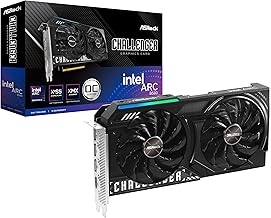


Ready to decide? Our #1 pick for 2026 is the Intel Arc B580.
Live price & availability on Amazon.











Write Your Review
No reviews yet. Be the first to share your experience!