
- Top Pick: Noctua NT-H1 3.5g SW Edition, Thermal Paste, Spatula and 3 Cleaning Wipes
- Best Value: Thermal Grizzly Kryonaut – 1 Gram – Extremely High Performance
- Premium Choice: Thermal Grizzly Kryonaut – 1 Gram – Extremely High Performance Thermal Paste + 12 Cleaning Wipes 6 Wet & 6 Dry – for Demanding Applications and Overclocking CPU/GPU/PS4/PS5/Xbox
Best way to apply thermal paste is a complete procedure rather than a single trick, and most of the temperature you gain or lose happens before the compound leaves the tube. This guide walks the full process from cooler removal to mounting torque, and covers the products that handle each stage.
As an Amazon Associate we earn from qualifying purchases at no extra cost to you.




As an Amazon Associate we earn from qualifying purchases at no extra cost to you.
By Ryan Cole
The Full Process: Best Way to Apply Thermal Paste
Four stages separate a proper repaste from a rushed one, and the compound itself is only the third of them. The best way to apply thermal paste is really about getting the other three right, because they matter more than which tube you buy.
Warm the System, Then Remove the Cooler
Cured compound grips hard when cold. Running the machine for ten minutes beforehand softens it, so the cooler lifts away instead of pulling the processor out of an unlatched socket, which is a real risk on AMD boards where the retention arm holds the chip rather than the lid.
Loosen mounting screws a turn at a time in a diagonal sequence rather than fully unscrewing one corner. Then twist the cooler gently to break the seal before lifting, never levering it off in one movement. Uneven release can bend the retention bracket or crack a socket latch.
Clean Both Surfaces Completely
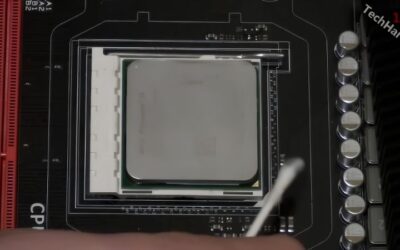
Isopropyl alcohol at 90 percent or higher removes old compound without leaving residue, and both the processor lid and the cooler coldplate need it. Anything less than 90 percent carries too much water and dries slowly.
Use lint-free cloths, coffee filters or dedicated cleaning wipes rather than paper towel. Fibres left behind sit directly in the contact area and cost measurable temperature, which undoes the point of the whole exercise. Work in one direction rather than circling, and give both surfaces a second pass.
Apply the Right Volume for the Chip
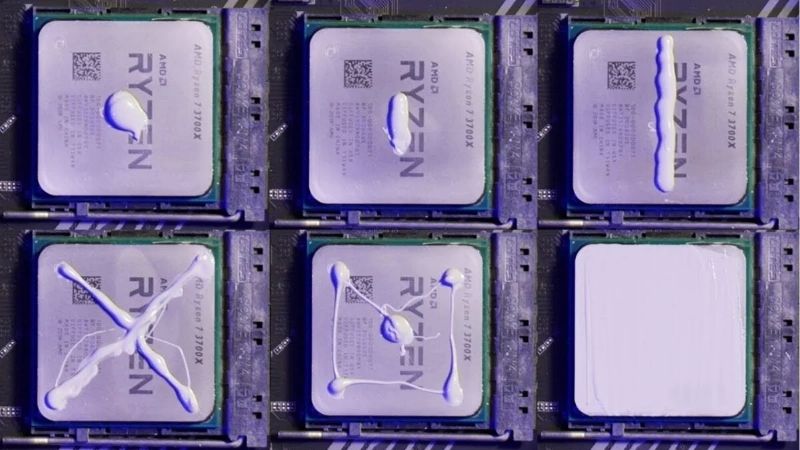
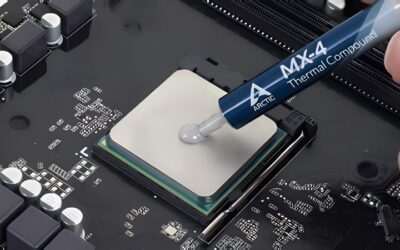
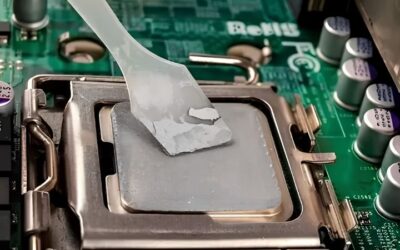
A drop about the size of a small pea suits a standard desktop processor. Larger heat spreaders on high core-count parts want somewhat more, while a bare die takes a much thinner manual film applied with a spatula.
Warming the syringe in a closed hand for a couple of minutes makes thicker compounds dispense evenly. This single habit produces more consistent results than any argument about dots versus lines, and it costs nothing beyond a short pause before you start.
Mount Evenly and Do Not Overtighten
Tighten the cooler in a diagonal sequence, a couple of turns per corner at a time, so pressure builds evenly across the heat spreader. Uneven mounting is one of the most common causes of disappointing temperatures after a repaste.
Stop when the screws meet their stops or the springs are fully compressed. Overtightening bows the board around the socket without improving contact, and on some coolers it can crack the retention hardware. Manufacturers design the spring travel to deliver correct pressure, so let it do the work.
What the 2026 Market Means for Cooling Maintenance
Three market conditions have made repasting a more common job this year than it has been in a while, which is why the best way to apply thermal paste is being asked about more often than usual.
Inexpensive Upgrades Deliver the Best Returns
With graphics card prices elevated, improving hardware you already own is the practical route to better performance. Fresh compound, a better CPU cooler, additional case fans and a decent power supply all produce measurable gains.
On a machine four or five years old, the original application has usually degraded enough that a repaste alone lowers temperatures noticeably. It frequently restores boost clocks that had been quietly throttling for months, which shows up as higher sustained frame rates rather than a higher peak.
The Budget Component Tier Has Shrunk
Component vendors moved their ranges upward through 2026 and promotional pricing policies ended in February. That primarily affects boards and coolers, but it raises the cost of a full cooling refresh.
Compound is one of the few categories where a few dollars still buys a real improvement, which makes it the cheapest meaningful upgrade in a PC. That is why it keeps coming up whenever an ageing system starts throttling.
Seasonal Discounts Still Reach This Category
Memory and pre-built systems will not fall meaningfully this November, since that stock was built from components bought at this year’s elevated contract prices. Coolers, fans, power supplies and compounds are different.
Buying compound alongside cleaning supplies and replacement fans during a sale makes sense. The absolute savings are modest, so do not delay a repaste that a hot-running machine needs today, since months of throttling costs more than the discount is worth.
Top Picks: Best Way to Apply Thermal Paste in One Purchase
These cover compound, cleaning and application together, because the best way to apply thermal paste needs all three and running out of isopropyl halfway through a job is a genuinely common problem. Verify pricing and availability before ordering.
| Product | Type | Covers Cleaning | Applicator | Best For |
|---|---|---|---|---|
| Noctua NT-H2 with wipes | Compound plus wipes | Yes | Spatula | Complete single purchase |
| Arctic MX-6 with MX-Cleaner | Compound plus cleaner | Yes | No | Best all-round value |
| Arctic MX-4 45g tub | Compound only | No | No | Multiple machines |
| Thermal Grizzly Kryonaut with kit | Compound plus kit | Partially | Spatula | Overclocked systems |
| ArctiClean two-step kit | Cleaning only | Yes | No | Stubborn cured paste |
| Thermalright TF7 with spatula | Compound plus spatula | No | Spatula | Budget repaste |
Noctua NT-H2 with Cleaning Wipes
The bundled version of NT-H2 is the closest thing to a complete repaste in one box. The compound spreads predictably under normal mounting pressure, has an exceptionally long shelf life, and the included wipes handle both surfaces.
Cost per gram is well above the Arctic products for a performance difference that is hard to detect on a normal build. What you are actually buying is not having to source cleaning supplies separately.
Arctic MX-6 with MX-Cleaner
This pairing is the best value route to doing the job properly. MX-6 is non-conductive, resists pump-out well over years, and the dedicated cleaner removes cured compound faster than isopropyl alone.
MX-6 is thick, so warm the syringe before dispensing or the drop will sit stubbornly where you put it. Under a low-pressure mount that thickness can produce uneven coverage if you skip that step.
Arctic MX-4 45g Tub
For anyone maintaining several machines, the large tub changes the economics entirely. Cost per application drops far below any syringe, and MX-4 flows more readily than MX-6, which makes repeated jobs quicker.
You supply your own cleaning materials and applicator, and the compound gives up a degree or two to MX-6 while resisting migration slightly less well. Neither matters against the packaging advantage.
Thermal Grizzly Kryonaut with Application Kit
Kryonaut sits at the top of the non-conductive performance range and is thin enough that a central drop reaches the corners unaided. The kit versions add a spatula and basic cleaning materials.
It is among the most counterfeited products in the category, so buy only from authorised retailers. Its service life at sustained high temperatures is also shorter than the Arctic MX line, which matters on a machine you rarely open.
ArctiClean Two-Step Kit
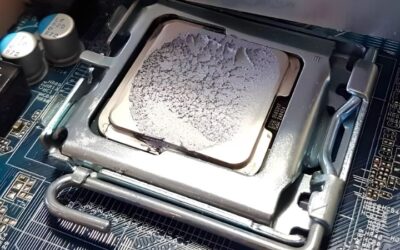
This is cleaning only, and it earns a place when compound has cured hard over years. The first solution breaks down the old material and the second removes residue, which isopropyl alone struggles with on badly baked applications.
It adds a purchase to a job that isopropyl usually handles fine, so it is unnecessary for a machine repasted regularly. Keep it for the five-year-old system where the paste has turned to chalk.
Thermalright TF7 with Spatula
TF7 undercuts the better-known compounds while performing within the same narrow band, and the included spatula suits anyone who prefers a manual spread to a central drop.
Long-term field data is thinner than for Arctic and Noctua products, so its behaviour after several years is less documented. For a system you expect to open again reasonably soon, that concern is minor.
Frequently Asked Questions
These questions come up repeatedly once builders treat the best way to apply thermal paste as a procedure rather than a single step performed with a syringe.
Should I run the PC before removing the cooler?
Yes, for around ten minutes. Warm compound releases far more easily than cured cold compound, which reduces the chance of pulling an unlatched processor out of an AMD socket along with the cooler.
What alcohol concentration should I use for cleaning?
Isopropyl alcohol at 90 percent or higher. Lower concentrations carry too much water, dry slowly and can leave residue. Pair it with lint-free cloths, coffee filters or dedicated wipes rather than paper towel.
How tight should the cooler mounting screws be?
Tighten diagonally, a couple of turns per corner, until the screws meet their stops or the springs are fully compressed. Overtightening bows the board without improving contact and can damage retention hardware on some coolers.
Do I need to let new paste cure before benchmarking?
Conventional compounds are effectively at full performance immediately, with only minor settling over the first few heat cycles. Phase change materials are the exception and need around ten cycles before temperatures stabilise.
See More:
- Who makes the best motherboard
- Best budget AM5 CPU for gaming
- What is the best thermal paste pattern
- Best mini ITX computer case
- Best desktop RAM for gaming
Final Thoughts
The best way to apply thermal paste has more to do with preparation and mounting than with the compound itself. Warm the machine, clean both surfaces with high-strength isopropyl and lint-free cloths, use roughly a pea of a compound you have warmed in your hand, then tighten diagonally without forcing it. NT-H2 with wipes covers the whole job in one purchase; MX-6 with a cleaner is the better value. Figures reflect August 2026 and should be verified before purchase.


Write Your Review
No reviews yet. Be the first to share your experience!