
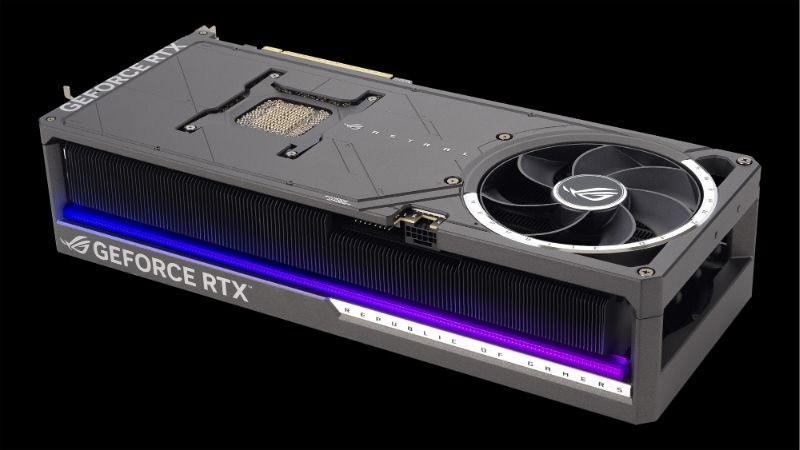
Quick answer: For most people in 2026, the best 5090 card is the ASUS ROG Astral — our #1 rated choice. See the full ranked comparison, alternatives and buying advice below.
Top 5090 Card Rtx 5090 Models Picks for 2026
Here are our current top 5090 card rtx 5090 models picks, compared on real Amazon owner reviews, price, and features. Live prices update below.


Best 5090 card shoppers face a tricky problem: every RTX 5090 uses the same Blackwell GB202 GPU, so the model you choose comes down to cooling, noise, size, build quality, and price rather than raw speed. This guide ranks the standout RTX 5090 cards of 2026, explains the criteria that actually separate them, and gives you a clear buying framework so you pay for the right strengths and skip the marketing you do not need.
Quick Picks and 5090 Comparison Table
If you are short on time, start here. Every RTX 5090 delivers the same flagship performance from its 21760 CUDA cores and 32GB of GDDR7, so these picks are sorted by the practical traits — thermals, acoustics, and fit — that decide which card is right for your build.
Best Overall, Best Value, and Best Premium
Our top recommendations break down into three clear roles for three different buyers. Each represents the best balance of cooling, noise, and price within its category.
- Best Overall: ASUS ROG Astral RTX 5090 — the most complete package of cooling, acoustics, and build quality.
- Best Value: Gigabyte Windforce RTX 5090 — flagship performance with the extras trimmed to keep the price down.
- Best Premium: MSI Suprim RTX 5090 — top-tier materials, premium cooling, and a showpiece design.
All three deliver identical gaming performance because the GPU is fixed. What you are really choosing between is how quietly and coolly that performance is delivered, and how the card looks and fits inside your case.
A fourth option deserves a mention for one specific buyer: the Founders Edition. Its compact 2-slot design is the only realistic 5090 for small-form-factor builds, and it sells at Nvidia’s baseline MSRP, making it the pick when case clearance, not cooling or aesthetics, is your hardest constraint.
Side-by-Side Specification Table
The table below highlights the differences that matter when every card shares the same core silicon. Use it as a fast reference before reading the detailed reviews.
| Model | Best For | Cooling | Slot Size | Relative Price |
|---|---|---|---|---|
| ASUS ROG Astral | Overall | Quad-fan, large heatsink | ~3.8 slots | High |
| Gigabyte Windforce | Value | Triple-fan | ~3.5 slots | Lower |
| MSI Suprim | Premium | Triple-fan, premium frame | ~3.5 slots | Highest |
| Founders Edition | Compact builds | Dual-fan, 2-slot | 2 slots | MSRP |
What All RTX 5090 Cards Share
Every model on this list is built on the same flagship foundation: the Blackwell GB202 GPU with 21760 CUDA cores, 32GB of GDDR7 on a 512-bit bus, and roughly 1792 GB/s of memory bandwidth. That shared core is why raw frame rates barely differ between them.
They also share a high 575W power draw and the 16-pin 12V-2×6 power connector, which means a strong power supply is non-negotiable regardless of which card you pick. Nvidia recommends planning around a 1000W PSU for a complete high-end system.
Finally, every 5090 supports DLSS 4 multi-frame generation, the 50-series-exclusive AI feature that drives the highest on-screen frame rates. This experimental capability is part of the value of buying into the flagship tier at all.
Because these traits are constant, the rest of this guide focuses on the variables you actually control: cooler design, physical size, acoustics, and price. Those are the only levers that change your experience once the core silicon is fixed, so they deserve the bulk of your attention when comparing models.
Detailed Reviews of the Best RTX 5090 Cards
With the shared foundation established, the differences come down to execution. Each review below follows the same structure — strengths, trade-offs, and the buyer it suits — so you can compare them on equal terms.
ASUS ROG Astral RTX 5090 (Best Overall)
The ROG Astral earns the overall pick by doing nearly everything well. Its oversized quad-fan cooler keeps the 575W GPU running cool and quiet even under sustained load, which directly translates to higher sustained boost clocks and a more comfortable acoustic experience at your desk.
Build quality is a clear strength, with a rigid metal frame, a robust backplate, and refined RGB that looks premium rather than gaudy. The trade-offs are size and price: this is a large, heavy card that demands a roomy case and good airflow, and it sits at the upper end of 5090 pricing.
It suits the buyer who wants the best-cooled, quietest 5090 and has the case space and budget to match. If you are building a no-compromise flagship rig, the Astral is the safest premium-class choice on the list.
Gigabyte Windforce RTX 5090 (Best Value)
The Windforce is the smart pick for buyers who want flagship performance without paying for showpiece extras. It delivers the same 32GB GDDR7 and full GB202 performance as every other 5090, while a competent triple-fan cooler keeps temperatures in check for typical gaming workloads.
The savings come from trimming the premium touches: lighting, frame materials, and the most aggressive cooling are scaled back compared with the Astral or Suprim. Under heavy sustained load it runs a touch warmer and louder than the top-tier coolers, which is the honest trade-off for the lower price.
This card is ideal for the value-focused enthusiast who cares about frames per dollar and is happy to skip RGB and luxury finishes. For most gamers, the Windforce captures the great majority of the flagship experience for noticeably less money.
MSI Suprim RTX 5090 (Best Premium)
The Suprim is the choice for buyers who want the flagship to look and feel as premium as it performs. Its triple-fan cooler is paired with a heavy, precisely finished metal frame, and the result is excellent thermals with a genuinely high-end aesthetic that anchors a showcase build.
Acoustically it is among the quietest 5090 cards, and the premium materials give it a reassuring solidity. The trade-off is straightforward: it carries the highest price of the group, so you are paying a premium for design and finish rather than extra speed, since the performance ceiling is identical to its rivals.
It fits the buyer assembling a no-expense-spared system who values aesthetics and acoustics as much as raw output. If the card is a centerpiece of a glass-panel build, the Suprim justifies its premium for the right owner.
Buying Guide: How to Choose Your 5090 Card
Because performance is effectively constant across models, choosing well means matching a card’s physical and acoustic traits to your specific build and budget. These are the criteria that separate a great purchase from an expensive mismatch.
Cooling, Size, and Case Compatibility
Cooling is the most meaningful differentiator on a 575W card. Better coolers hold higher sustained boost clocks and stay quieter, so a card’s fan count, heatsink size, and acoustic reputation matter far more than any factory overclock measured in single-digit percentages.
Size is the practical companion to cooling. Many 5090 models occupy 3.5 to 4 slots and are physically long, so measure your case clearance before buying, especially GPU length and slot height. A card that cannot fit or starves for airflow will throttle and roar regardless of how good its cooler is on paper.
For compact builds, the 2-slot Founders Edition is the notable exception and the only realistic 5090 for smaller chassis. Confirm both clearance and front-to-back airflow so the card can actually breathe at full load.
Weight is the often-forgotten factor on these large coolers. A heavy quad-fan card can sag in its slot over time, so many owners add a support bracket, and several premium models include one in the box. It is a small detail, but on a card this expensive, protecting the slot and the PCB from long-term stress is well worth the minute it takes to install.
Power Supply and 12V-2×6 Connector
Every 5090 draws around 575W and uses the 16-pin 12V-2×6 connector, which makes your power supply a critical part of the decision rather than an afterthought. Plan around a high-quality 1000W PSU for a full high-end system to leave proper headroom for transient spikes.
Cable handling matters as much as wattage. Use the connector and adapter supplied with the card or a native 12V-2×6 cable from a reputable PSU, and seat it fully until it clicks to avoid the high-resistance contact that causes connector heat issues.
If your current PSU is older or marginal, budget for an upgrade alongside the card. A 5090 paired with an undersized or low-quality supply is a recipe for instability, and skimping here undermines an otherwise premium build.
Price, Availability, and 2026 Market News
Pricing on the 5090 is volatile, and two current developments make timing part of the buying decision. Nvidia’s approval to sell its powerful H200 AI chips to China keeps the company’s production and engineering attention firmly on high-margin data-center silicon, which can tighten the supply of flagship gaming GPUs and keep prices firm.
At the same time, laptop and component prices are trending upward across the market. For the flagship tier this means waiting for a meaningful price drop is a risky bet, since constrained supply and rising costs more often push prices up than down, and good stock at fair pricing tends not to last.
The practical conclusion is to buy on availability rather than hope. If your preferred model appears in stock at a reasonable price and your build is ready, acting during that window is wiser than waiting for discounts that the current market is unlikely to deliver.
Real-World Performance Every 5090 Delivers
Choosing between models is about cooling and fit, but it helps to know exactly what that shared GB202 core gives you in real use. Across every card on this list the performance ceiling is identical, and it is genuinely flagship-class in both gaming and creator workloads.
4K and High-Refresh Gaming
At 4K the RTX 5090 is the fastest gaming GPU available, routinely sustaining high frame rates in demanding titles where every previous card had to lean hard on upscaling. The combination of 21760 CUDA cores and 32GB of GDDR7 on a 512-bit bus means it rarely runs out of either compute or memory at native 4K.
For high-refresh 1440p the card is almost overkill, frequently pushing frame rates that exceed common monitor refresh ceilings, which makes it a true future-proof purchase rather than a one-generation stopgap. Owners pairing it with a 4K 240Hz panel report the most satisfying match for the card’s output.
The practical lesson is to match your display to the card. A 5090 behind a 1080p 60Hz monitor wastes most of its potential, so plan a high-resolution, high-refresh screen to actually see what you paid for.
DLSS 4 and Creator Workloads
The experimental edge of the 5090 is its exclusive access to DLSS 4 multi-frame generation, the 50-series-only feature that uses AI to insert multiple generated frames and push on-screen frame rates far beyond the native render rate in supported games. This is the single most forward-looking reason to buy into the flagship tier.
Beyond gaming, the 32GB framebuffer makes the 5090 a serious creator card. Large 3D scenes, high-resolution video timelines, and local AI workloads all benefit from the enormous memory pool, and many buyers justify the card as much for content creation as for gaming.
If your workflow mixes gaming with rendering, editing, or AI experimentation, the 5090’s memory capacity and AI feature set deliver value that cheaper cards simply cannot match. That dual-purpose strength is part of what makes the flagship price easier to rationalize.
Thermals and Noise Under Sustained Load
This is where the individual models finally diverge in your daily experience. The GPU runs at roughly 575W, so the quality of a card’s cooler determines how high it holds its boost clock and how loud your system gets during long sessions, even though peak performance is shared.
Premium coolers like those on the ROG Astral and Suprim keep the card cooler and quieter under sustained load, while value coolers such as the Windforce run slightly warmer and more audible during extended gaming. None of this changes the frame rate, but it changes how pleasant the card is to live with.
Case airflow magnifies these differences. A well-ventilated case lets even a mid-tier cooler perform admirably, while a cramped, poorly ventilated build can make any 5090 throttle and roar, so treat airflow as part of the cooling equation rather than an afterthought.
RTX 5090 Card FAQs
A few questions come up repeatedly when choosing among 5090 models. These answers cover the practical concerns that decide most purchases and help you finalize your shortlist with confidence.
Do More Expensive 5090 Cards Perform Faster?
Not in any way you will notice. Every RTX 5090 uses the identical GB202 GPU and 32GB of GDDR7, so gaming performance is effectively the same across models, and factory overclocks add only low single-digit differences that no player perceives in real games.
What the extra money buys is better cooling, lower noise, stronger build quality, and design. Those are real benefits for comfort and longevity, but they are not speed, so judge premium models on thermals and acoustics rather than expecting more frames.
This is also why reading independent thermal and noise testing matters more than chasing the highest factory boost number on the box. A card that stays a few degrees cooler under load will hold its clocks more consistently during long sessions, and that steadiness is the closest thing to a real performance advantage you will find between models.
What PSU Do I Need for an RTX 5090?
Plan around a high-quality 1000W power supply for a complete high-end system built around the 5090’s roughly 575W draw. That headroom comfortably absorbs transient power spikes and leaves room for a fast CPU and the rest of the platform.
Equally important is using a proper 12V-2×6 connection and seating it fully. A quality modern PSU with a native cable, correctly installed, is the safest pairing for a flagship card of this power class.
If you are reusing an older supply, check that it is on the ATX 3.0 or 3.1 specification, which is designed to handle the brief power transients that high-end GPUs produce. An older unit without that headroom can trigger shutdowns under load even if its rated wattage looks sufficient on paper, so the safest path for a 5090 is a current-generation 1000W supply from a reputable brand.
Which 5090 Card Should Most People Buy?
For most buyers the value-focused Gigabyte Windforce is the sensible default, delivering the full flagship experience while skipping the premium extras that inflate price. It captures the great majority of what a 5090 offers for less money.
Step up to the ASUS ROG Astral if you want the best cooling and quietest operation, or the MSI Suprim if premium aesthetics and materials matter for a showcase build. Choose the 2-slot Founders Edition only if case size forces a compact card.
Whichever model you pick, prioritize a model with a strong cooler and a length that fits your case over chasing the lowest sticker price on an unfamiliar brand. A well-cooled card from a reputable manufacturer protects your large investment and keeps the system quiet, which matters far more over years of ownership than a small upfront saving.
See more:
- Nvidia GeForce GTX 1050 Ti
- 3080 vs 5080
- RTX 4080 price
- Sapphire graphics card
- Is HDR good for gaming
Recommended Products

Prime MSI GeForce RTX 4060 Ventus 2X Black 8G OC Gaming Graphics Card - 8GB GDDR6X, PCI Express Gen 4, 128-bit, 3X DP v 1.4a, HDMI 2.1a (Supports 4K & 8K HDR)

ASUS Dual GeForce RTX 4060 Ti OC Edition 8GB GDDR6 (PCIe 4.0, 8GB GDDR6, DLSS 3, HDMI 2.1, DisplayPort 1.4a, Axial-tech Fan Design, 0dB Technology), 3 Year Warranty

Prime GIGABYTE GeForce RTX 4060 Eagle OC 8G Graphics Card, 3X WINDFORCE Fans, 8GB 128-bit GDDR6, GV-N4060EAGLE OC-8GD Video Card (Renewed)
As an Amazon Associate we earn from qualifying purchases. Product prices and availability are accurate as of the date/time indicated.
Conclusion
In conclusion, the best 5090 card for you is the one whose cooling, size, acoustics, and price match your build, because every model shares the same flagship GB202 performance and 32GB of GDDR7. The ASUS ROG Astral wins overall, the Gigabyte Windforce is the value champion, and the MSI Suprim leads on premium design, while the Founders Edition serves compact builds. With supply focused on AI chips and component prices trending upward in 2026, the smart move is to buy your preferred model when stock and price align — check current availability through the link on this page before the window closes.
Ready to decide? Our #1 pick for 2026 is the ASUS ROG Astral.
Live price & availability on Amazon.


Write Your Review
No reviews yet. Be the first to share your experience!