
DLSS Ray Reconstruction is the feature that quietly fixed one of ray tracing’s ugliest problems: the smeary, noisy, boiling look that older denoisers left behind in reflections and lighting. If you own an RTX card and want your ray-traced and path-traced games to actually look as clean as the marketing promised, this is the setting that gets you there. This review explains what Ray Reconstruction does, why it beats the old approach, which GPUs and games support it, and where it still stumbles, based on how RTX owners describe the difference in real scenes.
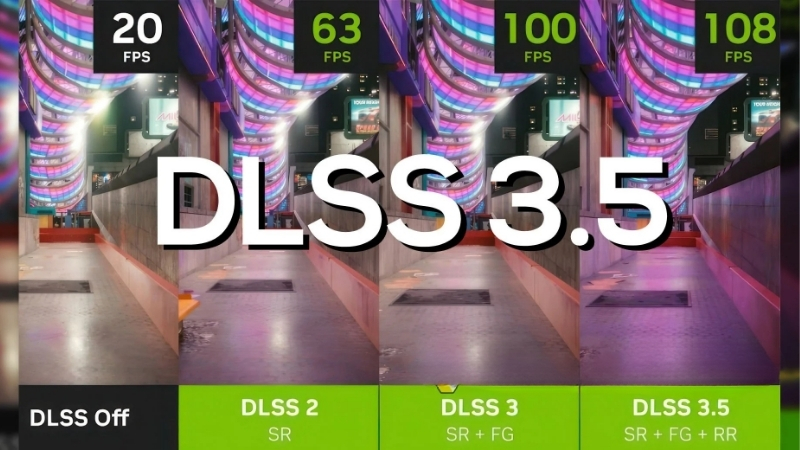
What DLSS Ray Reconstruction Is and How It Works
Ray Reconstruction is part of the DLSS suite, and it replaces the traditional denoisers that ray-traced games relied on with a single AI model trained to reconstruct clean lighting. That sounds abstract, but the visible result is sharper reflections, more stable lighting, and less of the shimmering artifact-filled look that made ray tracing disappointing in motion. Understanding what it replaced is the key to appreciating why it matters. Here is the mechanism in plain terms.
As an Amazon Associate we earn from qualifying purchases at no extra cost to you.


The Problem with Traditional Denoisers
Ray tracing works by tracing a limited number of light rays, which produces an accurate but extremely noisy image, like a grainy photo. Games then run denoisers to clean up that noise into a smooth picture. The catch is those denoisers were hand-tuned, imperfect, and often blurry.
The old denoisers caused real problems: smeared reflections, ghosting behind moving objects, a boiling texture in lighting, and lost detail. In many games, ray tracing looked worse in motion than a good screenshot suggested, and that gap frustrated players who enabled it expecting cinematic results.
Multiple separate denoisers also fought each other and discarded useful information, which is exactly the inefficiency Ray Reconstruction was built to solve.
How the AI Model Improves Ray Tracing
Ray Reconstruction swaps those hand-tuned denoisers for a single AI network trained on vast amounts of high-quality image data. Instead of guessing how to smooth noise with fixed rules, it reconstructs the lighting using learned patterns, preserving detail the old denoisers threw away.
The visible improvements are consistent: sharper and more accurate reflections, more stable lighting with less shimmer, reduced ghosting, and better detail in ray-traced effects. In path-traced games, which trace far more light, the difference is especially dramatic.
Because it is integrated into DLSS, it also works alongside upscaling, so you get cleaner ray tracing and recovered performance from the same technology stack, which is the forward-looking payoff for RTX owners.
It is worth appreciating why a single trained model beats a stack of separate denoisers. Traditional ray-traced games ran different denoisers for different effects, one for shadows, another for reflections, another for global illumination, and each discarded information the others might have used. Ray Reconstruction sees the whole noisy image at once and reconstructs it with a unified understanding of how light should behave, so it keeps fine detail those separate passes would have smeared away. That holistic approach is why the improvement is most visible precisely in the complex, multi-effect scenes that used to look worst.
Which RTX GPUs Support Ray Reconstruction
Ray Reconstruction is supported across RTX cards, the RTX 20, 30, 40, and 50 series, because it runs on the Tensor cores present in all of them. This broad support means you do not need the newest GPU to benefit, only an RTX card and a game that implements it.
That said, the feature only helps in games with ray tracing or path tracing, since it is denoising that lighting. On a title with no ray tracing, there is nothing for it to reconstruct, so it simply does not apply.
Practically, if you have any RTX card and play ray-traced games, Ray Reconstruction is available to you, though the heavier path-traced showcases naturally favor stronger cards to run smoothly.
Ray Reconstruction in Real Games
A clever technology only matters if it shows up in the games you play and delivers a visible upgrade. Ray Reconstruction has spread across the major ray-traced and path-traced titles, and enabling it is usually a single toggle. This section covers which games support it, how to turn it on, and the honest trade-offs, so you know what to expect rather than assuming it is flawless everywhere.
Which Games Support It
Ray Reconstruction appears in the games that lean hardest on ray tracing and path tracing, the visual showcase titles where clean lighting matters most. Support has grown steadily since its introduction, covering many of the most demanding modern games with heavy ray-traced effects.
The titles that benefit most are path-traced games, where the old denoisers struggled hardest and the AI model has the most to fix. In those, the improvement can be transformative rather than subtle.
Since support is per-game, the reliable check is looking in your game’s DLSS settings for a Ray Reconstruction option, which appears only where the developer has implemented it.
How to Enable It and What to Expect
You enable Ray Reconstruction in the game’s graphics settings, typically within the DLSS section, as its own toggle alongside upscaling and frame generation. You need ray tracing turned on for it to do anything, since it works on ray-traced lighting.
Once on, expect cleaner reflections, more stable lighting, and reduced smearing, most noticeable in scenes with lots of reflective surfaces or complex lighting. The change is often subtle in still shots but clearly better in motion, which is where the old denoisers failed.
There is generally little performance cost, and sometimes a small gain, since one efficient AI model replaces several separate denoisers. That makes it an easy toggle to leave on in supported games.
One practical tip: if a game offers both Ray Reconstruction and a choice of DLSS quality presets, enable Ray Reconstruction first and then adjust the upscaling preset, since the cleaner denoising often lets you use a more aggressive upscale without the image looking soft.
Pros and Cons Users Report
Because Ray Reconstruction is essentially free image quality on RTX hardware, the honest question is how consistent the improvement is. Weighing the praise against the occasional complaint gives a realistic picture.
What users like: markedly cleaner and sharper ray tracing, dramatic improvements in path-traced games, reduced ghosting and shimmer, and little to no performance penalty. RTX owners frequently call it the setting that finally made ray tracing look right.
What users criticize: occasional over-smoothing or a slightly different look some prefer to tune, rare artifacts in specific scenes, and of course no benefit in games without ray tracing. The complaints are minor and scene-specific against a large overall gain.
Getting the Best Ray-Traced Image
Ray Reconstruction is one of the strongest arguments for enabling ray tracing at all, but getting the most from it depends on the game and, especially for path tracing, your hardware. This final section covers when the feature truly shines, the graphics power that unlocks its most impressive showcases, and the bottom line on whether it belongs in your settings.
When Ray Reconstruction Shines and When It Falls Short
It shines in ray-traced and especially path-traced games with lots of reflections, mirrors, water, and complex lighting, exactly the scenes the old denoisers handled worst. There, the cleaner, more stable image is a clear and often striking upgrade.
It falls short only where you would expect: in games without ray tracing it does nothing, and in a few scenes its look differs enough that some players tweak it. Those are narrow exceptions against a broad, consistent improvement in the games it targets.
Motion is where it earns its reputation. A ray-traced reflection that looked acceptable in a paused screenshot would often smear, ghost, or crawl the moment the camera moved under the old denoisers, and that instability is exactly what broke immersion. Ray Reconstruction keeps reflections and lighting stable as you move, so a mirror stays a mirror and a wet street holds its highlights instead of shimmering. For players who turned ray tracing off because it looked distracting in motion, this is the change most likely to bring them back.
Hardware That Unlocks Path Tracing
Ray Reconstruction improves ray tracing for free, but running the heaviest path-traced games smoothly still demands a capable GPU. The most jaw-dropping showcases, full path tracing, are where Ray Reconstruction looks best and also where frame rates fall hardest without strong hardware.
A powerful RTX card lets you enable path tracing plus Ray Reconstruction and still hit playable frame rates, especially when combined with DLSS upscaling and frame generation. That combination is the current peak of real-time graphics on PC.
If you want to experience path tracing with Ray Reconstruction at its best, compare current prices and specs on capable RTX graphics cards through the links on this page.
See More:
- NVIDIA Broadcast vs OBS
- RTX HDR settings
- NVIDIA App download
- NVIDIA RTX Video Super Resolution
- GeForce Experience alternative
Final Verdict
Ray Reconstruction is worth enabling in every supported game for any RTX owner who uses ray tracing, because it makes that ray tracing look substantially cleaner at little or no performance cost. It is one of the most tangible quality improvements DLSS has delivered.
If you play path-traced titles, it is close to essential, transforming lighting that older denoisers left smeary and unstable. Turn it on wherever you see the option and enjoy ray tracing that finally matches the promise.
In the end, DLSS Ray Reconstruction is the AI upgrade that made ray tracing genuinely look the way it was supposed to, replacing flawed denoisers with a single trained model for sharper reflections and more stable lighting on every RTX card. Enable it in any ray-traced game you play, and lean into path tracing where your hardware allows. If your GPU cannot yet drive those path-traced showcases, check the recommended RTX cards through the links here to unlock the full effect.
Top-Rated Picks


| Product | Brand | Rating | Reviews | Price |
|---|---|---|---|---|
| ARCTIC MX-4 (4 g) – Premium Performance Thermal Paste… | ARCTIC | ★ 4.8 | 104k | $4.99 |
| ARCTIC MX-4 (incl. Spatula, 4 g) – Premium Performanc… | ARCTIC | ★ 4.8 | 71.9k | $5.49 |
| Crucial 8GB DDR4 RAM 3200MHz (PC4-25600), Downclockab… | Crucial | ★ 4.8 | 62.8k | $74.99 |
| AMD Ryzen 5 5600X 6-core, 12-thread unlocked desktop … | — | ★ 4.8 | 30.2k | $177.60 |
| NVIDIA Shield Remote; Voice Search, Motion-Activated,… | — | ★ 4.7 | 10.6k | $25.99 |
Frequently Asked Questions
What problem does Ray Reconstruction solve?
Path-traced rendering fires very few rays per pixel, producing an extremely noisy image that traditional hand-tuned denoisers must clean up. Those denoisers blur detail, lose reflections in motion and cause boiling artefacts. Ray Reconstruction replaces them with a neural network trained on high-quality offline renders, recovering sharper lighting detail.
Which GPUs and games support it?
It works on all GeForce RTX cards from the 20-series onward, since it runs on tensor cores rather than requiring new hardware. Game support must be implemented by the developer; flagship examples include Cyberpunk 2077 with path tracing, Alan Wake 2, Portal RTX and Black Myth Wukong.
Does it cost or save performance?
It replaces the existing denoiser rather than adding a stage, so the net cost is usually neutral to slightly positive, and in some path-traced titles it actually improves frame rate. The real benefit is image quality, particularly in reflections, indirect lighting and moving light sources.
Do I need to enable it separately from DLSS?
Yes. In most games it appears as its own toggle, often labelled Ray Reconstruction, and requires ray tracing or path tracing to be enabled first. It can be combined with DLSS upscaling, DLAA and frame generation, and the NVIDIA app can override the model version used.
Are there any downsides?
On the older CNN model some players reported oversharpening and occasional smearing on fast-moving specular highlights. The transformer model introduced with DLSS 4 addresses much of this at a modest additional cost. If you see artefacts, try forcing the newer preset through the NVIDIA app before disabling the feature entirely.











Write Your Review
No reviews yet. Be the first to share your experience!