
- Top Pick: ASRock Radeon RX 7600 Challenger Pro 8GB OC, AMD RDNA 3, 8GB GDDR6, PCIe 4.0, Triple Fans, 0dB Silent, 2695MHz Boost, Triple Fan Graphics Card
- Best Value: AMD Ryzen 3 4100 4-Core, 8-Thread Unlocked Desktop Processor with Wraith Stealth Cooler
- Premium Choice: PowerColor Fighter AMD Radeon RX 6500 XT Gaming Graphics Card with 4GB GDDR6 Memory
The amd fsr 4 upscaler is the most important software leap Radeon has made in years, and it quietly rewrites the value equation for anyone shopping RDNA 4 graphics cards. FSR 4 finally moves AMD to a machine-learning approach, promising sharper images and cleaner motion than the older spatial and temporal methods it replaces. But it also arrives with a hardware catch that shapes the whole buying decision. This review breaks down what FSR 4 actually is, which GPUs support it, how it performs in real games, and what owners genuinely praise — and complain about — so you can decide whether it is worth upgrading for.
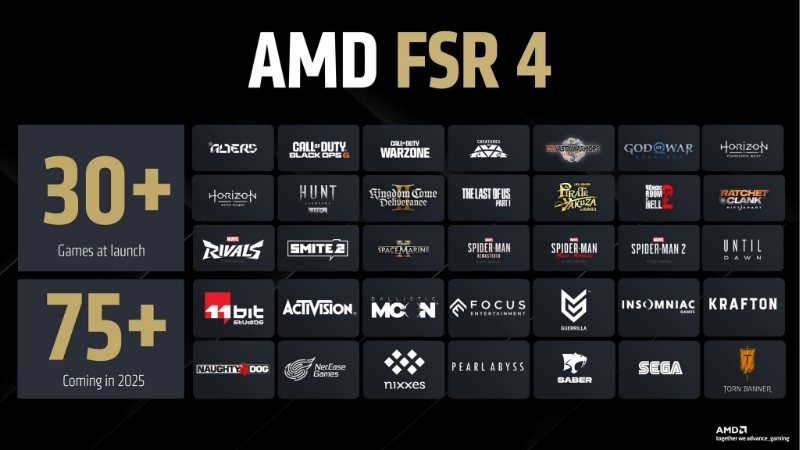
What AMD FSR 4 Actually Is
FidelityFX Super Resolution 4 is AMD’s first upscaler built primarily around AI hardware acceleration rather than hand-tuned algorithms. The goal is simple to state and hard to execute: render the game at a lower internal resolution, then reconstruct a high-resolution image that looks close to native while boosting frame rates. Understanding how it differs from FSR 3, which cards can actually run it, and what its quality modes deliver is the foundation for judging whether FSR 4 belongs in your next build or upgrade.
As an Amazon Associate we earn from qualifying purchases at no extra cost to you.




From FSR 3 to an AI-Based Upscaler
FSR 3 was open and impressively broad, running on a huge range of GPUs including older AMD cards and rival hardware. Its weakness was motion: fine detail could shimmer, and ghosting sometimes appeared in fast-moving scenes, which sharp-eyed players noticed immediately.
FSR 4 attacks exactly those flaws using a machine-learning model that reconstructs detail more intelligently. Early testing shows noticeably reduced shimmering and cleaner edges, especially on foliage, fences, and hair — the classic problem areas for temporal upscalers.
The result is a generational jump in perceived quality rather than a minor tweak, which is why FSR 4 is being treated as a genuine reason to upgrade rather than a routine driver update.
Which GPUs Support FSR 4
This is the crucial catch. FSR 4’s AI mode requires RDNA 4 hardware, meaning current cards like the RX 9070 and RX 9070 XT. Older Radeon cards and rival GPUs do not get the full AI experience and continue to rely on FSR 3.
Practically, that means “trying FSR 4” is inseparable from “buying a current-generation Radeon card.” If you already own an RDNA 3 or earlier GPU, FSR 4 becomes a reason to consider an upgrade, not a free bonus you can simply toggle on.
So before you get excited about the image-quality gains, confirm your target card is RDNA 4 — otherwise you are reading about a feature your hardware can’t unlock.
FSR 4 Image Quality and Modes
Like other modern upscalers, FSR 4 offers quality tiers — typically Quality, Balanced, and Performance — that trade image fidelity for frame rate. Quality mode targets the cleanest picture, while Performance mode chases the highest possible FPS for players who need every frame.
In hands-on impressions, FSR 4 Quality mode at 1440p and 4K is where it shines, delivering an image many users describe as close to native with a healthy frame-rate uplift. The lower modes remain useful for stretching an older CPU-limited system, though softness becomes more visible the further you push them.
The takeaway is to match the mode to your resolution: at 4K, Quality mode is the star; at 1080p, the benefits are smaller because the internal render resolution drops quite low.
One practical note reviewers stress: FSR 4 is a per-game toggle inside supported titles, not a global switch, so the quality you see depends partly on how well each studio has integrated it. The best implementations look close to native, while a rushed one can still show minor softening in fine detail.
Real-World Performance and User Impressions
Benchmarks matter, but so does the lived experience of the people running FSR 4 every day. Synthesizing the pattern from enthusiastic 4–5 star owners and the more critical 2–3 star reports gives a balanced, trustworthy view of where the technology delivers and where it still frustrates. Here is what both the frame-rate data and the wider community feedback actually say about FSR 4 in practice.
FPS Gains Across Popular Games
The headline benefit is frames. In supported titles at 1440p and 4K, enabling FSR 4 Quality mode commonly lifts frame rates substantially over native rendering, turning a borderline-playable setting into a comfortably smooth one.
The uplift scales with resolution: the higher your target resolution, the more upscaling helps. That is why FSR 4 is most transformative for 4K gamers on an RX 9070-class card, rather than 1080p players who are frequently already CPU-bound and see smaller gains.
For anyone chasing high-refresh 1440p with ray tracing enabled, FSR 4 is often the feature that makes those settings realistic on mainstream hardware.
It is worth being realistic about expectations, though. Upscaling multiplies the frames your card can already produce; it does not rescue a GPU that is badly overmatched for a game. On a properly matched RDNA 4 card, however, the difference between native and FSR 4 Quality can be the gap between a stuttery experience and a locked, smooth one.
What 4-5 Star Users Praise
Owners who rate the experience highly consistently point to two things: cleaner motion compared with FSR 3, and the frame-rate freedom to enable ray tracing without tanking performance. Many describe the Quality-mode image as a real step up in stability, with far less of the shimmering that plagued older FSR implementations.
A recurring positive is that FSR 4 makes their new Radeon card feel like a smart long-term buy, since the upscaler is expected to keep improving through driver updates. That sense of a future optimization runway adds perceived value to the whole purchase.
Several also highlight that it finally removes their reason to switch brands purely for upscaling quality, which is high praise given how one-sided that comparison used to be.
Common Complaints from 2-3 Star Reviews
The criticism is just as consistent. The loudest complaint is the RDNA 4 exclusivity: owners of older Radeon cards feel left behind and see it as a paywall for a feature they hoped would arrive via a simple driver update.
The second theme is game support. FSR 4 has to be implemented per title, so the list of supported games is still growing, and players get frustrated when a favorite game only offers older FSR.
A minority also report occasional visual artifacts in specific scenes, though driver updates have steadily addressed many of these, so the complaint is trending in the right direction over time.
It is worth reading these criticisms in context. Almost none of them dispute that FSR 4 looks and performs better than FSR 3; the frustration is about access and rollout speed rather than the core technology. For a buyer purchasing a new RDNA 4 card today, most of these pain points simply do not apply, since the hardware requirement is already met and support is expanding with each driver release.
FSR 4 vs the Competition, Value, and Buying Advice
No upscaler exists in a vacuum, and FSR 4’s real worth depends on how it stacks up against rivals and whether the hardware it requires is a sensible buy in today’s market. This section compares FSR 4 with DLSS 4 and XeSS, lays out the honest trade-offs in a simple pros-and-cons format, and factors in 2026 pricing so you can make a confident, well-timed decision rather than an impulsive one.
FSR 4 vs DLSS 4 and XeSS
Against Nvidia’s DLSS 4, FSR 4 has closed much of the historic quality gap, particularly in motion stability, though DLSS 4’s mature frame-generation stack still gives it an edge across the widest range of titles. Against Intel’s XeSS, FSR 4 is broadly competitive when running on RDNA 4 hardware.
The key context is this: FSR 4 is AMD’s strongest answer yet, and for a Radeon owner it removes the biggest reason people used to jump to a GeForce card purely for superior upscaling.
For the reader weighing brands, that shift matters. Upscaling quality was long treated as Nvidia’s trump card in this price range, so a Radeon option that competes closely changes the math on which GPU actually offers the better all-round value for your money.
Pros and Cons of FSR 4
Here is the balanced summary drawn from the performance data and owner feedback.
Pros: AI-based reconstruction with cleaner motion, strong 1440p and 4K image quality in Quality mode, large frame-rate gains, and an expected optimization runway through future drivers.
Cons: requires RDNA 4 hardware, so it is not a free upgrade for existing owners; per-game support is still expanding; and occasional artifacts appear in edge cases that depend on the specific title.
Is an FSR 4 GPU Worth Buying in 2026?
Because FSR 4 is tied to RDNA 4 cards, the buying decision is really about GPU timing — and 2026 pricing is directly relevant. The steep component price climb of late 2025 has cooled into relative stability, but prices have stopped rising rather than started falling. New memory supply from sources like CXMT, plus Micron’s two Idaho plants, is coming, yet those facilities won’t run until 2027–2028, so genuine relief is still years out.
That means waiting through 2026 for FSR 4-capable cards to get dramatically cheaper is a gamble the supply picture doesn’t support. If an RX 9070 or RX 9070 XT fits your budget and you value the upscaling upgrade, buying now is reasonable. Ready to unlock FSR 4? Check current pricing and availability on a supported RDNA 4 card through the link on this page before the market shifts again.
Think of it this way: the software is free once you own the hardware, and it keeps getting better through updates. So the real cost of entry is simply the card itself, and locking in that card while pricing is stable is the most sensible way to start benefiting from every future FSR 4 improvement.
See More:
Conclusion
The amd fsr 4 upscaler is a real turning point for Radeon: AI reconstruction delivers cleaner motion, strong Quality-mode image fidelity, and big frame-rate gains that make ray tracing far more accessible on mainstream hardware. Its one true limitation is the RDNA 4 requirement, which turns “trying FSR 4” into “buying a current-generation card.” For gamers targeting 1440p or 4K, that upgrade is easy to justify — and with component prices only holding steady rather than dropping, there is little reason to wait. Use the link above to compare live prices on an FSR 4-ready Radeon and secure yours today.
Top-Rated Picks


| Product | Brand | Rating | Reviews | Price |
|---|---|---|---|---|
| ARCTIC MX-4 (4 g) – Premium Performance Thermal Paste… | ARCTIC | ★ 4.8 | 104k | $4.99 |
| ARCTIC MX-4 (incl. Spatula, 4 g) – Premium Performanc… | ARCTIC | ★ 4.8 | 71.9k | $5.49 |
| Crucial 8GB DDR4 RAM 3200MHz (PC4-25600), Downclockab… | Crucial | ★ 4.8 | 62.8k | $74.99 |
| AMD Ryzen 5 5600X 6-core, 12-thread unlocked desktop … | — | ★ 4.8 | 30.2k | $177.60 |
| NVIDIA Shield Remote; Voice Search, Motion-Activated,… | — | ★ 4.7 | 10.6k | $25.99 |
Frequently Asked Questions
Which GPUs support FSR 4?
FSR 4 is machine learning based and requires RDNA 4 hardware, meaning the RX 9000 series such as the 9070 XT, 9070 and 9060 XT. Older RX 6000 and RX 7000 cards lack the FP8 throughput the model needs and remain on FSR 3.1, which still works well but looks softer in motion.
How much better does it look than FSR 3?
The difference is substantial. FSR 3 relied on hand-tuned temporal heuristics that produced shimmering on fine detail and ghosting behind moving objects. FSR 4 uses a trained model that handles disocclusion far more cleanly, bringing image stability much closer to DLSS. Quality mode at 1440p is now genuinely hard to distinguish from native.
Can I force FSR 4 into games that only ship FSR 3.1?
Yes. Adrenalin includes an override that upgrades FSR 3.1 titles to the FSR 4 model without a game patch, which covers a large and growing list. Games using older FSR 2 or FSR 3.0 integrations cannot be upgraded this way because the required interface was only standardised in 3.1.
Does FSR 4 cost more performance than FSR 3?
It does, because running the model is heavier than the old heuristic path. Expect to give back a few percent of the frame rate uplift compared with FSR 3 at the same preset. The image quality gain is large enough that dropping from quality to balanced usually leaves you ahead on both counts.
Is FSR 4 worth upgrading a GPU for on its own?
On its own, no. But it removes the single biggest argument against Radeon cards in the upscaling era, so if you were already comparing an RX 9070 against an RTX 5070, image quality is no longer the deciding factor. Judge the purchase on raw performance, VRAM and price instead.











Write Your Review
No reviews yet. Be the first to share your experience!