
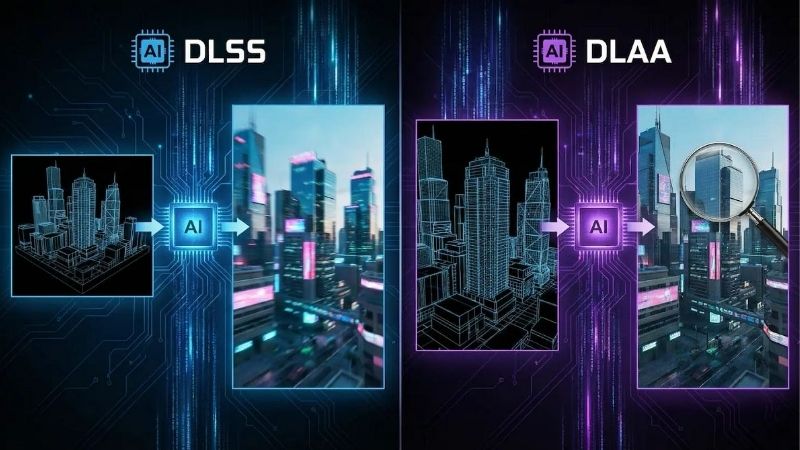
DLAA vs DLSS is the question every RTX owner eventually runs into when they open a modern game’s settings menu, because both use Nvidia’s AI but pull in opposite directions. DLAA vs DLSS comes down to one simple trade-off: DLAA spends your performance on the cleanest possible image at native resolution, while DLSS spends image quality to hand you more frames. This 2026 comparison gives you the quick verdict, a side-by-side spec table, a feature-by-feature breakdown, and a clear recommendation so you know exactly which to enable and when.
The Quick Verdict and Core Differences
If you only read one section, read this one. DLAA wins on pure image quality and is the right choice when your game already runs fast; DLSS wins on performance and is the right choice when you need more frames. Neither is universally “better” — they solve different problems with the same underlying technology, and the best players switch between them per game rather than picking a side. Treating them as a toolkit instead of a rivalry is the mindset that gets you the best image in every game you launch.
The Quick Verdict for Busy Readers
Use DLAA when your frame rate already sits comfortably above your monitor’s refresh rate and you want the sharpest, most stable picture. Use DLSS when a game is demanding, when you are running 4K or heavy ray tracing, or whenever you would rather have extra performance than the last few percent of clarity.
Both features require an RTX graphics card, so if you are still on older hardware, the single most impactful move is upgrading to a current RTX card — that is what unlocks this entire conversation. It is worth checking the latest RTX deals before you decide between settings, because the hardware matters more than the toggle. No setting can conjure performance or Tensor-core features that the silicon does not physically have, which is why the card is the foundation of this entire comparison.
Comparison Table: DLAA vs DLSS at a Glance
Here are the core differences side by side, distilled to what actually changes your experience:
- Primary goal — DLAA: maximum image quality. DLSS: maximum frame rate.
- Render resolution — DLAA: native. DLSS: lower than native, then AI-upscaled.
- Performance effect — DLAA: slightly lower frames than no AA. DLSS: significantly higher frames.
- Image sharpness — DLAA: highest. DLSS: very good, near-native on the Quality preset.
- Best use case — DLAA: light or already-fast games. DLSS: demanding games and high resolutions.
- Hardware needed — Both: any Nvidia RTX GPU.
How the Same AI Powers Both
DLAA and DLSS share Nvidia’s deep-learning pipeline running on the Tensor cores inside RTX cards. The difference is purely where they apply that intelligence: DLSS reconstructs a full-resolution image from fewer rendered pixels, while DLAA takes a full-resolution image and refines its edges and stability.
Because they are siblings, both improve whenever Nvidia ships a newer model, and updating your driver can sharpen both in games you already own. This shared foundation is also why many titles list them together in one dropdown, sometimes labeling DLAA as “DLSS at native resolution.” Recognising that shared lineage makes it obvious why driver updates can quietly improve both features in titles you already own.
Deep Dive Face-Off: Quality, Performance, and Use Cases
Beyond the headline trade-off, the two features behave differently depending on resolution, game type, and what you are trying to achieve. This section compares them across the criteria that actually affect your experience — image quality, performance, and the situations where a hybrid approach beats either one alone.
Image Quality Face-Off
For raw clarity, DLAA is the winner. By processing every native pixel, it produces the cleanest edges and the most stable image in motion, with thin objects like cables and foliage staying solid instead of shimmering. That stability is the single biggest reason enthusiasts describe DLAA as the cleanest anti-aliasing currently available on PC.
DLSS on its Quality preset gets remarkably close, and in many games the difference is hard to spot during normal play. But the lower the DLSS preset — Balanced, Performance, Ultra Performance — the more the gap widens, especially on smaller monitors where upscaling artifacts are easier to notice. On a large 4K television viewed from the couch, by contrast, those same artifacts can be almost impossible to perceive, which shifts the calculus toward DLSS.
If image quality is your single priority and performance is not a concern, DLAA leads cleanly and is the obvious pick. The advantage is most visible on smaller, denser scenes where every shimmering edge is easy to spot at a normal viewing distance.
Performance Face-Off
Here the roles reverse completely. DLSS exists to boost frame rates, and on its Performance presets it can deliver large gains by rendering far fewer pixels before upscaling. That makes it the obvious pick for 4K gaming, ray-traced titles, and any game that struggles at native resolution.
DLAA, by contrast, slightly reduces frames compared to running no anti-aliasing, because it does extra work at full resolution. It is never the tool to reach for when you are short on performance. Think of its cost as a quality tax you only pay when you can comfortably afford it. And when you cannot, DLSS is right there to hand those frames straight back to you in an instant.
The practical rule is simple and worth memorizing: if a game runs fast, choose DLAA; if it runs slow, choose DLSS. That single sentence resolves the vast majority of real-world decisions you will face in a settings menu.
The Alternative: When Neither Is Ideal
Sometimes the best answer is a combination rather than a single setting. Pairing DLSS with DLDSR — rendering at a higher internal resolution and then letting DLSS bring the cost back down — can produce an image that rivals DLAA’s clarity while keeping frames healthy.
And if a game offers neither feature, or you are on hardware that cannot run them well, the real fix is the GPU itself. An older or entry-level card limits every one of these options at once. When that happens, no amount of menu tweaking substitutes for the raw throughput and Tensor-core count of a stronger GPU.
Upgrading to a capable current-generation RTX card is the alternative that makes all of them viable, so it is worth comparing today’s mid-range and high-end RTX models if your card is holding you back. Upgrading the GPU is the move that simultaneously raises your frame rate and unlocks the AI features that make both DLAA and DLSS possible in the first place.
Final Verdict and Recommendation
The DLAA vs DLSS debate has a clean answer once you frame it correctly: they are not rivals, they are tools for different jobs, and most gamers should keep both in their kit. The right choice depends entirely on how a specific game runs on your specific hardware, which is why a flexible, per-game mindset beats loyalty to one setting.
Who Should Use DLAA
Choose DLAA if you play single-player, cinematic, or well-optimized games and you already exceed your monitor’s refresh rate. It rewards you with the cleanest, most stable image PC gaming offers, and it is the natural pick for anyone who values fidelity over the last few frames. If your idea of a great session is a visually stunning world running smoothly, DLAA is built for you.
It is also ideal on higher-end RTX cards that have performance to spare at your resolution, since the small cost of DLAA barely registers when you are already running fast. On a flagship card at 1440p, for instance, you can often enable DLAA and still sit comfortably above your monitor’s refresh ceiling.
Who Should Use DLSS
Choose DLSS if you play demanding modern titles, game at 4K, use heavy ray tracing, or simply prefer higher frame rates. Its Quality preset gives you most of DLAA’s clarity with a major performance boost, which is why it is the default recommendation for the majority of games. For most libraries, leaving DLSS Quality on by default and only switching to DLAA in lighter titles is the path of least resistance.
For most people, DLSS Quality is the everyday setting and DLAA is the treat you reserve for lighter games — a combination that covers almost every situation you will run into. Keeping that simple two-mode habit means you rarely have to think hard about anti-aliasing again.
See More:
The Bottom Line and Your Next Move
Whichever side of the comparison fits you, both features live or die by your graphics card, since neither one runs on hardware that lacks Tensor cores. The setting is only half the equation; the silicon behind it is the other half. A capable RTX card turns this whole debate from a compromise into a simple matter of preference.
If you are ready to unlock DLAA, DLSS, frame generation, and DLDSR together, it is worth checking the recommended RTX graphics cards and a fast, sharp monitor linked below before you commit to your next setup, so you can use every one of these tools to its full potential. The right card means you are never forced to pick between a clean image and a smooth one, because you will have the headroom for both.
In the end, the DLAA vs DLSS choice is less about which technology is superior and more about matching the tool to the moment: DLAA for pristine image quality, DLSS for performance, and a capable RTX card to make either one effortless. Use the guide above to pick per game, and explore the hardware recommendations linked below to get the most from both.
Top-Rated Picks


| Product | Brand | Rating | Reviews | Price |
|---|---|---|---|---|
| ARCTIC MX-4 (4 g) – Premium Performance Thermal Paste… | ARCTIC | ★ 4.8 | 104k | $4.99 |
| ARCTIC MX-4 (incl. Spatula, 4 g) – Premium Performanc… | ARCTIC | ★ 4.8 | 71.9k | $5.49 |
| Crucial 8GB DDR4 RAM 3200MHz (PC4-25600), Downclockab… | Crucial | ★ 4.8 | 62.8k | $74.99 |
| AMD Ryzen 5 5600X 6-core, 12-thread unlocked desktop … | — | ★ 4.8 | 30.2k | $177.60 |
| NVIDIA Shield Remote; Voice Search, Motion-Activated,… | — | ★ 4.7 | 10.6k | $25.99 |
Frequently Asked Questions
What is the core difference between them?
Both use the same neural network. DLSS renders internally below your output resolution and upscales, trading some detail for frames. DLAA renders at full native resolution and applies the network purely as anti-aliasing, giving the best image quality but no performance benefit at all.
Which should I use at 1080p?
DLAA, if your frame rate allows. At 1080p even DLSS Quality renders internally at only 720p, which is where upscaling artifacts are most visible on thin geometry and fine text. DLAA removes that compromise entirely and is a big upgrade over typical in-game TAA.
Which should I use at 4K?
DLSS Quality or Balanced is usually the smarter choice at 4K, since the internal resolution is still 1440p or higher and the reconstructed result is close to native. Reserve DLAA for older or lighter titles where you already exceed your monitor’s refresh rate.
How big is the performance gap?
DLSS Quality typically delivers thirty to forty percent more frames than native, while DLAA sits slightly below native because of the added neural pass. In practice DLAA can be twenty-five to forty percent slower than DLSS Quality in the same scene at the same output resolution.
Can I combine them with frame generation?
Yes, on RTX 40 and 50 series cards. DLAA plus frame generation is a good pairing when you want maximum fidelity and your base frame rate is at least sixty, since frame generation restores smoothness without the internal resolution loss that DLSS upscaling introduces.






Write Your Review
No reviews yet. Be the first to share your experience!