
What is RT cores is a question that comes up the moment anyone turns on ray tracing and watches their frame rate respond. In plain terms, RT cores are dedicated hardware units inside Nvidia RTX graphics cards built to calculate ray tracing, the lighting technique that makes reflections, shadows, and global illumination look true to life. Without these specialized cores, ray tracing would crawl on general-purpose hardware. This guide explains what RT cores do, how they work alongside the other cores in your GPU, and how to decide whether their visual payoff is worth it for the way you play.
Understanding What RT Cores Actually Are
To judge whether RT cores matter to you, it helps to know what problem they solve. Ray tracing is enormously demanding math, and RT cores exist purely to handle that workload efficiently so your games can run it in real time rather than as a slideshow.
As an Amazon Associate we earn from qualifying purchases at no extra cost to you.




How RT Cores Handle Ray Tracing
Ray tracing simulates how individual light rays travel, bounce, and reflect through a scene. Doing this realistically means tracing millions of rays per frame and checking what each one hits, a task that overwhelms ordinary processing.
RT cores accelerate the hardest parts of that process, especially the bounding volume hierarchy traversal and ray-triangle intersection tests that decide where each ray lands. By doing this in dedicated silicon, they free the rest of the GPU to keep rendering.
The result is that effects which once required hours of offline rendering for movies can now run live in a game. That leap from pre-rendered to real-time is exactly what RT cores were created to make possible.
RT Cores vs CUDA and Tensor Cores
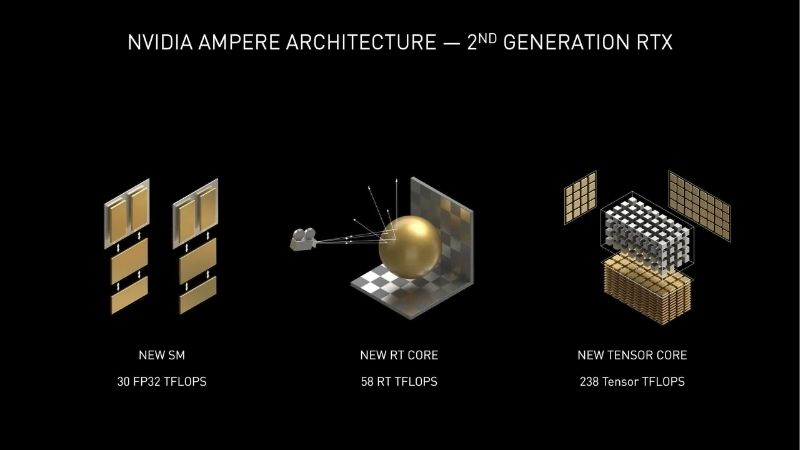
A modern RTX card actually contains three kinds of cores, each with a distinct job. CUDA cores handle general rendering, tensor cores run AI tasks like DLSS, and RT cores focus solely on ray tracing math.
They work as a team rather than in isolation. The CUDA cores build the scene, the RT cores calculate accurate lighting, and the tensor cores can then upscale the image to recover lost performance. Each core type covers a weakness the others would otherwise have.
Understanding this division explains why RTX cards handle ray-traced games so much better than older GPUs that lack dedicated RT and tensor hardware entirely.
How RT Cores Have Improved Each Generation
RT cores have grown significantly more capable with each RTX generation. Newer versions process more rays per clock and handle advanced effects like ray-traced global illumination with a smaller performance hit.
This generational progress matters when shopping. A current-generation card delivers far more usable ray tracing performance than an older one, even if both technically support the feature, so the generation of the RT cores is as important as their presence.
It also affects which effects you can run comfortably. Early RT cores handled basic reflections and shadows, but newer ones make heavier techniques like full ray-traced global illumination and path tracing playable. A game that brings an older card to its knees can run smoothly on a recent one, purely because the RT cores process those extra rays so much faster. When you compare two cards, checking the architecture generation tells you more about real ray tracing ability than any single headline figure.
Why RT Cores Matter for Modern Gaming
Hardware only earns its keep when it changes what you see and feel, so let us look at the payoff. RT cores deliver the most visually transformative effects in modern games, but that beauty comes with a performance cost worth understanding before you commit.
Ray Tracing Visuals RT Cores Unlock
The most striking benefit is lighting that behaves like the real world. Reflections show accurate surroundings, shadows soften and sharpen naturally with distance, and light bounces between surfaces to fill rooms believably.
These effects add depth and realism that traditional rendering tricks only approximate. In supported games, the difference between ray tracing on and off can be the gap between a flat scene and one that feels physically present.
For everyday play, the impact is greatest in atmospheric single-player titles where you have time to notice reflections in water, glass, and polished floors that RT cores render correctly.
The Pros and Cons of RT Cores
Ray tracing is gorgeous, but it is not free, so weigh both sides drawn from how RTX owners describe living with the feature day to day.
Pros:
- Dramatically more realistic lighting, reflections, and shadows in supported games.
- Dedicated hardware makes real-time ray tracing actually playable.
- Pairs with DLSS to recover much of the lost frame rate.
Cons:
- Ray tracing still carries a real performance cost, even with RT cores.
- Not every game supports it, and the quality of implementation varies widely.
- The best ray tracing experience needs a higher-tier, more expensive card.
The balanced reading is that RT cores deliver a genuine visual leap that is worth having, provided you set expectations correctly. They will not make ray tracing free, but combined with DLSS they make it practical, and the experience improves with every generation. For anyone who values how a game looks, the upside clearly outweighs the cost, while frame-rate purists can simply leave the effects off and still enjoy a capable card.
RT Cores Working With DLSS
The smartest way Nvidia tackles ray tracing’s cost is by pairing RT cores with DLSS. Ray tracing lowers your frame rate, while DLSS uses tensor cores to upscale and generate frames, clawing much of it back.
This combination is what makes high-quality ray tracing practical at 1440p and 4K. You render at a lower internal resolution, let the RT cores apply realistic lighting, and let DLSS rebuild a sharp, high-frame-rate image on top.
In practice, enabling both together is almost always the right move. It is the intended design, and it turns ray tracing from a luxury into something you can leave on without crippling performance.
How to Get the Most From RT Cores
Owning RT cores is only useful if you put them to work sensibly. A little setup and some honest expectations go a long way, so here is how to enable ray tracing wisely and choose a card that handles it well. The aim is to enjoy the visual upgrade without sacrificing the smooth frame rate that makes a game feel good, and a few smart settings get you there.
Enabling Ray Tracing in Your Games
Most supported games place ray tracing options in the graphics or display menu, often with separate toggles for reflections, shadows, and global illumination. Start by turning these on at a moderate preset.
Then enable DLSS alongside it to offset the performance hit. Adjusting individual ray tracing effects rather than using a single master switch lets you keep the ones you value most while trimming those that cost too much.
It helps to know which effects give the best return. Ray-traced reflections usually deliver the most obvious visual upgrade for the performance they cost, while some shadow and lighting options are subtler. A practical routine is to turn everything on, see how the frame rate holds, then dial back the least noticeable effects until you reach a smooth, good-looking balance you are happy with.
Knowing When RT Cores Are Worth It
Ray tracing rewards some games far more than others. In slow, atmospheric titles with lots of reflective surfaces, the visual upgrade is obvious and immersive. In fast competitive shooters, you may barely notice it while sacrificing frames you need.
Be honest about your priorities. If you chase the highest frame rate in esports, leaving ray tracing off is perfectly reasonable. If you love cinematic worlds, RT cores are one of the best reasons to own an RTX card.
Your resolution matters too, since ray tracing is most demanding at 4K, where pairing it with DLSS becomes essential rather than optional.
Choosing an RTX Card With Strong RT Cores
Because ray tracing performance scales with both the generation and the tier of RT cores, picking the right card matters. Mid-range RTX cards handle ray tracing well at 1080p and 1440p, while 4K ray tracing leans toward the higher tiers.
To find the right balance, compare current RTX models and their verified prices through the links on this page, matching the RT core generation to the resolution you play at. A quick check now helps you land a card that keeps ray tracing smooth as games grow more demanding.
As a rough guide, plan around your target resolution. For 1080p ray tracing a mid-range RTX card is plenty, 1440p benefits from a step up, and 4K ray tracing genuinely rewards a higher-tier card paired with DLSS. Buying with a little headroom above your current needs is sensible too, since ray tracing in newer games tends to grow heavier over time, and a card with stronger RT cores will stay comfortable for longer.
See More:
Final Thoughts on RT Cores
To wrap up, RT cores are the dedicated ray tracing engines that let RTX graphics cards render lifelike lighting, reflections, and shadows in real time. Understanding what is RT cores shows why they shine in atmospheric, visually rich games, why they pair so naturally with DLSS, and why their generation matters as much as their presence. Decide how much you value cinematic visuals versus raw frames, choose an RTX card whose RT cores match your resolution, and you will get the most from one of the defining features of modern graphics. As more games adopt ray tracing and path tracing as standard rather than optional extras, having capable RT cores is steadily shifting from a luxury to a sensible baseline for anyone building a system meant to last.
Top-Rated Picks


| Product | Brand | Rating | Reviews | Price |
|---|---|---|---|---|
| ARCTIC MX-4 (4 g) – Premium Performance Thermal Paste… | ARCTIC | ★ 4.8 | 104k | $4.99 |
| ARCTIC MX-4 (incl. Spatula, 4 g) – Premium Performanc… | ARCTIC | ★ 4.8 | 71.9k | $5.49 |
| Crucial 8GB DDR4 RAM 3200MHz (PC4-25600), Downclockab… | Crucial | ★ 4.8 | 62.8k | $74.99 |
| AMD Ryzen 5 5600X 6-core, 12-thread unlocked desktop … | — | ★ 4.8 | 30.2k | $177.60 |
| NVIDIA Shield Remote; Voice Search, Motion-Activated,… | — | ★ 4.7 | 10.6k | $25.99 |
Frequently Asked Questions
What do RT cores actually do?
They accelerate the two most expensive parts of ray tracing: traversing the bounding volume hierarchy that organises scene geometry, and testing whether a ray intersects a triangle. Doing this in fixed-function hardware is many times faster than running the same maths on general shader cores, which is why software ray tracing crawls.
Can cards without RT cores run ray traced games?
Some can, very slowly. GTX 10 series cards received limited DirectX Raytracing support through drivers, but frame rates collapse because shaders handle everything. Games with mandatory ray tracing, such as several recent releases, effectively require an RTX 20 series card or newer, or an AMD RX 6000 series or later.
How much performance does ray tracing cost?
It depends on how much is ray traced. Ray traced shadows or reflections alone might cost fifteen to thirty percent. Full path tracing, which simulates all lighting bounces, can cut frame rates by seventy percent or more, which is why it is normally paired with aggressive upscaling and frame generation.
Have RT cores improved across generations?
Substantially. Each generation roughly doubled intersection throughput and added features such as opacity micromaps, displaced micro-meshes and shader execution reordering, which reduce wasted work in complex scenes. A modern midrange card often beats a previous-generation flagship in heavy ray tracing while trailing it in traditional rasterised rendering.
Does ray tracing need more VRAM?
Yes. The acceleration structures describing scene geometry consume additional memory, typically one to two gigabytes at 1440p and more at 4K with detailed environments. This is a major reason 8GB cards struggle with ray traced titles even when their cores are fast enough to render the frames.










Write Your Review
No reviews yet. Be the first to share your experience!