
- Top Pick: Thermalright 5 Pack TL-C12C-S CPU Fan 120mm ARGB Case Cooler Fan, 4pin PWM Silent Computer Fan with S-FDB Bearing Included, up to 1550RPM Cooling Fan(5 Quantities)
- Best Value: CORSAIR RS120 ARGB 120mm PWM Fans – Daisy-Chain Connection – Low-Noise – Magnetic Dome Bearing – Triple Pack – Black
- Premium Choice: ARCTIC P12 Pro A-RGB – 3 Pack – Powerful Premium Fan, 120 mm PWM Fan with Y-Cable Splitter, 600-3000 RPM, 0 RPM <5% PWM, 5V Digital RGB, Fluid Dynamic Bearing, 4-Pin – Black
Best RGB fans lists often skip the part that matters, which is whether the fan moves air properly before it lights up. A poor fan with excellent lighting is still just a poor fan, and the cabling system behind it largely decides how pleasant the whole build is to assemble and tidy away afterwards.
As an Amazon Associate we earn from qualifying purchases at no extra cost to you.
By Ryan Cole, PC hardware writer at NvidiaReview
How to Choose the Best RGB Fans
Choosing the best RGB fans means treating them as cooling components first and lighting second. Three things decide whether a set suits your build: the airflow characteristic you need, which lighting standard and controller they use, and how many cables end up behind the motherboard tray.

Airflow Versus Static Pressure
Fans designed for open case panels prioritise raw airflow, measured in CFM, while fans intended for radiators and restrictive dust filters prioritise static pressure, measured in millimetres of water. Using the wrong type is why some builds sound busy while still running warm.
Most current fans compromise between the two and work acceptably everywhere, but the difference shows on a thick radiator. If you are mounting fans on a 38mm radiator or behind a dense mesh front panel, favour a model that publishes a static pressure figure rather than only CFM.
ARGB Standards, Controllers and Software
Addressable lighting uses a 3-pin 5V ARGB header, which is not interchangeable with the older 4-pin 12V RGB standard. Plugging one into the other damages the fans, so check your motherboard headers before ordering and count how many are actually available on the board.
Many premium sets bypass the board entirely with their own controller and software, which gives finer effects at the cost of running another application. Board-controlled fans keep everything in one utility. Neither approach is wrong, but mixing ecosystems in one build usually ends badly.
Cabling Systems and Cost Per Fan
A six-fan build with individual PWM and ARGB leads produces twelve cables, which is the single biggest reason RGB builds look untidy. Daisy-chain systems and single-cable hubs solve this properly, and once you have used one it is difficult to go back to conventional wiring.
Compare cost per fan rather than kit price, since starter packs include the controller and expansion packs do not. Proprietary systems also lock you into one brand for future additions, which matters if you plan to expand the build or reuse the fans in a different case later.
Top Picks: Best RGB Fans for Every Build
These five candidates for the best RGB fans run from budget three-packs to premium daisy-chain systems. All figures are vendor-published specifications and revisions vary, so confirm the model code and connector type before ordering. Availability was checked in August 2026.
| Fan | Size | Lighting | Cabling | Best for |
|---|---|---|---|---|
| Lian Li Uni Fan SL Infinity | 120 / 140 mm | ARGB, dual sided | Interlocking daisy chain | Show builds |
| Corsair iCUE Link RX120 RGB | 120 / 140 mm | ARGB | Single Link cable | Tidiest wiring |
| Phanteks D30 D-RGB | 120 mm, 30 mm thick | D-RGB | Daisy chain | Radiators and airflow |
| Arctic P12 PWM PST A-RGB | 120 mm | A-RGB | PST daisy chain | Best value |
| Thermalright TL-C12C-S ARGB | 120 mm | ARGB | Standard leads | Cheapest entry |
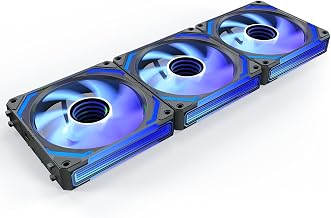
Lian Li Uni Fan SL Infinity – Best for Visible Builds
The Uni Fan system interlocks physically, so a row of three or four fans connects to a single set of cables at the end of the chain. The Infinity version lights both the hub and the outer frame, which is why it appears in so many showcase builds behind glass panels.
You are paying a clear premium for the lighting and the mounting system rather than airflow, and the fans require the bundled controller. The rigid interlocking also constrains spacing in some cases. For a build meant to be looked at, nothing else assembles this cleanly.
Arctic P12 PWM PST A-RGB – Best Value
Arctic’s P12 is a genuinely good static pressure fan that happens to have addressable lighting, sold in multi-packs at a fraction of the premium sets. It handles radiators and restrictive front panels properly, and the PST daisy chain keeps PWM cabling manageable across several fans.
The lighting is less dense and less even than the premium options, which is exactly where the money went. Frame styling is plain. If you want fans that cool properly and light up adequately rather than the reverse, this is the set that makes the others hard to justify.
Corsair iCUE Link RX120 RGB – Best for Cable Management
The Link system reduces an entire fan array to one cable running back to a hub, which is the tidiest solution available if you are building with several fans and a matching liquid cooler. Lighting quality is high and the software handles effects across all connected components.
It is expensive per fan, the hub occupies space and needs a header, and the ecosystem is proprietary, so future additions mean buying Corsair again. For a build with six fans and an AIO where wiring would otherwise be a nightmare, the system genuinely earns its price.
Phanteks D30 D-RGB – Best for Radiators and Airflow
At 30mm thick rather than the usual 25mm, the D30 has more blade depth to work with, which shows on thick radiators and dense mesh panels. Phanteks also sells reverse airflow versions, which let you mount fans blade-side outward without spoiling the appearance of the build.
The extra thickness eats clearance, so check radiator and panel space before committing, particularly in compact cases. The daisy-chain system is proprietary. Where clearance allows, the combination of real static pressure and dense lighting is unusual at this price point.
Thermalright TL-C12C-S ARGB – Best Budget Entry
Thermalright sells these in multi-packs at prices that undercut nearly everything else with addressable lighting, and the fans themselves are competent for case airflow duty. For a first build where the lighting is a nice extra rather than the point, they cover both jobs cheaply.
Cabling is conventional, so a six-fan build produces a lot of leads to route, and the bearing noise at high duty is more noticeable than premium alternatives. Lighting is basic. As the cheapest way to add addressable fans without buying unbranded hardware, they are hard to fault.
What the 2026 Market Means for Case Cooling
Fans sit in one of the few component categories where 2026 pricing has stayed reasonable, which changes where a small upgrade budget is best spent and how urgently the best RGB fans need buying. Three market factors are worth weighing before you order a set.
Fans Remain a Cheap, Real Upgrade
With graphics cards up sharply and memory following, most builders cannot justify a platform upgrade this year. Adding two or three decent intake fans to a case that shipped with one is among the few remaining changes that measurably lowers component temperatures for very little money.
The gains are largest in cases with restrictive front panels or a single stock fan. Pair the new fans with a clean dust filter and fresh thermal compound on the processor, and a machine that throttles during long sessions frequently returns to holding its clocks properly.
Prices Have Crept Up at the Bottom
Cooling components have risen roughly 6 to 8 percent as manufacturers concentrate on mid-range and premium lines, and the promotional pricing policies that used to offset that were withdrawn in February 2026. Unbranded fans have filled the gap left at the bottom of the market.
Those are worth avoiding. Bearing quality determines how a fan sounds after two years, and it is the one specification that cheap manufacturers never publish honestly. Buying a named multi-pack costs a little more and removes the risk of a rattling machine within a year.
Late-Year Discounts Are Genuine Here
The usual advice to wait for November sales does not hold for memory, storage or prebuilt systems this year, because that stock was built from expensive contract components. Fans, cases, coolers and power supplies fall outside that problem and continue to discount properly then.
If your machine is running hot now, buy and fix it rather than waiting for a small saving. If the fans are part of a wider build alongside a case and cooler, grouping the order into late November is sensible. All pricing described here reflects August 2026 conditions.
Frequently Asked Questions
The questions builders ask most when adding lighting to a case: which header the fans actually need, how many can be chained together safely, whether lighting affects cooling performance, and how the best RGB fans compare with plain models on noise and airflow.
Which header do addressable fans use?
A 3-pin 5V ARGB header, which is physically similar to the older 4-pin 12V RGB connector but not compatible with it. Plugging an addressable fan into a 12V header will damage the lighting, so identify the header on your board carefully before connecting anything.
How many fans can I daisy chain?
It depends on the system, but four to six per chain is typical, limited by the current the header or controller can supply. Exceeding that causes lighting to behave erratically rather than failing outright. Check the vendor limit rather than assuming a chain can extend indefinitely.
Do RGB fans cool worse than plain ones?
Not inherently, though the lighting hardware occupies hub space and sometimes reduces blade area slightly. The bigger issue is that some lighting-focused models were designed around appearance first. Compare published airflow and static pressure figures rather than assuming parity.
Do I need the manufacturer software?
Only for proprietary controller systems. Fans connected to a standard motherboard ARGB header are controlled by your board utility, which keeps everything in one application. Systems with their own hub generally require their own software running to change effects at all.
See More:
- Best thermal compound paste
- Thermal paste at Best Buy
- Graphics card at Best Buy
- Best AM4 CPU for gaming
- Best motherboard for 9800x3d
Final Thoughts
The best RGB fans are the ones that would still be worth buying with the lighting switched off. Arctic’s P12 A-RGB covers that brief cheaply, the Lian Li Uni Fan system suits builds meant to be seen, and the iCUE Link range solves cable clutter properly. Check your header type before ordering anything.
As an Amazon Associate we earn from qualifying purchases at no extra cost to you.













Write Your Review
No reviews yet. Be the first to share your experience!