
- Top Pick: 1000W Fully Modular Power Supply, 80+ Gold Certified PSU | ATX 3.1 & PCIe 5.1 Ready | 12V-2×6 Connector | 140mm Low-Noise Fan | 105℃ Japanese Capacitors | Black PSU
- Best Value: Auotac 1000W Fully Modular Power Supply, 80+ Gold PSU, ATX 3.1 & PCIe 5.1 Ready, Native Dual-Color 12V-2×6 Cable, RGB Low-Noise Smart Fan, 105°C-Rated Capacitors, Black
- Premium Choice: CORSAIR RM1000x ATX 3.1 PCIe 5.1 Ready Fully Modular 1000W Power Supply – Low-Noise, Cybenetics Gold Efficiency, Native 12V-2×6 Connector – Black
Best PSU 1000W shopping only makes sense once you know why you need that capacity. For a single mid-range graphics card it is money wasted, but for a 400W graphics card paired with a 16-core processor, or for any build running two genuinely high-draw components at once, it stops being optional at all.
As an Amazon Associate we earn from qualifying purchases at no extra cost to you. Product prices and availability are accurate as of the date shown and are subject to change.
By Ryan Cole, PC hardware writer at NvidiaReview
How to Choose the Best PSU 1000W
Choosing the best PSU 1000W for your machine starts with confirming that the capacity is justified, then narrowing on the details that matter at this tier. Three questions cover it: what your components actually draw, which connectors you need, and how the unit behaves at partial load.
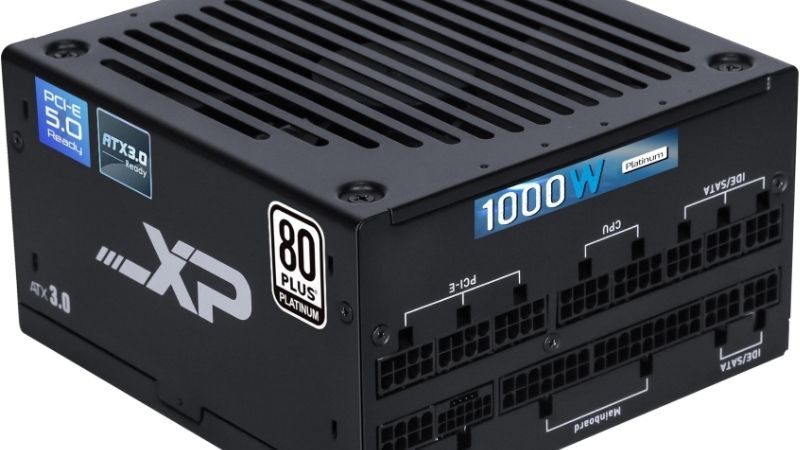
When 1000W Is Genuinely Justified
Add the board power of your graphics card to the package power of your processor, then leave roughly 150W for drives, fans and transient spikes. A 400W card with a 230W processor lands near 780W of headroom-adjusted draw, which is where an 850W unit starts to feel tight.
Two situations make this capacity tier the right call: a flagship graphics card that spikes far above its rated figure, or a workstation running a 16-core chip at sustained load alongside several drives. If neither applies, an 850W unit costs less and runs closer to its efficiency sweet spot.
Connectors, Cable Count and Case Depth
Check how many 12V-2×6 connectors the unit provides natively, since some flagship cards want a single high-current cable while other configurations need more than one. Using adapters at this power level adds junctions where you least want them, so native cabling is worth prioritising.
Units at this capacity are frequently longer than 850W models, sometimes reaching 160mm or more, which becomes a problem in compact cases and in mid-towers with front radiators. Measure the power supply shroud depth before ordering, and count the cables your build actually requires.
Efficiency at Partial Load and Fan Behaviour
Efficiency curves peak somewhere near half load, so a 1000W unit running a 400W system sits in a good place rather than a wasteful one. What you should not do is buy 1000W for a 300W machine, where the unit spends its life well below its efficient band for no benefit.
Fan behaviour matters more at this tier because the components generate more heat. A zero RPM mode keeps the supply silent at desktop and light gaming loads, and units with larger fans ramp more gently. Warranty length remains the most reliable public proxy for internal quality.
Top Picks: Best PSU 1000W for High-End Builds
These five candidates for the best PSU 1000W cover Gold, Platinum and Titanium efficiency tiers with different approaches to noise and monitoring. All figures are vendor-published specifications and revisions vary, so confirm the model code before ordering. Stock was checked in August 2026.
| Power supply | Efficiency | Standard | Notable feature | Best for |
|---|---|---|---|---|
| Corsair RM1000x | 80 Plus Gold | ATX 3.1, 12V-2×6 | Zero RPM mode | Best all-round |
| Seasonic Vertex GX-1000 | 80 Plus Gold | ATX 3.0, 12VHPWR | Long warranty | Long-term reliability |
| Corsair HX1000i | 80 Plus Platinum | ATX 3.1, 12V-2×6 | Software monitoring | Workstation builds |
| MSI MPG A1000G PCIE5 | 80 Plus Gold | ATX 3.0, 12VHPWR | Flat cables | Best value |
| be quiet! Dark Power 13 1000W | 80 Plus Titanium | ATX 3.0, 12VHPWR | Very low noise | Silent high-end builds |
Corsair RM1000x – Best Overall
The RM1000x pairs Gold efficiency with a large fan running a zero RPM mode at low load, native 12V-2×6 support on current revisions and fully modular cabling. Corsair backs it with a ten-year warranty, which says more about the internal design than any specification line does.
The stock cables are stiff, which complicates routing in cases with tight rear clearance, and the unit is physically long enough to crowd a front radiator in some mid-towers. It also carries a premium over value alternatives. For a high-end build that should stay silent, it is the safe answer.
MSI MPG A1000G PCIE5 – Best Value
MSI’s A1000G delivers Gold efficiency, ATX 3.0 compliance with a native 12VHPWR cable, fully modular flat cabling and a ten-year warranty, generally at a lower price than the Corsair and Seasonic equivalents. The flat cables are noticeably easier to route behind a motherboard tray.
Fan behaviour is less refined, with a curve that ramps earlier under sustained load than the premium units. MSI’s support network is smaller than Corsair’s if a claim becomes necessary. For a powerful build where the budget is already stretched by the graphics card, it is well judged.
Seasonic Vertex GX-1000 – Best for Long-Term Reliability
Seasonic platforms have a long record of quiet dependability, and the Vertex range brings ATX 3.0 compliance with a native 12VHPWR cable, fully modular cabling and a warranty at the top end of the market. It is the unit to buy if you expect the machine to outlive two graphics cards.
Cables are stiff and the unit is long, which is a recurring theme at this capacity. Current stock spans several revisions with different connector arrangements, so read the model code carefully rather than assuming. As a supply you install once and forget entirely, it is very hard to fault.
Corsair HX1000i – Best for Workstation Monitoring
The HX1000i steps up to Platinum efficiency and adds software monitoring of load, efficiency and temperature, along with configurable single or multi-rail operation. For a workstation running sustained heavy loads, being able to see actual draw rather than guessing has genuine value.
You pay a meaningful premium over the Gold units for efficiency gains that take years to recover, and the monitoring requires vendor software running to do anything. For a pure gaming machine that is wasted money. In a system doing paid work, the visibility justifies itself quickly.
be quiet! Dark Power 13 1000W – Best for Silent Builds
Titanium efficiency, a carefully tuned fan profile and a frameless fan design make this the quietest unit here under sustained load. be quiet! designs the whole range around acoustics, and at this capacity that engineering shows most clearly when the system is drawing heavily for hours.
It is the most expensive option on this list by a clear margin, and the Titanium efficiency gain over Gold will not repay that difference on a home electricity bill. If the machine sits on your desk, runs hard and you want it inaudible, that is the trade you are actually buying.
What the 2026 Market Means for High-End Power Supplies
Power supply pricing has moved this year without a supply crisis behind it, which changes when buying the best PSU 1000W for a future build actually makes sense. Three market factors are worth weighing carefully before you order anything at this capacity.
Buying Ahead of a Graphics Card Upgrade
With graphics cards up sharply, many builders are delaying that upgrade rather than abandoning it. Buying a 1000W unit with native 12V-2×6 cabling now means the card you eventually install plugs straight in, instead of forcing a second purchase alongside an already expensive component.
That is the strongest argument for spending here today. A power supply outlives several graphics cards, so sizing for the card you intend to buy rather than the one currently installed avoids replacing a perfectly good unit in eighteen months for connector reasons alone.
Prices Have Crept Up Across the Category
Power supplies have risen roughly 6 to 10 percent as manufacturers concentrate on mid-range and premium lines, and the promotional pricing policies that used to offset that were withdrawn in February 2026. The cheapest tier has thinned out, which matters less at this capacity.
At 1000W, the bargain end was never worth considering anyway. This is the one component whose failure can damage everything connected to it, and in a build with a flagship graphics card the saving from an unknown brand is trivial against the hardware it is protecting.
Late-Year Discounts Remain Genuine Here
The advice to wait for November sales does not hold for memory, storage or prebuilt systems this year, since that stock was built from expensive contract components. Power supplies, cases, coolers and fans fall outside that problem and continue to discount properly in that window.
So if your current unit is failing or a build is waiting on one, buy now. If the purchase is planned alongside other parts, grouping it into late November is a reasonable strategy. Pricing conditions described here reflect August 2026 and should be verified before ordering.
Frequently Asked Questions
The questions builders ask most at this capacity: whether the best PSU 1000W options are overkill for gaming, how oversizing affects efficiency, what the newer connector standards change, and how long a unit at this tier should last in daily use.
Is 1000W overkill for a gaming PC?
For most, yes. A single card in the 300W class with any current processor is comfortable on 850W. The best PSU 1000W options earn their place with flagship cards drawing 400W or more, 16-core processors under sustained load, or builds with several drives and many fans.
Does oversizing hurt efficiency?
Mildly. Efficiency peaks near half load, so a 1000W unit powering a 400W system sits in a comfortable range. Powering a 250W system is less ideal, though the real cost is the purchase price rather than the electricity. Buy for the system you plan to run, not the largest number available.
How many 12V-2×6 cables do I need?
One for most current graphics cards, though some flagship models and certain partner designs expect a specific arrangement. Check the card documentation before ordering, and prefer a supply providing the required connectors natively rather than relying on adapters at this power level.
How long should a unit at this tier last?
A decade is a reasonable expectation from a Gold or better platform, which is why ten-year warranties are common. Heat accelerates capacitor ageing, so a supply in a well-ventilated case with a zero RPM fan mode generally outlives one crammed into a warm, poorly ventilated shroud.
See More:
- Best thermal compound paste
- Thermal paste at Best Buy
- Graphics card at Best Buy
- Best AM4 CPU for gaming
- Best motherboard for 9800x3d
Final Thoughts
The best PSU 1000W is one bought for a build that genuinely needs it. The RM1000x is the sensible all-rounder, the MSI A1000G delivers most of that for less, and the Dark Power 13 buys near silence at a real premium. If your system draws under 600W, save the money and buy 850W instead.
As an Amazon Associate we earn from qualifying purchases at no extra cost to you. Product prices and availability are accurate as of the date shown and are subject to change.
















Write Your Review
No reviews yet. Be the first to share your experience!