
- Top Pick: Noctua NA-STPG1, Thermal Paste Guard AMD AM5 CPUs and 10 Cleaning Wipes
- Best Value: Thermal Paste for Computer CPU GPU Laptop 12.8W/mk Made in USA 4 Gram High Thermal Conductivity – Non Corrosive/Non-Conductive All Processor
- Premium Choice: Thermal Grizzly Kryonaut – 1 Gram – Extremely High Performance Thermal Paste + 12 Cleaning Wipes 6 Wet & 6 Dry – for Demanding Applications and Overclocking CPU/GPU/PS4/PS5/Xbox
Best thermal paste for CPU results depend as much on how you apply the compound as on which tube you buy. A mid-tier compound spread properly will beat a premium one applied badly every time, and the correct pattern for a rectangular AM5 heat spreader is not the same as the one you would use on a square Intel lid.
As an Amazon Associate we earn from qualifying purchases at no extra cost to you.
By Ryan Cole, PC hardware writer at NvidiaReview
How to Choose the Best Thermal Paste for CPU Cooling
The best thermal paste for CPU use is whichever compound suits your chip, your cooler and your confidence with a syringe. Three questions settle it: how much the conductivity rating really matters, which application pattern your processor needs, and how safe the compound is if you slip.
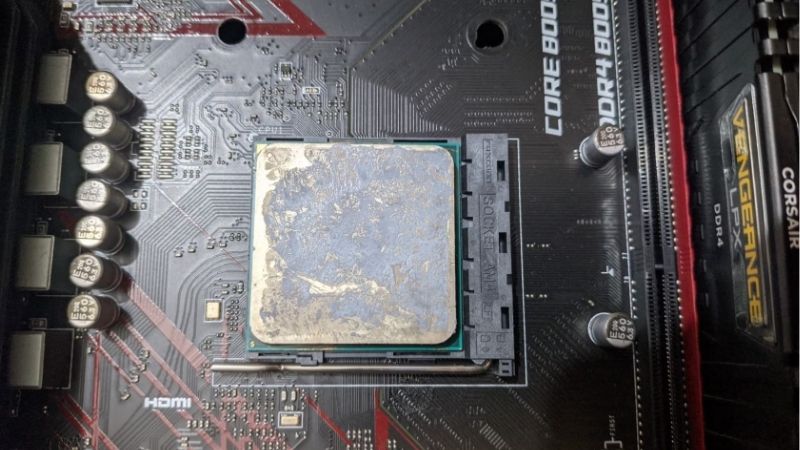
Conductivity Ratings Versus Real Temperature Differences
Published W/mK figures come from different test methods, so they work as a rough tier ranking rather than a guarantee. Arctic rates MX-4 at 8.5 W/mK while Thermal Grizzly rates Kryonaut at 12.5 W/mK, but the gap you actually see on a mainstream processor is usually a couple of degrees.
Where the difference grows is on hot, dense chips pushing high sustained power under a strong cooler. If your processor is a locked six-core running under a tower heatsink, almost any reputable compound performs the same. If it spikes hard and often, the premium tier starts to earn its price.
Application Pattern for AM5 and Intel Heat Spreaders
Square Intel heat spreaders respond well to a single pea-sized dot in the centre, which spreads outward evenly as the cooler is tightened. Rectangular AMD AM5 lids are different: a thin line down the long axis, or a small dot with two shorter lines, gives better coverage at the ends.
Quantity matters more than pattern. Roughly a quarter of a gram covers a desktop processor, and excess simply squeezes out around the socket where it insulates rather than helps. Tighten cooler screws in a diagonal pattern, a few turns at a time, so pressure spreads the compound evenly.
Non-Conductive Compounds and Cleanup
Almost every ceramic or metal-oxide compound aimed at consumers is non-conductive and non-capacitive, meaning a smear onto socket pins or a nearby capacitor is a cleaning job rather than a dead board. Liquid metal is the exception and belongs only in careful, experienced hands.
Cleanup is simple with high-purity isopropyl alcohol and a lint-free cloth. Avoid paper towel, which sheds fibres onto the surface you just cleaned. Some compounds ship with cleaning wipes included, which is a small convenience that makes a second attempt far less annoying on a first build.
Top Picks: Best Thermal Paste for CPU Builds
These five picks for the best thermal paste for CPU installs cover budget tubes, forgiving compounds for beginners and high-performance options for hot chips. All figures are manufacturer-rated. Availability and pricing tiers were checked in August 2026 and change frequently.
| Compound | Rated conductivity | Common sizes | Viscosity | Best for |
|---|---|---|---|---|
| Arctic MX-4 | 8.5 W/mK | 2g / 4g / 8g | Easy | Everyday builds |
| Noctua NT-H1 | Not published | 1.4g / 3.5g | Easy | First installs |
| Thermal Grizzly Kryonaut | 12.5 W/mK | 1g / 5.55g | Medium | Hot processors |
| Cooler Master MasterGel Maker | 11 W/mK | 1.5g | Thick | Enthusiast air cooling |
| Gelid GC-Extreme | 8.5 W/mK | 1g / 3.5g / 10g | Thick | Long-term stability |
Arctic MX-4 – Best Everyday Choice
MX-4 is rated at 8.5 W/mK, is non-conductive and non-capacitive, and needs no cure time before you power the machine on. The viscosity is friendly enough that it spreads under mounting pressure without warming, and Arctic sells it in sizes up to 8g for people who build regularly.
It will not top a chart against the premium tier, and on a high-TDP processor you can measure the difference. There is nothing else to complain about. For a mainstream gaming build where the cooler is doing the heavy lifting, this is the sensible default that never causes problems.
Noctua NT-H1 – Best for a First Installation
Noctua publishes no headline conductivity figure for NT-H1, rating it instead for roughly three years of service. What you are buying is predictability: it spreads consistently, it tolerates a slightly off-centre application, and it does not need a warm room to leave the syringe cleanly.
The 1.4g tube is small and the price per gram is high for an older formulation, with NT-H2 sitting above it in Noctua’s own range. Peak performance is mid-pack. For someone mounting a cooler for the first time and wanting zero surprises, that premium is easy to justify.
Thermal Grizzly Kryonaut – Best for Hot Chips
Kryonaut is rated at 12.5 W/mK across an operating range of -250C to 350C and remains the enthusiast reference point. It is non-conductive, spreads under cooler pressure without a spatula, and is the compound to choose when the processor underneath spikes hard on short bursts of load.
Under constant high heat it dries faster than denser compounds, so a workstation running long jobs will need reapplication sooner than it would with a thicker paste. Cost per gram is also the highest here. For a gaming machine repasted every couple of years, none of that matters much.
Cooler Master MasterGel Maker – Best Widely Stocked Premium Option
MasterGel Maker is rated at 11 W/mK using nano-diamond particles, is non-conductive, and typically ships in a 1.5g syringe with a flat applicator included. It performs close to the premium tier and turns up in physical retail far more reliably than several boutique alternatives.
It is genuinely thick. In a cool room it needs a minute of warming and the applicator is not optional, which makes it a poor first-timer choice. The syringe is also small for the price. As a strong compound you can buy locally when a build stalls, it earns its place.
Gelid GC-Extreme – Best Long-Term Consistency
GC-Extreme is rated at 8.5 W/mK and has a long reputation for holding its performance over years rather than degrading quickly. The dense formulation resists pump-out well, which is exactly what you want in a machine that will not be opened again for a long time after assembly.
The thickness that gives it that stability makes application harder, particularly in a cold room, and it benefits from a spreading tool rather than relying on mount pressure alone. Availability is patchier than the mainstream brands. For a build-and-forget system, it is a quietly excellent option.
What the 2026 Market Means for Repasting
Compound is cheap, but the decision about where a small upgrade budget goes has changed this year, and that affects how much the best thermal paste for CPU cooling is really worth to you. Three market factors are worth knowing before you buy anything for an existing machine.
Repasting Is the Cheapest Real Performance Fix
Graphics card prices have climbed steeply and memory has followed, which puts a full upgrade out of reach for many builders. Meanwhile a syringe of compound costs less than a takeaway and can recover several degrees on a machine that has been running the same paste layer for three years.
If your processor throttles during long sessions, start there rather than with new hardware. Repasting, cleaning the heatsink fins and checking case fan filters usually takes one evening and frequently restores most of the sustained clock speed you assumed had been lost to ageing components.
Cooling Parts Still See Real Late-Year Discounts
The usual advice to wait for November sales does not apply to memory, storage or prebuilt systems this year, because that stock was built from expensive contract components. Compound, coolers, fans and cases sit outside that problem and continue to see genuine reductions in that window.
For compound alone the difference is small enough that buying today is fine. If you are also replacing the cooler or adding case fans, grouping the purchase into late November is reasonable. Prices referenced anywhere in this guide reflect August 2026 and should be verified before ordering.
Skip the Bargain Tubes at the Bottom of the Range
Cooling components have risen roughly 6 to 8 percent as manufacturers concentrate on mid-range and premium lines, and the promotional pricing policies that used to offset that were withdrawn in February 2026. The very cheapest unbranded compounds are also becoming harder to trust.
The saving between an unbranded tube and a reputable one is a couple of dollars on a component that protects a processor worth hundreds. Buy a named compound with a printed conductivity rating and a stated non-conductive formulation, in the smallest size that covers your planned builds.
Frequently Asked Questions
The questions that come up most during a repaste: how much compound to use, whether to spread it manually, how often the job needs redoing, and whether the best thermal paste for CPU cooling is genuinely worth paying up for on an ordinary mainstream processor.
How much compound should I actually use?
About a quarter of a gram for a desktop processor, which looks like a pea on a square Intel lid or a thin line down a rectangular AM5 one. Excess simply squeezes out around the socket and insulates rather than helps, so more is never better once both surfaces are properly covered.
Do I need to spread it manually?
Usually not. Mounting pressure spreads medium-viscosity compounds evenly, and manual spreading risks trapping air bubbles under the cooler. Thick compounds such as MasterGel Maker or GC-Extreme are the exception, and they generally ship with an applicator precisely for that reason.
How often should a CPU be repasted?
Every two to three years on a typical machine, or whenever the cooler comes off for any reason. If temperatures have risen five degrees or more over a year with clean fans and filters, pump-out is the likely explanation and a fresh application will usually bring them back down.
Is the pre-applied compound on a new cooler good enough?
Yes, factory pre-applied compound from a reputable cooler brand is perfectly serviceable. Clean it off and use your own only if you have a better tube available, if the layer looks dry or damaged, or if you have already dry-fitted the cooler once and disturbed the pattern.
See More:
- Best thermal compound paste
- Thermal paste at Best Buy
- Graphics card at Best Buy
- Best AM4 CPU for gaming
- Best motherboard for 9800x3d
Final Thoughts
The best thermal paste for CPU cooling is a reputable non-conductive compound applied in the right quantity with the right pattern. MX-4 covers everyday builds, NT-H1 forgives a shaky first attempt, Kryonaut suits hot chips, and GC-Extreme holds up in a sealed machine. Any of them beats a dried layer from three years ago.
As an Amazon Associate we earn from qualifying purchases at no extra cost to you.















Write Your Review
No reviews yet. Be the first to share your experience!