
- Top Pick: ASUS Dual NVIDIA GeForce RTX 3050 6GB GDDR6 OC Edition Gaming Graphics Card – PCIe 4.0, HDMI 2.1, DisplayPort 1.4a, 2-Slot Design, Axial-tech Fan Design, Steel Bracket, 3 Year Warranty
- Best Value: Nvidia GeForce GTX 1080 8GB FE Founders Edition GDDR5X Video Graphics Card (Renewed)
- Premium Choice: Nvidia GeForce GTX 1070 Founders Edition (Renewed)
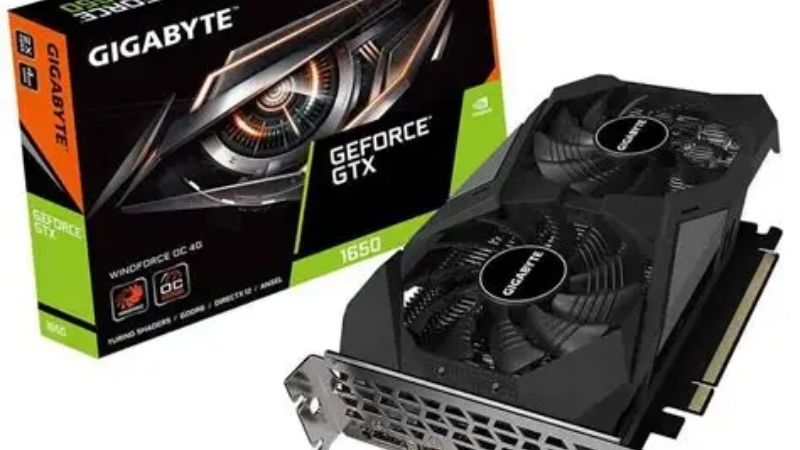
Nvidia GTX 1650 drivers are one of the few pieces of good news for owners of older budget cards, and the reason is a technicality most people get wrong. When Nvidia ended Game Ready support for Maxwell, Pascal, and Volta in October 2025, a lot of GTX owners assumed they were included. GTX 1650 owners were not. The card is Turing, not Pascal, and Turing was explicitly excluded from that deprecation. This guide explains what that means in practice, how to install and troubleshoot drivers on a 1650, and the honest limits of what any driver can do for a 4GB card in 2026.
Why the GTX 1650 Kept Its Driver Support
The confusion is understandable. The card carries a GTX badge, it launched in 2019, and its neighbours in the used market — the GTX 1060, the GTX 1070 — have been moved to legacy status. It looks like it belongs with them. It does not.
Turing vs Pascal: The Line Nvidia Actually Drew
Nvidia’s deprecation covered three architectures: Maxwell (GTX 700 and 900 series), Pascal (GTX 10-series), and Volta (the Titan V). Those cards received a final Game Ready driver in October 2025 and moved to quarterly security updates only, running through October 2028.
The GTX 1650 uses the TU117 die — Turing silicon, the same architecture generation as the RTX 20-series. Nvidia confirmed explicitly that GTX 16-series cards continue receiving regular Game Ready updates alongside the RTX line.
The naming is what misleads. The GTX 16-series sits between generations: Turing architecture without the RT and Tensor cores that define the RTX branding. Nvidia stripped the ray tracing hardware to hit a price, kept the underlying architecture, and the driver team draws its line at architecture rather than at branding.
| Card | Architecture | Driver status in 2026 |
|---|---|---|
| GTX 970 / 980 | Maxwell | Legacy — security only to Oct 2028 |
| GTX 1060 / 1080 Ti | Pascal | Legacy — security only to Oct 2028 |
| Titan V | Volta | Legacy — security only to Oct 2028 |
| GTX 1650 / 1660 | Turing | Full Game Ready support |
| RTX 2060 and newer | Turing / later | Full Game Ready support |
What Full Support Actually Gets You
Be precise about the benefit, because it is narrower than “supported” implies. You receive day-zero game profiles, bug fixes, security patches, and driver-level optimisations for new titles. That is genuinely valuable — a new release running on a current driver rather than a two-year-old one frequently differs by double digits.
What you do not receive is features the hardware cannot execute. The GTX 1650 has no RT cores and no Tensor cores. DLSS in any form, ray tracing, Multi Frame Generation, and Reflex 2’s frame warp are not coming to it, ever. No driver adds silicon.
The gap is widening rather than holding steady. DLSS 4.5 arrived at CES 2026, MFG 6x followed, and DLSS 5 lands this autumn with real-time neural rendering that Nvidia is expected to restrict to RTX 50 hardware. Each release moves the baseline that game developers design against, and your card is not moving with it.
So the support is real and the ceiling is real. Both things are true and most articles pick one.
The Windows 10 Deadline That Does Apply
One deadline does affect you, and it is close. Nvidia extended Windows 10 Game Ready driver support to October 2026 — roughly three months from now. That extension was announced for RTX GPUs specifically.
Many GTX 1650 systems are prebuilt machines and budget laptops still running Windows 10, which makes this the more pressing question for this audience than the architecture one. If you are in that group, the move to Windows 11 is free and worth doing before the deadline rather than after.
The card itself is unaffected either way. This is an operating system boundary, not a hardware one.
Installing GTX 1650 Drivers Cleanly
The procedure is the same as any Nvidia card, with two wrinkles specific to this tier: many 1650s live in laptops with OEM-customised drivers, and many live in machines where a clean install is overdue by several years.
Desktop Cards: The Standard Path
Download from Nvidia’s site or through the Nvidia App — note that the Nvidia Control Panel is being retired, so guides referencing its menus are already stale.
Create a restore point. Run the installer, choose Custom (Advanced), tick Perform a clean installation. Reboot fully rather than trusting the installer’s prompt.
Disconnect from the network before uninstalling the old driver. Windows Update will otherwise install its own version into the gap, leaving a mixed state that behaves worse than either.
Laptop GTX 1650s: Where It Gets Awkward
A large share of GTX 1650s shipped in laptops, and laptop graphics involve a second driver — the integrated Intel or AMD GPU — plus Optimus switching between them. Nvidia’s generic driver works on most modern laptops, but some OEM models require the manufacturer’s build for display output or power management to function correctly.
If the generic driver produces a black screen on the internal panel, or breaks external display output, the OEM build is the answer rather than a newer Nvidia release. Check the laptop manufacturer’s support page before assuming the driver is broken.
The other laptop-specific trap: a game running on the integrated GPU instead of the 1650, producing terrible frame rates that look like a driver fault. Force the discrete GPU per-application in the Nvidia App’s Graphics tab.
Rolling Back When Something Breaks
Device Manager, Display adapters, right-click the GPU, Properties, Driver tab, Roll Back Driver. Reboot. Three minutes and it covers most cases.
If Roll Back is unavailable, download your last known-good version from Nvidia’s archive and clean-install it. Note the version number you are on before you experiment — reconstructing it afterward is tedious.
If the machine will not display, boot Safe Mode, remove the display driver there, reboot onto the Microsoft basic adapter, and install from that working desktop.
Pros and Cons of Running a GTX 1650 in 2026
Driver support is a reason to keep the card, not a reason to be content with it. The honest assessment separates what the card still does well from what it structurally cannot do.
What Still Works in Its Favour
Ongoing driver support is genuinely worth something — you are on the maintained branch while GTX 1060 owners are not, despite the 1060 being the faster card in raw terms. That is an odd outcome and it favours you.
Power and fit remain excellent. Most GTX 1650 models draw 75W and run entirely from the PCIe slot with no supplementary connector, which is why the card is still the default choice for upgrading an office prebuilt with a weak power supply. Nothing in the current lineup matches that.
For esports at 1080p — CS2, Valorant, League, Rocket League — the card is still adequate. If that is what you play, the driver support means it will stay adequate.
Where the Card Has Been Left Behind
4GB of VRAM is the hard constraint, and it is not fixable. Modern titles at 1080p high settings routinely exceed it, and when VRAM fills, the symptom is not a lower average frame rate — it is severe stutter as assets are swapped over the PCIe bus.
The missing feature set is the larger issue. Games are increasingly designed assuming upscaling is available, with performance targets set on that basis. Without DLSS, you are running at native resolution in a world tuned for reconstruction, and the gap widens with every release.
There is one partial workaround worth knowing: Intel’s XeSS in its DP4a mode runs on non-Intel hardware, including Turing GTX cards. It is not DLSS 4 and image quality is a step behind, but in titles that support it, it is the only upscaling available to you.
The Honest Verdict Table
| Your situation | Verdict |
|---|---|
| Esports at 1080p, frame rates fine | Keep it. Drivers are supported; nothing to fix |
| Prebuilt with a weak PSU, no budget | Keep it. 75W slot power is hard to replace |
| Modern AAA at 1080p, stuttering | 4GB is the cause. No driver fixes this |
| Wanting DLSS or ray tracing | Hardware cannot do it. Upgrade or accept |
| On Windows 10 | Move to Windows 11 before October 2026 |
What the 2026 Market Means if You Are Considering an Upgrade
Driver support keeps the card alive. It does not make it fast. If the stutter section above described your experience, the useful question is timing, and the market has a clearer answer than it did a year ago.
Prices Flattened, But They Have Not Fallen
Component pricing has continued trending upward, memory foremost. The positive signals are real but weak: the steep climb through late 2025 has flattened, and Framework has reported a period of relative stability while still warning that volatility remains. New supply is opening — OEMs can source DDR5 from Chinese suppliers such as CXMT, and Micron is building two Idaho fabs — but neither produces until 2027–2028.
Translated for someone on a 1650: waiting is not being rewarded. Prices stopped rising sharply, they have not dropped, and the supply that would drop them is three years out. The cards available now are approximately the cards available in 2028, at approximately these prices.
Where the Money Goes Furthest
The tier that has normalised best is the RTX 5060 class. The RTX 5060 carries a $299 MSRP and has traded near $339 as of July 2026 — the tightest MSRP-to-street gap anywhere in the RTX 50 lineup. The RTX 5060 Ti 16GB at $429 MSRP has run roughly $470–$589 depending on retailer.
For a 1650 owner the jump is not incremental. You go from 896 CUDA cores to 3,840, from 4GB to 8GB, and from no upscaling to full DLSS 4 with Multi Frame Generation. The feature gain alone is larger than the raw performance gain.
Check your power supply first. The RTX 5060 needs a supplementary connector and around 550W, which many machines running a slot-powered 1650 do not have. Budget for a PSU alongside the card, or the upgrade stalls on the bench. If your system can take it, it is worth comparing current listings across the 5060 and 5060 Ti tiers — they are the two closest to list price in the entire stack.
See More:
- Nvidia beta
- Nvidia CUDA 11.8
- Check CUDA version
- Nvidia GPU for gaming
- PNY GeForce RTX 5080 16GB OC review
Final Verdict on Nvidia GTX 1650 Drivers
Nvidia GTX 1650 drivers are alive and will stay alive, and that is a real advantage over the GTX 10-series owners who lost Game Ready support in October 2025. Turing was excluded from the deprecation, so you continue receiving day-zero profiles, bug fixes, and optimisations for new titles. Install through the Nvidia App rather than hunting for the Control Panel, always tick clean install, and if you are on a laptop check the OEM build before blaming a generic driver.
Two honest limits. The October 2026 Windows 10 deadline applies to your machine even though your card is fine — move to Windows 11 while it is free. And driver support does not make a 4GB card into a modern one; DLSS 4 and ray tracing require hardware the 1650 does not have, and no release will change that. Keep it for esports and accept the ceiling, or plan an upgrade knowing that the market has stopped rewarding patience.
Frequently Asked Questions
Is the GTX 1650 still getting current drivers?
Yes. The 1650 is built on Turing, the same architecture generation as the RTX 20 series, and Turing has not been moved to the legacy branch. It continues to receive current Game Ready and Studio releases, unlike Maxwell and Pascal cards which now get security fixes only.
Will a driver update ever give it DLSS?
No. The 1650 uses a TU117 die without tensor cores, and DLSS super resolution requires that hardware. No driver can add it. The card can use vendor agnostic upscalers such as FSR where a game implements them, and that is the only upscaling route available to it.
Which driver version should I install?
Use the latest Game Ready release from the Nvidia driver page, selecting the GTX 16 series product family. There is rarely a reason to run an older build unless a specific version resolved an issue for your system. Use the clean installation option if you are jumping several versions at once.
Does it need a power connector?
Most GTX 1650 cards are rated around 75W and draw all their power from the PCIe slot, requiring no supplementary connector. That makes it a popular upgrade for small office prebuilts with weak power supplies. Some factory overclocked and GDDR6 variants add a 6-pin connector, so verify the exact model.
Is 4GB of VRAM the real limitation now?
Yes, more than the driver situation. Many current titles exceed 4GB even at 1080p medium settings, which produces frame time spikes no driver can resolve. The 1650 remains fine for esports and older games, but it is the memory buffer rather than driver support that dates it.
As an Amazon Associate we earn from qualifying purchases at no extra cost to you.


Ready to decide? Our #1 pick for 2026 is the GTX 970 / 980.
Live price & availability on Amazon.











Write Your Review
No reviews yet. Be the first to share your experience!