
- Top Pick: ZOTAC Gaming GeForce RTX 4070 Ti Super Solid OC DLSS 3 16GB GDDR6X 256-bit 21 Gbps PCIE 4.0 Gaming Graphics Card, IceStorm 2.0 Advanced Cooling, ZT-D40730RC-10P
- Best Value: ASUS TUF Gaming NVIDIA GeForce RTX 4070 Ti OC Edition Gaming Graphics Card (PCIe 4.0, 12GB GDDR6X, HDMI 2.1a, DisplayPort 1.4a), 3 Year Warranty
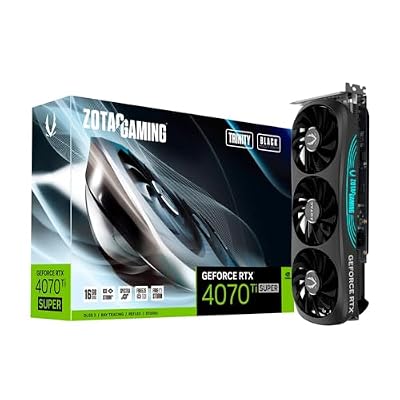
- Premium Choice: ZOTAC GAMING GeForce RTX 4070 Ti SUPER Trinity Black Edition 16GB GDDR6X
Top Nvidia Geforce Rtx 4070 Super Picks for 2026
Here are our current top nvidia geforce rtx 4070 super picks, compared on real Amazon owner reviews, price, and features. Live prices update below.

Dropped $10.00


Dropped $2.52
Nvidia GeForce RTX 4070 Ti Super drivers come in two distinct flavours, and choosing correctly matters more for creators than most buyers realise. Game Ready and Studio drivers serve different priorities, and the right pick can mean the difference between a crash mid-render and a stable, productive session. This review examines both driver branches through a creator-and-gamer lens, weighs real owner feedback, and answers whether the card is worth buying in 2026.
As an Amazon Associate we earn from qualifying purchases at no extra cost to you. Product prices and availability are accurate as of the date shown and are subject to change.



Studio vs Game Ready: Choosing the Right Driver
The GeForce RTX 4070 Ti Super supports both Game Ready and Studio drivers, and understanding the trade-off between them is the foundation of getting the most from the card. They are built from the same underlying code but validated and tuned for different audiences, so the better choice depends entirely on how you use your machine day to day.
What Studio Drivers Do Better for Creators
Studio drivers are built around stability and validated performance in creative applications. Nvidia tests them extensively against tools like video editors, 3D renderers, and design suites, prioritising reliability over chasing the newest game patch.
For anyone who edits video, renders 3D scenes, or runs long creative workloads, that validation translates into fewer crashes and more predictable behaviour during the exact moments when a failure costs you real work. The 16GB buffer on the 4070 Ti Super pairs well with this stability-first approach for memory-hungry projects.
The trade-off is update cadence: Studio drivers arrive less often, so you may not get day-one tuning for the very newest games.
In practice, that slower cadence is rarely a problem for creators, whose applications change far less often than games do. A Studio driver that is a few weeks old still runs the latest version of most creative tools flawlessly, so the trade-off costs creators almost nothing while buying them meaningful stability. It is a sensible exchange for anyone whose income or deadlines depend on the machine not crashing.
When Game Ready Drivers Make More Sense
Game Ready drivers flip those priorities. They ship frequently, often on a game’s launch day, with the latest optimisations and feature support tuned for the newest titles. For a primarily gaming-focused 4070 Ti Super owner, this is the sensible default.
They also bring new gaming features and DLSS refinements faster, which matters if you want the latest upscaling improvements as soon as they land. The cost is the occasional early bug that a more conservative Studio cadence avoids.
For pure gamers, the faster feature flow easily justifies the slightly higher chance of a launch-day hiccup.
There is also a simple middle path for the undecided: default to Game Ready, and only switch to Studio if a creative application starts misbehaving. Most owners never need to think about it beyond that, which keeps the dual-branch system from feeling like a burden rather than the flexibility it actually is.
Switching Between the Two Safely
A detail many owners overlook is that you can move between the branches freely. If a Game Ready release destabilises a creative app, switching to the current Studio driver is a legitimate fix, and vice versa for gaming issues.
For the cleanest result when switching, run Display Driver Uninstaller in safe mode first, then install the chosen branch fresh. This avoids the leftover-file conflicts that cause many reported problems and keeps either driver running at its best.
It also helps to align driver switches with your workload rather than the calendar. If you have a heavy editing project coming up, moving to Studio beforehand makes sense; if a major game launches that you want to play at its best, Game Ready is the call. Treating the branch as something you choose per season of work, not once and forever, gets the most from the card.
What Creators and Gamers Say About These Drivers
Buyer feedback on the GeForce RTX 4070 Ti Super’s driver experience is largely positive, with creators and gamers praising different strengths and the criticism concentrated on update timing rather than the hardware. Here is how the sentiment breaks down.
4-5 Star Praise: Stability for Creative Work
Creators in 4-5 star reviews consistently praise the Studio drivers for rock-solid stability during long renders and edits. Many describe switching to Studio as the moment their workflow stopped crashing, crediting the validated drivers directly.
Gamers, meanwhile, praise the Game Ready branch for smooth day-one support and the modern NVIDIA App that ties everything together. The card’s strong 1440p performance under either driver earns repeated enthusiasm across both groups.
What stands out across reviews is how rarely the praise comes with caveats once owners have matched the branch to their needs. Creators on Studio and gamers on Game Ready both describe a card that simply does its job, which is the highest compliment GPU software can earn. That consistency is a recurring thread in the card’s favour.
2-3 Star Gripes: Update Timing Conflicts
The critical feedback is honest and recurring. The most common 2-3 star complaint involves the tension between branches: gamers who want the newest features find Studio too slow, while creators who installed Game Ready hit occasional instability in their applications.
A smaller group dislikes having to choose at all, wishing for a single driver that did both jobs perfectly. A few report needing a clean install to resolve a conflict after switching branches, which is more effort than expected.
These gripes are about workflow fit rather than the card’s capability, and the fix — picking the right branch — is straightforward once understood.
Pros and Cons for a Hybrid Workflow
The pros of the GeForce RTX 4070 Ti Super driver setup: two validated branches covering both gaming and creation, excellent stability on Studio, fast feature support on Game Ready, the streamlined NVIDIA App, and the freedom to switch as needs change. For a hybrid creator-gamer, that flexibility is genuinely valuable.
The cons: you must consciously choose a branch, switching cleanly requires a DDU reinstall, and neither branch is perfect for every workload at once. These are minor trade-offs rather than real flaws.
On balance, the dual-driver approach is a strength for anyone whose work spans both gaming and creation, letting them tune the card to the task at hand.
For buyers, the reassuring conclusion is that you are not locked into a compromise. Whatever your balance of work and play, one of the two branches fits it well, and you can change your mind later at no cost. That adaptability is exactly what makes the card so easy to recommend across very different users.
Is the RTX 4070 Ti Super Worth It in 2026?
A flexible driver setup only matters if the card is worth owning, and in 2026 that depends on an unusual market. This section covers the pricing forces, who the card suits, and what to check before buying.
How the H200 News and 2026 Price Hikes Hit This Card
The 4070 Ti Super sits in a tightening market. GPU prices have climbed because GDDR7, GDDR6 and high-bandwidth memory are in severe shortage, with VRAM now driving more than 80% of the bill of materials on some high-end cards and trackers logging increases of roughly 15–23%. As the 50-series matures, this card’s stock is thinning and prices have firmed rather than fallen.
Nvidia’s data-center business adds pressure. In January 2026 the U.S. approved exports of Nvidia’s H200 AI chip to China, with Chinese firms reportedly ordering more than two million units at around $27,000 each. Capacity directed at those high-margin AI orders is capacity not building consumer GeForce cards, keeping this 16GB tier tight and pricey.
The practical takeaway: prices are unlikely to ease soon, so if you find a 4070 Ti Super at a fair price and value its dual-driver flexibility for work and play, acting sooner beats waiting on a market trending the wrong way.
Who This Card and Driver Setup Suit Best
The 4070 Ti Super is an excellent fit for hybrid users who both game at high-refresh 1440p and create, since the dual-driver setup lets them prioritise stability or features as needed. The 16GB buffer supports memory-hungry creative work alongside gaming.
Pure gamers get a great card on Game Ready alone, and pure creators get reassuring stability on Studio. The setup is most rewarding, though, for those who genuinely straddle both worlds.
That dual-purpose strength is rare at this price, and it is a real part of the card’s appeal.
Where to Buy and What to Check First
Before buying, confirm the card fits your case, that your PSU covers its 285W draw, and that the price is fair against current street rates. Decide upfront which driver branch matches your main use, and plan a clean install for the smoothest start.
You can compare live pricing on the RTX 4070 Ti Super through the links on this page, then choose whichever listing offers the best deal for your build today.
See More:
Conclusion
The Nvidia GeForce RTX 4070 Ti Super drivers story comes down to choice: Studio drivers deliver validated stability for creators, Game Ready drivers bring fast features for gamers, and the freedom to switch between them is a real asset for hybrid users. Owner feedback praises both branches, with the only friction being update-timing fit that the right choice resolves. Paired with strong 1440p performance and a 16GB buffer, the card is a smart buy in 2026. With memory shortages and Nvidia’s H200-driven supply priorities keeping consumer GPUs scarce and expensive, prices are more likely to rise than fall — so once the Nvidia GeForce RTX 4070 Ti Super drivers and performance have won you over, securing a fair deal sooner beats waiting. Use the links on this page to check today’s price and buy with confidence.
Frequently Asked Questions
What is the best nvidia geforce rtx 4070 ti super drivers in 2026?
The best nvidia geforce rtx 4070 ti super drivers depends on your budget and how you plan to use it. The options compared above are our top-rated picks based on real customer ratings, build quality, and overall value — start with the highest-rated model that fits your budget.
How much should I expect to spend on a nvidia geforce rtx 4070 ti super drivers?
Prices vary by brand and features. Budget options cover the essentials, while mid-range and premium models add durability, performance, and extra features. Compare the prices in the list above to find the best value for your needs.
What should I look for when buying a nvidia geforce rtx 4070 ti super drivers?
Focus on what matters most for your use case — build quality, compatibility, performance, warranty, and verified customer reviews. Every pick above is selected to balance these factors.
Are budget nvidia geforce rtx 4070 ti super drivers options worth it?
Yes. For most people a well-reviewed budget or mid-range nvidia geforce rtx 4070 ti super drivers delivers excellent value. You only need to spend more if you specifically require premium materials or top-tier performance.
How did we choose these nvidia geforce rtx 4070 ti super drivers picks?
We compare current Amazon ratings, review counts, key features, and price to surface the options with the best real-world value. The list is refreshed as ratings and availability change.










