
GPU coil whine is that high-pitched electrical buzzing or squealing some graphics cards make under load, especially when frame rates run very high. It is one of the most common complaints among PC owners, and also one of the most misunderstood: it is usually harmless, but it can be genuinely annoying. This guide explains what coil whine actually is, whether you need to worry about it, and the practical ways to reduce or eliminate the noise, drawing on patterns reported across many cards and configurations.

Understanding the cause makes GPU coil whine far less alarming, and in most cases you can reduce it without replacing anything.
What Is GPU Coil Whine?
Coil whine is an electrical phenomenon rather than a mechanical one, which is why it behaves so differently from fan noise. Knowing how it is produced, whether it threatens your hardware, and when it is worth acting on sets realistic expectations before you try to fix it.
How Coil Whine Happens
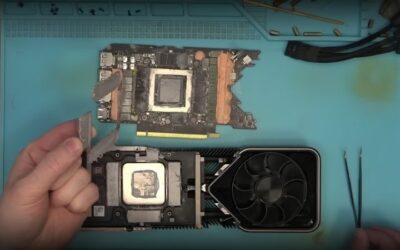
The noise comes from the card’s inductors, small coils in the power-delivery circuitry, vibrating at an audible frequency as current passes through them rapidly. Under heavy or fast-changing load, those vibrations can become loud enough to hear.
This is why coil whine is most noticeable at very high frame rates, such as in menus or simple games where the card produces hundreds of frames per second. The faster the card works, the more the coils vibrate.
It is a normal electrical behavior found to some degree in many electronic devices, not just graphics cards.
The pitch and volume depend on the specific components and the load. Because every card uses slightly different inductors and power circuitry, two identical models can whine quite differently, which is why one person’s card is silent while another’s is audible across the room. That variation is part of why coil whine is so hard to predict before buying.
Is Coil Whine Harmful?
In almost all cases, coil whine is purely an annoyance and not a sign of damage. The card is operating normally; it is simply making an audible byproduct of its power delivery, and it does not indicate a fault or a shortened lifespan.
Some new cards whine more when first used and quieten over time as the components settle. A card that has whined since day one is usually fine to keep using if the noise is tolerable.
So while it can be irritating, coil whine rarely justifies worry about the card’s health.
It is also worth separating coil whine from other noises. A buzzing that changes with frame rate is coil whine, whereas grinding or clicking that tracks fan speed is a mechanical fan issue, and a rhythmic noise can be something touching the blades. Identifying which sound you actually have prevents chasing the wrong fix.
When It Is Worth Acting On
Coil whine becomes worth addressing when it is loud enough to distract you during normal use, or when it is dramatically worse than you would expect. Mild whine at extreme frame rates is normal; a constant, piercing noise during ordinary gaming is more bothersome.
The good news is that the simplest fixes target exactly the conditions that cause the worst whine, namely very high frame rates. Reducing those often reduces the noise substantially.
Deciding whether the noise genuinely bothers you guides how much effort the fixes deserve.
Listening environment plays a part too. A whine that is inaudible in a normally noisy room can be grating in a silent one, so the same card may warrant action for one user and none for another. Judging the noise in the room where you actually use the PC keeps your expectations realistic.
How to Reduce GPU Coil Whine
Because coil whine scales with how hard and fast the card is working, the most effective fixes simply reduce that load. Most approaches cost nothing and are easily reversed, so try them in order before considering anything drastic.
Cap Frame Rate and Enable V-Sync
The single most effective fix is to cap your frame rate. Coil whine is loudest when a card pumps out extremely high frame rates in menus or light games, so limiting the rate to your monitor’s refresh removes the worst of it.
Enabling a frame cap or a sync option stops the card from producing hundreds of unnecessary frames, which immediately calms the coils. Many users find that capping menus and lighter titles eliminates the whine they found most irritating.
This costs nothing, reduces heat and power as a bonus, and is the first thing to try.
Menu screens are a common hidden culprit. A game’s menu often runs uncapped at thousands of frames per second, producing a sharp whine the moment you pause or alt-tab. Applying a global frame cap, not just an in-game one, catches these moments and is frequently what silences the most jarring bursts of noise.
Check Power Supply and Cables
While the card’s coils make the noise, the power supply can influence it. A low-quality or struggling supply can contribute to or worsen coil whine, so a quality unit with adequate headroom sometimes reduces it.
Make sure power cables are firmly connected and, where possible, use separate cables rather than daisy-chaining for a high-draw card. These steps will not always help, but they are worth checking when the whine is severe.
A solid power foundation occasionally tames whine that other steps do not.
Bear in mind that results here are inconsistent by nature. Coil whine originates on the card, so the power supply only influences it indirectly, and swapping units is no guarantee of improvement. Treat a power-supply change as a possible help only when you were due an upgrade anyway, rather than a targeted cure.
Pros and Cons of Each Approach
Each method has trade-offs worth knowing before you rely on it. Here is the honest balance sheet for reducing coil whine.
Pros
- Capping frame rate is free, effective, and reduces heat and power.
- A quality power supply can lessen whine and benefits the whole system.
- Case dampening reduces perceived noise without touching the card.
Cons
- No software fix removes coil whine entirely; it only reduces it.
- Coil whine varies between individual cards, so results differ.
- Swapping the power supply is costly if it does not help.
When to Consider a Replacement or RMA
If the whine is severe enough to be intolerable despite every reasonable fix, replacement or a warranty claim becomes worth considering. This is the exception rather than the rule, but it is a valid path for an extreme case. Here is how to think about it.
Severe Coil Whine and Warranty
Excessively loud coil whine on a new card can sometimes qualify for a warranty replacement, since extreme noise may be considered a defect by the manufacturer or retailer. It is worth checking the return policy if the whine is genuinely unbearable from the start.
Because coil whine varies between individual units, a replacement of the same model may whine less, or not at all. Many users who exchanged a particularly loud card received a quieter one.
For a brand-new card, a return or exchange is often the most practical route for severe whine.
Document the noise before you start a claim. A short video that captures the whine under load gives a retailer or manufacturer something concrete to assess, and it strengthens the case that the noise is genuinely excessive rather than the mild whine considered normal for many cards.
Reducing Noise in the Case
If replacement is not an option, you can reduce how much whine reaches your ears. A case with sound-dampening material absorbs high-frequency noise, and positioning the system further from your desk helps too.
Closing the case, fitting any included foam panels, and managing where the system sits can all lower the perceived volume meaningfully. These steps treat the symptom rather than the source, but they are effective and low-cost.
For many people, dampening the noise is enough to make a whining card comfortable to live with.
Simple placement changes can do a lot. Moving the tower from the desktop to the floor, or to the far side of the desk, adds distance and a barrier between the coils and your ears. Combined with a closed, dampened case, these no-cost adjustments often reduce the perceived whine to a level that no longer registers.
Choosing Quieter Hardware
If you do decide to replace the card, some models are known for quieter power delivery than others, though coil whine is never fully guaranteed against. Reading owner feedback for a specific model gives a sense of how prone it is to whine.
A higher-quality board design and a strong power supply both tilt the odds toward a quiet system. When choosing a replacement, weigh acoustic feedback alongside performance.
If a new card is the route you take, check the current price and choose a model with a reputation for quiet operation.
See More:
- GPU for Valorant 240fps
- GPU for Fortnite 240fps
- GPU for CS2 high fps
- GPU for Apex Legends
- RTX 4070 Cyberpunk FPS
Conclusion
GPU coil whine is a normal electrical noise from the card’s inductors under load, usually harmless and most noticeable at very high frame rates rather than a sign of a failing card. The most effective fix is simply capping your frame rate, which calms the coils while reducing heat and power, and a quality power supply or case dampening can help further. Only severe, intolerable whine on a new card justifies a return or replacement. Try the free fixes first, and if you do choose to replace the card, check the current price and pick a model known for quiet, stable power delivery.
Top-Rated Picks


| Product | Brand | Rating | Reviews | Price |
|---|---|---|---|---|
| ARCTIC MX-4 (4 g) – Premium Performance Thermal Paste… | ARCTIC | ★ 4.8 | 104k | $4.99 |
| ARCTIC MX-4 (incl. Spatula, 4 g) – Premium Performanc… | ARCTIC | ★ 4.8 | 71.9k | $5.49 |
| Crucial 8GB DDR4 RAM 3200MHz (PC4-25600), Downclockab… | Crucial | ★ 4.8 | 62.8k | $74.99 |
| AMD Ryzen 5 5600X 6-core, 12-thread unlocked desktop … | — | ★ 4.8 | 30.2k | $177.60 |
| NVIDIA Shield Remote; Voice Search, Motion-Activated,… | — | ★ 4.7 | 10.6k | $25.99 |
Frequently Asked Questions
Is coil whine a defect I should return the card for?
It is a normal side effect of high-frequency switching in the power delivery circuit, not a fault, and it does not shorten card life. Manufacturers rarely accept it as a warranty claim, though many retailers allow an exchange within the return window. Severity varies between individual samples of the same model.
What reliably reduces coil whine?
Capping frame rate is the single most effective step, because whine scales with frames per second. Set a limit of 120 or 141 fps in the Nvidia app, RTSS, or in-game. Enabling VSync in menus and undervolting the card to reduce current both help noticeably as well.
Can the power supply make whine worse?
Yes. A PSU with lower-quality chokes or poor transient response can add its own whine and amplify the GPU’s. Trying a different high-quality unit, and using two separate native PCIe cables instead of one daisy-chained cable, sometimes reduces the noise substantially at zero cost beyond the swap test.
Does coil whine ever go away on its own?
Frequently it lessens over the first few weeks of use as the inductors settle, an effect users describe as break-in. It rarely disappears completely. If it is getting worse over months rather than better, monitor for other symptoms such as crashing, which would indicate real VRM degradation.
Do case and desk placement matter?
They matter for perception. A steel case with solid panels dampens whine better than a glass and mesh design, and moving the tower off the desk to the floor puts the noise further from your ears. Sound-dampening foam on the side panel provides a further modest reduction.




Write Your Review
No reviews yet. Be the first to share your experience!