
- Top Pick: Advanced CUDA Programming: Master GPU Computing, Parallel Algorithms, Kernel Optimization, and High-Performance Applications with Modern C++ Techniques
- Best Value: CUDA C++ in Practice: A Complete Developer's Guide to GPU Architecture, Parallel Algorithms, and Real-World Performance Optimization
- Premium Choice: CUDA Systems Engineering: Bare-Metal Kernels, Memory Hierarchies, and Enterprise GPU Optimization
Laptop GPU hierarchy is the map every gaming laptop buyer needs before spending a dollar, because Nvidia’s mobile lineup now spans three generations and more than a dozen tiers. From the entry RTX 4050 to the towering RTX 5090, each chip occupies a specific rung defined by CUDA cores, VRAM, memory type, and DLSS support. This guide lays out the full ladder in plain terms, ranking every meaningful RTX mobile tier so you understand exactly where each card sits and which one matches your needs in 2026.
Understanding How The Hierarchy Is Built
Before ranking individual cards, it helps to understand the factors that determine a GPU’s place on the ladder. Three generations coexist in the market, and the tier names alone can mislead without context on architecture and specifications.
As an Amazon Associate we earn from qualifying purchases at no extra cost to you.




The Specifications That Define A Tier
CUDA core count is the primary lever, scaling roughly with raw rasterization performance within a generation. VRAM capacity and memory bus width set the ceiling for higher resolutions, while memory type, GDDR6 versus the newer GDDR7, governs bandwidth.
Power, expressed as TGP, is the underrated variable that can shuffle the order. A higher-tier card limited to low wattage can underperform a lower-tier card running at full power, which means the hierarchy is a guide rather than an absolute law.
How Generations Stack Up
Three architectures populate the current market: Ampere from the RTX 30 series, Ada Lovelace from the RTX 40 series, and Blackwell from the RTX 50 series. Each generation brings efficiency gains and new DLSS capabilities, so a newer mid-tier chip can rival an older high-tier one.
This generational overlap is why naming can deceive. A 5070 does not automatically beat a 4080, and understanding the cross-generation picture is essential to reading the hierarchy correctly.
The Role Of DLSS Across The Ladder
DLSS support climbs with each generation, and it materially affects real-world performance. The RTX 30 series runs DLSS 2 upscaling only, the RTX 40 series adds DLSS 3 Frame Generation, and the RTX 50 series introduces DLSS 4 Multi Frame Generation.
This experimental layer means that two cards with similar raw specs can deliver very different smoothness in supported games. Nvidia’s AI features increasingly shape where a card effectively lands in the hierarchy.
The Entry And Mainstream Tiers
The lower and middle rungs are where most buyers shop, balancing price against capability. These tiers cover everything from budget 1080p gaming to comfortable 1440p play, and they reward careful matching of card to resolution.
Entry-Level: RTX 4050 And RTX 3060
The RTX 4050 laptop, with 2,560 CUDA cores and 6GB of GDDR6, anchors the modern entry point for 1080p gaming with DLSS 3 support. The older RTX 3060 laptop, at 3,840 cores and 6GB, remains capable but lacks Frame Generation, relying on DLSS 2 alone.
These cards suit budget buyers and esports players who prioritize high frame rates at 1080p. Their limited VRAM is the main constraint, capping ambitions at higher resolutions and the heaviest textures.
The Mainstream Core: RTX 4060 And RTX 5060
The RTX 4060 laptop, with 3,072 cores and 8GB on a 128-bit bus, is the volume seller for 1080p high-refresh gaming. The newer RTX 5060 laptop matches the 8GB capacity but adds GDDR7 and DLSS 4, lifting its longevity even at a similar core count.
These mainstream chips define value in the market, handling modern titles smoothly at 1080p. The 5060’s DLSS 4 support is its key advantage, making it the more future-proof of the two for buyers planning a longer hold.
The 1440p Step-Up: RTX 4070 And RTX 5070
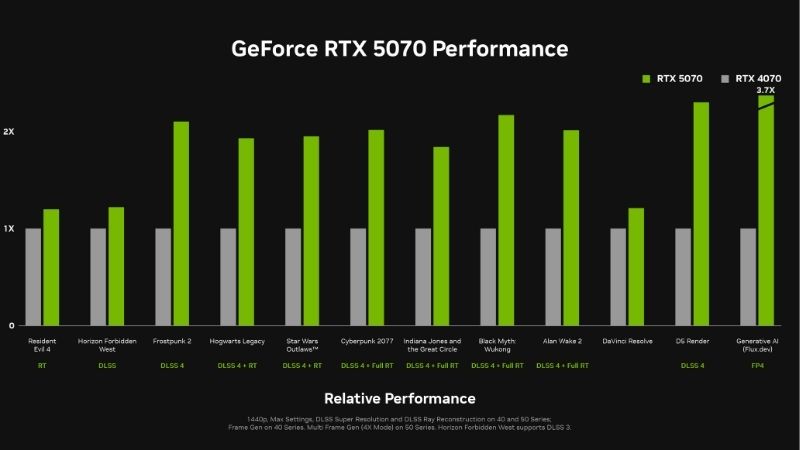
The RTX 4070 laptop, at 4,608 cores and 8GB, opens comfortable 1440p gaming with DLSS 3. The RTX 5070 laptop shares the same core count but upgrades to GDDR7 and DLSS 4, trading raw shader gains for faster memory and superior AI features.
Both occupy the upper mainstream rung where 1440p becomes realistic. The shared 8GB buffer is their common limitation, which keeps them a clear step below the VRAM-rich performance tier above.
The Performance And Flagship Tiers
At the top of the ladder sit the cards built for 1440p maximum settings and 4K ambitions. These tiers command premium prices but deliver the VRAM, cores, and bandwidth that demanding gamers and creators require.
The Performance Tier: RTX 4080, RTX 5070 Ti And RTX 5080
The RTX 4080 laptop, with 7,424 cores and 12GB on a 192-bit bus, breaks past the 8GB ceiling for serious 1440p play. The RTX 5070 Ti laptop offers 5,888 cores with 12GB of GDDR7 and DLSS 4, while the RTX 5080 laptop pushes to 7,680 cores and 16GB of GDDR7, sitting just below the flagship.
These cards target buyers who want high-refresh 1440p or entry 4K without paying flagship prices. The Blackwell options add DLSS 4, making them the smarter long-term picks within this competitive band.
The Flagship Tier: RTX 4090 And RTX 5090
The RTX 4090 laptop, with 9,728 cores and 16GB on a 256-bit bus, was the Ada peak and remains a 4K-capable powerhouse. The RTX 5090 laptop crowns the current hierarchy with 10,496 cores, 24GB of GDDR7, and DLSS 4, standing alone at the summit.
These flagships serve uncompromising gamers and professionals who need maximum frames and VRAM. The 5090’s enormous 24GB buffer and Blackwell features make it the definitive top tier, with the 4090 a strong value flagship if found discounted.
Pros And Cons Of Buying By Hierarchy
The advantage of using the hierarchy is clarity: it prevents overpaying for performance you will not use and stops you from buying under your needs. It frames the entire market in a single ladder, simplifying a confusing lineup.
The drawback is that the ladder ignores price-to-performance sweet spots and TGP variation between laptops. A card’s rung tells you its ceiling, not its value, so the hierarchy works best paired with attention to wattage and current pricing.
Final Thoughts On Choosing Your Tier
The hierarchy is most useful when combined with awareness of the current buying climate, which shapes how far your budget stretches. This closing section ties the ladder to real-world timing and a clear recommendation.
How Pricing And Supply News Affects Your Choice
The market currently rewards buying with intent. Gaming laptop prices have continued trending upward under tight memory supply, which inflates machines across every tier of the hierarchy. The encouraging news is that the steep late-2025 climb has eased, with some makers reporting relative stability, though they warn volatility persists.
Lasting relief remains distant. Fresh DDR5 and GDDR supply is opening from makers like CXMT, and Micron is building two plants in Idaho, but those will not ramp until 2027 to 2028. Because prices have plateaued rather than fallen, climbing a tier now often makes more sense than waiting for cuts that may not arrive in 2026.
Matching A Tier To Your Use Case
For 1080p gaming, the mainstream tier of the 4060 or 5060 delivers the best balance. For 1440p, the 4070, 5070, or 4080 tiers fit, while 4K and creative work call for the 5080, 4090, or 5090 flagships.
Anchoring your choice to resolution and workload, rather than chasing the highest number, is the surest way to use the hierarchy well. Ready to find your tier? Explore current laptop deals across each rung through the links on this page.
The Smart Way To Read The Ladder
Treat the hierarchy as a starting framework, then refine with TGP ratings and pricing for the specific laptops you consider. A high-wattage mid-tier card can outvalue a constrained higher tier, so the ladder guides without dictating.
Used this way, the hierarchy turns a bewildering lineup into a clear decision. It is the foundation, and your resolution, budget, and the current market complete the picture.
Top-Rated Picks



| Product | Brand | Rating | Reviews | Price |
|---|---|---|---|---|
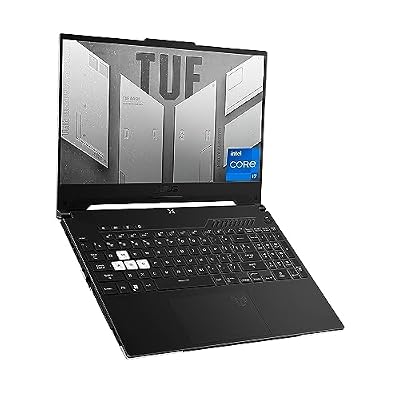
| ASUS TUF Dash 15 (2022) Gaming Laptop, 15.6" 144Hz FH… | — | ★ 4.5 | 1.5k | $995.00 |
| ASUS ROG Strix G16 Gaming Laptop, 165Hz Display, NVID… | — | ★ 4.5 | 1.1k | $1,600.00 |
| msi Raider 18" QHD+ 240Hz Gaming Laptop, Intel Core U… | — | ★ 4.5 | 1.1k | $4,789.00 |
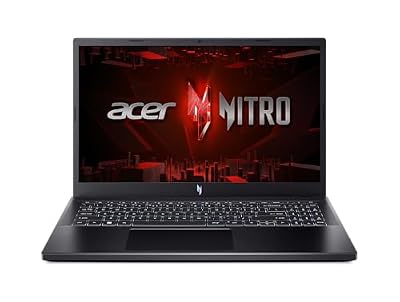
| Acer Nitro V Gaming Laptop | Intel Core i5-13420H Pro… | — | ★ 4.5 | 1.1k | $799.99 |
| ASUS ROG Strix G16 (2025) Gaming Laptop, 16” FHD+ 16:… | — | ★ 4.5 | 477 | $1,539.00 |
Frequently Asked Questions
Readers navigating the laptop GPU hierarchy often have these questions about how the ladder works in practice.
Does a higher tier always mean better performance?
Not always, because TGP and cooling vary between laptops, so a power-limited higher-tier card can trail a well-cooled lower-tier one.
The hierarchy sets a ceiling for each chip, but the specific laptop’s implementation determines the real result.
Can a newer mid-tier GPU beat an older high-tier one?
Yes, generational gains in efficiency and features mean a newer mid-tier chip can rival an older high-tier card.
DLSS generation matters here, since DLSS 4 on Blackwell can lift effective performance beyond what raw specs suggest.
Which tier should most gamers buy?
For 1080p, the mainstream tier of the 4060 or 5060 offers the best balance of price and capability.
For 1440p, the 4070, 5070, or 4080 tiers fit, while 4K and creative work call for the flagship tiers.
Applying The Hierarchy To A Purchase
A hierarchy is only useful when it guides a real decision, so this section turns the ladder into practical buying steps. It connects the tiers to budgets and goals.
Start With Your Resolution
Begin by fixing your target resolution, since it anchors which rung you need: 1080p, 1440p, or 4K. This single choice eliminates most of the ladder immediately.
Matching resolution to tier prevents both overspending on unused power and underbuying below your needs.
Check Wattage And Cooling
Once you have a tier, compare the specific laptops by TGP and thermal design, because a power-limited high-tier chip can trail a well-cooled lower-tier one.
This step is where the hierarchy meets reality, and it often separates two laptops that share the same GPU name.
Weigh Features And Longevity
Finally, factor in DLSS generation and VRAM, since DLSS 4 and larger buffers extend a card’s useful life. Newer Blackwell tiers age more gracefully.
Used this way, the ladder becomes a confident framework rather than a rigid ranking, guiding you to the right rung for your needs.
See More:
The Bottom Line
The laptop GPU hierarchy in 2026 spans three generations, from the entry RTX 4050 and 3060 through the mainstream 4060 and 5060, up to the 1440p-capable 4070, 5070, and 4080, and finally the 5080, 4090, and 5090 flagships. Reading the ladder correctly means weighing cores, VRAM, DLSS generation, and TGP together rather than trusting tier names alone, and with prices plateaued rather than falling, choosing the right rung for your resolution and buying now is the wisest strategy.











Write Your Review
No reviews yet. Be the first to share your experience!