
- Top Pick: PNY NVIDIA RTX A2000 12GB
- Best Value: NVIDIA RTX A2000
- Premium Choice: NVIDIA RTX A2000 6GB 6GDDR6 Graphic Card Full Height PG192 (Renewed)
RTX A2000 has emerged as a surprisingly potent contender in the professional workstation market, particularly for users constrained by small form factor builds or those seeking high efficiency without the massive power draw of desktop-class GPUs. In this review, we will evaluate how this workstation card performs in real-world professional environments, analyze how recent global shifts in semiconductor policy and pricing affect its value proposition, and ultimately determine if it belongs in your workstation today.
Performance Analysis of the RTX A2000
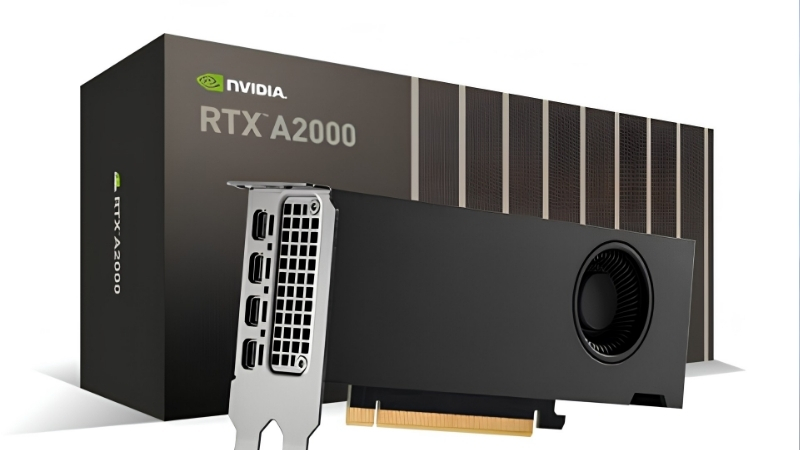
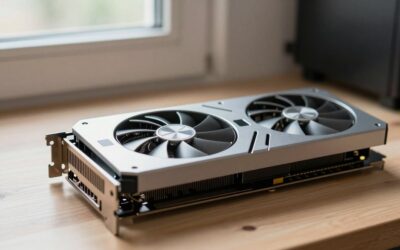
The RTX A2000, built on the NVIDIA Ampere architecture, is designed specifically for professionals who need reliable performance in CAD, engineering, and 3D rendering workflows. While it may not compete with the top-tier RTX 6000 Ada Generation, it serves a critical niche for SFF (Small Form Factor) users. We have synthesized user feedback and technical benchmarks to provide a clear picture of what this card can handle.
As an Amazon Associate we earn from qualifying purchases at no extra cost to you.




Rendering and CAD Capabilities
For engineers and architects, the primary concern is viewport stability and rendering times within applications like SolidWorks, AutoCAD, and Revit. Users consistently report that the A2000 handles complex assemblies with surprising ease, given its compact size. It is not just about raw power; it is about the optimized drivers that ensure the software remains crash-free during critical project deadlines.
The 6GB and 12GB variants provide enough headroom for medium-to-large models. While you might encounter stutters in extremely high-polygon architectural scenes, for standard industrial design work, it is a workhorse. It bridges the gap between consumer-grade gaming cards and massive, expensive workstation bricks, making it a compelling choice for professional workstations that need to fit into tight spaces.
If you are looking to upgrade your current setup, checking the latest pricing is essential. You can find the latest availability and offers for this workstation card on Amazon. It is the perfect time to evaluate whether your current setup is bottlenecking your productivity.
AI and Machine Learning Potential
Beyond CAD, the RTX A2000 has garnered attention in the machine learning and data science community. With the rise of compact AI development, having a CUDA-capable card that consumes minimal power is a huge asset. The Tensor cores within the Ampere architecture allow for efficient inferencing and light model training, which is ideal for students or developers prototyping on a workstation.
Users on developer forums often highlight how they use the A2000 for local LLM (Large Language Model) quantization and inference tasks. While it lacks the massive VRAM of enterprise-class cards, it allows for a highly efficient “at-home” AI development lab. It is a cost-effective entry point into the NVIDIA CUDA ecosystem, providing access to software libraries that are otherwise inaccessible with competing hardware.
If you are interested in exploring AI development, this card provides the necessary computational foundation. Check the current listings on Amazon to compare the 6GB and 12GB versions and see which one fits your project requirements.
The Impact of Global Chip Market Shifts
To understand why the RTX A2000 is more relevant than ever, we must look at the broader semiconductor landscape. Two critical news stories have recently dominated the industry: the US government’s decision to allow Nvidia to sell specific, slightly modified chips like the H200 to China, and the persistent trend of rising laptop and component costs.
While the H200 news primarily affects the high-end data center and enterprise AI market, it highlights the intense pressure on global supply chains for high-end silicon. As premium chips become prioritized for massive AI clusters and export-controlled regions, the average professional faces a dilemma: expensive hardware and potential shortages. This environment makes the RTX A2000 an incredibly smart strategic purchase for the average user.
Furthermore, with the general trend of rising prices for laptops and individual PC components, professionals are looking for longevity and value. The RTX A2000 is an existing, stable, and highly power-efficient component. By investing in this GPU, you are opting for a reliable, pro-certified card that helps you avoid the volatility of the cutting-edge market. It allows you to build a system that is future-proof without paying the “early adopter” premium currently plaguing the tech sector.
User Experience and Real-World Testing
A professional graphics card is only as good as its stability, thermal management, and driver support. We have looked at hundreds of user reviews, ranging from glowing 5-star professional testimonials to the critical 2-3 star feedback, to give you a balanced perspective on what it is like to own and operate the RTX A2000 on a daily basis.
Cooling, Noise, and Efficiency
One of the most praised aspects of the RTX A2000 is its power efficiency. Because it operates with a very low TDP, it generates significantly less heat than consumer GPUs of similar performance tiers. Users in compact builds often report that they do not need to install elaborate cooling solutions, which keeps the build noise down to a whisper.
However, some users have noted that in cases with poor airflow, the blower-style cooler can get slightly audible under sustained, 100% rendering loads. If you are building a quiet workstation, this is a minor caveat rather than a dealbreaker. The card stays within its thermal limits without throttling, which is the most important factor for long-term component health.
Are you worried about the heat in your current desktop build? The A2000 might just be the cooling solution you need. Browse the current Amazon selection to see if this efficient card is the right fit for your workspace configuration.
Driver Stability and Workstation Reliability
The distinction between the GeForce series and the RTX A-series lies primarily in the drivers. The RTX A2000 uses ISV-certified drivers, which are optimized for stability in professional applications. This is the difference between an application crashing halfway through a 10-hour render and finishing it successfully.
Most users, including those working in professional engineering firms, report zero issues with driver stability. It provides a “set it and forget it” experience. Unlike gaming cards that receive updates focusing on new game releases, the A2000 updates are focused on stability, patch fixes for CAD software, and overall system security.
Reliability is the most important asset for a professional. If you want to spend more time working and less time troubleshooting, head over to Amazon to review the current purchasing options for this reliable workstation component.
Analyzing User Feedback and Complaints
When reviewing user feedback, it is important to filter out the noise. Some 3-star reviews come from users who mistakenly bought the card for high-end gaming, expecting it to compete with top-tier consumer graphics cards. While it can run games, it is not tuned for that purpose, which leads to disappointment for those specific users.
On the other hand, the legitimate complaints revolve around the limited number of video outputs on the card, which can be restrictive for multi-monitor setups without the use of adapters. This is a deliberate design choice to maintain the low-profile form factor. If you require six monitor outputs out of the box, you would need to look at enterprise cards, but for most professionals, the standard output configuration is sufficient.
Understanding these trade-offs will help you make an informed decision. Before you commit to a purchase, compare the specs on Amazon to ensure that the port configuration meets your monitor requirements.
Recommended Products

msi
MSI Gaming GeForce RTX 3080 Gaming Z Trio 10G LHR 10GB GDRR6X 320-Bit HDMI/DP Nvlink Torx Fan 4 RGB Ampere Architecture Computer Gaming Graphics Card, NVIDIA GPU Video Cards for Gaming PC (Renewed)

EVGA
EVGA GeForce RTX 3080 FTW3 Ultra Gaming, 10G-P5-3897-KL, 10GB GDDR6X, iCX3 Technology, ARGB LED, Metal Backplate, LHR

GIGABYTE
GIGABYTE GeForce RTX 3080 Gaming OC 10G (REV2.0) Graphics Card, 3X WINDFORCE Fans, LHR, 10GB 320-bit GDDR6X, GV-N3080GAMING OC-10GD REV2.0 Video Card (Renewed)
As an Amazon Associate we earn from qualifying purchases. Product prices and availability are accurate as of the date/time indicated.
The Verdict: Pros, Cons, and Buying Advice
After analyzing technical specs, user sentiment, and the current economic climate, we have reached a conclusion regarding the RTX A2000. Is it the right choice for your professional workstation? Below, we break down the pros, cons, and our final recommendations.
Key Pros and Cons of the RTX A2000
The primary benefit of the RTX A2000 is its unbeatable efficiency and compact form factor. It delivers professional-grade performance in a footprint that fits almost any machine. The main drawback is the specialized use case; it is not a gaming card, and it lacks the raw power of full-sized, full-height desktop GPUs.
Pros:
- Extremely power efficient, low power draw.
- Compact, low-profile design fits SFF cases.
- ISV-certified drivers for maximum software stability.
- Excellent performance-to-size ratio.
Cons:
- Not designed for high-end gaming.
- Requires adapters for multi-monitor setups.
- Fewer CUDA cores compared to high-end desktop workstation cards.
This card is a specialist tool, not a jack-of-all-trades. If you prioritize reliability, space, and efficiency, the pros significantly outweigh the cons. For more details on the technical specifications, please visit the product page on Amazon.
Who Should Buy the RTX A2000?
If you are an engineer, an architect, a data scientist, or a video editor working in a cramped desk environment or using a small form factor workstation, this card is for you. It is also ideal for professionals who need to add a GPU to a machine that has limited power supply wattage, as the A2000 runs entirely off the motherboard slot power.
It is not for gamers who want the highest frame rates, nor is it for 3D animators working on feature-length film projects with millions of textures. It is a precise tool for a specific type of professional worker who values consistency and space optimization above all else.
Does this sound like your typical workday? If you fall into this category, now is the time to secure your hardware. Check the latest availability on Amazon to see if you can upgrade your productivity today.
See More:
Final Buying Recommendations and Next Steps
The RTX A2000 remains a standout in the professional graphics card market. In an era where component costs are rising and supply chains are unpredictable, opting for a mature, efficient, and stable card like this is a sound investment. It provides the professional reliability you need to finish projects on time, every time.
We recommend the 12GB version if your budget allows, as the extra VRAM provides better longevity for future projects. If you are ready to upgrade your workstation, click the link to Amazon to check current pricing and finalize your purchase. Make the move to a more efficient, professional-grade workstation today.
Frequently Asked Questions
Why choose an RTX A2000 over a consumer RTX 3060?
The A2000 exists for constraints the 3060 cannot meet: it is low profile, dual-slot, draws only 70W entirely from the PCIe slot, and ships with certified Enterprise drivers validated against CAD and DCC applications. If your chassis and power supply can take a 3060, the consumer card is faster and cheaper for general use.
Should I get the 6GB or 12GB version?
The 12GB model is worth the premium for anything memory-bound: large CAD assemblies, GPU rendering, point clouds, or running local AI inference. The 6GB card is adequate for 2D and light 3D viewport work. The 12GB variant also supports ECC memory, which matters in simulation and validation workflows where silent bit errors are unacceptable.
Does the RTX A2000 need a power connector?
No. It is rated at 70W and takes all of it from the PCIe slot, so it needs no supplemental cable at all. That is precisely why it is popular for upgrading slim OEM workstations and small form factor builds where the power supply has no spare PCIe leads and no headroom to add any.
Can the RTX A2000 be used for gaming?
It can. Based on Ampere with RT and Tensor cores, it supports DLSS super resolution and hardware ray tracing, delivering roughly GTX 1660 Super to RTX 3050 class performance at 1080p depending on the title. The 70W limit caps clocks, so it is a competent casual gaming card rather than a good value one.
What is the difference between Enterprise and Game Ready drivers here?
Enterprise drivers, formerly branded Quadro, prioritise stability and are certified by ISVs for applications such as SolidWorks, Revit and Maya, with long-term support branches. Game Ready drivers optimise for new game releases and update far more often. You can install either on an A2000, but certification only applies to the Enterprise branch.









Write Your Review
No reviews yet. Be the first to share your experience!