
- Top Pick: ASUS Prime GeForce RTX 5060 Ti 16GB GDDR7 Gaming Graphics Card
- Best Value: GIGABYTE GeForce RTX 5060 Ti WINDFORCE OC 8G Graphics Card, 8GB 128-bit GDDR7, PCIe 5.0, WINDFORCE Cooling System, GV-N506TWF2OC-8GD Video Card
- Premium Choice: ASUS Dual GeForce RTX 5060 Ti 16GB GDDR7 OC Edition Gaming Graphics Card
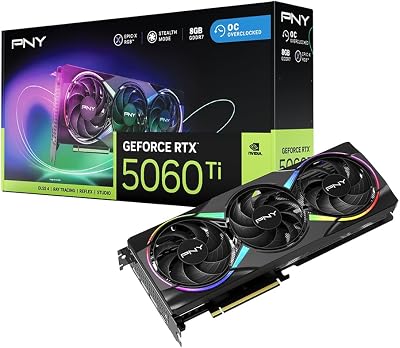


Is RTX 5060 Ti good enough to deserve your money in 2026? It is one of the most searched GPU questions, and the honest answer is that it depends entirely on you. The card is genuinely capable, but whether it is the right choice comes down to your monitor, the games you play and your budget. This quick guide walks you through a simple, step-by-step way to decide, so you can buy with real confidence instead of second-guessing the purchase later. Think of the next few minutes as a short checklist that turns a vague question into a clear yes or no.
What to Check Before Deciding If the RTX 5060 Ti Is Good
Before you judge any graphics card, gather three pieces of information about your own setup. These three factors, more than any benchmark headline, decide whether the 5060 Ti is a great buy or simply the wrong card for your needs. Take a moment to gather them honestly, because a rushed guess here is what leads to buyer’s remorse.
As an Amazon Associate we earn from qualifying purchases at no extra cost to you.


Your Resolution and Monitor
Start with your screen, because it sets everything else. The 5060 Ti is designed for 1080p and entry-level 1440p gaming, so it shines on those monitors and clearly struggles once you push it to 4K, where a higher tier makes far more sense.
If you play at 1080p, the card has plenty of power in reserve for most modern titles at high settings. If you own a 1440p high-refresh panel, it still performs well, but it will work harder and lean on upscaling in the most demanding games.
Write down your resolution and refresh rate right now, because both matter. A fast 1080p 240Hz esports setup asks more of the card than a standard 1080p 60Hz screen, and everything else in this guide flows from that one detail. Getting this number right first saves you from either overspending on power you cannot use or underbuying and feeling limited.
Your Game Library and VRAM Needs
Next, look honestly at what you actually play. Esports and older titles are very light on memory, while the newest AAA releases can push past 8GB at high textures, which is exactly where memory, not raw speed, becomes the real question.
This matters because the 5060 Ti comes in 8GB and 16GB versions that are otherwise identical. If your library leans toward modern, texture-heavy games, the amount of memory you choose will define how comfortable the card feels over the next few years.
Make a short list of your five most-played games, and think a year ahead too. If you tend to buy new AAA releases as they launch, assume your memory needs will only grow, and lean toward the version with more headroom. A card that fits your library today but chokes on next year’s blockbuster is a false economy worth avoiding.
Your Budget and Today’s Market
Finally, set a realistic budget and check current prices rather than launch figures. In 2026, component prices have been climbing rather than falling, so the card can cost noticeably more than its original sticker once you actually shop for it.
Memory is a major reason for that rise, as graphics cards compete with the wider industry for tight DRAM supply. This directly affects the price gap between the 8GB and 16GB versions, and since that gap is pure memory cost, it is the part most likely to move as the market shifts.
Waiting for a big drop is tempting, but real relief is likely years away, as new memory factories largely come online around 2027 to 2028. Note your ceiling price and the live prices of both versions, because a fair price today is probably as good as it gets for now. Trying to time the market perfectly usually costs you months of gaming for a saving that may never arrive.
How to Decide If the RTX 5060 Ti Is Good for You, Step by Step
With your resolution, games and budget in hand, follow these three steps in order. Each one narrows the decision a little further, until the right answer for your build becomes obvious rather than a guess. Work through them in order and resist the urge to skip ahead, since each step depends on the one before it.
Step 1: Match It to Your Resolution
Run through this quick check to confirm the card suits your monitor before anything else:
1. If you game at 1080p, the 5060 Ti is a strong, comfortable choice with power to spare. 2. If you game at 1440p, it is capable but expect to enable upscaling in the heaviest titles. 3. If you game at 4K, look at a higher tier instead, because the 5060 Ti simply is not built for that resolution.
If your resolution passes this check, move on to the next step with confidence. If it fails, the honest answer is that the card is not the right fit, and you should factor in any 4K or ultrawide monitor you plan to buy soon before spending anything. Matching the GPU to the screen you will actually own is the single most important call in the whole process.
Step 2: Choose Between 8GB and 16GB
Now decide which version matches your games, using this simple rule of thumb:
1. Mostly esports or older titles at 1080p, and the 8GB version is enough while saving you money. 2. Modern AAA games, 1440p, or heavy textures and ray tracing, and the 16GB version is the safer choice. 3. Any content creation or local AI work, and the 16GB version is effectively mandatory.
The two cards share identical raw performance, so this really is a memory decision rather than a speed one. Remember that running out of memory shows up as sudden stutter and texture pop-in, which is far more annoying than a slightly lower average frame rate, so when in doubt pick 16GB. The small premium for extra memory is cheap insurance against the exact stutter that ruins otherwise smooth games.
Step 3: Weigh DLSS 4, Price and Alternatives
Finally, factor in features and value before you commit any money:
1. Confirm the games you play support DLSS 4, which can boost frame rates significantly on this card. 2. Compare the live price of your chosen version against the options just above and below it. 3. If a slightly pricier card offers much more, or a cheaper one already covers your needs, take the two minutes to consider it.
DLSS 4 Multi Frame Generation is a genuine strength here and a big reason the card often feels faster than its raw numbers suggest. If the price is fair, and DLSS 4 covers the games you care about, then the decision is effectively made in the card’s favor. At that point you are not gambling; you are buying a card whose strengths clearly line up with how you play.
Pros, Cons and Mistakes to Avoid
To round out your decision, here is an honest look at where the RTX 5060 Ti genuinely excels, where it falls short, and the common mistakes buyers make that are easy to sidestep once you know them. Reading this section before you check out can save you both money and a return shipping label.
Strengths of the RTX 5060 Ti
The card’s biggest strength is efficient, modern 1080p and 1440p performance backed by full DLSS 4 support. It runs cool, draws modest power and slips neatly into small builds, which makes it a genuinely pleasant card to live with day to day.
The 16GB version adds real longevity on top of that, keeping textures high and handling creation and local AI tasks that smaller cards simply choke on. For buyers who mix gaming with side projects, that flexibility is a meaningful, practical bonus.
For its intended audience, a 1080p or 1440p gamer who values efficiency and modern features over brute force, the 5060 Ti is a very good card that does its job with little fuss and low running noise. That quiet, low-heat operation is easy to underrate until you have lived with a louder, hotter card.
Weaknesses and Who Should Skip It
The main weakness is that the 8GB version can stutter in demanding modern titles at higher settings, which quietly undercuts its value for anyone buying with the future in mind. It is the single flaw you most need to plan around.
The card is also not a 4K machine, so anyone gaming at that resolution should look higher up the range rather than hoping it will cope. Paying for it and then feeling short-changed at 4K is one of the most common regrets buyers report.
If you need maximum raw power, chase the highest frame rates on a top-tier competitive monitor, or plan to game at 4K, skip the 5060 Ti and step up a tier. It is a mainstream card, not an enthusiast flagship. Buying it for a job it was never designed to do is the fastest route to disappointment, so be realistic about your goals.
Common Buying Mistakes
The most frequent mistake is buying the 8GB version to save a little money, then hitting memory limits within a year. If your games are modern and demanding, spend the extra on the 16GB version and avoid that regret entirely.
Another mistake is ignoring live prices in a rising market. Always compare current prices rather than launch figures, since the value equation keeps shifting as memory costs push cards upward month to month.
Finally, do not overlook the rest of your build. Pairing the card with a weak CPU or a mismatched monitor wastes much of what makes it good, so confirm your power supply and case clearance before you buy anything at all. A few minutes of checking now prevents a frustrating return or a bottleneck that quietly caps your frame rates.
See more:
- Nvidia gear store
- Nvidia number of employees
- Nvidia Jetson Xavier Developer Kit
- GeForce graphics driver
Final Verdict: Is the RTX 5060 Ti Good for You?
So, is RTX 5060 Ti good? For 1080p and entry 1440p gamers who want modern efficiency and DLSS 4, yes, it is a genuinely strong card, especially in its 16GB form. It is not the right pick for 4K gaming or for anyone chasing maximum raw power, and the 8GB version is best kept for lighter, 1080p-focused libraries. If your resolution, games and budget line up with what you checked above, and the live price is fair, the 5060 Ti is an easy card to recommend. Check the current price on both the 8GB and 16GB versions through the link below before you buy, so you lock in the right card at the best available price.
Frequently Asked Questions
Who is the RTX 5060 Ti actually right for?
It suits someone gaming at 1440p who wants high settings without paying flagship prices, particularly in the 16GB configuration. It is also a sensible upgrade from an RTX 2060, 3060, or older card. It is poor value for anyone still gaming at 1080p on a sixty hertz panel.
Which version should I buy?
The 16GB model, unless your budget is genuinely fixed and you only game at 1080p. Both variants use the same GPU and clocks, so the extra memory is the only difference and it is the specification most likely to determine how long the card remains comfortable in new releases.
What system do I need around it?
A modern six core or better CPU, a PCIe 4.0 or newer motherboard to avoid the eight lane bandwidth penalty, resizable BAR enabled in the UEFI, and a quality 550 to 600 watt power supply with a spare 8-pin PCIe cable. Most cards fit any mid tower without clearance concerns.
Is it good enough for 4K?
Only with heavy upscaling in less demanding titles. The 128-bit memory bus limits bandwidth well before the shader count becomes the constraint, so native 4K in modern AAA games is not realistic. If 4K is your target, the 5070 Ti is the sensible entry point instead.
Should I wait for the next generation instead?
If your current card still runs what you play, waiting costs nothing but time. If you are on a card that struggles today, buying now gets you DLSS 4 multi frame generation and adequate memory immediately. There is always a faster card coming, so buy against need rather than anticipation.











Write Your Review
No reviews yet. Be the first to share your experience!