
A Thunderbolt cable looks like any other USB-C cable, and that is why many gaming and creator desks underperform. Plug a plain charging cable into a dock, an external GPU enclosure, a high-refresh monitor or a fast NVMe enclosure and the link can fall back to slow USB speeds, lose a display, or drop charging power without warning. The connector fits, but the capability inside is completely different.
- Quick Answer
- How to Choose
- Apple Thunderbolt 5 (USB-C) Pro Cable (1m)
- Cable Matters Intel Certified Thunderbolt 5 Cable (1m)
- OWC Thunderbolt 5 (USB-C) Cable (0.3m)
- Cable Matters Intel Certified Active Thunderbolt 4 Cable (6.6 ft)
- Belkin Thunderbolt 4 Cable (2m)
- Who Should Skip It
- FAQ
- Final Verdict
- Product and ASIN Reference
The best thunderbolt cables solve that with certification you can rely on. A certified Thunderbolt 4 cable guarantees fast data, DisplayPort alt mode video and proper power delivery over one connection. A certified Thunderbolt 5 cable doubles core bandwidth and adds extra display bandwidth for demanding monitor setups. For a modern PC with Thunderbolt or USB4 ports, the cable is part of the connection itself, not an accessory to grab at random.
This guide covers only certified Thunderbolt 4 and Thunderbolt 5 cables from established brands: a short Thunderbolt 5 option for tidy drive links, longer active Thunderbolt 4 options for reaching across a desk, and one-meter all-purpose spares. Every pick supports DisplayPort alt mode, so one cable can carry data, video and power together.
As an Amazon Associate, we earn from qualifying purchases.
Quick Answer
For most gaming and creator PCs, choose a certified Thunderbolt 5 cable in one meter for the fastest dock, monitor and storage links, or a certified Thunderbolt 4 cable in two meters when reach matters more than peak speed. Keep the cable short for maximum bandwidth, match charging to your laptop, and avoid uncertified USB-C cables for Thunderbolt jobs.
How to Choose
Start with the generation, because it sets the ceiling for everything else. Thunderbolt 4 cables support data up to 40Gb/s, enough for most docks, external SSD enclosures and one high-resolution monitor or two lower-resolution displays through a dock. Thunderbolt 5 cables support 80Gb/s bidirectional data and up to 120Gb/s display bandwidth with Bandwidth Boost on compatible hosts. That headroom matters for Thunderbolt 5 docks, very fast storage, and multi-monitor setups pushing several high-refresh displays. A Thunderbolt 5 cable also works with Thunderbolt 4, Thunderbolt 3 and USB4 gear, so it is the safer future-facing buy.
Length is the second decision. Passive cables keep full speed only over short runs, which is why most full-speed cables are one meter or less. Longer cables use active electronics to preserve the signal, and a good active cable can hold full Thunderbolt 4 speed at two meters. Measure the route from PC to dock before ordering, and choose the shortest length that reaches comfortably with slack. A too-short cable pulls on ports; a far-too-long one creates clutter.
Charging is the third check. Thunderbolt 4 certification requires up to 100W of power delivery, covering most ultraportables and many gaming laptops docked for everyday work. Some newer cables extend to 240W under USB Power Delivery extended power range, suiting larger laptops built for that ceiling. The cable alone does not create power: charger, dock and laptop must all support the wattage you want, so check dock output first.
Display support deserves a separate look. All cables here carry DisplayPort alt mode, how Thunderbolt sends video to a monitor or through a dock. Thunderbolt 4 handles one 8K display or two 4K displays in typical configurations. Thunderbolt 5 raises that ceiling for compatible hosts, with higher resolutions, refresh rates and more displays through a suitable dock. Your GPU, monitor and dock still decide the result: a cable cannot add a display your GPU cannot drive, but the wrong cable can remove one.
Finally, check certification rather than marketing language. Look for Intel certified or manufacturer-stated Thunderbolt certification, a clear model number, and a braided jacket if the cable will travel. Words such as compatible or fast on an uncertified listing do not guarantee data, video and charging together. For eGPU enclosures, stick to short certified cables, because they are sensitive to signal quality and length.
Apple Thunderbolt 5 (USB-C) Pro Cable (1m)

Apple’s Thunderbolt 5 Pro cable is the clean premium choice for a mixed desk with a gaming PC, a creator laptop and Thunderbolt displays. At one meter it sits in the sweet spot for full-speed passive performance, long enough to reach a dock or drive beside the machine and short enough to keep the link simple.
Performance is the main reason to choose it. The cable supports Thunderbolt 5 data with Bandwidth Boost for displays, while falling back cleanly to Thunderbolt 4, Thunderbolt 3 and USB4 speeds on older hosts. Charging reaches the higher extended power range ceiling, and DisplayPort 2.1 support makes it a strong fit for newer monitors through a compatible host and dock.
Specs
| Item | Detail |
|---|---|
| Generation | Thunderbolt 5 |
| Length | 1 meter |
| Data speed | Up to 80Gb/s, up to 120Gb/s with Bandwidth Boost |
| Charging | Up to 240W |
| Video | DisplayPort 2.1 alt mode |
| Compatibility | Thunderbolt 5, 4, 3, USB4 and USB-C |
Cable Matters Intel Certified Thunderbolt 5 Cable (1m)

The Cable Matters Thunderbolt 5 cable offers the same core speed class in a plain, work-focused design that suits PC builders and desks built around docks and enclosures. It is Intel certified, rated for 80Gb/s bidirectional data and up to 120Gb/s of display bandwidth where the host supports Bandwidth Boost. For a gaming PC with a Thunderbolt 5 dock or a creator workstation moving large files to fast external storage, that is the full current-generation specification in a one-meter run.
This cable suits a semi-permanent desk link. Connect a dock once, route the cable cleanly, and leave it to carry peripherals, network, storage, displays and laptop power over a single plug each morning. If you want Thunderbolt 5 headroom without a premium braided finish, this is the practical center of the guide.
Specs
| Item | Detail |
|---|---|
| Generation | Thunderbolt 5, Intel certified |
| Length | 1 meter, 3.3 feet |
| Data speed | 80Gb/s, up to 120Gb/s with Bandwidth Boost |
| Charging | Up to 240W |
| Video | DisplayPort alt mode, multi-display via dock |
| Model | 107062-BLK-1m |
OWC Thunderbolt 5 (USB-C) Cable (0.3m)

The OWC Thunderbolt 5 cable in its shortest length is built for links where a long cable is pure clutter. At 0.3 meters it connects an external SSD resting beside a laptop, a dock stacked close to the host, or a storage device that lives right next to the PC.
Despite the compact size, there is no cut in capability. The cable carries up to 80Gb/s of bidirectional data and up to 120Gb/s for higher display bandwidth on compatible systems, with charging at the higher extended power range. Choose it if your drive, dock or hub lives within easy reach of the port and you value a clean, strain-free connection. Treat it as a specialist short link, and pair it with a one-meter cable for general desk duty.
Specs
| Item | Detail |
|---|---|
| Generation | Thunderbolt 5 |
| Length | 0.3 meters |
| Data speed | Up to 80Gb/s, up to 120Gb/s for displays |
| Charging | Up to 240W |
| Video | DisplayPort alt mode |
| Compatibility | Thunderbolt 5, 4, 3, USB4 and USB-C |
Cable Matters Intel Certified Active Thunderbolt 4 Cable (6.6 ft)

Reach is the reason this Cable Matters cable exists. At 6.6 feet, or two meters, it is an active Thunderbolt 4 cable designed to hold 40Gb/s data, video and charging over a distance that would force a passive cable to slow down.
Active electronics help preserve signal integrity over the longer run, so a dock, drive or monitor link behaves like a short connection rather than a compromise. Charging reaches 240W on this listing, above the Thunderbolt 4 baseline, giving flexibility with larger laptops and higher-output docks where the rest of the chain agrees. Video covers one 8K display or two 4K displays in typical configurations. If reach frustrates you more than peak bandwidth, this is the most useful cable in the guide.
Specs
| Item | Detail |
|---|---|
| Generation | Thunderbolt 4, Intel certified, active |
| Length | 6.6 feet, 2 meters |
| Data speed | 40Gb/s |
| Charging | Up to 240W |
| Video | One 8K or two 4K displays |
| Model | 107025-BLK-2m |
Belkin Thunderbolt 4 Cable (2m)
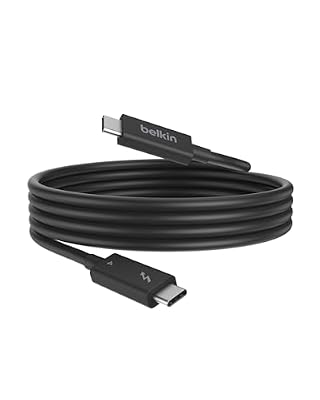
Belkin’s Thunderbolt 4 cable is another two-meter active option, from a brand many buyers already know from docks and chargers. It is Intel Thunderbolt certified and USB4 compliant, with 40Gb/s bandwidth and power delivery up to 100W. That charging figure matches the classic Thunderbolt 4 requirement exactly, enough for most thin gaming laptops, creator ultraportables and office machines that dock for displays, storage and peripherals and charge steadily while connected.
The two-meter length suits the same under-desk and behind-monitor routes as the other long cable here, giving a second choice if you prefer Belkin’s build or matching accessories. It does not chase the higher charging ceiling or Thunderbolt 5 bandwidth. Instead it delivers the certified Thunderbolt 4 essentials over a genuinely useful length, which is what most current docks actually need.
Specs
| Item | Detail |
|---|---|
| Generation | Thunderbolt 4, Intel certified |
| Length | 2 meters, 6.6 feet, active |
| Data speed | 40Gb/s |
| Charging | Up to 100W |
| Video | DisplayPort alt mode via Thunderbolt |
| Model | INZ002 |
Who Should Skip It
Skip certified Thunderbolt cables if you only need to charge a phone or tablet, because a simpler USB-C charging cable will do that job. Also skip the short cables here if your dock and PC are far apart, and skip the two-meter cables if you are building a Thunderbolt 5 storage setup needing full 80Gb/s speed where a one-meter cable already reaches.
Pause also if your PC has no Thunderbolt or USB4 port at all. A Thunderbolt cable will still work as a USB-C cable in many cases, but it cannot add Thunderbolt speed, eGPU support or dock displays to a port that lacks those features. Check motherboard, laptop and dock specifications first, especially on desktop PCs where only certain USB-C ports carry Thunderbolt.
FAQ
Is a Thunderbolt 5 cable worth buying for a Thunderbolt 4 PC?
Yes, if you want a future-facing spare, because a Thunderbolt 5 cable works with Thunderbolt 4 hosts and devices at Thunderbolt 4 speeds. The benefit comes later, when a Thunderbolt 5 laptop, dock or enclosure joins the desk and the same cable already supports the higher bandwidth.
Can one Thunderbolt cable run my dock, monitors and charging together?
Yes, that is the main purpose of a certified Thunderbolt cable between a compatible laptop and dock. The dock splits the connection out to monitors, storage, network and peripherals while sending power back to the laptop.
Why does cable length change Thunderbolt speed?
High-speed signals weaken over distance, so passive cables keep full Thunderbolt bandwidth only over short lengths. Longer cables need active electronics to preserve the signal, and even then the generation matters. That is why full-speed Thunderbolt 5 cables are short, while certified active Thunderbolt 4 cables can reach two meters at 40Gb/s. Choosing the shortest comfortable length is the simplest way to protect speed and reliability.
Will a Thunderbolt cable work for fast external SSD gaming storage?
Yes, with a compatible Thunderbolt or USB4 enclosure and host port, a certified cable preserves the fast link that makes external game storage practical. Use a short cable for a portable enclosure and avoid substituting a plain charging cable, which can drop the connection to much slower USB speeds.
Final Verdict
For a current-generation desk, start with a one-meter Thunderbolt 5 cable. The Apple Thunderbolt 5 Pro is the premium braided pick, while the Cable Matters Thunderbolt 5 cable is the practical PC-focused alternative with the same core bandwidth and charging class.
For the many strong Thunderbolt 4 setups still in daily use, the two long cables are the most useful upgrades. The Cable Matters active Thunderbolt 4 cable combines two-meter reach with a higher charging ceiling, while the Belkin Thunderbolt 4 cable covers the certified essentials at the same length for 100W-class laptops. Match generation to your dock, length to your measured route and charging to your laptop, and any of these five certified cables will outperform a random USB-C lead where it counts.
Product and ASIN Reference
| Product | ASIN |
|---|---|
| Apple Thunderbolt 5 (USB-C) Pro Cable (1m) | B0DLBSYR55 |
| Cable Matters Intel Certified Thunderbolt 5 Cable (1m) | B0CP8K1C59 |
| OWC Thunderbolt 5 (USB-C) Cable (0.3m) | B0DH7VN49M |
| Cable Matters Intel Certified Active Thunderbolt 4 Cable (6.6 ft) | B0CVR2ZDQ1 |
| Belkin Thunderbolt 4 Cable (2m) | B09PQFPDHX |





Write Your Review
No reviews yet. Be the first to share your experience!