


RivaTuner Statistics Server, usually shortened to RTSS, is the quiet engine behind smooth gaming overlays and rock-steady frame rates, yet many people install it without realising how powerful it is. If you want a clean on-screen display, a way to cap your frame rate, or smoother frame pacing, this tool does it all for free. This review explains what RTSS actually does, how well it works, and what real users praise and criticise, so you can get the most from it.
As an Amazon Associate we earn from qualifying purchases at no extra cost to you.






What RivaTuner Statistics Server Actually Does
RTSS is far more than the overlay engine most people know it as. It combines a customisable on-screen display, a precise frame-rate limiter, and frame-time tools into one lightweight program. Understanding these core roles is the key to unlocking its full value.
The On-Screen Display Engine
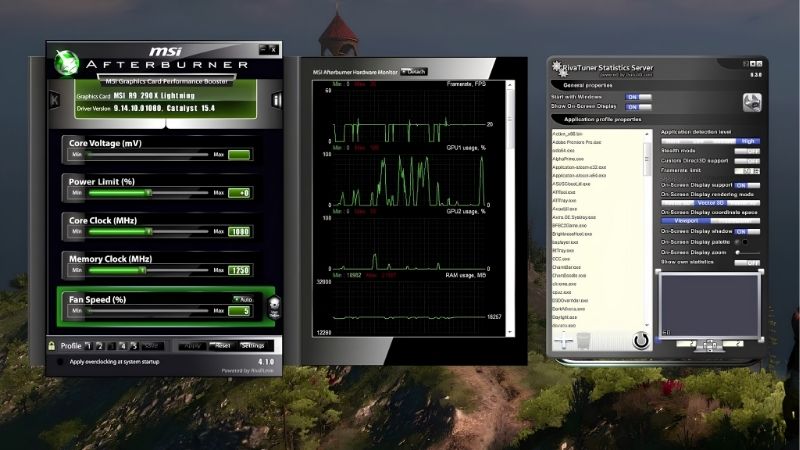
RTSS is the technology that actually draws performance overlays onto your games. When you see frame rate and temperatures displayed in a corner, RTSS is doing the rendering, even if another tool provides the data.
This is why it pairs so naturally with monitoring apps. It takes readings from tools like MSI Afterburner and displays them cleanly on screen, acting as the reliable display layer for your stats.
The overlay is highly customisable through RTSS. You can adjust position, size, colour, and layout, turning a basic readout into a clean, readable display tailored exactly to your taste.
Understanding this division of labour helps explain a common source of confusion. Many people install a monitoring app and wonder why an overlay appears in their games, not realising that RTSS quietly installed alongside it is doing the actual drawing. The monitoring app is the source of the numbers, while RTSS is the painter that puts them on screen. Once you grasp that relationship, configuring your overlay becomes far less mysterious, because you know which program to open for which setting rather than hunting blindly through menus.
The Precise Frame-Rate Limiter
One of RTSS’s most valuable features is its accurate frame-rate limiter. Capping your frame rate sounds simple, but RTSS does it with exceptional precision, which brings real benefits beyond just a number.
A well-set limit reduces heat, power draw, and fan noise. By stopping your card from rendering more frames than you need, RTSS keeps temperatures lower and your system quieter during long sessions.
It also smooths gameplay in many cases. A steady, capped frame rate often feels more consistent than an uncapped one that swings wildly, which is why many players prefer a sensible limit.
There is a competitive angle to the limiter as well. In fast games, an uncapped frame rate that constantly bounces around can subtly change how the game feels from moment to moment, whereas a firm, precise cap keeps input and pacing steady. Many players also use the limiter to keep their card comfortably below its maximum in less demanding titles, which stops the fans from spinning up loudly for frames they will never notice. This blend of consistency, quiet, and control is exactly why the RTSS limiter has such a devoted following.
Frame-Time Smoothing and Scan Sync
RTSS includes advanced features for enthusiasts chasing perfect smoothness. Its frame-time and scanline-sync options can reduce stutter and tearing beyond what a simple cap achieves, giving very smooth results when tuned well.
These features work by controlling exactly when frames are delivered. Fine-tuning frame pacing this way can make a game feel noticeably smoother, even at the same average frame rate.
The table below summarises what RTSS brings to the table:
| Feature | What it does | Main benefit |
|---|---|---|
| On-screen display | Draws stats onto games | Live performance info |
| Frame-rate limiter | Caps FPS precisely | Lower heat and noise |
| Scanline sync | Controls frame timing | Reduced tearing |
What Users Say About RivaTuner Statistics Server
Beyond the features, feedback from gamers reveals how RTSS performs in daily use. Their experiences show clear patterns about its strengths and its rough edges, helping you decide how to set it up.
Why It Is Considered Essential
Users praise RTSS as an essential, invisible workhorse. It runs quietly in the background, powers their overlay reliably, and enforces their frame-rate cap without fuss, which is why so many consider it a permanent install.
Its frame-rate limiter earns special praise. Many users value it above the limiters built into games or drivers, describing it as the most precise and consistent way to cap frames, which improves both smoothness and temperatures.
Longevity is another quality reviewers highlight. RTSS has been maintained and refined for many years, so it works reliably across a huge range of games old and new, and it rarely causes the conflicts or crashes that plague less mature tools. For many users this dependability is the whole point: they set it up once, forget it is there, and simply enjoy a consistent overlay and a steady frame rate in every game. That kind of quiet, trustworthy reliability is exactly what earns a utility a permanent place on a gaming PC.
Common Frustrations and Fixes
The main frustration is that the interface looks dated and technical. Its old-fashioned design intimidates newcomers, though the settings themselves are straightforward once you know that most people only need to adjust a few.
Some users also find the sheer number of options confusing at first. The fix is to focus on the essentials, an on-screen display and a frame-rate cap, and leave the advanced sync features until you are comfortable.
RivaTuner Statistics Server Pros and Cons
Here is the honest balance sheet before you rely on it:
Pros:
- Free, lightweight, and reliably powers your overlay.
- Exceptionally precise frame-rate limiter.
- Advanced tools to smooth frame pacing.
Cons:
- Dated, technical-looking interface.
- Many options overwhelm beginners.
- Displays and manages data but cannot fix hardware.
The verdict is clear: for a reliable overlay, a superb frame-rate limiter, and smoother gameplay, RTSS is one of the most useful free tools available, once you look past its dated appearance.
Getting the Most From RivaTuner Statistics Server
RTSS delivers real benefits when set up thoughtfully. A few practical choices help you use it to run cooler, smoother, and quieter, and to spot when your hardware needs attention.
Using the Limiter to Run Cooler and Quieter
The frame-rate limiter is the easiest big win. Capping frames a little below your maximum stops your card working needlessly hard, which lowers temperature, power, and fan noise all at once.
This is especially useful in menus and older games. Without a cap, a card can render hundreds of pointless frames, running hot and loud for no benefit, which a sensible limit instantly solves.
Setting the cap thoughtfully brings the biggest benefit. A common approach is to cap a few frames below the refresh rate of your monitor, since rendering far beyond what your screen can display wastes power and generates heat for frames you never actually see. On a high-refresh monitor you might still cap well above sixty, but the principle holds: match the limit to what your display and your eyes can genuinely use. Doing this once, then leaving RTSS to enforce it in every game, quietly improves temperatures, noise, and consistency across your whole library.
If your card still runs hot even with a cap, cooling is the next step. A set of quality case fans keeps temperatures down further, letting your capped, quieter system stay cool through long sessions.
Setting Up a Clean, Useful Overlay
A focused overlay is far more useful than a cluttered one. Displaying just frame rate and temperatures through RTSS gives you the essential information without covering your game in text.
Styling matters for daily use. Adjusting the overlay’s size, colour, and position makes it readable yet unobtrusive, which is what turns it into something you keep on permanently.
Pairing RTSS with a monitoring tool completes the setup. Afterburner supplies the readings and RTSS displays them cleanly, giving you a reliable, good-looking overlay in every game.
Knowing When Hardware Is the Real Limit
RTSS makes hardware limits obvious. If your frame rate sits well below your cap and temperatures are high, your card is the bottleneck and cooling or an upgrade would help.
Reading the overlay guides smart spending. Seeing exactly why performance falls short stops you from buying the wrong fix, whether that turns out to be cooling or a new card.
This clarity is worth emphasising because it protects your wallet. It is easy to assume a disappointing frame rate means you need a more powerful card, but the combination of RTSS and a monitoring tool often tells a different story, revealing a card throttling from heat, a frame rate needlessly capped, or a processor holding things back. By reading that picture before you shop, you make sure any money you spend targets the real limitation rather than an assumed one, which is exactly how a free overlay ends up saving you far more than it costs.
Ready to run cooler and smoother? If RTSS shows your card running hot, use the links on this page to grab quality case fans or thermal paste and keep your temperatures and frame rates exactly where you want them.
See More:
Conclusion
RivaTuner Statistics Server is a quietly essential tool that powers a clean overlay, delivers a superbly precise frame-rate limiter, and can smooth your frame pacing, all for free. Use its cap to run cooler and quieter, set up a focused overlay, and treat a low frame rate with high temperatures as a cue to act. If heat is the limit, better cooling is the answer, so use the links above to grab quality case fans or thermal paste and keep your card cool, quiet, and smooth for years to come.
Frequently Asked Questions
Does RivaTuner Statistics Server reduce frame rate?
The overlay costs roughly one to three percent depending on how many sensors you display and the refresh interval you choose. Reducing the update rate and trimming unused readouts almost eliminates the impact. The built-in frame limiter itself has negligible cost and often improves consistency rather than harming raw throughput.
Is the RTSS frame limiter better than an in-game cap?
Usually yes for frame pacing. RTSS applies a precise wait in the presentation path, which produces flatter frame times than most in-game limiters. Nvidia Reflex generally offers lower input latency in supported titles, so a common approach is Reflex where available and RTSS elsewhere, capped just below your refresh rate.
What is Scanline Sync and when should I use it?
Scanline Sync pushes the display tearing line into an area of the screen you rarely look at, giving near vsync smoothness without the added latency of a full vsync buffer. It works best on fixed refresh displays when your hardware comfortably exceeds the refresh rate, and needs manual tuning per title.
Can RTSS trigger anti-cheat bans?
RTSS hooks the graphics API to draw its overlay, which some kernel-level anti-cheat engines treat with suspicion. It is widely used and rarely causes bans, but the safest practice is disabling the overlay in competitive online games and enabling it only for benchmarking, offline testing and single player sessions.
Does it work with DirectX 12 and Vulkan?
Yes, provided you keep it updated, since new API versions and game engines occasionally require a compatibility fix. If the overlay fails to appear, check that the detection level is set to a higher value, that the game profile is not excluded, and that no other overlay is conflicting.
Ready to decide? Our #1 pick for 2026 is the On-screen display.
Live price & availability on Amazon.










Write Your Review
No reviews yet. Be the first to share your experience!