
NVIDIA 3080 drivers are usually searched for by someone who already has a problem. The card was stable last week, a driver landed, and now something crashes, flickers, or greys out that did not before. This article is written for that person: what the current branch is, which known issues are documented rather than imagined, how to tell whether the driver is genuinely your culprit, and how to get back to a build that worked. No general advice about keeping software updated — you know that, and it is what got you here.
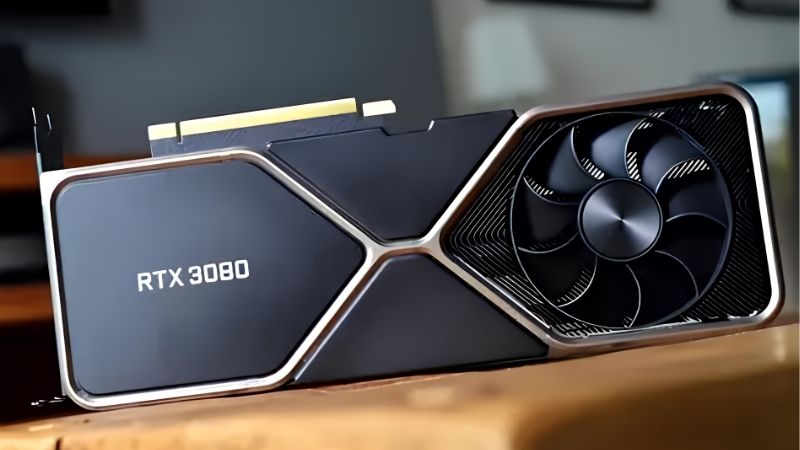
Which RTX 3080 Driver Is Stable Right Now?
The honest answer depends on what you play and what else is in your system, which is unsatisfying but true. What is useful is knowing where the branch sits, what NVIDIA itself lists as broken, and how to read that against your symptoms.
As an Amazon Associate we earn from qualifying purchases at no extra cost to you.







The Current Branch and What Changed in It
As of July 2026 the current Game Ready branch is 610, with 610.74 released on 7 July 2026 and 610.62 before it in mid-June.
The June release was a bug-fix drop rather than a feature one, and its fix list is worth knowing because these are problems people had been living with: stability issues in World of Warcraft, random visual corruption in Apex Legends, and DLSS settings that would grey out and refuse selection.
The July release is narrower — day-one support for new titles plus general fixes. If you are on a 610 build and stable, little in it demands you move.
Known Issues Worth Knowing Before You Update
NVIDIA publishes known issues in every release note and reading them takes ninety seconds. Most people skip this, then spend an evening diagnosing something already documented.
The currently listed issue affecting the widest group: “Prefer Maximum Performance” power management mode may not be applied correctly. If you rely on that setting — and many high-refresh users do, because it removes a stutter in desktop apps and Explorer — this is a live problem in the current build, not something wrong with your PC. It is known, it is NVIDIA’s, and reinstalling will not fix it.
10GB vs 12GB: Same Driver, Different Card
Worth clarifying because it affects what you should expect rather than which file you download.
| RTX 3080 10GB | RTX 3080 12GB | |
|---|---|---|
| CUDA cores | 8,704 | 8,960 |
| VRAM | 10 GB GDDR6X | 12 GB GDDR6X |
| Memory bus | 320-bit | 384-bit |
| Bandwidth | 760 GB/s | 912 GB/s |
| TDP | 320 W | 350 W |
The driver is identical for both. The reason to know which you own is diagnostic: if your crashes cluster in VRAM-heavy scenarios at 1440p or 4K, a 10 GB card has a plausible hardware explanation that a 12 GB card does not, and no driver version fixes a full frame buffer.
How to Diagnose a Driver Problem on an RTX 3080
Before you roll anything back, establish that the driver is actually the cause. The RTX 3080 has a specific characteristic that produces crashes indistinguishable from driver faults, and a significant share of the people convinced they have a driver bug do not.
Is It Actually the Driver? The 320W Question
The RTX 3080 draws 320 W, and it does not draw it smoothly. Ampere flagships are notorious for transient power spikes — brief excursions well above the rated figure, lasting milliseconds.
Those transients trip over-current protection on nominally adequate power supplies. The symptom is a hard shutdown or black screen under load, and it looks exactly like a driver crash. It is not.
The test is free. Cap your frame rate, or apply an 80 percent power limit in MSI Afterburner. If the crashes stop, your PSU is the problem and you just saved an evening of driver roulette. A 3080 wants a genuinely good 750 W supply, not a nominal one.
Second free test: check temperatures under sustained load. GDDR6X runs hot here, and memory junction temperatures above roughly 100 °C cause instability that also mimics a driver fault.
Reading Release Notes Like a Troubleshooter
If the hardware checks pass, go to the release notes rather than the forums.
Open the release notes PDF for your build and the two before it. Read Fixed Issues and Known Issues only. You are looking for your symptom in NVIDIA’s own words.
If it appears under Known Issues in your build and under Fixed Issues in a later one, update. If it appears under Known Issues in your build and nowhere earlier, roll back. Five minutes, and it settles the question definitively — which forum threads never do.
The Rollback Path That Works
If you conclude the driver is the cause, do the rollback properly or it will not hold.
Download the older build first, before removing anything — Advanced Driver Search, RTX 3080, your Windows version, the release you want. Then clean out the current driver with DDU in Safe Mode and install with Perform a clean installation ticked.
The step people miss: disconnect from the internet before installing and stay offline until you have rebooted. Otherwise Windows Update reinstalls the newest driver within hours and puts you back where you started.
Pros and Cons of Updating vs Staying Put
There is a real argument on both sides, and RTX 3080 owners sit where neither answer is automatic. The card is old enough to have a long list of known-good builds behind it, and new enough that updates still bring things worth having.
When Updating Is the Right Call
Your symptom is on the fixed list. This is the clearest case and it is why reading release notes beats guessing.
You play new releases at launch. Day-one optimisation is real work, and skipping it means a higher chance of crashes and visual bugs in titles that run fine for everyone else.
Security is the third and least exciting reason. Graphics drivers run with kernel-level access, and staying several branches back indefinitely is a genuine exposure rather than a theoretical one.
When Staying on a Known-Good Build Wins
You are stable and you play an established library. If nothing on the fix list affects you, a new driver is a change with unknown consequences and no upside.
You depend on a setting that the new build broke. The “Prefer Maximum Performance” issue is a live example — if that mode is load-bearing for your setup, the current build is a downgrade for you specifically regardless of what it fixed for others.
You are mid-way through something that matters. Do not update the driver the week of a tournament or a deadline. This sounds obvious and people do it constantly.
The DLSS 4.5 Setting Ampere Owners Should Change
This one is worth acting on today and almost nobody has been told.
DLSS 4.5 arrived at CES 2026 for every RTX GPU, including your 3080. But Ampere Tensor Cores handle only FP16 inference natively — native FP8 arrived with Ada, FP4 with Blackwell. The second-generation transformer model in DLSS 4.5 is roughly five times more compute-intensive than the first.
The consequence is that NVIDIA itself recommends RTX 30 series users stay on Model K, the original DLSS 4.0 model, for a better balance of performance and image quality. Forcing the newer models on your card costs frames it cannot spare.
Set this in the NVIDIA app under DLSS Overrides. If you have been forcing “Latest” on everything and wondering why your frame rate dropped, this is why.
Ampere in 2026: What Your 3080 Still Gets
Context matters when deciding how much to worry. Your card sits in a materially different position from the GTX 10 series, whose owners are reading much bleaker articles. It is worth knowing where the boundaries are.
Still Fully Supported, Unlike Pascal
The RTX 3080 receives full Game Ready driver support. Every new branch includes it, day-one optimisations apply, and nothing about your card is in maintenance mode.
Compare that to Pascal: NVIDIA’s current release notes state plainly that support for the GeForce 10, 900, and 700 series is discontinued, with a final security build. Ampere is nowhere near that boundary.
What you do not get is Frame Generation (Ada hardware) or Multi Frame Generation (Blackwell only). Those are hardware gaps, not driver ones.
The Windows 10 Deadline in October 2026
This one is close enough to matter now. NVIDIA extended Game Ready driver support for RTX GPUs on Windows 10 to October 2026 — a year beyond Microsoft’s own end-of-life date for the OS.
That is roughly three months away as of this writing. If you are running an RTX 3080 on Windows 10, your Game Ready driver stream ends this autumn, and future branches will target Windows 11 only.
You have two options and both are fine: move to Windows 11, or identify the last Windows 10 build that works for you and archive the installer. What is not fine is discovering this in November.
The Control Panel Is Gone — What Replaced It
If you updated recently and went looking for the NVIDIA Control Panel, you are not imagining its absence. Control Panel support was dropped in the 610.47 release in May 2026.
Everything moved to the NVIDIA app. Settings you used to reach through the Control Panel — power management mode, image scaling, per-game profiles, DLSS overrides — now live there instead.
This matters for troubleshooting because older guides and videos still describe the Control Panel route, and following them on a current driver leads to a menu that no longer exists. If an instruction tells you to right-click your desktop and open the Control Panel, it predates May 2026.
See More:
- NVIDIA
- NVIDIA DeepStream
- NVIDIA GPU driver update
- NVIDIA GeForce NOW download
- NVIDIA RTX A2000 12GB driver
Conclusion
Choosing the right NVIDIA 3080 drivers is a diagnostic exercise, not a preference. Establish first that the driver is actually your problem — cap your frame rate or apply an 80 percent power limit, and check your memory junction temperature, because a 320 W card with transient spikes produces crashes that look identical to driver faults.
If the hardware checks pass, read the release notes for your build and the two before it. Your symptom is either on a Fixed list, which means update, or a Known Issues list, which means roll back. Five minutes of reading beats five hours of forum threads.
Two things to act on regardless of your symptom. Set your DLSS model override to K rather than Latest, because Ampere lacks the FP8 support the newer models assume. And if you are on Windows 10, sort out your plan before October — Game Ready support for that OS ends this autumn, and your RTX 3080 deserves better than being stranded by a date you could have seen coming.
Frequently Asked Questions
Which driver version is stable for the RTX 3080 right now?
Recent 580 branch builds are well tested on Ampere and bring the DLSS 4 transformer super resolution model, which meaningfully improves image quality on this card. If a release causes issues, drop to the previous branch’s last hotfix rather than jumping back several years, since older builds lack newer game support.
Should I buy the 10GB or worry about VRAM?
The 10GB model is now the card’s main limitation at 4K, where ultra textures and ray tracing overrun the buffer and produce hitching. The 12GB variant fares better. Dropping textures one step or using DLSS Quality usually resolves the stutter, and no driver update can change the physical capacity.
What causes 3080 crashes and how do I fix them?
The usual suspects are transient power spikes tripping an undersized supply, factory overclocks that were marginal from new, and corrupted driver installs. Use at least a quality 750W unit, apply a small negative core offset or an undervolt curve, and clean install with Display Driver Uninstaller before blaming the card.
Can the 3080 use frame generation?
No. Frame generation requires the Ada optical flow accelerator, and multi frame generation requires Blackwell. Ampere gets DLSS super resolution and ray reconstruction only. Driver-level Smooth Motion has extended some interpolation behavior to older cards in specific cases, but it is not equivalent to full DLSS frame generation.
Does undervolting hurt performance?
Barely. A typical curve of around 900mV at 1800MHz cuts board power by 50 to 80W while losing one to three percent performance, and often gains a little back through higher sustained boost from lower temperatures. It also reduces the transient spikes that cause power supply shutdowns on this generation.
Ready to decide? Our #1 pick for 2026 is the CUDA cores.
Live price & availability on Amazon.











Write Your Review
No reviews yet. Be the first to share your experience!