
- Top Pick: Nimo eGPU External Graphics Card Enclosure, AMD Radeon RX 7600M XT 8GB GDDR6, USB4 80Gbps & Oculink, Portable All-in-One eGPU Dock with Built-in 240W PSU, 65W PD for Laptop, Mini PC, Handheld
- Best Value: ASUS ROG XG Mobile (2025) External Graphics Card, NVIDIA® GeForce RTX™ 5070 Ti, GC34R-050, Thunderbolt™ 5, PCI Express, Compatible with Desktop, Laptop
- Premium Choice: BOSGAME eGPU Graphic Card Dock Expansion Card, Radeon RX 7600M XT 8GB GDDR6 RDNA3 Architecture M.2 2280 Oculink, Support Thunderbolt 3 AndThunderbolt 4
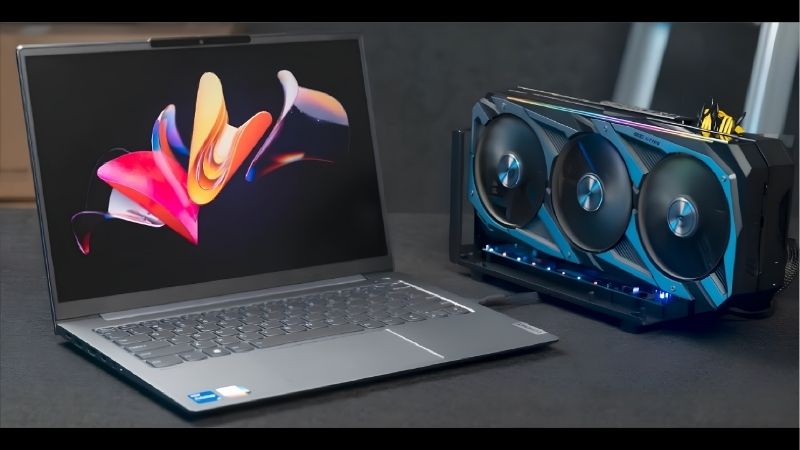
eGPU performance loss is the single biggest worry for anyone thinking about running a desktop graphics card outside their laptop, and rightly so. Nobody wants to spend serious money only to discover half the frames vanish into a cable. This review cuts through the anxiety with real numbers: how much you actually lose, where the loss comes from, how to claw much of it back, and whether the remaining tax is a fair price for desktop-class gaming on a portable machine.
Understanding Where eGPU Performance Loss Comes From
Before panicking over benchmark charts, it helps to understand what is actually being lost and why. The graphics card itself is not slower outside your laptop; the connection feeding it is narrower than a desktop slot. Grasping that distinction is the key to predicting your own results and to knowing which fixes genuinely help.
The Bandwidth Bottleneck Explained
A desktop feeds a graphics card through a PCIe 4.0 x16 slot, worth hundreds of gigabits per second. A Thunderbolt eGPU tunnels the same data through a link closer to PCIe 3.0 x4, delivering roughly 22 to 32 gigabits per second of usable bandwidth after overhead. That is the root of the loss.
Crucially, this narrower pipe throttles the conversation between the processor and the card, not the card’s own rendering. Once a frame is being drawn, the graphics chip works at full speed. The penalty appears when the CPU must hand large amounts of data across that thin link, which happens far more in some games than others.
This is why two people with identical hardware can report very different losses. Their games, resolutions, and even their monitor setup change how hard the bottleneck is pushed, so a single headline percentage never tells the whole story.
It also explains why memory-heavy tasks feel the pinch most. Games that stream large textures or constantly load new assets ask the CPU to shovel data across the link again and again, whereas titles that load a level once and stay there barely touch it. Understanding your own library, then, is the fastest way to predict whether you will land at the mild or the harsh end of the loss range.
Real eGPU Performance Loss by Resolution
Independent testing lands on a consistent range: a Thunderbolt eGPU typically costs 10 to 30 percent of desktop frame rates, and the exact figure tracks resolution closely. The table below shows the pattern with a mid-range card:
| Resolution and load | Desktop (fps) | Thunderbolt eGPU (fps) | Loss |
|---|---|---|---|
| 1080p, competitive shooter | 240 | 175 | ~27% |
| 1440p, AAA high | 110 | 92 | ~16% |
| 4K, ultra settings | 62 | 57 | ~8% |
The takeaway is liberating: the harder you push the graphics card with higher resolutions, the smaller the percentage you lose. At 4K the bottleneck barely matters, because the card spends its time on its own heavy rendering rather than waiting on the cable.
That inverse relationship should shape your expectations. If you mainly play demanding single-player games at 1440p or 4K, your real-world loss sits at the gentle end of the range, not the alarming headline figure.
It is worth stressing how misleading the worst-case number can be in isolation. A reviewer benchmarking an esports title at 1080p on a laptop screen will honestly report a large loss, yet that exact scenario is the harshest possible test. Judge the technology by the resolution and games you actually play, and the picture becomes far more reassuring than a single scary chart implies.
How the Interface Changes Your Loss
The connection you choose matters as much as the card. An OCuLink link roughly doubles Thunderbolt’s usable bandwidth, cutting typical losses to around 5 to 15 percent. For frame-sensitive players, that difference is the reason many now prefer OCuLink despite its messier cabling.
Here is how the same card compares across connections at 1080p, where the bottleneck bites hardest:
| Connection | Average fps | Loss vs desktop |
|---|---|---|
| Desktop PCIe x16 | 240 | 0% |
| OCuLink (x4) | 205 | ~14% |
| Thunderbolt 3 / 4 | 175 | ~27% |
So before you blame the card, look at the cable. Matching the interface to how competitively you play is the first lever you control over your own performance loss.
There is a caveat worth knowing, though. OCuLink’s bandwidth advantage comes at the cost of easy hot-plugging and a tidier single-cable experience, so the lower loss is not free. For a competitive player the trade is usually worth it, while a casual gamer who values plugging in and walking away may happily accept Thunderbolt’s slightly larger loss for the convenience it buys.
What Owners Say About eGPU Performance Loss
Numbers describe the average, but reviews reveal how the loss actually feels day to day. Reading through hundreds of buyer accounts shows a clear split between owners who barely notice the tax and those who feel cheated, and the difference almost always comes down to expectations and a few simple settings.
Why Some Owners Barely Notice the Loss
The most satisfied owners share a habit: they play at higher resolutions and output through an external monitor plugged straight into the card. That single choice recovers 5 to 15 percent of lost frames, because images no longer travel back over Thunderbolt to the laptop screen.
These reviewers describe the experience as feeling essentially like a desktop, and for their use case that is broadly true. When the bottleneck is minimised by resolution and monitor placement, the remaining loss disappears into the noise of normal frame-rate variation.
Many also mention that the loss becomes invisible once they stop comparing spreadsheets and simply play. A game running at 92 fps instead of 110 looks and feels identical in motion, especially on a high-refresh monitor, so the gap that looks meaningful on paper vanishes in practice. That gap between measured and felt performance is the reason so many owners quietly stop worrying about it after a week.
Why Others Feel Shortchanged
The disappointed minority usually made one of two mistakes. Some expected zero loss and were let down by any drop at all, while others played CPU-heavy esports titles at 1080p on the laptop’s internal screen, the exact worst case for the bottleneck.
A second complaint is inconsistency, where performance dips after a driver or system update until settings are reconfigured. These are real frustrations, but they are largely avoidable, which is why researching the technology beforehand correlates so strongly with a happy review.
eGPU Performance Loss Pros and Cons
Weighing the evidence, here is the honest balance sheet on living with the loss:
Pros:
- Loss shrinks to single digits at 1440p and 4K.
- An external monitor and OCuLink recover much of the drop.
- Even with the tax, gains over integrated graphics are enormous.
Cons:
- 1080p esports on the laptop screen suffers the worst loss.
- Results vary with CPU strength and game engine.
- Occasional retuning needed after driver updates.
In short, eGPU performance loss is very manageable if you play to its strengths, and only painful if you fight against them.
Is the Performance Loss Worth It in Today’s Market?
The final question is not just how much you lose, but whether the remaining performance justifies the spend right now. That answer depends on how you play and on a hardware market that has been anything but stable, so it is worth reading both together before you buy.
How to Minimise Your eGPU Performance Loss
Three habits do most of the work. Output to an external monitor connected to the card, choose OCuLink over Thunderbolt if your device supports it, and keep graphics drivers and resizable BAR current. Together these can turn a scary headline loss into a barely noticeable one.
Match your card to the link, too. Pairing a modest RTX 4070-class card with the bottleneck wastes far less potential than strapping a flagship to a cable that cannot feed it, so you keep more of what you paid for.
Finally, set the resolution to your advantage. Playing at 1440p rather than 1080p not only looks better but also shrinks the percentage lost, a rare win-win that costs nothing.
A few enclosure choices help too. A short, certified cable protects the bandwidth you have, and keeping the enclosure in open air rather than a sealed cabinet lets the card sustain its clocks instead of throttling. None of these tweaks is expensive, yet stacked together they can shift your result from the harsh end of the range toward the gentle one, which is exactly where you want to be.
Prices, Timing and Whether to Buy Now
Hardware pricing shapes the value equation. Graphics cards and their surrounding components have trended upward, driven largely by memory costs feeding through the supply chain, though the sharp climb of late 2025 has eased into a stretch of relative stability that makers still warn could shift again.
Relief is not imminent. New memory supply is on the way, including Chinese DDR5 sources and two Micron plants under construction in Idaho, but those facilities are not expected to run until 2027 or 2028. Prices have plateaued rather than fallen, so waiting a year is unlikely to reward you.
Given that, the smart move is to accept a small, well-managed performance loss now rather than hold out for cheaper hardware that is years away. Spend on a sensible card and a good connection instead of chasing a flagship the cable cannot fully use.
Who Should Accept the Trade-Off
If you own a capable thin laptop and value one portable machine that also games seriously at your desk, the loss is a bargain for what you gain. The alternative, integrated graphics, is not close in performance.
If you never move your machine and want maximum frames per dollar, a desktop still wins, and no amount of tuning changes that. Knowing which camp you fall into makes the decision simple, and it saves you from either overspending on a setup you do not need or underspending on one that leaves you wanting more.
Ready to build a low-loss setup? Compare current prices on a well-reviewed enclosure, a short certified cable, and a sensible mid-range card through the links on this page, and lock them in before the next price movement.
See More:
Final Thoughts
eGPU performance loss is real, but it is far less frightening than the headline numbers suggest once you understand and control it. Play at higher resolutions, output to an external monitor, favour OCuLink where possible, and pair a sensible card with the link, and the tax shrinks into single digits. With prices flat rather than falling, there is little reason to wait, so use the links above to build a setup that keeps eGPU performance loss to the bare minimum.
Frequently Asked Questions
How much frame rate do I lose over Thunderbolt?
Thunderbolt 3 and 4 provide the equivalent of a PCIe 3.0 x4 link with protocol overhead, so real throughput sits well below a desktop x16 slot. Typical losses run 10 to 20 percent at 4K on an external monitor and 25 to 40 percent at 1080p where the interface is hit hardest.
Why is the loss worse on the laptop screen?
Rendering to the internal display forces the finished frames back across the same Thunderbolt cable to the laptop, consuming bandwidth in both directions. That loopback path commonly costs an additional 10 to 20 percent, which is why connecting a monitor directly to the enclosure is strongly recommended.
Does a more powerful GPU lose proportionally more?
Yes. The interface bandwidth is fixed, so a faster card produces more frames and pushes more data per second, hitting the ceiling sooner. A high-end card can lose a third of its performance while a mid-range card loses only ten to fifteen percent, which changes the value calculation considerably.
Does resolution change how much you lose?
Significantly. At higher resolutions each frame takes longer to render, so the interface has more time to move data and the bottleneck eases. This is why eGPU losses shrink at 4K and become severe at 1080p high refresh, where thousands of small frames per second saturate the link.
Does OCuLink eliminate the problem?
It reduces it substantially. OCuLink exposes a direct PCIe 4.0 x4 link without Thunderbolt protocol overhead, roughly doubling usable bandwidth and typically cutting losses to under ten percent. The trade-offs are no hot plugging, a separate power supply and very limited laptop support compared with Thunderbolt.
As an Amazon Associate we earn from qualifying purchases at no extra cost to you.


Ready to decide? Our #1 pick for 2026 is the 1080p, competitive shooter.
Live price & availability on Amazon.









Write Your Review
No reviews yet. Be the first to share your experience!