
- Top Pick: Vimy Underground
- Best Value: Let the Boat Sail
- Premium Choice: Tactics and Skills – Shooting
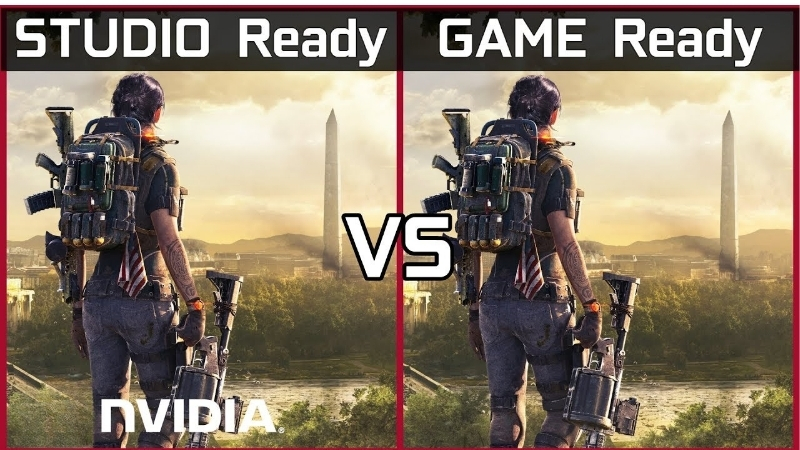
Game Ready vs Studio Driver is the decision that trips up everyone who both games and creates on the same PC, because NVIDIA offers two driver branches for the same card and picking wrong means either slower renders or a slower start on new games. If you edit video, model in 3D, or design by day and game by night, you want a clear answer on which branch fits your mix. This comparison lays out exactly what each driver prioritizes, what you gain and lose with each, and a recommendation by user type, so you can choose in a couple of minutes and stop second-guessing.
Game Ready vs Studio Driver: The Quick Verdict
Both branches run on the same GeForce or RTX hardware and share most of the same code; the difference is what NVIDIA optimizes and tests them for. Game Ready chases the newest games with fast, frequent updates, while Studio moves deliberately and certifies against professional creative software for maximum stability. That single distinction, speed toward games versus stability for work, drives the entire decision. Understanding it up front is what makes the rest of the comparison easy to apply to your own usage.
As an Amazon Associate we earn from qualifying purchases at no extra cost to you.


What Each Driver Is Built For
Game Ready Drivers are built for gamers. NVIDIA releases them rapidly, often timed to major game launches, with day-one optimizations and the latest gaming features. They update frequently, sometimes every couple of weeks, to keep new titles running their best.
Studio Drivers are built for creators. They update less often and undergo extended testing against creative applications, prioritizing stability across long, demanding workloads over immediate game-day tuning. The goal is a driver that will not crash during a render.
Neither is inherently better; they are the same family aimed at opposite priorities. The right choice depends entirely on whether your card mostly plays games or mostly does work.
It helps to dispel a common myth here: Studio Drivers are not slower for gaming in any meaningful way. Outside the launch window of a brand-new title, the two branches deliver essentially the same frame rates in the same games, because they share the same core rendering code. What Studio gives up is the day-one tuning for the newest releases, not general gaming performance. Likewise, Game Ready is not unstable, it simply has not been put through the same extended certification against professional creative software. Framing the choice as stability focus versus launch-day focus, rather than fast versus slow, is what keeps the decision clear.
What You Gain and Lose with Each
Because both branches share the same core, the trade is narrow but real, and it comes down to update speed versus tested stability. The table below distills it for a quick decision.
| Factor | Game Ready | Studio |
|---|---|---|
| Optimized for | Latest games | Creative apps |
| Update frequency | Frequent, fast | Less frequent |
| Day-one game support | Yes | Delayed |
| Stability testing | Standard | Extended, app-certified |
| Gaming performance | Best on launch | Nearly identical |
| Creative reliability | Good | Best |
| Price | Free | Free |
Quick Verdict: Which to Choose
If you mostly game and play new releases at launch, choose Game Ready for the day-one optimizations. If your card is mostly a work tool for video, 3D, or design, choose Studio for the stability that protects long renders.
For a true fifty-fifty split, Studio is often the safer default, because gaming performance on Studio Drivers is nearly identical to Game Ready outside of brand-new launches, while the stability benefit for creative work is meaningful. You give up little on the gaming side and gain real reliability for work.
Deep Dive Face-Off: Stability, Performance, and Updates
The quick verdict covers most people, but if you sit on the fence you want to know exactly where the two differ in daily use. The meaningful gaps show up in three areas: how often each updates, how each handles a long creative workload, and how much gaming performance you actually sacrifice by choosing Studio. Comparing them on these axes shows why the hybrid decision is closer than it first appears. Here is the detailed face-off.
Update Cadence and Game-Day Optimization
Game Ready’s rapid cadence is its defining strength. When a major game launches, NVIDIA ships a driver tuned for it, sometimes delivering a measurable performance uplift or fixing launch-day bugs. For players who buy new titles at release, that immediacy matters.
Studio’s slower cadence means those day-one optimizations arrive later, if they are relevant at all. For a creator, this is a non-issue; for someone who plays every big release on day one, it is the main thing they give up by choosing Studio.
The practical weight of this depends entirely on how often you play brand-new games at launch versus established titles, which already run well on either branch.
Stability for Creative Workloads
Studio’s extended certification is its core advantage. Creative applications lean heavily on the GPU for long, uninterrupted tasks, and a driver validated against those apps is far less likely to crash mid-render or produce visual errors that ruin output.
For anyone whose work or income depends on the machine finishing a render or export, that reliability is worth more than any benchmark. A lost four-hour render costs real time and money, which is exactly what Studio’s testing is designed to prevent.
Game Ready is not unstable for creative work, but it is not certified for it either, so it carries a marginally higher risk during the exact long workloads where a crash is most costly.
There is also a subtler reliability benefit that matters to professionals: predictability. Because Studio Drivers update less often, your working environment stays consistent for longer stretches, so a driver change is far less likely to introduce a new quirk in the middle of a project. Frequent Game Ready updates, while great for gamers wanting the latest optimizations, occasionally alter behavior in ways a creator on a deadline does not want to discover mid-render. For a machine that has to behave the same way tomorrow as it did today, that stability of behavior is as valuable as the crash resistance itself.
Pros and Cons for Hybrid Users
For the person who genuinely does both, the choice is a balance rather than a clear win, so naming the trade-offs plainly helps. Here is the honest picture for a mixed gaming-and-creation setup.
Game Ready pros: best performance on new game launches, latest gaming features first, frequent fixes. Cons: not certified for creative apps, slightly higher crash risk in long renders.
Studio pros: certified stability for creative software, nearly identical gaming performance outside launches, fewer disruptive updates. Cons: delayed day-one game optimizations, less frequent feature updates. For most hybrid users, Studio’s stability outweighs the launch-day gap.
The Alternative and Final Recommendation
There is a middle path for people who refuse to fully commit either way, and there is a hardware dimension to how much the choice even matters. This section covers the option of switching branches as your priorities shift, the hardware angle for a hybrid rig, and a clear recommendation by user type, so you leave with a decision rather than a debate. Here is how to close it out.
The Alternative: Switching Branches as Needed
You are not locked in. The NVIDIA App lets you switch between Game Ready and Studio branches whenever you like, so a genuine hybrid user can run Studio during a heavy work period and switch to Game Ready around a big game launch, then back again.
The cost is a little friction, a clean install is wise when switching, and remembering to do it. For most people this is more effort than it is worth, and picking one branch to live on is simpler. But for someone with distinct work and gaming phases, switching is a legitimate way to get the best of both.
In practice, very few people switch as often as they imagine they will, so it is worth being honest with yourself about your real habits before relying on this route.
Hardware Angle for Hybrid Rigs
The driver debate matters less on a strong machine. A powerful RTX card with ample VRAM and generous system memory handles both demanding games and creative renders well on either branch, so the stability difference is your main deciding factor rather than raw capability.
On a hybrid rig, the components, VRAM for large projects, RAM for editing, a fast encoder for exports, do more for your experience than the driver branch does. The driver protects stability; the hardware determines speed.
If you are building a machine that both games and creates, compare current prices and specs on high-VRAM RTX graphics cards and system memory through the links on this page to build a rig that performs well on whichever branch you choose.
See More:
- NVIDIA Broadcast vs OBS
- RTX HDR settings
- NVIDIA App download
- NVIDIA RTX Video Super Resolution
- GeForce Experience alternative
Final Verdict: Who Should Use Which
Gamers who chase new releases should run Game Ready for the day-one optimizations. Dedicated creators should run Studio for the stability that protects their work. That covers the clear cases with no ambiguity.
Hybrid users who do meaningful creative work should lean Studio as their default, since gaming performance is nearly identical outside launch days and the reliability is worth more, switching to Game Ready only around specific big releases if day-one performance matters to them. That balance serves the mixed user best.
Choosing between Game Ready vs Studio Driver comes down to your real mix of play and work: Game Ready for gamers who want new releases optimized on day one, Studio for creators who need renders and exports to finish reliably. Hybrid users are usually best served by Studio, with the option to switch branches around major launches. And since a capable machine narrows the gap either way, compare the recommended RTX cards and memory through the links here to build a rig that performs on whichever driver you pick.
Top-Rated Picks


| Product | Brand | Rating | Reviews | Price |
|---|---|---|---|---|
| ARCTIC MX-4 (4 g) – Premium Performance Thermal Paste… | ARCTIC | ★ 4.8 | 104k | $4.99 |
| ARCTIC MX-4 (incl. Spatula, 4 g) – Premium Performanc… | ARCTIC | ★ 4.8 | 71.9k | $5.49 |
| Crucial 8GB DDR4 RAM 3200MHz (PC4-25600), Downclockab… | Crucial | ★ 4.8 | 62.8k | $74.99 |
| AMD Ryzen 5 5600X 6-core, 12-thread unlocked desktop … | — | ★ 4.8 | 30.2k | $177.60 |
| NVIDIA Shield Remote; Voice Search, Motion-Activated,… | — | ★ 4.7 | 10.6k | $25.99 |
Frequently Asked Questions
Are they actually different code?
They come from the same underlying driver branch, but Studio builds go through additional validation against creative applications such as Premiere Pro, DaVinci Resolve, Blender, Maya and Autodesk tools. Game Ready builds ship faster to match new game launches, which means less soak time but day-one optimisation and profiles for the latest releases.
Do Studio drivers lose gaming features?
No. DLSS, ray tracing, Reflex, G-Sync, ShadowPlay and the full control panel are all present, and gaming performance is essentially identical for titles that already shipped. What you miss is the launch-day optimisation and bug fixes for brand-new games, which can occasionally mean poor performance or visual glitches until the next Studio release.
Which should a streamer or hybrid user pick?
If you play new releases the week they launch, use Game Ready. If your income depends on a stable editing or 3D pipeline and you play mostly older titles, Studio’s slower, more heavily tested cadence reduces the chance of a driver update breaking a project mid-deadline.
How do I switch between them?
Download the branch you want from NVIDIA’s driver page or select the driver type in the NVIDIA app, then install with the Perform Clean Installation option ticked. There is no need to change hardware or uninstall the GPU, and you can switch back at any time without penalty.
Should I update every single release?
Not necessarily. Update when a new game you play is listed, when a fix addresses a bug affecting you, or when a security advisory is issued. Otherwise, staying one or two versions behind on a driver that works well is a legitimate strategy, particularly on production workstations.






Write Your Review
No reviews yet. Be the first to share your experience!