
- Top Pick: Thermal Grizzly WireView GPU – 1×12 VHPWR Normal – GPU Power Consumption Measuring Device – PCIe Power Connector – Real Time Direct Monitoring – Made in Germany
- Best Value: be quiet! Pure Power 12 850W PSU | 80 Plus Gold | ATX 3.1 | PCIe 5.1 GPU Support Power Supply | Silent 120mm Fan | High Performance 12V-Rail | Black | BP004US | 10 Year Warranty
- Premium Choice: Thermal Grizzly WireView GPU – 1x8Pin PCIe Normal – GPU Power Consumption Measuring Device – PCIe Power Connector – Real Time Direct Monitoring – Made in Germany
GPU power consumption comparison is exactly what you need when you are choosing a graphics card, sizing a power supply, or simply trying to understand why one card needs a huge unit while another sips power. Wattage varies enormously across the range, from efficient mainstream cards to power-hungry flagships, and knowing the numbers side by side makes the decision far clearer. This review lays out the figures in a simple table, explains what drives the differences, and helps you match a card to your power supply and your priorities.
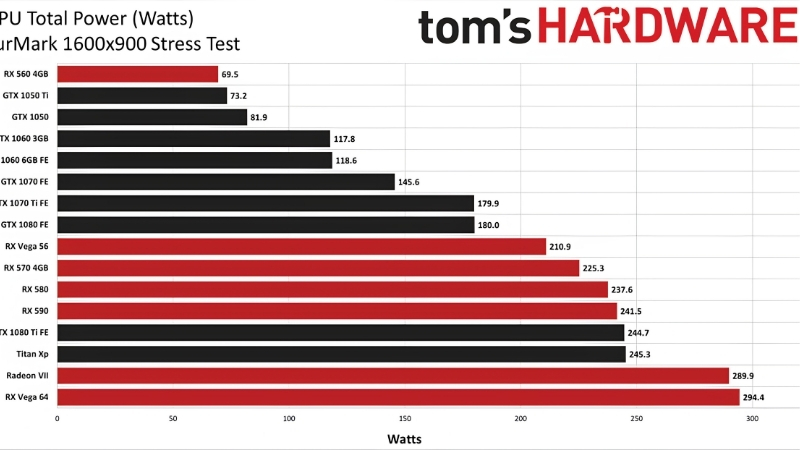
GPU Power Consumption Compared at a Glance
The quick answer: modern Nvidia cards range from around 115 watts for an entry card up to 575 watts for the flagship, with most mainstream cards landing between 200 and 360 watts. The table below puts the popular models side by side with their board power and the recommended power supply, so you can compare them in seconds rather than hunting through separate reviews.
As an Amazon Associate we earn from qualifying purchases at no extra cost to you.


The GPU Power Consumption Comparison Table
Here are the current popular cards compared on total board power and the power supply Nvidia recommends for each.
| GPU | Board power | Recommended PSU |
|---|---|---|
| RTX 4060 | ~115W | 550W |
| RTX 4070 | ~200W | 650W |
| RTX 4080 | ~320W | 750W |
| RTX 4090 | ~450W | 850W |
| RTX 5080 | ~360W | 850W |
| RTX 5090 | ~575W | 1000W |
At a glance you can see the spread: the flagship 5090 draws roughly five times as much as an entry-level 4060, which is why power-supply requirements scale so sharply across the range.
It is also worth noting that this spread is wider than in past generations. As flagship cards push performance harder, their power draw has climbed faster than the mainstream tier, stretching the gap between the cheapest and most expensive cards in the table.
For buyers, this means a power supply that was generous for a mid-range card a few years ago can be marginal for today’s high end. Always check the recommendation for the specific card you want rather than assuming an older unit will cope.
How to Read These Numbers
The board power figure is the sustained draw of the whole card under a full load, and it is the number to use for planning. The recommended power supply is higher than the card’s draw because it must also power your CPU, drives, and fans, and absorb brief spikes.
A useful habit is to look at the gap between the two columns. That difference, typically a few hundred watts, is the headroom that keeps your system stable, so never size a power supply to match only the card’s draw.
The recommended column already does this work for you, building in headroom for a typical CPU and system. If your CPU is unusually power-hungry, treat the recommended figure as a floor and add a little more rather than sizing right at it.
Why Board Power Is Not the Whole Story
The table shows sustained draw, but every modern card also produces brief transient spikes that exceed its rated figure. The higher-tier cards spike harder in absolute terms, which is part of why their recommended units climb so steeply.
This is why a quality, spike-tolerant power supply matters more on the bigger cards. A 4060 is forgiving, but a 5090 punishes an undersized or low-quality unit, so the recommended figures already build in that reality.
This is why two cards with similar board power can still call for different units. A card that spikes harder, or that is typically paired with a more powerful CPU, will carry a higher recommendation even if its steady draw looks comparable on paper.
What Drives the Differences in GPU Power Use
The wide spread in the table is not random; it follows clear, predictable factors. Understanding them helps you anticipate roughly how much power a card will use even before you look it up, and explains why two cards of similar age can sit so far apart.
Performance Tier and Class
The biggest driver is simply where a card sits in the range. Flagship cards push the most performance and therefore draw the most power, while mainstream cards are tuned for efficiency and a lower draw.
This is why the numbers scale so cleanly from the 4060 up to the 5090. If you know a card’s tier, you can usually predict its rough power class before checking a single specification.
That predictability is genuinely useful when planning a build. If you have decided on a performance tier but not a specific model, you can size your power supply in advance with confidence, knowing the final card will land in the expected range.
Architecture and Efficiency
Newer architectures generally deliver more performance per watt, which is why a current-generation card can match an older one while drawing less power. Nvidia’s efficiency gains, along with AI-based features like frame generation, stretch performance well beyond what the raw wattage alone would suggest.
This means the most useful way to compare cards is not just total watts, but performance per watt. A card that draws more but delivers far more frames can be the more efficient choice for the work it does.
This is the single most misunderstood point in any power comparison. A higher number on the table is not automatically worse; what matters is how much performance that power buys, and newer cards consistently turn each watt into more frames than their predecessors.
When you compare cards, then, line up performance per watt rather than wattage alone. A card near the top of the table can be the smarter long-term choice if it delivers far more of the frames you actually care about for each watt it draws.
Resolution and Workload
How hard you push a card changes its real draw significantly. Gaming at 4K with maximum settings pulls a card close to its rated power, while 1080p gaming or a capped frame rate can keep it well below.
So the table figures represent the upper end of normal use. Your own average draw depends on your resolution, settings, and the games you play, which is why two people with the same card can see quite different power bills.
For that reason, treat the table as a planning ceiling rather than a daily reading. It tells you the most a card will ask for, which is exactly what you need for sizing a power supply, even though your real-world average will usually sit comfortably below it.
Choosing a GPU by Power and Efficiency
Once you can see the numbers side by side, the practical question is how to use them to choose a card and a power supply that fit your goals, whether that is raw performance, a quiet efficient build, or a sensible balance. This section turns the comparison into a buying decision.
Pros and Cons of High Versus Low Power Cards
The choice between a power-hungry and an efficient card comes with clear trade-offs:
- High-power cards – Pros: top performance and headroom for 4K and demanding workloads. Cons: large expensive power supply, more heat, higher running cost, and more demanding cooling.
- Lower-power cards – Pros: cheap power supply, low heat, quiet operation, and low running cost. Cons: less performance for the most demanding games and resolutions.
Neither is simply better; the right choice depends on your resolution, budget, and how much you value a quiet, cheap-to-run system versus maximum frames.
Matching a GPU to Your Power Supply
If you already own a power supply, the table tells you instantly which cards it can run. A 650-watt unit comfortably handles a 4070, while a 5090 demands a 1000-watt unit and a modern ATX 3.1 standard.
Buying the card first and discovering your unit is too small is a common and avoidable mistake. Check your power supply’s wattage against the recommended column before you buy, and upgrade the unit first if there is a gap.
Upgrading the power supply first is also the safer order of operations. A card with no unit to power it is useless, whereas a slightly oversized unit waiting for a future card costs you nothing but a little money up front.
Tips to Cut Power Without Losing Performance
Whatever card you choose, a frame-rate cap and an undervolt can lower its draw with little or no performance loss. Capping frames to your monitor’s refresh rate stops the card working harder than it needs to.
On the higher-tier cards, a power limit set to around 80 to 90 percent trims heat and noise while keeping nearly all the performance. These simple tweaks let you enjoy a powerful card without paying the full power and thermal penalty every time you play.
That flexibility is worth remembering when you read the table. The figures show each card at full stretch, but with a frame cap or a power limit you can comfortably run a higher-tier card below its rated draw, narrowing the real-world gap between the tiers.
A clear GPU power consumption comparison turns a confusing spec hunt into a simple decision about performance, power supply, and running cost. Whether you are choosing a new card or sizing the right unit to feed it, take a look at the recommended graphics cards and power supplies linked throughout this review and pick the combination that fits your build.
See More:
- How to clean a GPU heatsink
- GPU vertical mount thermals
- GPU thermal throttle temp
- What PSU for RTX 4090
- What PSU for RTX 5080
Conclusion
This gpu power consumption comparison shows just how widely cards vary, from around 115 watts for an entry card to 575 watts for the flagship, with power-supply needs scaling right alongside. Use the table to match a card to your unit, remember that spikes and resolution shift the real draw, and lean on performance per watt rather than raw wattage when judging efficiency. With the numbers in front of you, choosing the right card and power supply is straightforward. Check the recommended cards and units above to build a balanced, well-powered system.
Top-Rated Picks


Editor's Pick
GIGABYTE GeForce RTX 3060 Gaming OC 12G (REV2.0) Graphics Card, 3X WINDFORCE Fans, 12GB 192-bit GDDR6, GV-N3060 Video Card


| Product | Brand | Rating | Reviews | Price |
|---|---|---|---|---|
| MSI GeForce RTX 3060 Ventus 2X 12G OC, Gaming Graphic… | — | ★ 4.7 | 4.5k | $635.00 |
| GIGABYTE GeForce RTX 3060 Gaming OC 12G (REV2.0) Grap… | — | ★ 4.7 | 3.2k | $479.00 |
| EVGA GeForce GTX 1060 3GB GAMING, ACX 2.0 (Single Fan… | EVGA | ★ 4.6 | 3.4k | $247.79 |
| MSI Gaming GeForce GTX 1660 Super 192-bit HDMI/DP 6GB… | — | ★ 4.7 | 2.2k | $232.60 |
| MSI GeForce RTX 4060 Ti Ventus 3X 8G OC (8GB GDDR6/PC… | — | ★ 4.7 | 1.3k | $998.00 |
Frequently Asked Questions
What is the difference between TGP, TBP and actual draw?
Total graphics power and total board power describe the ceiling the card is designed to sustain, including memory and voltage regulation. Real draw in a game usually sits somewhat below that ceiling and varies by title and resolution, while synthetic stress tools push right to the limit. Transient spikes can briefly exceed the rating by a large margin.
How do current cards compare in watts?
Roughly speaking, entry cards sit between 115W and 165W, mid-range cards land near 200W to 250W, upper mid-range around 300W to 360W, and flagships reach 450W to 575W. The spread between tiers has widened significantly over the past two generations, which is why supply requirements have climbed so sharply at the top end.
Does higher power always mean more performance?
Not proportionally. The last ten percent of board power typically buys three to five percent of frame rate because voltage and frequency scale poorly at the top of the curve. This is exactly why undervolting is so effective: many cards run within a few percent of stock performance at seventy to eighty percent of stock power.
How much does a high-power card add to my electricity bill?
Multiply average gaming draw by hours played and by your rate. A 350W card played twenty hours a week for a year consumes roughly 364 kilowatt hours, which is a modest annual cost in most regions. The bigger practical effect is the heat dumped into the room, which is noticeable in a small space during summer.
Can I cap power draw without losing much performance?
Yes. A power limit slider in MSI Afterburner set to eighty percent typically costs a few percent of frame rate while dropping temperature and fan noise substantially. Undervolting through the voltage frequency curve achieves a similar result while preserving clock speed, and it is the single best tuning step for a hot or loud card.











Write Your Review
No reviews yet. Be the first to share your experience!