
- Top Pick: ASUS ROG Astral GeForce RTX 5090 32GB GDDR7 OC Edition Gaming Graphics Card
- Best Value: ASUS ROG Astral LC GeForce RTX 5090 32GB GDDR7 OC Edition Gaming Graphics Card
- Premium Choice: GIGABYTE GeForce RTX 5090 WINDFORCE OC 32G Graphics Card, WINDFORCE Cooling System, 32GB 512-bit GDDR7, GV-N5090WF3OC-32GD Video Card
How many watts does a RTX 5090 use is the question every buyer of Nvidia’s flagship needs answered before they build, because this card sits at the very top of the power scale. Get the number right and you can size your power supply, plan your cooling, and estimate your running cost with confidence; get it wrong and you risk shutdowns or an undersized system. This guide gives you the exact figures, walks through sizing your setup step by step, and shows how to tame the 5090’s considerable appetite for power.
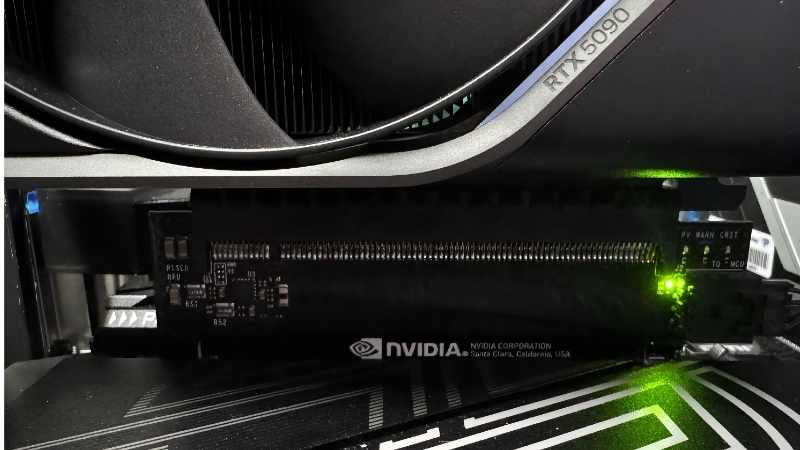
How Many Watts the RTX 5090 Actually Uses
The quick answer: the RTX 5090 draws around 575 watts under a full load, climbs higher still during brief transient spikes, and pushes a complete high-end system to roughly 700 to 800 watts, which is exactly why a 1000-watt power supply is the standard recommendation. This is the most power-hungry consumer card Nvidia has built, so planning around that 575-watt figure is essential. The breakdown below shows where the power goes.
As an Amazon Associate we earn from qualifying purchases at no extra cost to you.


The 575W Board Power Explained
Nvidia rates the RTX 5090 at a total board power of around 575 watts, covering the entire card, including the GPU core, the large memory bank, the fans, and lighting. That is a significant jump over the previous flagship and reflects the card’s sheer performance.
This 575-watt figure is the number to build around. It represents the sustained draw during demanding games and heavy workloads, and it forms the basis of every power-supply and cost calculation that follows.
Because the figure is so high, the 5090 demands more thought about power and cooling than any other consumer card, which is why this guide treats sizing carefully rather than guessing.
It also means the 5090 is not a card you can drop into just any system. Older or budget power supplies that happily ran a previous-generation card may simply be too small, so checking your unit against this figure before buying is essential rather than optional.
Transient Spikes and Real Peaks
On top of the 575-watt sustained draw, the 5090 produces sharp transient spikes that can momentarily push well beyond that figure. These surges last only milliseconds but are real, and they are the single biggest reason an undersized power supply can shut down even when the average load looks manageable.
This is where a modern ATX 3.1 power supply earns its place, since it is designed specifically to ride out spikes far above its rated output. Planning for the peaks, not just the average, is the key to a stable 5090 system.
This is also why two builders with the same wattage on the label can have very different results. A modern, spike-tolerant unit at 1000 watts will outperform an older 1000-watt unit that was never designed for these surges, so the standard matters as much as the number.
Idle and Everyday Draw
Away from heavy loads, the 5090 is far more modest. At idle on the desktop or during light tasks, it draws only a small fraction of its peak, so your power meter does not sit at 575 watts all day.
That said, the gap between its idle and peak draw is enormous, which is what makes proper power-supply sizing so important. The card spends most of its time relaxed, but it can demand its full appetite the instant a game loads.
For most owners this is good news for daily running costs, since the card is only hungry while you play. But it reinforces why you must size for the peak, not the average; the system has to be ready for that instant jump every single time you load a demanding title.
What PSU and Setup the RTX 5090 Needs
Turning that 575-watt figure into a power supply choice and a running-cost estimate is the practical part of owning a 5090. Because the card sits at the top of the scale, getting this right matters more than with any other GPU, so this section walks through it carefully.
The Recommended 1000W Power Supply
Nvidia recommends a 1000-watt power supply for the RTX 5090, and that is the figure most builders should treat as the minimum. The headroom above the card’s 575 watts absorbs transient spikes and powers a high-end CPU and the rest of the system without strain.
If you pair the 5090 with a top-tier processor, stepping up to 1200 watts adds comfortable margin and keeps the unit in its efficient zone. The well-reviewed 1000W and 1200W ATX 3.1 units linked in this guide are sized exactly for this card.
It is also worth choosing a unit with enough dedicated power outputs and a native 16-pin cable, rather than relying on a stack of adapters. On a card drawing this much, a clean, direct power path is part of what keeps the system stable.
Step-by-Step: Sizing Your System
- Start with the GPU: about 575 watts for the 5090.
- Add your CPU’s peak: typically 150 to 280 watts for a high-end chip.
- Add about 100 watts for drives, fans, RAM, and the motherboard.
- Add a 30% buffer for spikes and efficiency, then round up to 1000W or 1200W.
This math shows why 1000 watts is the floor rather than the target. With a powerful CPU, the buffer pushes you toward 1200 watts, which is the safer choice for a no-compromise build.
When you are between two sizes, round up. The price difference between a 1000-watt and a 1200-watt unit of similar quality is small next to the cost of the 5090 itself, and the extra margin pays you back in quieter, cooler running.
Electricity Cost of Running a 5090
Because the 5090 can draw around 575 watts under load, its running cost is meaningfully higher than a mid-range card. Long gaming sessions add a noticeable amount to a monthly bill, though the exact figure depends entirely on your local electricity rate.
To estimate your own cost, multiply the system’s gaming draw in kilowatts by your hours of use and your rate per kilowatt-hour. It is worth knowing this number going in, since the 5090’s performance comes with a real, ongoing energy cost that smaller cards avoid.
Managing the 5090’s High Power Draw
The 5090’s power appetite is the price of its performance, but you do not have to accept it unmanaged. A few choices can cut its draw and heat substantially, often with little or no loss in real-world performance, which is well worth the effort on a card this demanding.
Pros and Cons of the 5090’s Power Profile
Here is the honest balance of what the card’s high power use means:
- Pros: the power buys class-leading performance, and a properly sized ATX 3.1 unit handles it cleanly with room to spare.
- Cons: it requires a large 1000W to 1200W power supply, generates significant heat, raises your electricity cost, and demands careful case airflow to stay cool and quiet.
The trade-off is simple: you get the fastest consumer card available, but you must build a system that respects its power and thermal demands.
None of this should put you off the card; it simply means the 5090 rewards a thoughtful build. Pair it with the right power supply, good airflow, and a little tuning, and its appetite becomes a manageable detail rather than a problem.
Tips to Tame Power and Heat
A power limit is the most effective tool. Many 5090 owners cap the card to around 80 to 90 percent of its maximum power and lose only a tiny fraction of performance while cutting heat and noise noticeably.
Undervolting is the more refined approach, running the card at lower voltage for the same clocks. Combined with a sensible frame-rate cap, these tweaks can transform the 5090 from a hot, hungry card into a far calmer one without a meaningful drop in real performance.
Many owners report that a tuned 5090 runs noticeably quieter and cooler for the loss of only a percent or two of performance, which most people never notice in a game. For a card this powerful, that is an easy trade to make.
How the 5090 Compares on Efficiency
While its total draw is high, the 5090’s performance per watt is strong for the frame rates it delivers, and Nvidia’s AI-based features like frame generation stretch that efficiency further. In other words, it uses a lot of power because it does a lot of work, not because it is wasteful.
That distinction matters when you compare it with lower-tier cards. The 5090 will always draw more in absolute terms, but for the performance it provides, it is a capable rather than a careless user of power.
Framing it this way helps set expectations. You should plan for a high absolute draw and build accordingly, but you are paying that power budget for genuine, class-leading performance rather than waste.
The RTX 5090’s high power draw is the one thing you must plan for carefully, but with the right power supply and a little tuning it runs cleanly and reliably. If you are building around one, take a look at the recommended 1000W and 1200W ATX 3.1 units and cooling gear linked throughout this guide and choose the parts that match your system.
See More:
- How to clean a GPU heatsink
- GPU vertical mount thermals
- GPU thermal throttle temp
- What PSU for RTX 4090
- What PSU for RTX 5080
Conclusion
So, how many watts does a RTX 5090 use? Around 575 watts under load, higher in brief spikes, and only a fraction at idle, which pushes a full system to roughly 700 to 800 watts and calls for a 1000-watt power supply at minimum. Plan for the spikes with a modern ATX 3.1 unit, budget for the running cost, and use a power limit or undervolt to tame the heat. Check the recommended 1000W and 1200W power supplies above to give your RTX 5090 the stable, capable foundation it needs.
Top-Rated Picks


Prime
Top Rated
YEZriler 8 Pin PCIe Cable for EVGA Power Supply, PCIe 8 Pin Male to (6+2) Male PCI Express Power Adapter Sleeved 25-inch (63cm)

| Product | Brand | Rating | Reviews | Price |
|---|---|---|---|---|
| Cable Matters 8 Pin GPU Power Cable – 2ft, 8Pin PSU(E… | CableMatters | ★ 4.5 | 592 | $9.99 |
| Fasgear 16pin GPU Cable to 4X 8 Pin Pcie Extension – … | Fasgear | ★ 4.5 | 240 | $29.99 |
| PCIE 5.0 16Pin GPU Power 12VHPWR Extension Cable, 16P… | Bangfun | ★ 4.5 | 86 | $19.99 |
| YEZriler 8 Pin PCIe Cable for EVGA Power Supply, PCIe… | MoreOptionsForYou! | ★ 4.2 | 99 | $9.99 |
| (2-Pack) COMeap 12 Pin GPU Cable, Dual PCIe 8 Pin Fem… | COMeap | ★ 4.6 | 39 | $13.99 |
Frequently Asked Questions
What is the RTX 5090 rated at?
The card carries a 575W total board power rating, the highest of any consumer GeForce card to date. That figure covers the GPU, the 32GB of GDDR7 memory and the voltage regulation stage. Partner cards with factory overclocks sometimes ship with a slightly higher default limit and a power slider that extends to around 600W.
How much does it actually pull while gaming?
In real games at 4K with ray tracing the card commonly averages between 450W and 550W depending on the title and whether frame generation is active. Lighter esports titles at capped frame rates can sit far lower, often under 200W, because the boost algorithm scales down when the GPU is not fully utilised.
How large are the transient spikes?
Microsecond spikes well above the sustained rating are normal for this class of card. That is precisely why ATX 3.0 and 3.1 units are specified to tolerate excursions far beyond their rated output. A supply that trips its protection during a demanding scene is usually reacting to a spike, not to sustained overdraw.
Can I reduce its power draw meaningfully?
Yes, and the returns are excellent. Setting the power limit to around eighty percent, or applying an undervolt through the voltage frequency curve, typically costs three to six percent performance while cutting a hundred watts or more. Core temperature, hotspot delta and fan noise all improve noticeably, and the connector runs cooler as a result.
What does this mean for case cooling?
Nearly all of that power becomes heat inside your chassis. A mesh front panel, at least two intake fans and one or two exhaust fans are effectively mandatory. In a closed glass-front case the card will recirculate its own exhaust, raise memory junction temperatures and force the fans to a much louder operating point.











Write Your Review
No reviews yet. Be the first to share your experience!