
A CPU contact frame is a small, rigid bracket that replaces the stock loading mechanism around a processor socket. It is not a cooler, and it does not dissipate heat on its own. Its job is mechanical: hold the processor flatter, spread clamping pressure more evenly, and help the cooler base sit more consistently against the heat spreader. That matters most on Intel LGA1700, where the long rectangular package and the stock independent loading mechanism, often shortened to ILM, can leave the heat spreader slightly concave over time.
- Quick Answer
- How to Choose
- Thermalright LGA1700-BCF Black V2 CPU Retainer
- Thermalright LGA 1700 Bend Corrector Frame Black
- Thermal Grizzly CPU Contact Frame Intel 13th and 14th Generation
- Thermalright ASF Black V2 AM5 CPU Holder
- Thermal Grizzly AM5 Contact Sealing Frame
- Who Should Skip It
- FAQ
- Final Verdict
- Product and ASIN Reference
AMD AM5 frames solve a related problem. Ryzen processors have exposed components around the heat spreader and a shape that invites paste overflow. An AM5 frame surrounds the processor, helps contain paste, and protects nearby components during cooler swaps. On both platforms, the benefit is consistency: a flatter interface and fewer surprises when a cooler is removed and refitted.
This guide covers five real frames for LGA1700 and AM5, from Thermalright and Thermal Grizzly. Every pick is socket specific: an LGA1700 frame will not fit AM5, and none fits older sockets such as LGA1200 or AM4.
As an Amazon Associate, we earn from qualifying purchases.
Quick Answer
For Intel LGA1700, the Thermalright LGA1700-BCF Black V2 is the straightforward anti-bend choice, while the Thermal Grizzly frame for Intel 13th and 14th generation processors is the premium machined option. For AMD AM5, choose the Thermalright ASF Black V2 for a simple secure frame, or the Thermal Grizzly AM5 Contact Sealing Frame when paste containment and component protection matter most.
How to Choose
Start with the socket, because it decides everything else. Intel buyers need an LGA1700 frame matched to 12th, 13th, or 14th generation Core processors and boards using chipsets such as H610, B660, B760, Z690, and Z790. AMD buyers need an AM5 frame matched to Ryzen 7000 series processors and boards using chipsets such as X670 and B650. Later AM5 generations generally share the same socket surround, but the listing title and model code should still be checked against the exact frame version being ordered.
Next, decide what problem the frame should solve. On LGA1700, the priority is bending correction: a stiff frame with a shaped inner contour that moves pressure toward the edges of the heat spreader. On AM5, the priority is usually protection: a frame that avoids nearby capacitors, guards exposed components, and keeps paste out of the cutouts around the heat spreader. A sealing design suits builders who swap coolers often; a plain secure frame suits a build that will stay assembled.
Look for milled aluminum, precise cutouts, smooth edges, and insulated foot pads that reduce the chance of marking the processor cover. A good kit includes the correct screws and a Torx driver, plus instructions for tightening diagonally until snug. The stock backplate is normally reused and must stay in place while the original mechanism is removed, with the processor left seated to protect Intel socket pins. A frame installed crooked or overtightened can cause boot or memory trouble.
Finally, set realistic expectations. A frame may lower temperatures where the heat spreader was already bowing, but a system with good contact may show little change. Treat it as a mechanical refinement, not a substitute for a capable cooler or a clean paste application.
Thermalright LGA1700-BCF Black V2 CPU Retainer

The Thermalright LGA1700-BCF Black V2 is the current V2 version of the frame that made this category mainstream. It is a full-fit aluminum alloy retainer for Intel LGA1700 that replaces the stock ILM and distributes pressure more evenly across the heat spreader. The design uses precision positioning to avoid contact with processor capacitors, plus insulation protection foot pads intended to spread load without wearing the processor cover through repeated installations.
For most LGA1700 builders, this is the balanced pick. Installation is simple: leave the processor seated, remove the four ILM screws, lift the original mechanism away while keeping the backplate in place, set the frame over the processor, and tighten diagonally. Choose it for straightforward bending prevention without paying for premium machining. Keep the original ILM safely, since the motherboard maker may view its removal as a modification.
Specs
| Item | Detail |
|---|---|
| Socket | Intel LGA1700 |
| Processors | Intel 12th, 13th, and 14th generation |
| Material | Aluminum alloy, anodized sandblasted finish |
| Dimensions | 70 mm by 54 mm by 6 mm |
| Included | Frame and L-shaped screwdriver |
| Function | Anti-bend retainer replacing the stock ILM |
Thermalright LGA 1700 Bend Corrector Frame Black

This earlier Thermalright listing, sold as the LGA 1700 Bend Corrector Frame Black with a small tube of paste included, covers the same core job as the V2 retainer: reinforce the socket area, reduce deformation risk from cooler weight and clamping load, and keep the heat spreader flatter for more consistent cooler contact. It supports Intel processors from the 12th, 13th, and 14th generations on LGA1700 boards.
The appeal is simplicity for builders who find this listing available when the V2 is not. It follows the original Thermalright approach, with full-fit positioning and attention to avoiding capacitor contact. Because Thermalright sells several similar LGA1700 listings, buyers should confirm model, color, and contents rather than assuming every black frame is the same revision. It suits a value-focused build installed once and left alone; between this and the V2, prefer whichever listing clearly matches the board.
Specs
| Item | Detail |
|---|---|
| Socket | Intel LGA1700 |
| Processors | Intel 12th, 13th, and 14th generation |
| Material | Aluminum alloy |
| Color | Black |
| Included | Frame and thermal paste tube |
| Function | Bend corrector reinforcement plate |
Thermal Grizzly CPU Contact Frame Intel 13th and 14th Generation
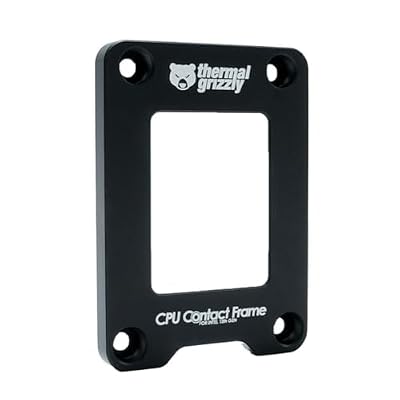
Thermal Grizzly takes a more engineered approach with its CPU Contact Frame for Intel 13th and 14th generation processors, designed with der8auer. The frame is milled from anodized aluminum and uses a special inner contour to shift contact pressure from the center of the processor toward the edges during assembly, directly addressing the concave curvature that the stock ILM can produce on LGA1700 packages. The maker lists compatibility extending across 12th, 13th, and 14th generation processors, despite the generation wording in the title.
The kit includes pan-head screws, a hex socket wrench, a Torx angle wrench, and a small tube of Aeronaut paste. The revised contour also simplifies fitting compared with the earlier 12th generation frame. Pick it for a high-end Intel build, a custom loop, or a system where the cooler will be removed regularly. Mini-ITX builders should check that no components sit beneath the frame area, a caution Thermal Grizzly itself raises.
Specs
| Item | Detail |
|---|---|
| Socket | Intel LGA1700 |
| Processors | Intel 12th, 13th, and 14th generation |
| Material | Anodized aluminum |
| Dimensions | 71 mm by 51 mm by 6 mm |
| Model | TG-CF-i13G |
| Included | Frame, screws, hex wrench, Torx wrench, and paste |
Thermalright ASF Black V2 AM5 CPU Holder

The Thermalright ASF Black V2 is the AM5 counterpart to the LGA1700-BCF, adapted to the very different shape of Ryzen processors. It is an all-aluminum alloy holder for AMD AM5 that surrounds the processor, supports the cooler load, and helps prevent paste from spilling into the recesses around the heat spreader. The frame is shaped to avoid capacitors, uses insulated protective feet, and aims for a full-fit, non-marking installation that can be repeated without wearing the processor cover.
Installation follows the same pattern as the Intel frames: the processor stays seated, the original hardware is unscrewed with the included T20 driver, and the frame is tightened diagonally until snug. The kit includes screws, the driver, and a syringe of TF7 paste. This is the default AM5 recommendation for a tidier, better protected socket on X670 or B650 boards, especially with heavy air coolers or frequent cooler changes. It does nothing for AM4 owners.
Specs
| Item | Detail |
|---|---|
| Socket | AMD AM5 |
| Processors | AMD Ryzen 7000 series |
| Material | Aluminum alloy, anodized finish |
| Dimensions | 70 mm by 54 mm by 6 mm |
| Included | Frame, screws, T20 driver, and TF7 paste |
| Function | Secure frame and anti-bend holder |
Thermal Grizzly AM5 Contact Sealing Frame

The Thermal Grizzly AM5 Contact Sealing Frame combines two jobs that are usually separate: a contact frame and a processor guard. It replaces the standard attachment mechanism on AM5 boards, encloses the heat spreader, and adds a silicone foam inlay that protects the exposed components sitting around the Ryzen heat spreader. That sealing function is the headline feature, because it helps stop paste from reaching sensitive parts of the package during application and cooler removal.
The frame uses a precision-milled inner contour for even pressure through defined contact points. The kit includes an insulator sheet, pan-head screws, two L-keys, and a small tube of Aeronaut paste. Thermal Grizzly notes it is suited to its own AM5 backplates, so confirm compatibility before ordering. Choose it when protection is the priority: frequent cooler swaps, generous paste use, or a valuable Ryzen system needing repeated maintenance.
Specs
| Item | Detail |
|---|---|
| Socket | AMD AM5 |
| Processors | AMD Ryzen 7000 series |
| Material | Anodized aluminum with silicone foam inlay |
| Model | TG-CSF-AM5 |
| Included | Frame, insulator sheet, screws, two L-keys, and paste |
| Function | Contact frame and processor guard combination |
Who Should Skip It
Skip a contact frame if the system already runs cool and quiet with the stock mechanism, because a frame cannot improve contact that is already even. Skip it also when the warranty position matters to the owner, since removing the original ILM or attachment mechanism may be treated as a modification by the motherboard maker. Builders who are not comfortable working around exposed socket pins, keeping a backplate aligned, or tightening small screws in sequence should leave the stock hardware alone.
Owners of other sockets should skip every pick here rather than forcing a fit: LGA1851, LGA1200, AM4, and older platforms need their own specific hardware, and some newer Intel boards already use a reduced-load mechanism that narrows the benefit. Anyone expecting a frame to rescue an undersized cooler, poor case airflow, or a bad paste application should spend the effort there instead.
FAQ
Does a CPU contact frame lower temperatures?
It can, when the stock mechanism was already bending the heat spreader enough to spoil cooler contact. Systems with even contact from the start may see little or no change. The frame improves the mechanical interface; the cooler, paste application, fan settings, and case airflow still decide most of the final temperature result.
Is installing a contact frame risky?
The steps are simple but unforgiving of carelessness. The processor should stay seated while the original hardware is removed, the backplate must stay in place, and screws should be tightened evenly in a diagonal pattern until snug. Forcing screws, dropping hardware into the socket, or fitting the wrong socket frame can damage a board, so unhurried work on a flat surface is essential.
Does a contact frame void a warranty?
It can affect the motherboard warranty position, because the original loading mechanism is removed and replaced. Intel and board makers have cautioned against socket modifications, while processor warranties can also be questioned when a part is run outside its standard mounting specification. Keeping the original hardware allows the change to be reversed, but reversal does not guarantee how a warranty claim will be judged.
Can one frame fit both Intel and AMD sockets?
No. LGA1700 and AM5 differ in size, shape, mounting holes, and retention design, so every frame is socket specific. Intel frames in this guide fit only LGA1700 boards, and AM5 frames fit only AM5 boards. The listing title, model code, and socket wording should all match the motherboard before any frame is ordered or installed.
Final Verdict
For Intel LGA1700, start with the Thermalright LGA1700-BCF Black V2 for proven anti-bend design and easy installation, and step up to the Thermal Grizzly Intel 13th and 14th generation frame when premium machining and a complete tool kit matter. The earlier Thermalright Bend Corrector listing remains a sensible alternative when it is the version clearly in stock. For AMD AM5, the Thermalright ASF Black V2 covers most builders, while the Thermal Grizzly AM5 Contact Sealing Frame is the choice for maximum package protection and paste containment. Match the frame to the socket first, install it carefully, and treat any temperature gain as a welcome bonus rather than a promise.
Product and ASIN Reference
| Product | ASIN |
|---|---|
| Thermalright LGA1700-BCF Black V2 CPU Retainer | B0CVTK3SLV |
| Thermalright LGA 1700 Bend Corrector Frame Black | B0B68GQWG3 |
| Thermal Grizzly CPU Contact Frame Intel 13th and 14th Generation | B0C6B233J2 |
| Thermalright ASF Black V2 AM5 CPU Holder | B0CYQ3LDML |
| Thermal Grizzly AM5 Contact Sealing Frame | B0CQKDJYNK |


Write Your Review
No reviews yet. Be the first to share your experience!