
Best motherboard for Ryzen 9 9950X3D decisions matter more than they do for the eight-core parts. Sixteen Zen 5 cores with a package limit around 230W will genuinely load a mid-range VRM during sustained rendering, and most buyers at this tier are doing paid work on the machine rather than only playing games on it.
As an Amazon Associate we earn from qualifying purchases at no extra cost to you.
By Ryan Cole, PC hardware writer at NvidiaReview
How to Choose the Best Motherboard for Ryzen 9 9950X3D
Choosing the best motherboard for Ryzen 9 9950X3D builds means planning for sustained load rather than short bursts. Three things decide it: whether the power delivery stays cool for hours, how the board behaves with larger memory capacities, and what connectivity your workload actually needs.
Sustained All-Core Load and VRM Temperature
Short benchmark runs tell you very little here. A 16-core chip pulling toward its 230W package limit for an hour of rendering heats the power stages and the surrounding board far more than any gaming workload, and thin heatsinks that cope for two minutes will not cope for sixty.
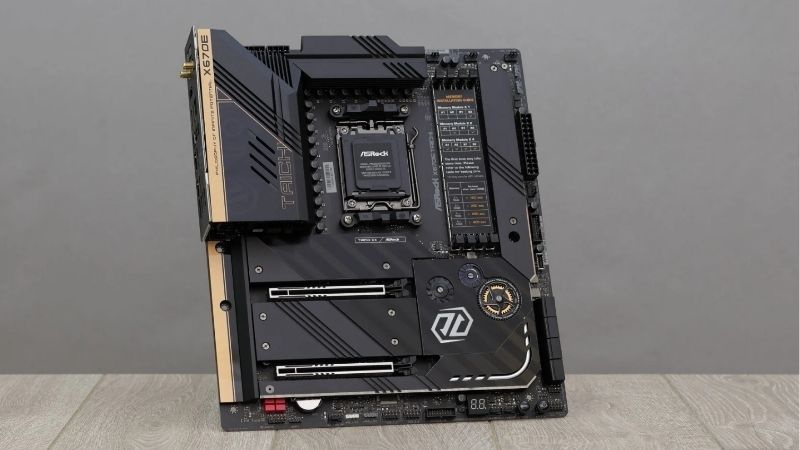
Look for heavy VRM heatsinks with real surface area and dual 8-pin CPU connectors, then give the socket area airflow. A top-mounted radiator that exhausts warm air directly over the power stages is a common cause of throttling in builds that look perfectly specified on paper.
Memory Capacity Versus Memory Speed
Gaming wants 32GB at 6000 MT/s with tight timings. Production work often wants 64GB or more, and that changes the calculation, because four populated DIMM slots frequently will not hold the same speed that two do on this platform, forcing a lower rated profile for stability.
The practical route is two high-capacity modules rather than four smaller ones, which preserves speed while reaching the capacity you need. Check the board QVL for kits at your target capacity specifically, since support at 32GB says nothing about behaviour at 96GB or above.
Lanes, Storage and Networking for Mixed Workloads
People buying 16 cores rarely run only a graphics card. Count the M.2 slots you need, then read the lane-sharing notes, because populating the third or fourth slot commonly disables SATA ports or narrows the secondary PCIe link on everything below the flagship tier.
X870E doubles the chipset for additional connectivity, which is genuinely useful when capture hardware, a fast network card and several drives coexist. If the machine games more than it works, that capability is money spent on ports that will sit empty for the life of the build.
Top Picks: Best Motherboard for Ryzen 9 9950X3D Builds
These five candidates for the best motherboard for Ryzen 9 9950X3D run from a value X870 board to full workstation-class connectivity. All figures are vendor-published specifications and revisions differ, so confirm the model code before ordering. Stock was checked in August 2026.
| Board | Chipset | M.2 slots | Networking | Best for |
|---|---|---|---|---|
| ASRock X870E Nova WiFi | X870E | 4 | 5G LAN, Wi-Fi 7 | Connectivity per pound |
| ASUS ROG Strix X870E-E Gaming WiFi | X870E | 4 | 5G LAN, Wi-Fi 7 | Tuning and expansion |
| MSI MPG X870E Carbon WiFi | X870E | 4 | 5G LAN, Wi-Fi 7 | Memory tuning |
| Gigabyte X870 Aorus Pro | X870 | 3 | 2.5GbE, Wi-Fi 7 | Balanced mid-range |
| MSI MAG X870 Tomahawk WiFi | X870 | 4 | 5G LAN, Wi-Fi 7 | Best value |
MSI MAG X870 Tomahawk WiFi – Best Value
MSI specifies a 14+2+1 duet rail design with 80A smart power stages, dual 8-pin connectors and an 8-layer PCB, which covers a 230W package limit with clear margin. It adds USB4 at 40Gbps, 5G Ethernet, Wi-Fi 7, four M.2 slots and a PCIe 5.0 graphics slot at a mid-range price.
Rear USB count is adequate rather than generous for a board hosting a 16-core processor, and it is not the choice for serious memory overclocking. The styling is plain. For the majority of people buying this chip, it is where the sensible spending stops.
ASRock X870E Nova WiFi – Best Connectivity Per Pound
The Nova brings dual-chipset X870E connectivity, four M.2 slots, 5G Ethernet, Wi-Fi 7 and substantial VRM heatsinks at a price that typically undercuts equivalent boards from the larger brands. For a machine juggling several drives and expansion cards, that is a lot of capability.
ASRock firmware updates arrive slightly later than the competition, which matters immediately after a processor launch, and support is thinner if something goes wrong. The styling is busy. On specification for the money at this tier, it is one of the strongest options available.
ASUS ROG Strix X870E-E Gaming WiFi – Best for Expansion and Tuning
The Strix pairs a heavy power stage array with dual-chipset connectivity, PCIe 5.0 for both graphics and storage, 5G Ethernet, Wi-Fi 7 and a dense rear panel including multiple USB4 Type-C ports. The ROG BIOS remains the most approachable for per-core Curve Optimizer work.
It costs roughly double a competent X870 board while delivering identical gaming frame rates, and the heatsink covers add weight that complicates cooler installation. Buy it when you populate the expansion slots and tune the machine, not because the processor is expensive.
MSI MPG X870E Carbon WiFi – Best for Memory Work
The Carbon offers an 18+2+1 array, dual-chipset connectivity, USB4, 5G Ethernet and Wi-Fi 7, with a BIOS that exposes memory timings in more depth than most competitors. For a workstation running 64GB or more, that granularity helps when a kit will not hold its rated profile.
Pricing sits firmly in flagship territory, and much of the connectivity goes unused in a machine that only games and renders. The board is also physically dense with heavy heatsinks. If you expect to spend an evening tuning memory rather than enabling EXPO and moving on, it earns that.
Gigabyte X870 Aorus Pro – Best Balanced Mid-Range
The Aorus Pro sits between the value and flagship tiers, offering a strong phase design, three M.2 slots with heatsinks, USB4, Wi-Fi 7 and 2.5GbE, along with the EZ-Latch mechanisms that make storage and graphics card changes considerably faster during maintenance.
Networking is 2.5GbE rather than 5G, and three M.2 slots is one fewer than the alternatives here, which matters in a storage-heavy workstation. VRM heatsinks are good rather than exceptional. For a machine that games more than it renders, it lands in a sensible middle position.
What the 2026 Market Means for 16-Core Builds
A build at this level is expensive in a year of unusual component pricing, so the surrounding market deserves attention before you commit to the best motherboard for Ryzen 9 9950X3D and the memory to go with it. Three factors should shape both of those decisions.
AM5 Runs Through 2029
AMD confirmed at Computex 2026 that socket AM5 will receive new processors until the end of 2029, while Intel’s next generation requires a different socket. For a workstation intended to last, that removes most of the risk in committing to an expensive board and case now.
It also changes what deserves the money. VRM cooling, storage capacity and firmware quality remain useful across future processors, while a chipset badge alone does not. Spend on the parts of the board that will still matter when a newer high-core-count chip drops into it.
Memory Pricing Hits This Build Hardest
DRAM prices have climbed sharply through 2026, with further increases forecast and no meaningful new capacity before late 2027. Builds around this processor frequently want 64GB or more, which makes memory one of the largest single line items in the entire parts list this year.
Target the capacity you genuinely need in two modules rather than four, check the board QVL at that capacity specifically, and accept a slightly lower rated speed if stability requires it. Waiting for late-year sales is unlikely to help with memory, though boards still discount.
Nothing New Before CES 2027
Zen 6 and Intel’s Nova Lake have both slipped to CES in January 2027, so no imminent launch rewards waiting. This processor sits near the top of the desktop range, and after more than a year on sale the platform’s early memory compatibility and scheduler quirks have been resolved.
That maturity matters on a build of this size. Early adopters dealt with problems that have since been fixed through BIOS and driver updates, so assembling now means fewer surprises during setup and tuning than the same machine would have caused a year ago.
Frequently Asked Questions
The questions builders ask most when specifying a workstation around this chip: whether the flagship chipset tier is really necessary, how the dual-die design behaves in games, what cooling sustained all-core loads require, and how much memory capacity makes sense at current prices.
Do I need X870E for this processor?
Only for connectivity. The best motherboard for Ryzen 9 9950X3D can be a good X870 board, which handles the power draw and delivers identical gaming performance. X870E earns its price when you populate four NVMe drives, run expansion cards alongside the graphics card, or use high-speed external storage as part of a daily workflow.
How does the dual-die design affect games?
Only one compute die carries the stacked cache, so games should be scheduled onto it. That relies on current chipset drivers and a working Game Bar installation. Keeping both updated is the practical fix when frame rates come in lower than expected in specific titles.
What cooling does sustained all-core work need?
A 360mm liquid cooler or a strong dual-tower air cooler. Gaming alone rarely loads all sixteen cores, so a 240mm unit copes there, but rendering and compilation push toward the package limit for extended periods, which is where the larger radiator and better airflow pay off.
Is 64GB of memory worth it at current prices?
It depends entirely on the workload. Virtual machines, large project files and heavy rendering justify it, while gaming does not. Given 2026 pricing, buy 32GB now if you only game, and reserve the higher capacity for machines where the extra memory earns its keep.
See More:
- Best thermal compound paste
- Thermal paste at Best Buy
- Graphics card at Best Buy
- Best AM4 CPU for gaming
- Best motherboard for 9800x3d
Final Thoughts
The best motherboard for Ryzen 9 9950X3D is one that stays cool for hours, not the one with the highest phase count. The MSI X870 Tomahawk covers most builds properly, the ASRock X870E Nova adds connectivity for less than the flagships, and the ROG Strix only makes sense if you populate the slots you are paying for.
As an Amazon Associate we earn from qualifying purchases at no extra cost to you.














Write Your Review
No reviews yet. Be the first to share your experience!